
- Configuring LinuxCNC
- Basic Configuration
- Actual position and Commanded position differ, using cia402 [SOLVED]
Actual position and Commanded position differ, using cia402 [SOLVED]
- low-blip
- Offline
- New Member
-

- Posts: 8
- Thank you received: 1
We are using cia402 and ethercat to run a 9-axis system, including xyz and 6 rotation axis. We noticed that the actual and commanded positions of the xyz axes are always off by a factor of 80 , e.g. if we send the Gcode to move X axis by 10mm, it moves by 10mm, the commanded position is 10, but the 'actual position' is 0.125. We can still run .ngc files, they do exactly what we expect them to do, but at the end we get motor position error on these three axes.
We've tried increasing the FERROR and MIN_FERROR in the .ini file

...
[AXIS_X]
MIN_LIMIT = -5
MAX_LIMIT = 395
MAX_VELOCITY = 500
MAX_ACCELERATION = 250
[JOINT_0]
TYPE = LINEAR
MAX_VELOCITY = 500
MAX_ACCELERATION = 250
FERROR = 200
MIN_FERROR = 50
MIN_LIMIT = -1
MAX_LIMIT = 1200
HOME = 0
HOME_OFFSET = 0
HOME_SEQUENCE = 1
HOME_IGNORE_LIMITS = YES
# nach github.com/dbraun1981/hal-cia402/blob/main/README.md
HOME_SEARCH_VEL = 5.0
HOME_LATCH_VEL = -2
HOME_FINAL_VEL = 1
HOME_USE_INDEX = FALSE
...
.hal:
Please Log in or Create an account to join the conversation.
- Hakan
- Offline
- Platinum Member
-

- Posts: 1317
- Thank you received: 454
I don't see anything obvious wrong in the setup.
8000 is a lot, 8000 steps or ticks or whatever per mm but that is probably right since it moves right.
What you can do to debug this is to use "halshow" and look at all pins in the chain from joint.0.motor-pos-cmd to the cia402 pin, to the driver pin, and the return from the driver pin, to the cia402 pins, to joint.0.motor-pos-fb pin.
Please Log in or Create an account to join the conversation.
- low-blip
- Offline
- New Member
-
- Posts: 8
- Thank you received: 1
Yes the x, y and z axes are driven by leadscrews.
Yes they are stepper motors.
I did double check the unit last week, we have everything set in mm. I wish it was as simple as that.
Please Log in or Create an account to join the conversation.
- Hakan
- Offline
- Platinum Member
-
- Posts: 1317
- Thank you received: 454
When linuxcnc is still running, start halshow in a terminal window. The machine can have e-stopped, that's ok.
Just type halshow at the prompt.
Navigate through pins and investigate the values of the pins outlined above.
This should hopefully give an understanding of where things go wrong.
Please Log in or Create an account to join the conversation.
- low-blip
- Offline
- New Member
-
- Posts: 8
- Thank you received: 1
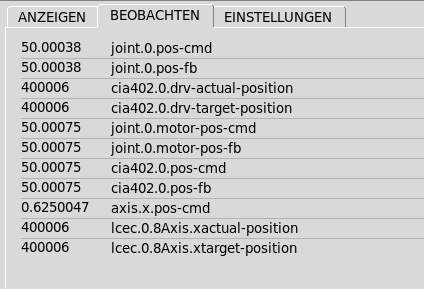
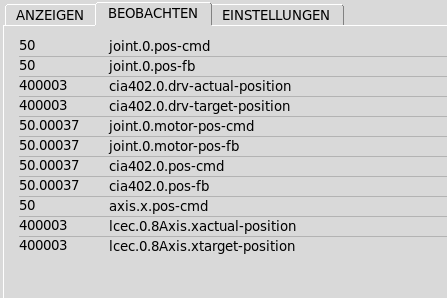
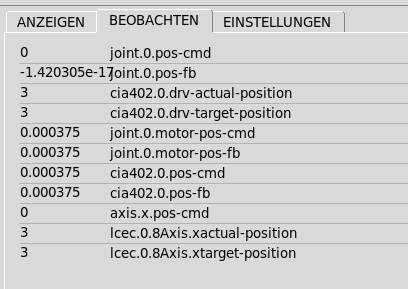
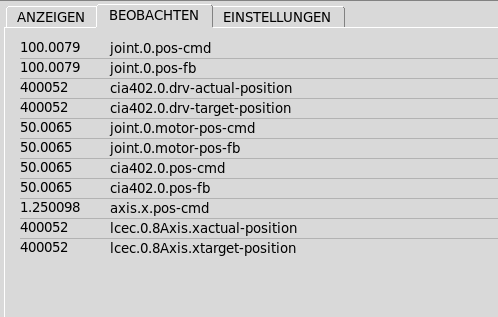
The pins I looked at were:
joint.0.pos-cmd
joint.0.pos-fb
cia402.0.drv-actual-position
cia402.0.drv-target-position
joint.0.motor-pos-cmd
joint.0.motor-pos-fb
cia402.0.pos-cmd
cia402.0.pos-fb
axis.x.pos-cmd
cec.0.8Axis.xactual-position
lcec.0.8Axis.xtarget-position
all seem like they're what they should be except axis.x.pos-cmd, after I sent G0 X50 in MDI mode, it was 50, everything was fine, then I switched to manual control mode, it changed to 0.625. That is also when I get the motor position error.
I took some screenshots at startup, after homing, after sending a G0X50 command and after I got the error. I don't have anywhere to host the images though, so I put them in the attachment in case that helps.
Please Log in or Create an account to join the conversation.
- Hakan
- Offline
- Platinum Member
-
- Posts: 1317
- Thank you received: 454
The translation between joints and axis is done in the kinematics module but there are more things involved I don't know so much about.
I see you have a userkins module, that one becomes suspicious of course.
You can follow the signals, ms by ms, using the halscope utility.
Maybe interesting to do that when you shift between MDI and manual.
Judging from the halshow output you EtherCAT drives behave as they should. The problem isn't there.
Please Log in or Create an account to join the conversation.
- Aciera
-

- Offline
- Administrator
-

- Posts: 4819
- Thank you received: 2176
I see you have a userkins module, that one becomes suspicious of course.
I agree, this is most likely a problem with your custom kinematic module. I usually see these kinds of jumps when the forward and the inverse kinematics do not match up.
Please Log in or Create an account to join the conversation.
- low-blip
- Offline
- New Member
-
- Posts: 8
- Thank you received: 1
while in userkins.comp or either of the kinematicsInverse functions, the /80 was not there. I tried compiling again, nothing changed. I tried deleting the /80 from userkins.c, everything is now working. I just have no idea why..int kinematicsForward ...
...
pos->tran.x = j[0]/80; // X coordinate
pos->tran.y = j[1]/80; // Y coordinate
pos->tran.z = j[2]/80; // Z coordinate
Please Log in or Create an account to join the conversation.
- low-blip
- Offline
- New Member
-
- Posts: 8
- Thank you received: 1
I remember Python giving me so much grief over the tabs and spaces in my first year of learning to program! At least these days IDEs take care of that problem.
C just went completely over my head when I tried to learn it. I can mostly read it but I cannot write anything in C, it's pretty frustrating
Please Log in or Create an account to join the conversation.
- Aciera
-
- Offline
- Administrator
-
- Posts: 4819
- Thank you received: 2176
Impossible to say without actually seeing your userkins.comp file.
Please Log in or Create an account to join the conversation.
- Configuring LinuxCNC
- Basic Configuration
- Actual position and Commanded position differ, using cia402 [SOLVED]