Edit 18/3/2021:
NOTE: This post describes how to install a 64-bit kernel and build LinuxCNC to suit on the Pi.
If you need a 64-bit kernel then these are the right instructions.
If, however, you just want to run LinuxCNC on a Pi, then it is much simpler to follow the instructions on the download page, and run the provided 32-bit kernel and LinuxCNC.
linuxcnc.org/docs/2.8/html/getting-start...tml#_normal_download
End-Edit 18/3/2021:
Install a fresh Raspbian 64 bit from this
Raspberry Pi OS (64 bit)
Following this link,
www.instructables.com/id/64bit-RT-Kernel...or-Raspberry-Pi-4B-/
it's possible obtained a Raspbian 64bit RT-Preempt kernel. .
The kernel can be also download from:
rt64-kernel.tgz
Copy this file in /tmp and install:
cd /tmp
tar xzf rt64-kernel.tgz
cd boot
sudo cp -rd * /boot/
cd ../lib
sudo cp -dr * /lib/
cd ../overlays
sudo cp -dr * /boot/overlays
cd ../broadcom
sudo cp -dr bcm* /boot/
Edit /boot/config.txt file and add following line.
kernel=kernel8.img
then reboot.
The command.
uname -a
done this:
Linux raspberrypi 5.4.51-rt32-v8 #1 SMP PREEMPT_RT Fri Aug 14 16:57:40 CEST 2020 aarch64 GNU/Linux
Building LinuxCNC:
sudo apt update
sudo apt install devscripts
sudo apt install dh-python libudev-dev tcl8.6-dev tk8.6-dev asciidoc dblatex
sudo apt install libreadline-gplv2-dev docbook-xsl dvipng ghostscript graphviz
sudo apt install groff imagemagick inkscape python-lxml source-highlight
sudo apt install texlive-extra-utils texlive-font-utils texlive-fonts-recommended
sudo apt install texlive-lang-cyrillic texlive-lang-french texlive-lang-german
sudo apt install texlive-lang-polish texlive-lang-spanish texlive-latex-recommended
sudo apt install w3c-linkchecker xsltproc python-dev python-tk libxmu-dev
sudo apt install libglu1-mesa-dev libgtk2.0-dev intltool libboost-python-dev
sudo apt install libmodbus-dev libusb-1.0-0-dev desktop-file-utils yapps2
sudo apt install python-yapps bwidget libtk-img mesa-utils tclx8.4
sudo apt install tcl-tclreadline python-configobj python-gtkglext1
sudo apt install python-xlib gstreamer0.10-plugins-base netcat
sudo apt install python-pil python-glade2 python-pil.imagetk
sudo apt install python-gst-1.0 w3c-linkchecker libxmu-dev libtirpc-dev
sudo apt install gdebi gdebi-core
git clone
github.com/LinuxCNC/linuxcnc.git
emc
cd emc
debian/configure uspace
dpkg-checkbuilddeps
debuild -uc -us
cd ..
The .debs file can be also download from this link:
LinuxCNC_64bit.zip
Installing LinuxCNC:
cd ~/
wget
ftp.it.debian.org/debian/pool/main/p/pyg...2_2.10.1-3_arm64.deb
sudo dpkg -i python-gtksourceview2_2.10.1-3_arm64.deb
sudo apt --fix-broken install
sudo gdebi linuxcnc-uspace_2.9.0~pre0_arm64.deb
sudo gdebi linuxcnc-uspace-dev_2.9.0~pre0_arm64.deb
sudo gdebi linuxcnc-doc-en_2.9.0~pre0_all.deb
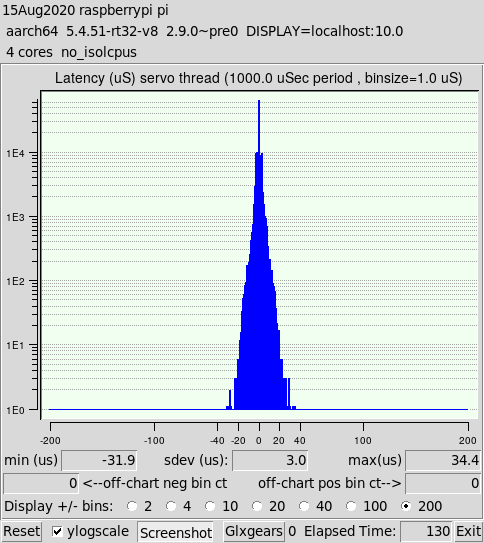
This is latency test obtained from command:
latency-histogram --nobase --sbinsize 1000 --show