
- LinuxCNC
- Installing LinuxCNC
- help needed installing linuxcnc as a simulator on my debian buster laptop
help needed installing linuxcnc as a simulator on my debian buster laptop
- RDA
- Offline
- Premium Member
-

Less
More
- Posts: 157
- Thank you received: 43
09 Jun 2021 02:00 #211592
by RDA
Replied by RDA on topic help needed installing linuxcnc as a simulator on my debian buster laptop
Ok so I got rid of the realtime task issue by significantly increasing the servo thread, but that doens really matter.
So the issue it probably not having a mesa card or needing a parallel port. Is there a way to config the system so you dont need actual hw or a parallel port?
So the issue it probably not having a mesa card or needing a parallel port. Is there a way to config the system so you dont need actual hw or a parallel port?
Please Log in or Create an account to join the conversation.
- BeagleBrainz
-

- Visitor
-

09 Jun 2021 02:21 - 09 Jun 2021 02:21 #211595
by BeagleBrainz
Replied by BeagleBrainz on topic help needed installing linuxcnc as a simulator on my debian buster laptop
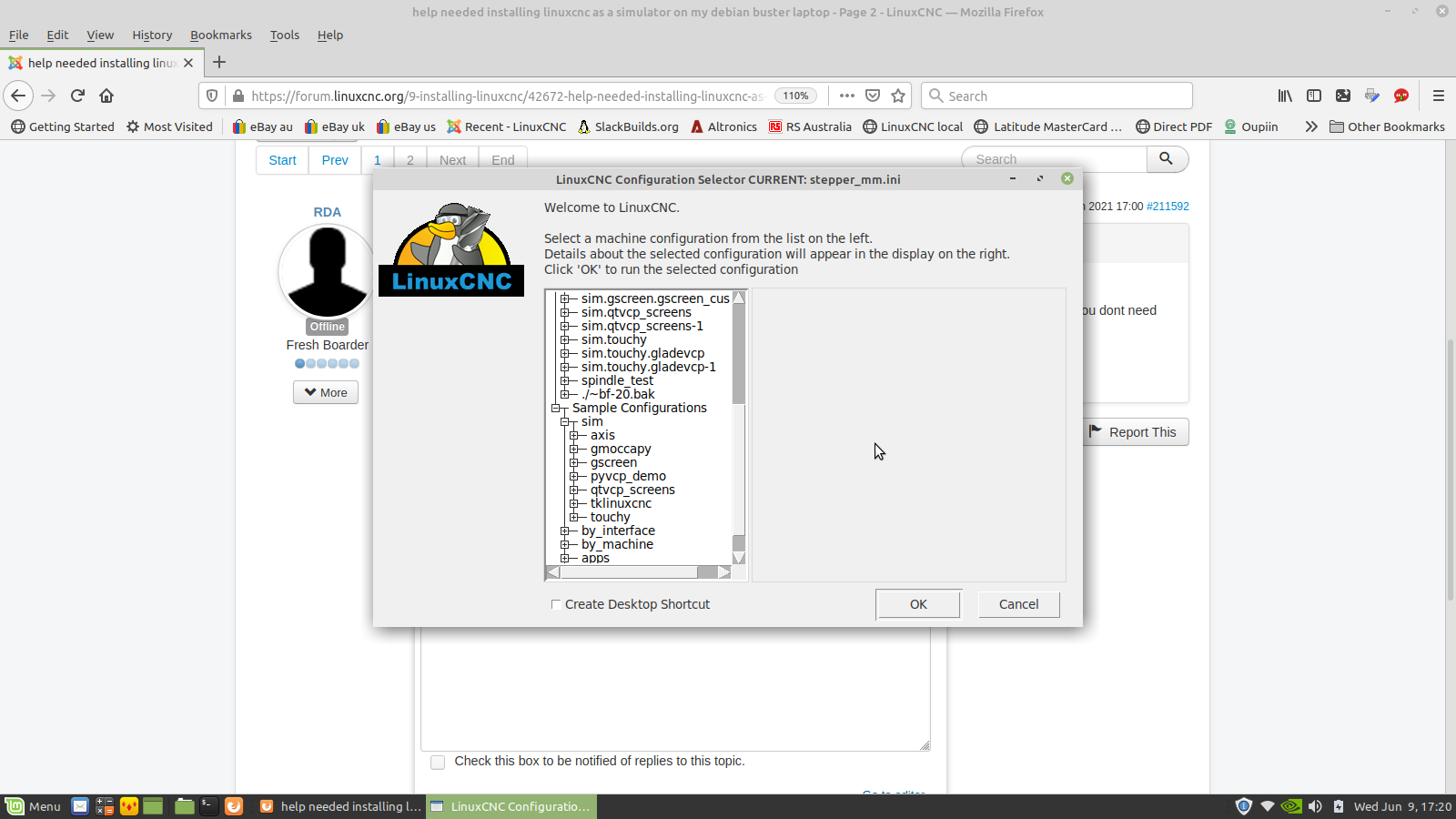
You just select one of the sims from the Linuxcnc menu
Attachments:
Last edit: 09 Jun 2021 02:21 by BeagleBrainz.
Please Log in or Create an account to join the conversation.
- RDA
- Offline
- Premium Member
-
Less
More
- Posts: 157
- Thank you received: 43
09 Jun 2021 03:48 #211598
by RDA
Replied by RDA on topic help needed installing linuxcnc as a simulator on my debian buster laptop
I also tried this before without success, sorry for not posting the result previously.
I assume its about some screen size setting but I dont know where to even begin :|
Error in startup script: bad pad value "3m": must be positive screen distance
    while executing
"pack $w.msg -in $w.top -side right -expand 1 -fill both -padx 3m -pady 3m"
    (procedure "tk_dialog" line 65)
    invoked from within
"tk_dialog .d [msgcat::mc "Copy Configuration?"] [msgcat::mc "Would you like to copy the %s configuration to your home directory so you can customize i..."
    (procedure "prompt_copy" line 3)
    invoked from within
"prompt_copy $::inifile"
    invoked from within
"if [ok_to_copy_config $::inifile] {
            set copied_inifile [prompt_copy $::inifile]
            if {$copied_inifile == ""} {
                c..."
    ("while" body line 6)
    invoked from within
"while {1} {
    focus $::tree
    vwait ::choice

    if { $::choice == "OK" } {
        if [ok_to_copy_config $::inifile] {
            set copied_in..."
    (file "/usr/lib/tcltk/linuxcnc/bin/pickconfig.tcl" line 875)
I assume its about some screen size setting but I dont know where to even begin :|
Please Log in or Create an account to join the conversation.
- andypugh
-

- Offline
- Moderator
-

Less
More
- Posts: 19904
- Thank you received: 4655
11 Jun 2021 12:33 #211819
by andypugh
Replied by andypugh on topic help needed installing linuxcnc as a simulator on my debian buster laptop
That's really odd, and a bit frustrating. What is crashing is actually the little dialog box which asks if you want to make a copy of the config.
There is an answer here: askubuntu.com/questions/1046620/a-git-gu...use-of-bad-pad-value
There is an answer here: askubuntu.com/questions/1046620/a-git-gu...use-of-bad-pad-value
The following user(s) said Thank You: BeagleBrainz
Please Log in or Create an account to join the conversation.
- BeagleBrainz
-
- Visitor
-
11 Jun 2021 16:27 #211833
by BeagleBrainz
Replied by BeagleBrainz on topic help needed installing linuxcnc as a simulator on my debian buster laptop
Great find Andy
Please Log in or Create an account to join the conversation.
- ytiuqibu
- Offline
- Senior Member
-

Less
More
- Posts: 77
- Thank you received: 3
25 Jun 2021 09:41 #212905
by ytiuqibu
Replied by ytiuqibu on topic help needed installing linuxcnc as a simulator on my debian buster laptop
I tried following tommylight's code to install a uspace version on Linux Mint 19.3 but failed with the errors shown in the attached text file
Where do I go from here
I couldn't paste the text as apparently it contains too many links to post directly
Cheers
Paul
Where do I go from here
I couldn't paste the text as apparently it contains too many links to post directly
Cheers
Paul
Please Log in or Create an account to join the conversation.
- tommylight
-

- Away
- Moderator
-
Less
More
- Posts: 22030
- Thank you received: 7504
25 Jun 2021 15:27 #212918
by tommylight
Replied by tommylight on topic help needed installing linuxcnc as a simulator on my debian buster laptop
Yup bumped into the same issue today, the keyserver is ignoring us! 
Saw a few days back PhillC posted about other valid keyservers but i could not find it.
In the meantime go to:
Buildbot.linuxcnc.org/dists
And find Stretch, Master OR 2.8, then amd64 and download the latest build of linuxcnc-userspace, then double click on it and follow the gdebi installation.
Saw a few days back PhillC posted about other valid keyservers but i could not find it.
In the meantime go to:
Buildbot.linuxcnc.org/dists
And find Stretch, Master OR 2.8, then amd64 and download the latest build of linuxcnc-userspace, then double click on it and follow the gdebi installation.
Please Log in or Create an account to join the conversation.
- phillc54
-

- Offline
- Platinum Member
-

Less
More
- Posts: 5711
- Thank you received: 2100
25 Jun 2021 19:30 #212936
by phillc54
Replied by phillc54 on topic help needed installing linuxcnc as a simulator on my debian buster laptop
forum.linuxcnc.org/38-general-linuxcnc-q...-05?start=280#212635Yup bumped into the same issue today, the keyserver is ignoring us!
Saw a few days back PhillC posted about other valid keyservers but i could not find it.
The following user(s) said Thank You: tommylight
Please Log in or Create an account to join the conversation.
- ytiuqibu
- Offline
- Senior Member
-
Less
More
- Posts: 77
- Thank you received: 3
27 Jun 2021 08:42 #213021
by ytiuqibu
Replied by ytiuqibu on topic help needed installing linuxcnc as a simulator on my debian buster laptop
Thank you both - installation now successful and just have to come to grips with configuration.
Please Log in or Create an account to join the conversation.
- tommylight
-
- Away
- Moderator
-
Less
More
- Posts: 22030
- Thank you received: 7504
27 Jun 2021 10:38 #213025
by tommylight
Replied by tommylight on topic help needed installing linuxcnc as a simulator on my debian buster laptop
I did add all the entries to both the 19.3 and 20.n tutorials for Mint, just in case.
Thank you Phill.
Thank you Phill.
Please Log in or Create an account to join the conversation.
- LinuxCNC
- Installing LinuxCNC
- help needed installing linuxcnc as a simulator on my debian buster laptop
Time to create page: 0.778 seconds