
Running LinuxCNC on a Raspbery Pi5 using the Byte2Bot daughter board
- EdWorks
-
 Topic Author
- Offline
- New Member
-

Less
More
- Posts: 17
- Thank you received: 1
01 Dec 2025 22:05 #339613
by EdWorks
Running LinuxCNC on a Raspbery Pi5 using the Byte2Bot daughter board was created by EdWorks
I recently struggled with getting my Raspberry Pi 5 to accept the estop input. On this forum, I asked the following question.
I would like to know how to connect the GPIO to LinuxCNC’s E-Stop chain.
From this, I received some tips and advice that pointed me in the right direction, but no working answers. I used a YouTube video on installing LinuxCNC on a Raspberry Pi, but the advice was old and no longer valid. My assessment at this time is: If someone were to attempt what I attempted, I don't see a mechanism for them to follow in my footsteps because they would unlikely use the search term "estop" or "GPIO" to search the forum. So I would like to put together what I learned to make this happen.
1. Not many users of this form are using Raspberry Pi computers - they have some limitations
2. The Byte2Bot hat does not create a parallel port. Rather is isolates the GPIO pins on the computer board and brings them out using a DB25 connector that is just like the parallel port on your Mesa card or computer. This allows you to use a parallel port breakout board. While a parallel port dedicates PIN2 to a dataline, with the output from a Raspberry Pi, one needs to refer to what is the GPIO line connected to that pin which is GPIO9 in this example. In your setup, you cannot refer to PIN2; you must only refer to which GPIO line it is. When someone sends you suggestions that look like "=> hal-gpio.PIN12.out" - it won't help you.
3. There are folks who can help you. The most valuable was the user "unkown". unknown provided this:
Below is a thread that is more or less an index for the Main RPi4/5 thread.
forum.linuxcnc.org/38-general-linuxcnc-q...l-images-only#325007
Has a section regarding GPIO and there is a working config if you follow the links.
They are there, you just have to look.
Just about everything regarding the Rpi4/5 is in this thread
forum.linuxcnc.org/9-installing-linuxcnc...official-images-only
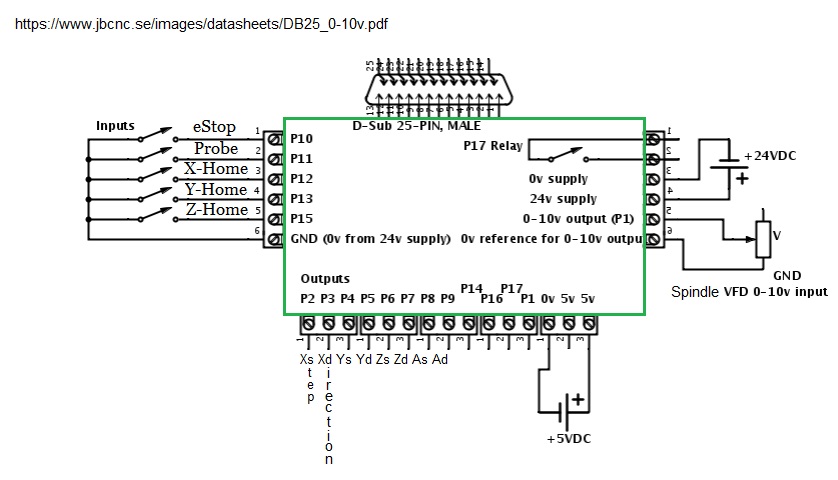
4. The schematic offered by Byte2Bot had some notable omissions that is corrected in the Circuit3.jpg schematic from another user.
5. The eStop button should be NC (Normally Closed) - I did not correct that. The eStop button should be latching - mine is not.
6. The *.hal file has changed significantly since the requirement of using the GPIO nomenclature
7. I have yet to control the spindle speed with the breakout board.
8. The StepConfig package in LinuxCNC is not intended for a Raspberry Pi with a hat. It is designed for a MESA board setup, which this is not. I'm not aware of a reason to use it, but it does create a *.hal and *.ini file for the machine name you select in setup.
9. If you want to search Google about eStop, do not search "Linuxcnc estop". You will fail. However, if you add the word "latch" to your query, you will have success. Don't ask. If you have a ton of experience, it may make sense.
10. When you submit a topic, hit the submit button and go have lunch. Nothing may happen for a while. I became impatient and hit submit again, and two instances of my topic were submitted. 11. How your question looks in the editor may not be how it looks online.12. I have more to learn.
SO
What do I have to promote the cause? If you use a Raspberry Pi 5 with a Byte2Bot parallel hat (it should be called a DB25 hat) with a parallel breakout board, you may have success with the following wiring and code.
I would like to know how to connect the GPIO to LinuxCNC’s E-Stop chain.
From this, I received some tips and advice that pointed me in the right direction, but no working answers. I used a YouTube video on installing LinuxCNC on a Raspberry Pi, but the advice was old and no longer valid. My assessment at this time is: If someone were to attempt what I attempted, I don't see a mechanism for them to follow in my footsteps because they would unlikely use the search term "estop" or "GPIO" to search the forum. So I would like to put together what I learned to make this happen.
1. Not many users of this form are using Raspberry Pi computers - they have some limitations
2. The Byte2Bot hat does not create a parallel port. Rather is isolates the GPIO pins on the computer board and brings them out using a DB25 connector that is just like the parallel port on your Mesa card or computer. This allows you to use a parallel port breakout board. While a parallel port dedicates PIN2 to a dataline, with the output from a Raspberry Pi, one needs to refer to what is the GPIO line connected to that pin which is GPIO9 in this example. In your setup, you cannot refer to PIN2; you must only refer to which GPIO line it is. When someone sends you suggestions that look like "=> hal-gpio.PIN12.out" - it won't help you.
3. There are folks who can help you. The most valuable was the user "unkown". unknown provided this:
Below is a thread that is more or less an index for the Main RPi4/5 thread.
forum.linuxcnc.org/38-general-linuxcnc-q...l-images-only#325007
Has a section regarding GPIO and there is a working config if you follow the links.
They are there, you just have to look.
Just about everything regarding the Rpi4/5 is in this thread
forum.linuxcnc.org/9-installing-linuxcnc...official-images-only
4. The schematic offered by Byte2Bot had some notable omissions that is corrected in the Circuit3.jpg schematic from another user.
5. The eStop button should be NC (Normally Closed) - I did not correct that. The eStop button should be latching - mine is not.
6. The *.hal file has changed significantly since the requirement of using the GPIO nomenclature
7. I have yet to control the spindle speed with the breakout board.
8. The StepConfig package in LinuxCNC is not intended for a Raspberry Pi with a hat. It is designed for a MESA board setup, which this is not. I'm not aware of a reason to use it, but it does create a *.hal and *.ini file for the machine name you select in setup.
9. If you want to search Google about eStop, do not search "Linuxcnc estop". You will fail. However, if you add the word "latch" to your query, you will have success. Don't ask. If you have a ton of experience, it may make sense.
10. When you submit a topic, hit the submit button and go have lunch. Nothing may happen for a while. I became impatient and hit submit again, and two instances of my topic were submitted. 11. How your question looks in the editor may not be how it looks online.12. I have more to learn.
SO
What do I have to promote the cause? If you use a Raspberry Pi 5 with a Byte2Bot parallel hat (it should be called a DB25 hat) with a parallel breakout board, you may have success with the following wiring and code.


The following user(s) said Thank You: unknown
Please Log in or Create an account to join the conversation.
- unknown
- Offline
- Platinum Member
-

Less
More
- Posts: 887
- Thank you received: 323
02 Dec 2025 11:30 #339636
by unknown
Replied by unknown on topic Running LinuxCNC on a Raspbery Pi5 using the Byte2Bot daughter board
Top work.
The thing is there is a few users of the RPi, I know about 3 personally, but very rarely do they post or answer any questions. So it gets left to a few to get the job done.
Personally I like the RPi5 I just acquired a second one thanks to my son for father's Day and grabbed the same waveshare housing and Nvme adapters I'm using on the mill.
I have been wondering about including a basic 3 axis Byte2Bob config in the next experimental image. Your thoughts ?
Would you be ok with some of your attachments, with due credit, being included ?
Cheers
Rob
The thing is there is a few users of the RPi, I know about 3 personally, but very rarely do they post or answer any questions. So it gets left to a few to get the job done.
Personally I like the RPi5 I just acquired a second one thanks to my son for father's Day and grabbed the same waveshare housing and Nvme adapters I'm using on the mill.
I have been wondering about including a basic 3 axis Byte2Bob config in the next experimental image. Your thoughts ?
Would you be ok with some of your attachments, with due credit, being included ?
Cheers
Rob
Please Log in or Create an account to join the conversation.
- EdWorks
-
Topic Author
- Offline
- New Member
-
Less
More
- Posts: 17
- Thank you received: 1
03 Dec 2025 01:05 #339673
by EdWorks
Replied by EdWorks on topic Running LinuxCNC on a Raspbery Pi5 using the Byte2Bot daughter board
I'm thinking that would be a great idea.
Regards
Bob
Regards
Bob
Please Log in or Create an account to join the conversation.
- RNZ
- Offline
- Senior Member
-

Less
More
- Posts: 48
- Thank you received: 15
30 Jan 2026 22:33 #342225
by RNZ
Replied by RNZ on topic Running LinuxCNC on a Raspbery Pi5 using the Byte2Bot daughter board
The RPi 5 + Mesa 7i96s is fantastic for LinuxCNC.
Please Log in or Create an account to join the conversation.
- EdWorks
-
Topic Author
- Offline
- New Member
-
Less
More
- Posts: 17
- Thank you received: 1
01 Feb 2026 16:44 #342283
by EdWorks
Replied by EdWorks on topic Running LinuxCNC on a Raspbery Pi5 using the Byte2Bot daughter board
Per chance, have you written up in some detail how you accomplished this?
Please Log in or Create an account to join the conversation.
- RNZ
- Offline
- Senior Member
-
Less
More
- Posts: 48
- Thank you received: 15
01 Feb 2026 19:46 #342292
by RNZ
Replied by RNZ on topic Running LinuxCNC on a Raspbery Pi5 using the Byte2Bot daughter board
Hi EdWorks, Some of it is documented on this forum. I got stuck at one point in the ethernet comms losing packets but that is resolved (documented on the forum). If you want to have a look, I could show you over video (Telegram/Signal).
In hindsight the setup was pretty clean and simple with a few gotchas along the way.
In hindsight the setup was pretty clean and simple with a few gotchas along the way.
Please Log in or Create an account to join the conversation.
- EdWorks
-
Topic Author
- Offline
- New Member
-
Less
More
- Posts: 17
- Thank you received: 1
03 Feb 2026 02:01 #342339
by EdWorks
Replied by EdWorks on topic Running LinuxCNC on a Raspbery Pi5 using the Byte2Bot daughter board
My system is running beautifully. My goal is to make "Running LinuxCNC on a Raspbery Pi5 using the Byte2Bot daughter board" simpler, more successful with fewer "Gotchas" than other options.
Please Log in or Create an account to join the conversation.
- magpie_lark
- Offline
- New Member
-
Less
More
- Posts: 5
- Thank you received: 2
28 Feb 2026 19:55 #343664
by magpie_lark
Replied by magpie_lark on topic Running LinuxCNC on a Raspbery Pi5 using the Byte2Bot daughter board
I'm trying to set up the DB25 board to connect to a geckodrive G540 and running into some confusion. Currently reading the
byte2bot guide
on this and I'm confused about the hal_gpio pin naming. Where are these pin numbers for "pi5 2025" coming from? They don't seem to match any pin mapping I've seen in any other online source. Do I use the 2023 or 2025 one?
Image of pinout naming matrix below.

Image of pinout naming matrix below.
Please Log in or Create an account to join the conversation.
Time to create page: 0.520 seconds