
Installing LinuxCNC RTAI
- ClimbingMike
-
 Topic Author
- Offline
- New Member
-

Less
More
- Posts: 3
- Thank you received: 0
09 Jun 2026 01:37 #346984
by ClimbingMike
Installing LinuxCNC RTAI was created by ClimbingMike
Hello community:
I have been struggling to install LinuxCNC with the RTAI patch.
My current computer is Dell Optiplex 980. I was following the previous instructions from this thread
[Solved] Trying to install RTAI, got errors - LinuxCNC
The first error I see if after I tried apt update the
W: Skipping acquire of configured file '2.9-rt/source/Sources' as repository 'www.linuxcnc.org bookworm InRelease' does not seem to provide it (sources.list entry misspelt?)
Then after I enter apt upgrade
raspi-firmware: missing /boot/firmware, did you forget to mount it?
run-parts: /etc/initramfs/post-update.d//z50-raspi-firmware exited with return code 1
run-parts: /etc/kernel/postinst.d/initramfs-tools exited with return code 1
dpkg: error processing package linux-image-6.1.0-49-rt-amd64 (--configure):
installed linux-image-6.1.0-49-rt-amd64 package post-installation script subprocess returned error exit status 1
dpkg: dependency problems prevent configuration of linux-image-rt-amd64:
linux-image-rt-amd64 depends on linux-image-6.1.0-49-rt-amd64 (= 6.1.174-1); however:
Package linux-image-6.1.0-49-rt-amd64 is not configured yet.
dpkg: error processing package linux-image-rt-amd64 (--configure):
dependency problems - leaving unconfigured
dpkg: dependency problems prevent configuration of rtai-modules-5.4.258:
rtai-modules-5.4.258 depends on linux-image-5.4.258-rtai-amd64; however:
Package linux-image-5.4.258-rtai-amd64 is not configured yet.
dpkg: error processing package rtai-modules-5.4.258 (--configure):
dependency problems - leaving unconfigured
Processing triggers for initramfs-tools (0.142+deb12u3) ...
update-initramfs: Generating /boot/initrd.img-6.1.0-49-rt-amd64
raspi-firmware: missing /boot/firmware, did you forget to mount it?
run-parts: /etc/initramfs/post-update.d//z50-raspi-firmware exited with return code 1
dpkg: error processing package initramfs-tools (--configure):
installed initramfs-tools package post-installation script subprocess returned error exit status 1
Errors were encountered while processing:
linux-image-5.4.258-rtai-amd64
linux-image-6.1.0-49-rt-amd64
linux-image-rt-amd64
rtai-modules-5.4.258
initramfs-tools
E: Sub-process /usr/bin/dpkg returned an error code (1)
I get installation error on all the RTAI packages
After I purge the
sudo apt-get purge linuxcnc-uspace
sudo apt-get purge linuxcnc-doc*
and install the dpkg
sudo dpkg -i ./linux-image-5.4.258-rtai-amd64_5.4.258-rtai-amd64-2_amd64.deb
I get this error after while instaling
Found background image: /usr/share/images/desktop-base/desktop-grub.png
Found linux image: /boot/vmlinuz-6.1.0-49-rt-amd64
Found initrd image: /boot/initrd.img-6.1.0-49-rt-amd64
Found linux image: /boot/vmlinuz-6.1.0-30-rt-amd64
Found initrd image: /boot/initrd.img-6.1.0-30-rt-amd64
Found linux image: /boot/vmlinuz-5.4.258-rtai-amd64
Found initrd image: /boot/initrd.img-5.4.258-rtai-amd64
Warning: os-prober will be executed to detect other bootable partitions.
Its output will be used to detect bootable binaries on them and create new boot entries.
Found Linux Mint 22.3 Zena (22.3) on /dev/sda6
Found Ubuntu 18.04.6 LTS (18.04) on /dev/sda7
done
dpkg: error processing package linux-image-5.4.258-rtai-amd64 (--install):
installed linux-image-5.4.258-rtai-amd64 package post-installation script subprocess returned error exit status 1
Errors were encountered while processing:
linux-image-5.4.258-rtai-amd64
then I restart the PC
I do see the RTAI kernel under grub and is able to log in to the machine but when I try to run
Latency-histogram
I get the error pop-up
Stop linuxcnc and hal first(try$halrun -U)
the $halrun -u report
Error: Can't remove RTAI modules kill the following processe(s) first
USER PID ACCESS COMMAND
/dev/rtai_shm: root 1191 ...m halcmd
Can someone point me a hint where i did wrong?
I have been struggling to install LinuxCNC with the RTAI patch.
My current computer is Dell Optiplex 980. I was following the previous instructions from this thread
[Solved] Trying to install RTAI, got errors - LinuxCNC
The first error I see if after I tried apt update the
W: Skipping acquire of configured file '2.9-rt/source/Sources' as repository 'www.linuxcnc.org bookworm InRelease' does not seem to provide it (sources.list entry misspelt?)
Then after I enter apt upgrade
raspi-firmware: missing /boot/firmware, did you forget to mount it?
run-parts: /etc/initramfs/post-update.d//z50-raspi-firmware exited with return code 1
run-parts: /etc/kernel/postinst.d/initramfs-tools exited with return code 1
dpkg: error processing package linux-image-6.1.0-49-rt-amd64 (--configure):
installed linux-image-6.1.0-49-rt-amd64 package post-installation script subprocess returned error exit status 1
dpkg: dependency problems prevent configuration of linux-image-rt-amd64:
linux-image-rt-amd64 depends on linux-image-6.1.0-49-rt-amd64 (= 6.1.174-1); however:
Package linux-image-6.1.0-49-rt-amd64 is not configured yet.
dpkg: error processing package linux-image-rt-amd64 (--configure):
dependency problems - leaving unconfigured
dpkg: dependency problems prevent configuration of rtai-modules-5.4.258:
rtai-modules-5.4.258 depends on linux-image-5.4.258-rtai-amd64; however:
Package linux-image-5.4.258-rtai-amd64 is not configured yet.
dpkg: error processing package rtai-modules-5.4.258 (--configure):
dependency problems - leaving unconfigured
Processing triggers for initramfs-tools (0.142+deb12u3) ...
update-initramfs: Generating /boot/initrd.img-6.1.0-49-rt-amd64
raspi-firmware: missing /boot/firmware, did you forget to mount it?
run-parts: /etc/initramfs/post-update.d//z50-raspi-firmware exited with return code 1
dpkg: error processing package initramfs-tools (--configure):
installed initramfs-tools package post-installation script subprocess returned error exit status 1
Errors were encountered while processing:
linux-image-5.4.258-rtai-amd64
linux-image-6.1.0-49-rt-amd64
linux-image-rt-amd64
rtai-modules-5.4.258
initramfs-tools
E: Sub-process /usr/bin/dpkg returned an error code (1)
I get installation error on all the RTAI packages
After I purge the
sudo apt-get purge linuxcnc-uspace
sudo apt-get purge linuxcnc-doc*
and install the dpkg
sudo dpkg -i ./linux-image-5.4.258-rtai-amd64_5.4.258-rtai-amd64-2_amd64.deb
I get this error after while instaling
Found background image: /usr/share/images/desktop-base/desktop-grub.png
Found linux image: /boot/vmlinuz-6.1.0-49-rt-amd64
Found initrd image: /boot/initrd.img-6.1.0-49-rt-amd64
Found linux image: /boot/vmlinuz-6.1.0-30-rt-amd64
Found initrd image: /boot/initrd.img-6.1.0-30-rt-amd64
Found linux image: /boot/vmlinuz-5.4.258-rtai-amd64
Found initrd image: /boot/initrd.img-5.4.258-rtai-amd64
Warning: os-prober will be executed to detect other bootable partitions.
Its output will be used to detect bootable binaries on them and create new boot entries.
Found Linux Mint 22.3 Zena (22.3) on /dev/sda6
Found Ubuntu 18.04.6 LTS (18.04) on /dev/sda7
done
dpkg: error processing package linux-image-5.4.258-rtai-amd64 (--install):
installed linux-image-5.4.258-rtai-amd64 package post-installation script subprocess returned error exit status 1
Errors were encountered while processing:
linux-image-5.4.258-rtai-amd64
then I restart the PC
I do see the RTAI kernel under grub and is able to log in to the machine but when I try to run
Latency-histogram
I get the error pop-up
Stop linuxcnc and hal first(try$halrun -U)
the $halrun -u report
Error: Can't remove RTAI modules kill the following processe(s) first
USER PID ACCESS COMMAND
/dev/rtai_shm: root 1191 ...m halcmd
Can someone point me a hint where i did wrong?
Please Log in or Create an account to join the conversation.
- tommylight
-

- Away
- Moderator
-

Less
More
- Posts: 21959
- Thank you received: 7478
09 Jun 2026 02:35 #346986
by tommylight
Replied by tommylight on topic Installing LinuxCNC RTAI
I do not think you're doing something wrong, but i am sure it is the dreadful "raspi" issue that's been plaguing the official ISO for several years, bloody hell...
Sorry, i have extremely good reasons to be p.o.
forum.linuxcnc.org/9-installing-linuxcnc...e-official-amd64-iso
Fix that, then try again to install RTAI.
Sorry, i have extremely good reasons to be p.o.
forum.linuxcnc.org/9-installing-linuxcnc...e-official-amd64-iso
Fix that, then try again to install RTAI.
The following user(s) said Thank You: ClimbingMike
Please Log in or Create an account to join the conversation.
- ClimbingMike
-
Topic Author
- Offline
- New Member
-
Less
More
- Posts: 3
- Thank you received: 0
22 Jun 2026 14:45 #347218
by ClimbingMike
Replied by ClimbingMike on topic Installing LinuxCNC RTAI
Hello Tommy:
The installation worked and I am able to launch the latency_histogram and 3D gears tests.
However do you know if there is a script or I am still missing steps in compiling the
rtai_lxrt.ko, rtai_fifo.ko, rtai_sem.ko,rtai_sem.ko, rtai_tbx.ko, rtai_bits.ko and rtai_mq.ko kernel modules.
I check the /usr/realtime-5.4.258-rtai-amd64/modules and I only see a shorter list of compiled RTAI specific kernel modules
drwxr-xr-x 3 root root 4096 Jun 10 15:36 .
drwxr-xr-x 7 root root 4096 Jun 10 15:36 ..
drwxr-xr-x 2 root root 24576 Jun 10 15:37 linuxcnc
-rw-r--r-- 1 root root 26785 Nov 18 2022 Module.symvers
-rw-r--r-- 1 root root 38088 Nov 18 2022 rtai_hal.ko
-rw-r--r-- 1 root root 43368 Nov 18 2022 rtai_math.ko
-rw-r--r-- 1 root root 21368 Nov 18 2022 rtai_mbx.ko
-rw-r--r-- 1 root root 46816 Nov 18 2022 rtai_msg.ko
-rw-r--r-- 1 root root 268328 Nov 18 2022 rtai_sched.ko
thanks
Michael
The installation worked and I am able to launch the latency_histogram and 3D gears tests.
However do you know if there is a script or I am still missing steps in compiling the
rtai_lxrt.ko, rtai_fifo.ko, rtai_sem.ko,rtai_sem.ko, rtai_tbx.ko, rtai_bits.ko and rtai_mq.ko kernel modules.
I check the /usr/realtime-5.4.258-rtai-amd64/modules and I only see a shorter list of compiled RTAI specific kernel modules
drwxr-xr-x 3 root root 4096 Jun 10 15:36 .
drwxr-xr-x 7 root root 4096 Jun 10 15:36 ..
drwxr-xr-x 2 root root 24576 Jun 10 15:37 linuxcnc
-rw-r--r-- 1 root root 26785 Nov 18 2022 Module.symvers
-rw-r--r-- 1 root root 38088 Nov 18 2022 rtai_hal.ko
-rw-r--r-- 1 root root 43368 Nov 18 2022 rtai_math.ko
-rw-r--r-- 1 root root 21368 Nov 18 2022 rtai_mbx.ko
-rw-r--r-- 1 root root 46816 Nov 18 2022 rtai_msg.ko
-rw-r--r-- 1 root root 268328 Nov 18 2022 rtai_sched.ko
thanks
Michael
Please Log in or Create an account to join the conversation.
- tommylight
-
- Away
- Moderator
-
Less
More
- Posts: 21959
- Thank you received: 7478
22 Jun 2026 15:25 #347222
by tommylight
Replied by tommylight on topic Installing LinuxCNC RTAI
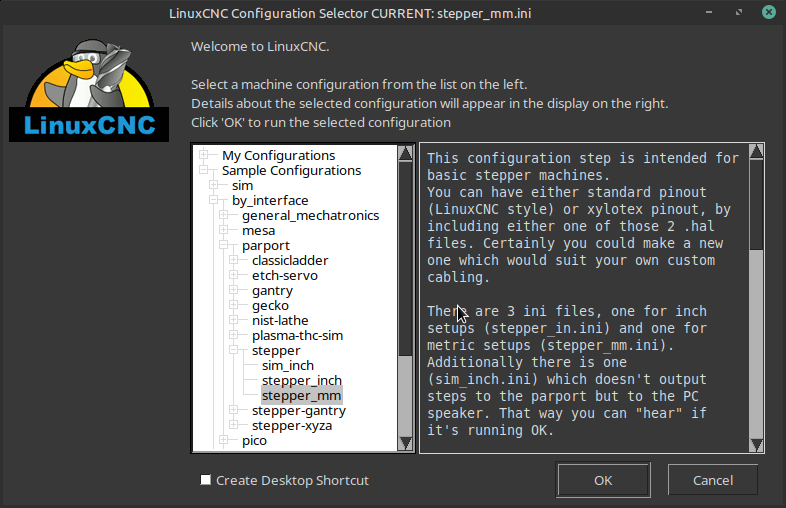
Run one of the included configs for parallel port, if those run you are OK.
Please Log in or Create an account to join the conversation.
- ClimbingMike
-
Topic Author
- Offline
- New Member
-
Less
More
- Posts: 3
- Thank you received: 0
22 Jun 2026 19:26 #347242
by ClimbingMike
Replied by ClimbingMike on topic Installing LinuxCNC RTAI
Hello Tommy:
thank you for the fast reply.
I am not sure which config your referencing to?
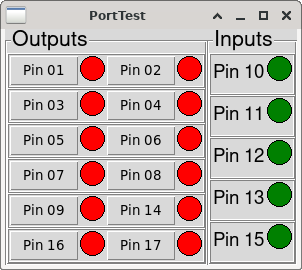
There is this PortTest demo.
Do you have the path to the config script. Because under the
/usr/realtime-5.4.258-rtai-amd64
bin calibration modules share testsuite
This is all i see and thing to do with config
thanks
Mike
thank you for the fast reply.
I am not sure which config your referencing to?
There is this PortTest demo.
Do you have the path to the config script. Because under the
/usr/realtime-5.4.258-rtai-amd64
bin calibration modules share testsuite
This is all i see and thing to do with config
thanks
Mike
Please Log in or Create an account to join the conversation.
- tommylight
-
- Away
- Moderator
-
Less
More
- Posts: 21959
- Thank you received: 7478
22 Jun 2026 20:47 #347246
by tommylight
Replied by tommylight on topic Installing LinuxCNC RTAI
Attachments:
Please Log in or Create an account to join the conversation.
Time to create page: 2.606 seconds