

- Posts: 85
- Thank you received: 0
Ethercat Cable Redundancy
4 years 11 months ago #225211
by wang
Ethercat Cable Redundancy was created by wang
Hello everyone
Now I am facing a demand. I don't know if you know Ethercat cable redundancy.
At present, I have successfully used linuxcnc+Ethercat to control a three-axis laser machine tool. However, according to customer needs, I not only need to achieve ethercat communication, but also need to achieve cable redundancy to ensure that the equipment is still online when one end is disconnected.
like this
www.hilscher.com/blog/ethercat-cable-redundancy/
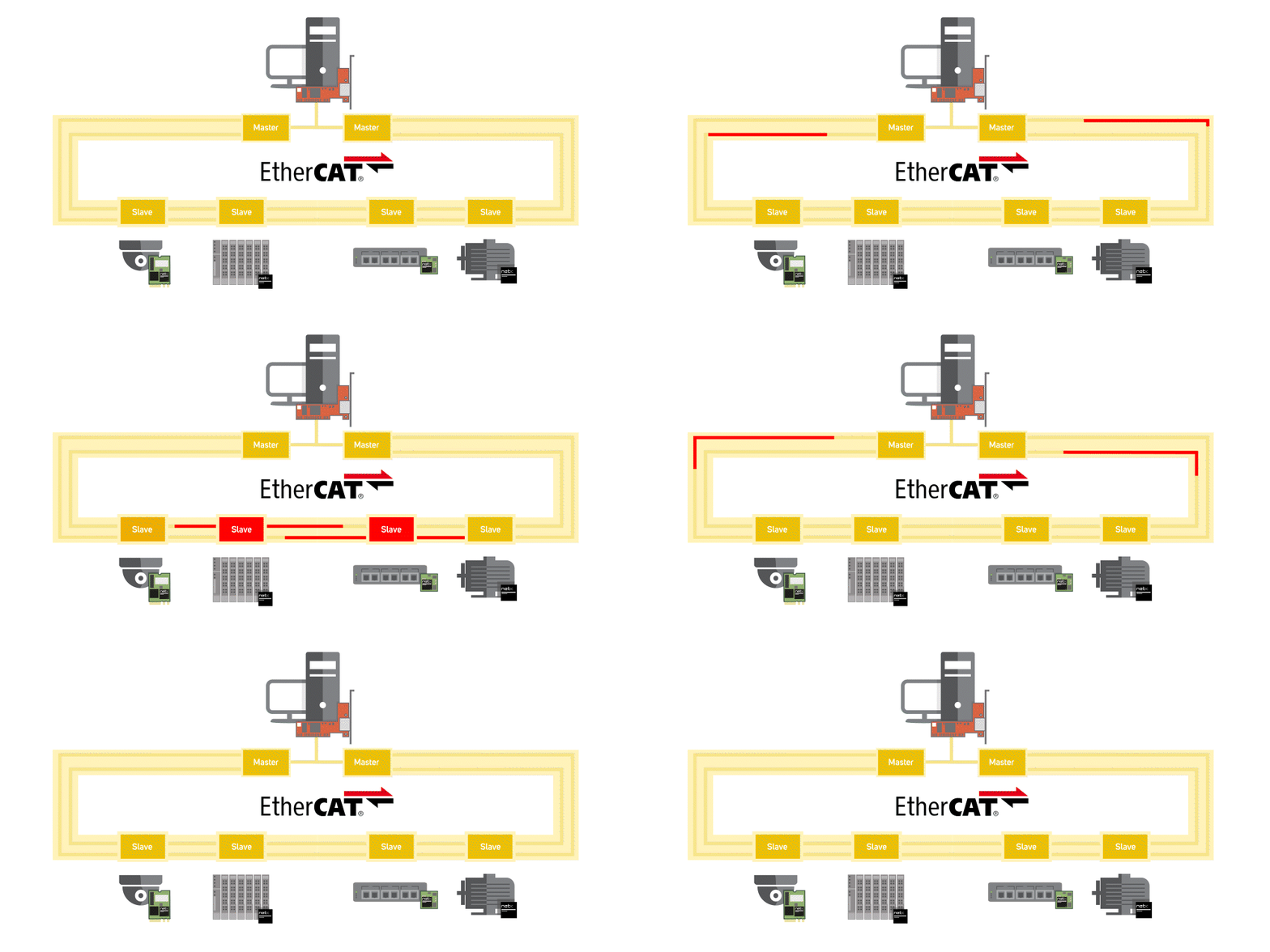
Have you done anything like this before? Or give me some ideas, thanks
wang
Now I am facing a demand. I don't know if you know Ethercat cable redundancy.
At present, I have successfully used linuxcnc+Ethercat to control a three-axis laser machine tool. However, according to customer needs, I not only need to achieve ethercat communication, but also need to achieve cable redundancy to ensure that the equipment is still online when one end is disconnected.
like this
www.hilscher.com/blog/ethercat-cable-redundancy/
Have you done anything like this before? Or give me some ideas, thanks
wang
Please Log in or Create an account to join the conversation.

4 years 11 months ago #225212
by db1981
Replied by db1981 on topic Ethercat Cable Redundancy
it works at some of my installations...
etherlab.org/download/ethercat/ethercat-1.5.2.pdf
first you have to recompile the master with the --with-devices option.
If you have installed with ec-debianize, edit the rules file in the debian folder.
then build-package again and reinstall.
After this you have to specify the backup devices mac adress in the ethercat config file MasterX_Backup (X is the number of the master to backup) .
sudo-update-ethercat and reboot....
The following user(s) said Thank You: wang
Please Log in or Create an account to join the conversation.
4 years 11 months ago #225321
by wang
Replied by wang on topic Ethercat Cable Redundancy
Thank you very much for your reply
I will study your document carefully
I have great admiration for your technical achievements
I will study your document carefully
I have great admiration for your technical achievements
Please Log in or Create an account to join the conversation.
4 years 11 months ago - 4 years 11 months ago #225355
by wang
Replied by wang on topic Ethercat Cable Redundancy
Thank you very much for your explanation. I read the document you provided, but I don't understand how to modify the "the rules file in the debian folder" you said. What parameters should I change? (I'm already here)
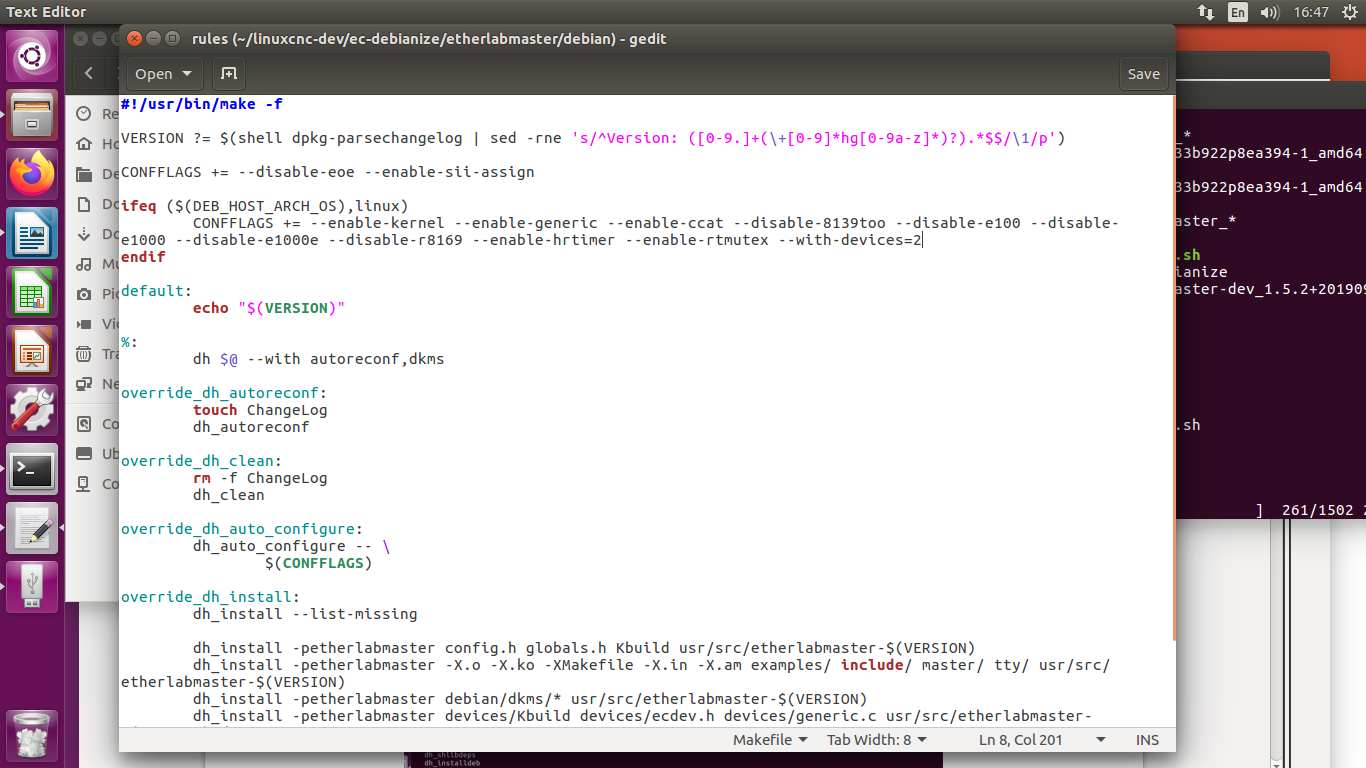
I tried adding "--with-devices=2" after CONFIGS, but it didn't make ethercat redundant.
I already know the configuration method of the two parameters "--with-devices" and "MasterX_Backup" by reading the document.
I have configured MasterX_Backup as a backup MAC address, do I need other operations?
I tried adding "--with-devices=2" after CONFIGS, but it didn't make ethercat redundant.
I already know the configuration method of the two parameters "--with-devices" and "MasterX_Backup" by reading the document.
I have configured MasterX_Backup as a backup MAC address, do I need other operations?
Last edit: 4 years 11 months ago by wang.
Please Log in or Create an account to join the conversation.
4 years 11 months ago #225364
by db1981
Replied by db1981 on topic Ethercat Cable Redundancy
I don't know by which method you installed the etherlabmaster.
If you have installed it with ec-debianize. you can edit the rules file
(/ec-debianize/etherlabmaster/debian/rules) on top of the file are the config flags for the Master defined. At this place you can add "--with-devices" and install the master again.
If you already have installed the master with "--with-devices" , everythins is fine.
Then you only have to edit the config file (etc/default/ethercat)
Please Log in or Create an account to join the conversation.
4 years 11 months ago #225588
by db1981
Replied by db1981 on topic Ethercat Cable Redundancy
did you rebuild and reinstall the package ?
have you done sudo-update-ethercat ?
have you done sudo-update-ethercat ?
Please Log in or Create an account to join the conversation.
Time to create page: 0.317 seconds