General Questions about using ethercat

More
1 year 4 months ago #331059 by Hakan
The line
setp cia402.0.csp-mode 1
should make the cia402 put the drive in csp-mode.
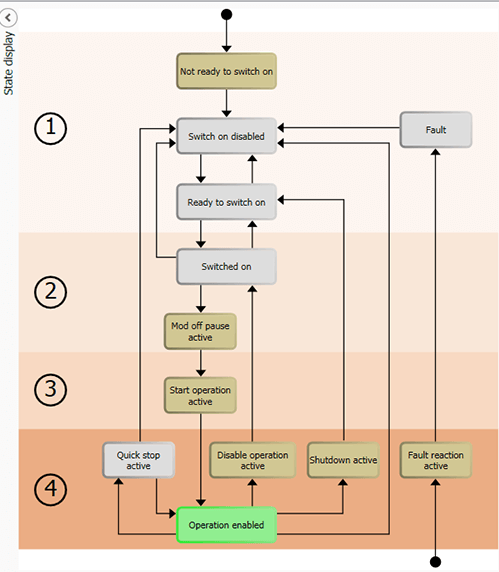
OP is required but not enough. For cia402 drivers, they have their own states on top of OP.
The drive needs to be in stat-op-enabled to start moving.
Easiest is to use halshow and navigate to pins,cia402,0 to check the values from the component.
 
The following user(s) said Thank You: Tntmold

Please Log in or Create an account to join the conversation.
More
1 year 4 months ago - 1 year 4 months ago #331067 by Tntmold
halshow value for cia402.0.csp-mode is true, but the drive parameters (value of modes-of-operation/cia402.0.opmode/lcec.0.x.opmode) is 0.

in the XML file there is
<pdoEntry idx="6060" subIdx="00" bitLen="8" halPin="opmode" halType="S32"/>

in the HAL file there is:

setp cia402.0.csp-mode 1
...
net x-modes-of-operation cia402.0.opmode => lcec.0.X.opmode
...

The drive wants parameter 6060 to be 8 for CSP mode. How do I correct that?
Last edit: 1 year 4 months ago by Tntmold. Reason: Added information

Please Log in or Create an account to join the conversation.

More
1 year 3 months ago #331097 by Hakan
As I said, first make sure the drive is in CIA 402 operation enable mode.


The cia402 component will make the drive go to operation-enable when you set cia402.0.enable true.
There should be a line that looks like this in your hal file
net x-enable <= joint.0.amp-enable-out => cia402.0.enable

If it doesn't go to operation-enable, check cia402.0.stat-op-enable in halshow,
you need to check the statusword and the controlword, and consult the manual
for reasons why the drive doesn't want to go operation enabled.

Please Log in or Create an account to join the conversation.

Time to create page: 0.590 seconds
Powered by Kunena Forum
