Need testers for gmoccapy_5_axis

More
10 years 10 months ago #66503 by newbynobi
Hallo fairngs,

oh my good, how much information, and the biggest error is in your first post!

You are using a XYZAU configuration, but you use JOINT 0,1,2,3 and 4. The U is joint 6!!!

X = 0
Y = 1
Z = 2
A = 3
B = 4
C = 5
U = 6
V = 7
W = 8

Also you do load a lot of userpanels, please do not implement them, until your basic config does run, as they may cause errors, whitch can only be seen on terminal.

Now lets talk about your mixing of 2.7 and 2.8 and menu starts etc.
if you clone linuxcnc, you get several branches, one of them is gmoccapy_5_axis, another one is master

If you check out gmoccapy_5_axis and compile it, and rip environment and start it from the same terminal your rip_environment, you will get linuxcnc 2.7, because gmoccapy_5_axis is based on that.

If you check out master, and do a make than!!! You have to do a make after each branch change! You will get linuxcnc 2.8.

So I see, you are missing some basics.

so please do the following in a terminal:
Code:
cd linuxcnc-dev git checkout gmoccapy_5_axis cd src make clean ./autogen.sh ./configure make sudo make setuid cd .. . ./scripts/rip-environment linuxcnc

If all do compile without errors, you will get the linuxcnc config picker screen. Please select from sim folder gmoccapyXYZAB and run that config.

If that does show up, you may begin to switch to your config, but do that step by step!
Start all test from the open terminal, as if you close it, you will need to do again the rip-environment!, and watch for outputs in the terminal.

The messages from gmoccapyy you posted a thread ago, is not complete and the part you posted does not show relevant errors.

Norbert
The topic has been locked.
More
10 years 10 months ago - 10 years 10 months ago #66518 by auto-mation-assist
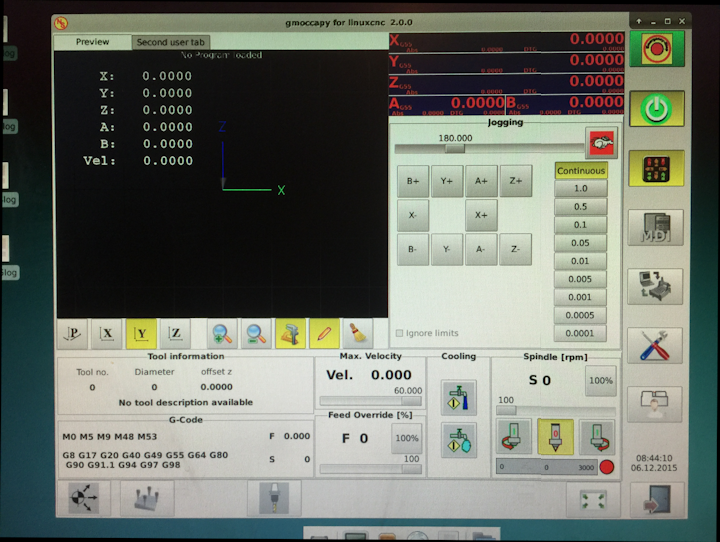
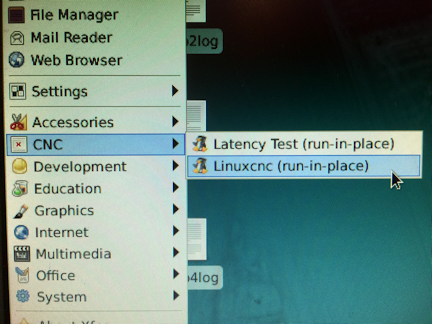
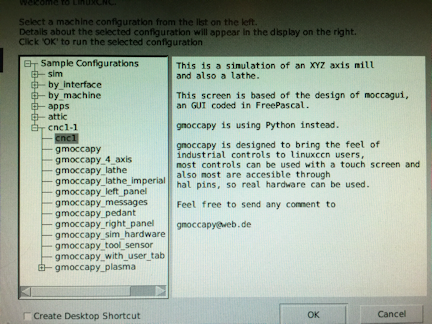
Norbert, I was able to get to get my configuration working and have attached some pictures to show the present selection menu. It does appear that the original selection menu was my biggest issue with its hidden files that retained data from its prior higher linuxcnc version that was installed before. I deleted hidden files that I found to be related to the selection menu tree that referenced linuxcnc and reinstalled the linuxcnc-dev version as per your prior post. I also removed the 4 axis version of gmoccapy that this problem installed.

I do wish that I did not have to go hunting for those files that needed to be removed but I did not feel like building the whole system from scratch again. I will clone the hard drive and continue with the tool length sensor, tool change and probing functions. The homing function in the files I posted are working properly for me on my test bed equipment.

I will try to find some probing functions files somewhere for gmocappy and will see if I can get those installed and working. The only thing that bothers me a little now is that my configuration shows up under the simulation tree. I will try o find a solution for that. I will change the joint to 6 as you mentioned for U. Right now that axis is set to B for testing. It has been a pretty steep learning curve and the end of that curve is still a long way away.
Last edit: 10 years 10 months ago by auto-mation-assist.
The topic has been locked.
More
10 years 10 months ago #67170 by Ludwig
Hi Norbert,
I try to move the C-Axis with the external push-button, but always the A-Axis is moving.
All other axis (X, Y, Z, A) are ok. If I use the mouse, then I can move the C-Axis.

net A-Axis-sel and2.29.in0
net PB-Plus and2.29.in1
net jog-a-plus and2.29.out gmoccapy.jog-a-plus

net C-Axis-sel and2.30.in0
net PB-Plus and2.30.in1
net jog-c-plus and2.30.out gmoccapy.jog-c-plus

Thanks for the great GUI !

Best regards,
Ludwig
The topic has been locked.
More
10 years 10 months ago #67191 by newbynobi
Got it,

I found the bug and will correct that asap.

Norbert
The topic has been locked.
More
10 years 10 months ago #67192 by newbynobi
@Ludwig

I solved the bug and gmoccapy 2.0.1 has been pushed.
I added a new config gmoccapy_XYZAC.ini which will open also a simulated pendant.
I used that for testing. Due to the simulated homing, you will have to home the axis in reversed order, not all at once!
Then select a increment in gmoccapy, an axis with the pendant and move the virtual jog wheel for testing.

Please report if the fix works also on hardware.

@AllOthers
please update your config if you use hardware button to jog!

Norbert
The following user(s) said Thank You: Ludwig
The topic has been locked.
More
10 years 10 months ago #67208 by Ludwig
Hi Norbert,
it works!!!

Only there is some cosmetic thinks to, that means, if the A-Axis or C-Axis change from 9.999 to 10.000 or 99.000 to 100.000 then the line in the middle (to separate the 2 axis) will move. But this is absolutely not important.

Thanks very much for the quick replay.

Best regards,
Ludwig
The topic has been locked.
Moderators: newbynobi, HansU
Time to create page: 0.324 seconds
Powered by Kunena Forum