
Can't read gcode text in dark mode when editing.
- TheTinkeringMechanic1
- Offline
- Senior Member
-

Less
More
- Posts: 67
- Thank you received: 5
04 May 2026 00:18 #346145
by TheTinkeringMechanic1
Replied by TheTinkeringMechanic1 on topic Can't read gcode text in dark mode when editing.
Thank you. This brings up yet another issue, I have been trying to update but I don't believe I have a good repository. I keep getting an error saying the address doesn't have a release. I have attempted several different locations And I entered them into synapse. But I must be doing something wrong.
Please Log in or Create an account to join the conversation.
- TheTinkeringMechanic1
- Offline
- Senior Member
-
Less
More
- Posts: 67
- Thank you received: 5
05 May 2026 23:33 #346188
by TheTinkeringMechanic1
Replied by TheTinkeringMechanic1 on topic Can't read gcode text in dark mode when editing.
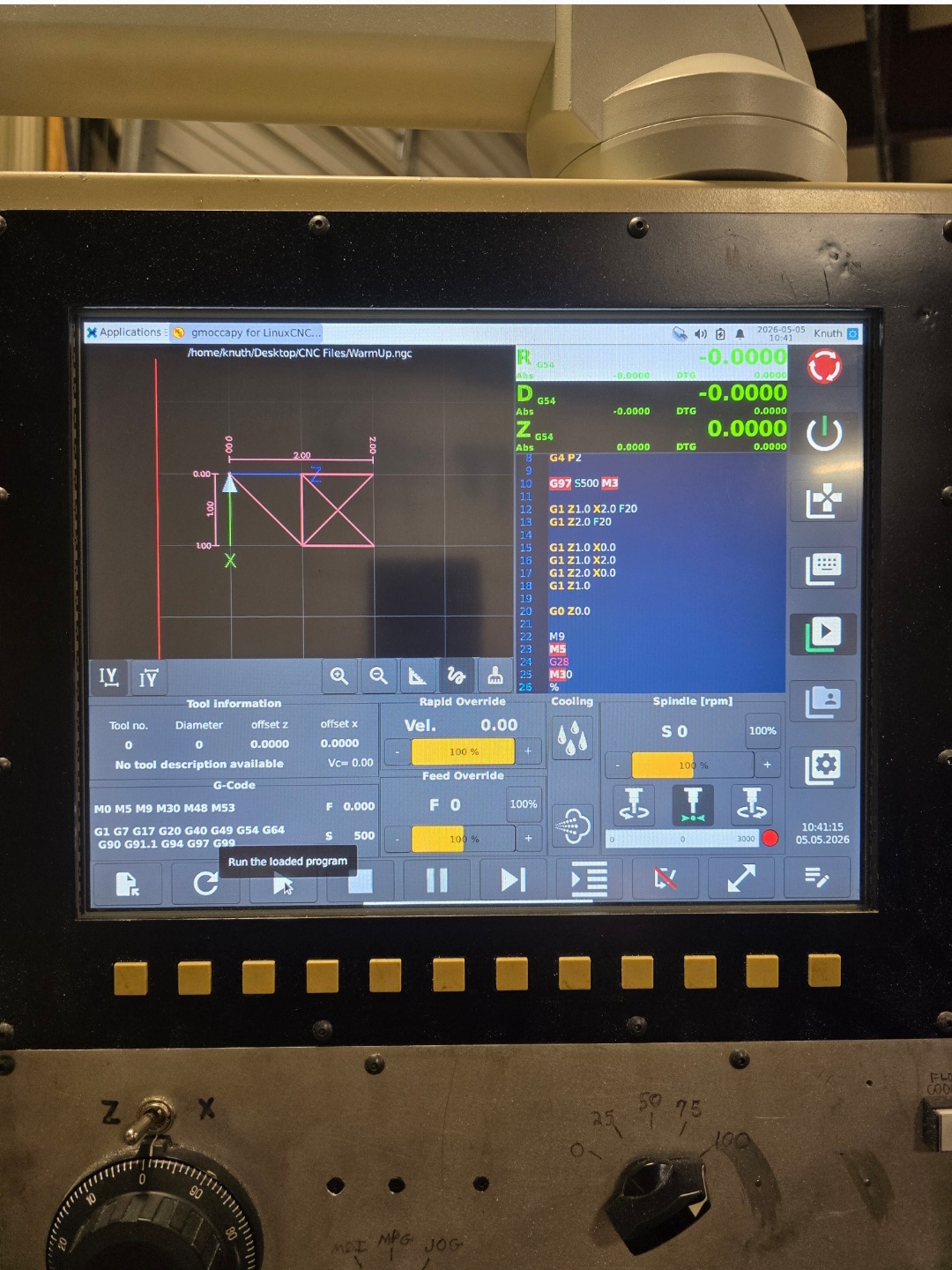
It appears I'm on my own... again. So far nothing worked to get a repository to update LinuxCNC. So I said f-it and completely deleted the partition and reinstalled linuxcnc completely from scratch. I am gad I did. The new installation resolved several issues. Most importantly, the editor in Linuxcnc that nothing I tried worked to get it resolved, is now resolved.
Attachments:
The following user(s) said Thank You: tommylight
Please Log in or Create an account to join the conversation.
- tommylight
-

- Offline
- Moderator
-

Less
More
- Posts: 21958
- Thank you received: 7478
05 May 2026 23:52 #346189
by tommylight
Replied by tommylight on topic Can't read gcode text in dark mode when editing.
I am glad it worked.
Please Log in or Create an account to join the conversation.
- HansU
-

- Offline
- Moderator
-
Less
More
- Posts: 729
- Thank you received: 217
06 May 2026 16:09 #346207
by HansU
Replied by HansU on topic Can't read gcode text in dark mode when editing.
Glad that the update resolves your issue.
But have you read linuxcnc.org/docs/html/getting-started/updating-linuxcnc.html regarding the update? It shouldn't be a big thing to update LinuxCNC.
But have you read linuxcnc.org/docs/html/getting-started/updating-linuxcnc.html regarding the update? It shouldn't be a big thing to update LinuxCNC.
Please Log in or Create an account to join the conversation.
- TheTinkeringMechanic1
- Offline
- Senior Member
-
Less
More
- Posts: 67
- Thank you received: 5
06 May 2026 20:06 #346222
by TheTinkeringMechanic1
Replied by TheTinkeringMechanic1 on topic Can't read gcode text in dark mode when editing.
Yes, I read that. It would download the update but It would say 2 "not upgraded". I couldn't find a reason why. I have attempted multiple repositories in synapsis, nothing changed.
Please Log in or Create an account to join the conversation.
- HansU
-
- Offline
- Moderator
-
Less
More
- Posts: 729
- Thank you received: 217
07 May 2026 12:59 #346247
by HansU
Replied by HansU on topic Can't read gcode text in dark mode when editing.
Have you tried the command line?
sudo apt update
sudo apt install linuxcnc-uspace
Please Log in or Create an account to join the conversation.
- TheTinkeringMechanic1
- Offline
- Senior Member
-
Less
More
- Posts: 67
- Thank you received: 5
08 May 2026 00:02 - 08 May 2026 00:06 #346265
by TheTinkeringMechanic1
Replied by TheTinkeringMechanic1 on topic Can't read gcode text in dark mode when editing.
Yup. Ran that and variants like it many times. It would say something along the lines of: 0 updates available 0 updates installed 2 not updated. I couldn't find out why it wouldn't upgrade it.
I tried:
"sudo apt update
sudo apt full-upgrade"
Then I tried:
"sudo apt purge --autoremove raspi-firmware
sudo apt update
sudo apt upgrade"
Gave me another error.
Then I went went into Synaptic, I reloaded "linuxcnc", marked the new version for upgrade, and then clicked apply. It gave me yet another error.
During a cursory search of the internet and that's when I learned that it's most likely due to an outdated repository link.
Then I asked here about finding a good repository address.
In the meanwhile I tried several different addresses from internet searches, tried them and all gave me errors.
Check back, found the post was moved and had no replies.
I used balena etcher, backed up the entire drive image just in case what I wanted to try didn't work, made copies of the INI and HAL files and their respective backups, loaded up a fresh linuxcnc to a bootable drive, used the installation to wipe the partition and installed it fresh.
Other than the new version being picky about what letters were capitalized in the name of the HAL file, and a couple of minor tweaks in Debian including reinstalling the Etouch driver so the touchscreen drivers would install, everything seems to be working fine now.
I tried:
"sudo apt update
sudo apt full-upgrade"
Then I tried:
"sudo apt purge --autoremove raspi-firmware
sudo apt update
sudo apt upgrade"
Gave me another error.
Then I went went into Synaptic, I reloaded "linuxcnc", marked the new version for upgrade, and then clicked apply. It gave me yet another error.
During a cursory search of the internet and that's when I learned that it's most likely due to an outdated repository link.
Then I asked here about finding a good repository address.
In the meanwhile I tried several different addresses from internet searches, tried them and all gave me errors.
Check back, found the post was moved and had no replies.
I used balena etcher, backed up the entire drive image just in case what I wanted to try didn't work, made copies of the INI and HAL files and their respective backups, loaded up a fresh linuxcnc to a bootable drive, used the installation to wipe the partition and installed it fresh.
Other than the new version being picky about what letters were capitalized in the name of the HAL file, and a couple of minor tweaks in Debian including reinstalling the Etouch driver so the touchscreen drivers would install, everything seems to be working fine now.
Last edit: 08 May 2026 00:06 by TheTinkeringMechanic1.
Please Log in or Create an account to join the conversation.
Moderators: newbynobi, HansU
Time to create page: 0.127 seconds