
Highlighted gcode doesn't follow current position.
- TheTinkeringMechanic1
- Offline
- Senior Member
-

Less
More
- Posts: 67
- Thank you received: 5
30 Jul 2026 15:52 #348219
by TheTinkeringMechanic1
Highlighted gcode doesn't follow current position. was created by TheTinkeringMechanic1
The is a minor thing that I hope is a simple fix.
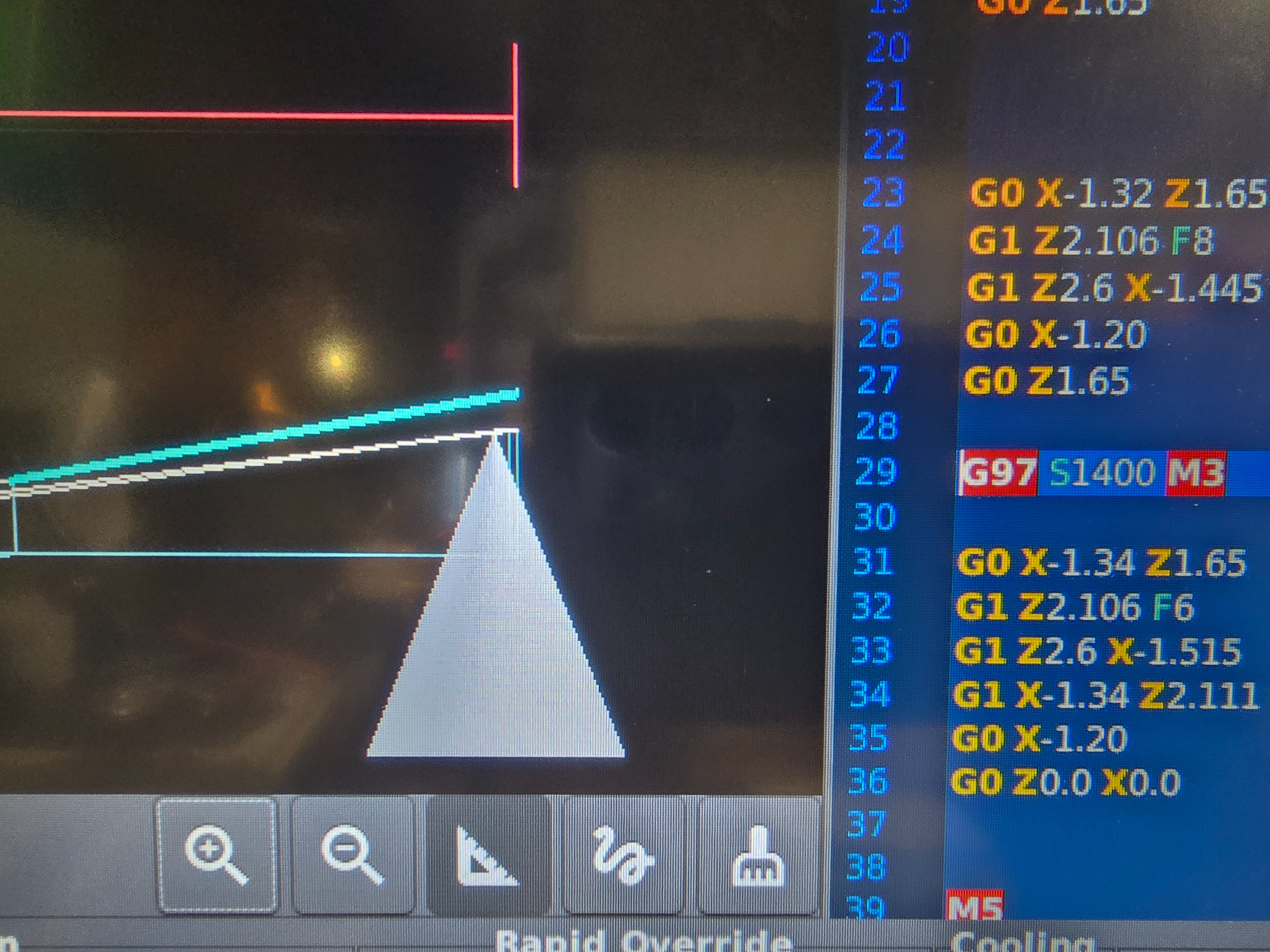
The graphical display that follows the tool path is spot on with what the tool is doing. That's not a problem. What I noticed is the highlighted gcode shown isn't following the same position.
So if I tap a tool path line to highlight it in the grid of the graphic window it doesn't highlight that tool path in the gcode.
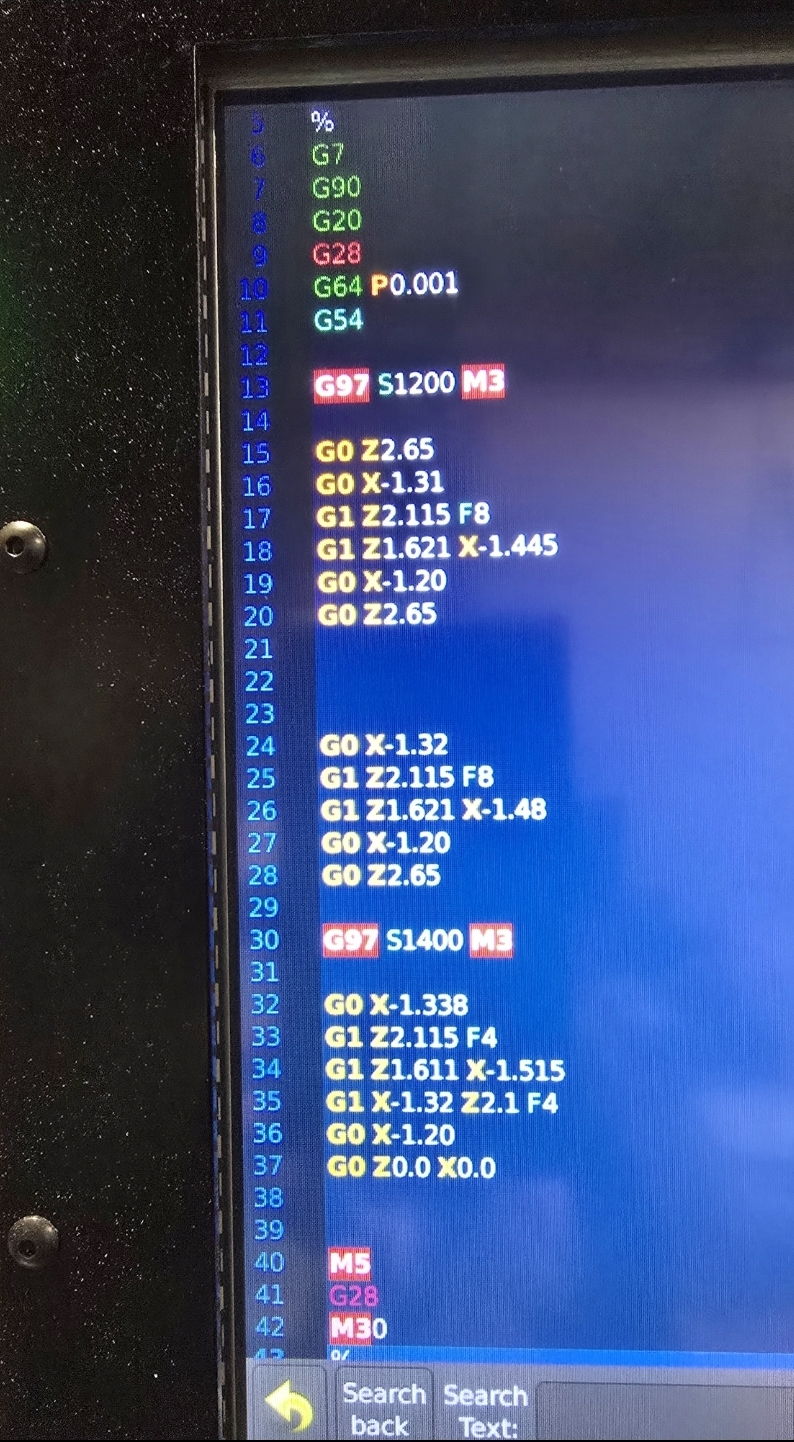
As you can see in the image I have the angled tool path highlighted which is supposed to be line 33, but in the gcode it's highlighting 29 which is the change in speed 5 lines prior.
A cursory search of the internet didn't reveal much other than recommendations to change g61,g64, but don't believe that has anything to do with this.
How do I correct this?
Thanks in advance.
The graphical display that follows the tool path is spot on with what the tool is doing. That's not a problem. What I noticed is the highlighted gcode shown isn't following the same position.
So if I tap a tool path line to highlight it in the grid of the graphic window it doesn't highlight that tool path in the gcode.
As you can see in the image I have the angled tool path highlighted which is supposed to be line 33, but in the gcode it's highlighting 29 which is the change in speed 5 lines prior.
A cursory search of the internet didn't reveal much other than recommendations to change g61,g64, but don't believe that has anything to do with this.
How do I correct this?
Thanks in advance.
Please Log in or Create an account to join the conversation.
- tommylight
-
- Offline
- Moderator
-

Less
More
- Posts: 21957
- Thank you received: 7478
30 Jul 2026 15:56 #348220
by tommylight
Replied by tommylight on topic Highlighted gcode doesn't follow current position.
What GUI?
Please Log in or Create an account to join the conversation.
- TheTinkeringMechanic1
- Offline
- Senior Member
-
Less
More
- Posts: 67
- Thank you received: 5
30 Jul 2026 16:30 #348222
by TheTinkeringMechanic1
Replied by TheTinkeringMechanic1 on topic Highlighted gcode doesn't follow current position.
3.4.9
Please Log in or Create an account to join the conversation.
- tommylight
-
- Offline
- Moderator
-
Less
More
- Posts: 21957
- Thank you received: 7478
30 Jul 2026 16:57 #348223
by tommylight
What user interface on screen?
It seems like GmoccaPy.
Upload a picture of the whole screen.
Replied by tommylight on topic Highlighted gcode doesn't follow current position.
That is most probably the kernel version, not the GUI.3.4.9
What user interface on screen?
It seems like GmoccaPy.
Upload a picture of the whole screen.
Please Log in or Create an account to join the conversation.
- Aciera
-
- Offline
- Administrator
-

Less
More
- Posts: 4818
- Thank you received: 2176
30 Jul 2026 17:05 #348224
by Aciera
Replied by Aciera on topic Highlighted gcode doesn't follow current position.
Also, please post the gcode
Please Log in or Create an account to join the conversation.
- TheTinkeringMechanic1
- Offline
- Senior Member
-
Less
More
- Posts: 67
- Thank you received: 5
30 Jul 2026 17:45 - 30 Jul 2026 17:49 #348227
by TheTinkeringMechanic1
Replied by TheTinkeringMechanic1 on topic Highlighted gcode doesn't follow current position.
If this isn't the version,
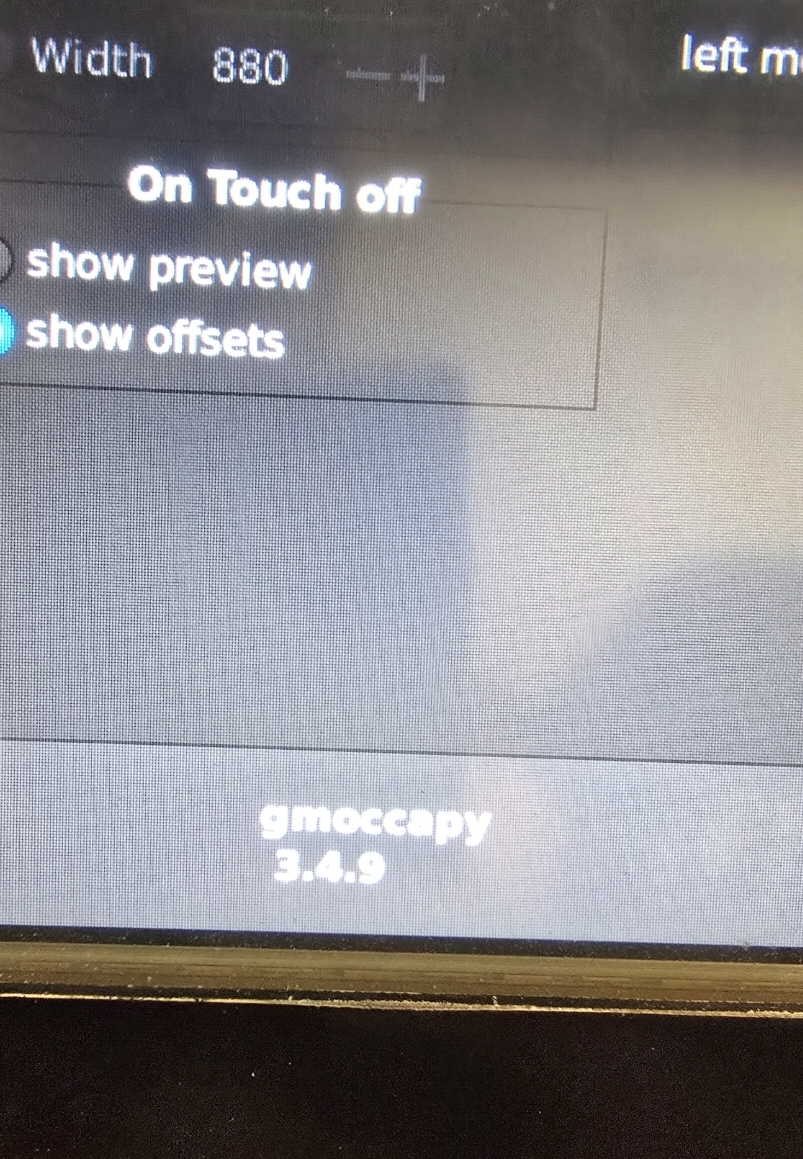 I don't know where it would be.
Attachments:
Last edit: 30 Jul 2026 17:49 by TheTinkeringMechanic1.
Please Log in or Create an account to join the conversation.
- TheTinkeringMechanic1
- Offline
- Senior Member
-
Less
More
- Posts: 67
- Thank you received: 5
30 Jul 2026 17:53 #348228
by TheTinkeringMechanic1
Replied by TheTinkeringMechanic1 on topic Highlighted gcode doesn't follow current position.
This is it.
Please Log in or Create an account to join the conversation.
- TheTinkeringMechanic1
- Offline
- Senior Member
-
Less
More
- Posts: 67
- Thank you received: 5
30 Jul 2026 18:05 - 30 Jul 2026 18:07 #348229
by TheTinkeringMechanic1
Replied by TheTinkeringMechanic1 on topic Highlighted gcode doesn't follow current position.
After posting that image of the g code I believe I see it now. The % symbol is on line 5. So that would explain everything being off set considering the line is starting at 1...
I knew it had to have been something silly.
Update: That was it....

I knew it had to have been something silly.
Update: That was it....
Last edit: 30 Jul 2026 18:07 by TheTinkeringMechanic1. Reason: Update
Please Log in or Create an account to join the conversation.
- tommylight
-
- Offline
- Moderator
-
Less
More
- Posts: 21957
- Thank you received: 7478
30 Jul 2026 23:52 #348250
by tommylight
Yet you ask us for help.
Replied by tommylight on topic Highlighted gcode doesn't follow current position.
Upload a picture of the whole screen.
You did neither, seems you are hiding something...Also, please post the gcode
Yet you ask us for help.
Please Log in or Create an account to join the conversation.
- tommylight
-
- Offline
- Moderator
-
Less
More
- Posts: 21957
- Thank you received: 7478
30 Jul 2026 23:53 #348251
by tommylight
Replied by tommylight on topic Highlighted gcode doesn't follow current position.
Thank you for reporting back.After posting that image of the g code I believe I see it now. The % symbol is on line 5. So that would explain everything being off set considering the line is starting at 1...
I knew it had to have been something silly.
Update: That was it....
Please Log in or Create an account to join the conversation.
Moderators: newbynobi, HansU
Time to create page: 0.357 seconds