NativeCAM is Features renamed

More
9 years 10 months ago #84113 by FernV
Replied by FernV on topic NativeCAM is Features renamed

andersal wrote: Hi,

I have problems seeing the workpiece in the lcnc view.

I'm running lcnc 2.7.8 on Debian Wheezy and have downloaded the latest version of NativeCAM from GIT.

I've gone through the setup of ncam and I can start it both stand-alone and embedded.

When running embedded and using the demo config file mill-mm.ini (the metric one), functions seem to be working.
- I can add a workpiece
- I can modify it, etc.

However, I cannot see it.. If i rescale the workpiece I can see the lcnc view changing zoom level but the workpiece is invisible.

Don't know if I can provide any more input for this error or if it's known. Please let me know if I can provide more valuable input.

Thanks
Anders


The answer is in the videos and here
forum.linuxcnc.org/40-subroutines-and-ng...amed?start=150#83272

Fern

Please Log in or Create an account to join the conversation.

More
9 years 10 months ago #84116 by andersal
How in the world could I miss that, sorry?
Thanks, it works and I must say that I'm impressed both by the product itself and your support/reply capacity..

Big thanks for NativeCAM.

Anders

Please Log in or Create an account to join the conversation.
More
9 years 10 months ago #84645 by gmouer
Hi Fern,
I have been using and learning NativeCam on a bridgeport mill I just finished retrofitting. I am loving NativeCam !

I have a couple questions. I have a touchprobe and played around with the probing routines. I understand them fairly well. Is there a parameter somewhere I am not seeing that sets the maximum probe travel before the code faults out? For probing the stock in X and Y I would like a bit more travel so that centering on the stock in the beginning is not as critical.

The other questions is if there are any plans to add more probing routines? Things such as finding the center of a circle pocket or the center of a round boss would be extremely useful.

Thanks for your work! I am really enjoying it.
George

Please Log in or Create an account to join the conversation.
More
9 years 10 months ago #84671 by FernV
Replied by FernV on topic NativeCAM is Features renamed

gmouer wrote: I have a couple questions. I have a touchprobe and played around with the probing routines. I understand them fairly well. Is there a parameter somewhere I am not seeing that sets the maximum probe travel before the code faults out? For probing the stock in X and Y I would like a bit more travel so that centering on the stock in the beginning is not as critical.

You can change probing params default in the 'Preferences/Probing' tab


gmouer wrote: The other questions is if there are any plans to add more probing routines? Things such as finding the center of a circle pocket or the center of a round boss would be extremely useful.

You can probe a hole or a boss using 'Probe Stock'. Bring the tip of your probe in the center of the hole (above or at the height you want it to be probed) or a boss/cylinder (of course above it), set the mode Inside/Outside, Probe height +/- then run. Safe relative z will be the height it will go up before changing side to probe. You do not have to initially set axes to 0, all values are relative to where it started. The end position will be aligned where you selected for X/Y axes and optionnaly be set to 0.0.

To you George and to all readers I wish a very merry Christmas and hope you also have a personal relation with my Lord Jesus Christ

Best regards
Fern

Please Log in or Create an account to join the conversation.

More
9 years 10 months ago #84672 by gmouer
Thanks much Fern ! I totally missed that ability to probe circles !
As for the preferences, which one in particular sets the max distance traveled when probing before a fault message comes up?

Have a great Christmas Fern ! I already got my favorite gift, NativeCam!

George

Please Log in or Create an account to join the conversation.

More
9 years 10 months ago #84850 by franstrein
Handling of Drill Array in NativeCam

Hi,
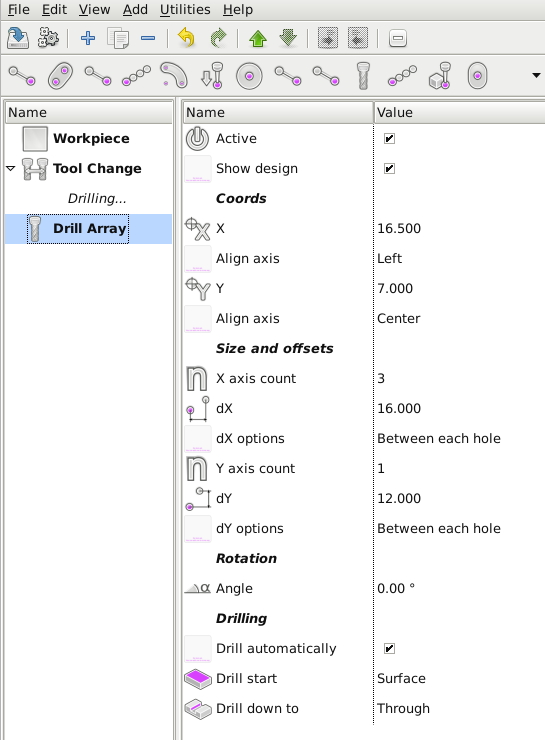
I added recently NativeCam to my gmoccapy setup for my Deckel FP1 mill. It looks good, and I am trying to get a better understanding. One of the first operations I needed, was using "Drill Array". However I doesn't give the results I expected:
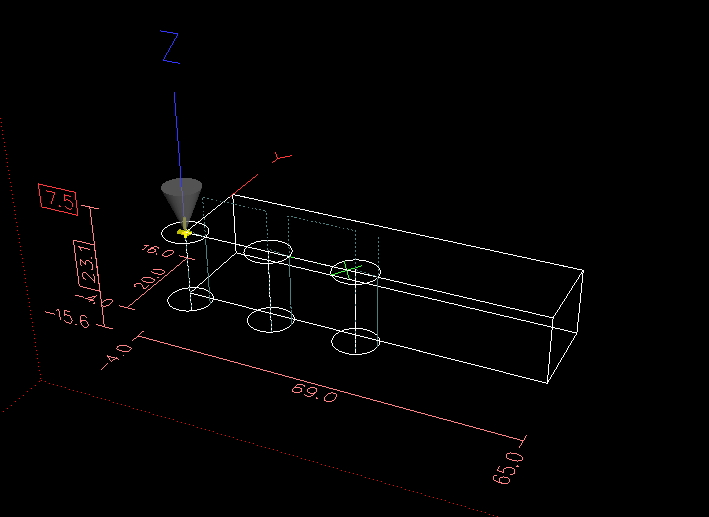
In a workpiece of 65*16*12mm , I plan to drill 3 holes, at x coordinates 16.5, 32.5 and 48.5, and all on y coordinate 7. These are references from the front left corner of the workpiece.

However the generated g-code appears to be done for (0,0) . (16,0) and (32,0) coordinates.
The screenshots below are from my simulated VMWare environment, but on the real machine simular results happen, and even start drilling at (-16,0). That might be due to the coordinate system used?


What am I doing wrong here?

Thanks,
Frans

Please Log in or Create an account to join the conversation.

Time to create page: 0.108 seconds
Powered by Kunena Forum
