
NativeCAM is dangerous.
- tuxcnc
- Offline
- Elite Member
-

Less
More
- Posts: 284
- Thank you received: 54
29 Sep 2026 07:41 #349976
by tuxcnc
NativeCAM is dangerous. was created by tuxcnc
User hermann1976 in the thread forum.linuxcnc.org/nativecam/59280-nativ...-transfer-to-control described strange behavior of LinuxCNC after generating a program with NativeCAM.
Partly out of desire to help, and partly out of curiosity, I started digging into the topic...
Although I wasn't able to reproduce the error described, but I found something much more important...
Well, there are no miracles in IT.
It is not possible for the same program to work correctly sometimes and then interrupt its operation by reporting an error.
Damage to the computer had to be ruled out because the error was repeatable and could not be due to random causes.
Since the reported error concerned going beyond the machine's working space, the first suspect was the offset subsystem.
And in fact, my default coordinate system is G54, and after running ncam.ngc it switched to G57 to return to G54 after finishing or interrupting.
This is so important that the operator may not notice it at all.
Although I didn't find G57 in ncam.ngc, there is a line #<_off_rot_coord_system>=57 (I removed the spaces). In turn, in the subroutines called from ncam.ngc there are lines G#<_off_rot_coord_system>, so it is it.
I didn't look any further in the code, I just decided to check if it was possible to take the program outside the working space by entering absurd offsets.
And this is where I really got scared.
Well, ncam.ngc overwrites the offset table !
He simply treats global data as his own private data.
After finishing the operation, it does not restore the previous data (which would not work anyway if the program was interrupted), it just leaves its garbage.
If the operator now executes another program that is using G57 that has executed correctly hundreds or thousands of times, he or she will get an unpleasant surprise, because the machine will work in other place than expected.
This is simply dangerous and therefore unacceptable.
Partly out of desire to help, and partly out of curiosity, I started digging into the topic...
Although I wasn't able to reproduce the error described, but I found something much more important...
Well, there are no miracles in IT.
It is not possible for the same program to work correctly sometimes and then interrupt its operation by reporting an error.
Damage to the computer had to be ruled out because the error was repeatable and could not be due to random causes.
Since the reported error concerned going beyond the machine's working space, the first suspect was the offset subsystem.
And in fact, my default coordinate system is G54, and after running ncam.ngc it switched to G57 to return to G54 after finishing or interrupting.
This is so important that the operator may not notice it at all.
Although I didn't find G57 in ncam.ngc, there is a line #<_off_rot_coord_system>=57 (I removed the spaces). In turn, in the subroutines called from ncam.ngc there are lines G#<_off_rot_coord_system>, so it is it.
I didn't look any further in the code, I just decided to check if it was possible to take the program outside the working space by entering absurd offsets.
And this is where I really got scared.
Well, ncam.ngc overwrites the offset table !
He simply treats global data as his own private data.
After finishing the operation, it does not restore the previous data (which would not work anyway if the program was interrupted), it just leaves its garbage.
If the operator now executes another program that is using G57 that has executed correctly hundreds or thousands of times, he or she will get an unpleasant surprise, because the machine will work in other place than expected.
This is simply dangerous and therefore unacceptable.
Please Log in or Create an account to join the conversation.
- hermann1976
-
- Offline
- Senior Member
-

Less
More
- Posts: 67
- Thank you received: 17
29 Sep 2026 15:51 - 29 Sep 2026 15:52 #349983
by hermann1976
Replied by hermann1976 on topic NativeCAM is dangerous.
Hello tuxcnc,
Many thanks for your feedback and your willingness to help me with my problem.
I can certainly understand your concerns.
I believe a clear approach is necessary. However, i think it is common practice to switch from one coordinate system—such as G54—to another during a program's execution. This offers many advantages.
I wrote a dovetail milling program (independently of NativCAM) that is variable; it automatically calculates the dovetails based on the varying widths and components of a drawer—sides, front and back pieces, etc.—and mills them accordingly.
The individual dovetails are milled within a loop where the coordinates remain relative to the same reference point. After one dovetail is cut, the G59.3 coordinate system is shifted, and the loop runs again. This continues until the entire row is finished. This keeps the G-code compact and manageable.
The situation is similar with NativCAM.
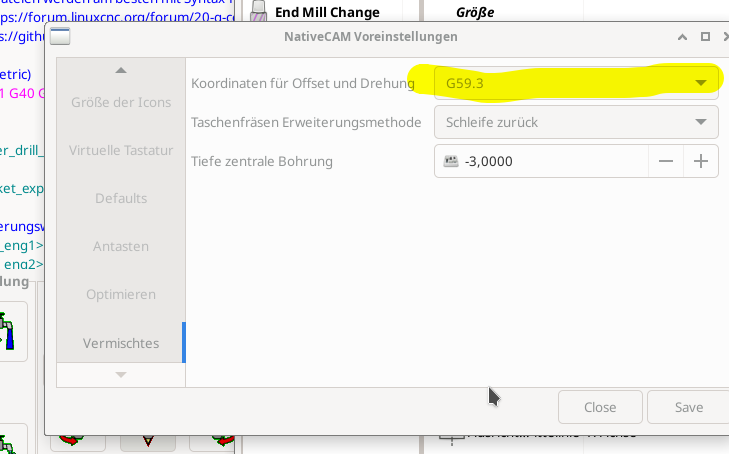
It just needs to be clearly communicated that G59.3 must not be used as a general workpiece zero point, but is reserved specifically for NativCAM.
You can set your preference in the settings (see attached image).
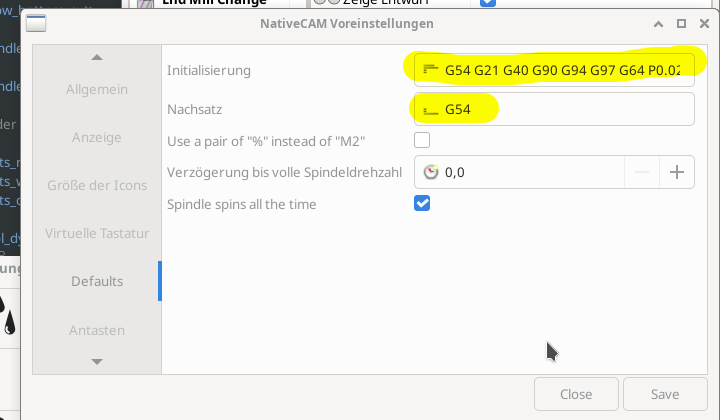
It is also important to include G54 in the initialization settings (see attached image).
This ensures that the system switches back to G54 after the program runs, and selects G54 again upon restarting after an interruption, thereby restoring the initial state.
Unfortunately, I was unable to trace or reproduce the error you described. Whenever I ran a program, the result was always consistent.
Thanks again for your help.
I still haven't found the source of my error.
(tranlated with GoogleTranslate)
Many thanks for your feedback and your willingness to help me with my problem.
I can certainly understand your concerns.
I believe a clear approach is necessary. However, i think it is common practice to switch from one coordinate system—such as G54—to another during a program's execution. This offers many advantages.
I wrote a dovetail milling program (independently of NativCAM) that is variable; it automatically calculates the dovetails based on the varying widths and components of a drawer—sides, front and back pieces, etc.—and mills them accordingly.
The individual dovetails are milled within a loop where the coordinates remain relative to the same reference point. After one dovetail is cut, the G59.3 coordinate system is shifted, and the loop runs again. This continues until the entire row is finished. This keeps the G-code compact and manageable.
The situation is similar with NativCAM.
It just needs to be clearly communicated that G59.3 must not be used as a general workpiece zero point, but is reserved specifically for NativCAM.
You can set your preference in the settings (see attached image).
It is also important to include G54 in the initialization settings (see attached image).
This ensures that the system switches back to G54 after the program runs, and selects G54 again upon restarting after an interruption, thereby restoring the initial state.
Unfortunately, I was unable to trace or reproduce the error you described. Whenever I ran a program, the result was always consistent.
Thanks again for your help.
I still haven't found the source of my error.
(tranlated with GoogleTranslate)
Last edit: 29 Sep 2026 15:52 by hermann1976.
The following user(s) said Thank You: tommylight
Please Log in or Create an account to join the conversation.
- tuxcnc
- Offline
- Elite Member
-
Less
More
- Posts: 284
- Thank you received: 54
29 Sep 2026 17:40 #349984
by tuxcnc
NativeCAM performs implicit operations, so the result may be surprising, although formally correct.
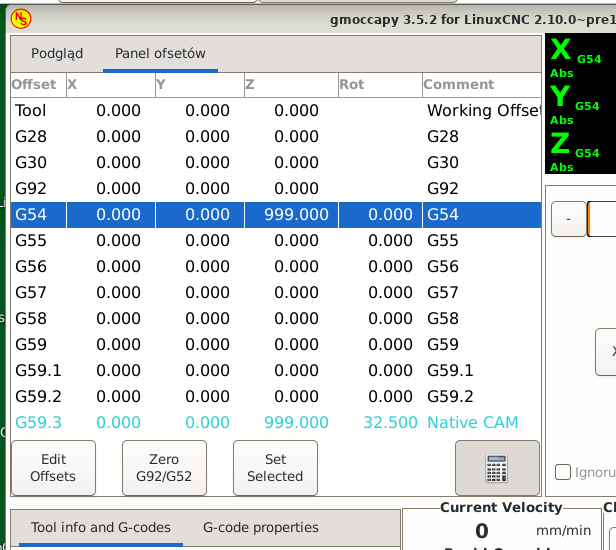
I managed to achieve this effect:
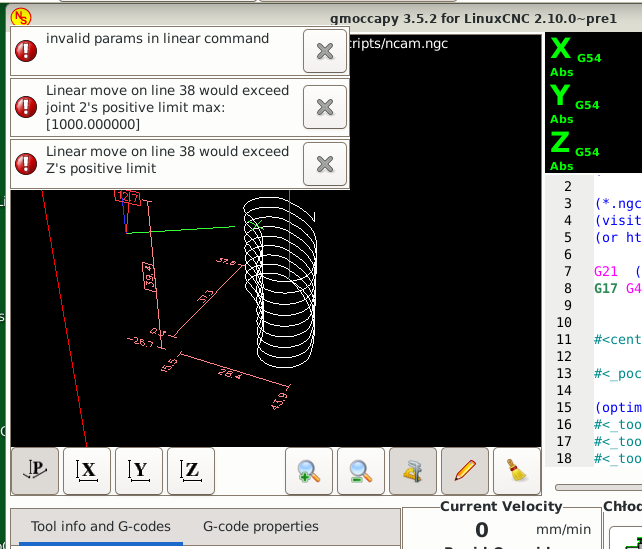
I did it by entering an absurd offset in G54.
NativeCAM clearly copied it to G59.3, and then tried to perform some operation and went outside the working space.
It may be more subtle for you, but it probably works the same.
Thank you for the tip with G59.3.
Of course, G54-G59.3 are basically there to execute the same program in absolute coordinates in a different place in the workspace. Expect codes G55, G56, etc. to be used sequentially as needed. Of course, you can reserve one of them for something and not use it for anything else, but it should be the last available code and not a random one...
In Gmoccapy you can even add an appropriate comment to the offset table, as seen above.
It's always better than ruining the G57...
Replied by tuxcnc on topic NativeCAM is dangerous.
I am sure that the reason for your error lies solely in your settings.I still haven't found the source of my error.
NativeCAM performs implicit operations, so the result may be surprising, although formally correct.
I managed to achieve this effect:
I did it by entering an absurd offset in G54.
NativeCAM clearly copied it to G59.3, and then tried to perform some operation and went outside the working space.
It may be more subtle for you, but it probably works the same.
Thank you for the tip with G59.3.
Of course, G54-G59.3 are basically there to execute the same program in absolute coordinates in a different place in the workspace. Expect codes G55, G56, etc. to be used sequentially as needed. Of course, you can reserve one of them for something and not use it for anything else, but it should be the last available code and not a random one...
In Gmoccapy you can even add an appropriate comment to the offset table, as seen above.
It's always better than ruining the G57...
Attachments:
The following user(s) said Thank You: tommylight
Please Log in or Create an account to join the conversation.
Time to create page: 0.234 seconds