
- Hardware & Machines
- CNC Machines
- Plasma & Laser
- FabScan - LinuxCNC Camera-Assisted Tracing / Scanning Project
FabScan - LinuxCNC Camera-Assisted Tracing / Scanning Project
- FabLabRacing
- Offline
- New Member
-

Less
More
- Posts: 18
- Thank you received: 13
05 Jul 2026 14:07 #347531
by FabLabRacing
FabScan - LinuxCNC Camera-Assisted Tracing / Scanning Project was created by FabLabRacing
I have been working on a small LinuxCNC companion project called **FabScan**. The basic idea is to create a LinuxCNC-friendly camera tracing utility that can help capture outlines, edges, holes, and reference points from real-world parts, then export usable DXF geometry for cleanup/CAM.
The project was inspired by the general workflow of SheetCam Scanything, to be clear it is not based on Scanything code, reverse engineering, or proprietary information. It is a from-scratch MIT open-source project aimed at LinuxCNC users.
The project can be found here: github.com/FabLabRacing/FabScan
The documentation is lacking at this point, it is mostly build notes.
The intended workflow is:
1. Mount a USB camera on the Z-Axis.
2. Use LinuxCNC for the actual machine position reference.
3. Use FabScan to view the camera, detect edges/lines, capture points, and build geometry.
4. Export DXF.
5. Use SheetCam or another CAM program for cleanup, tooling, and cutting.
## Current Status
The current working milestone is around **v0.5.10**.
At this point, FabScan can:
* Load an image and detect contours.
* Adjust threshold, blur, minimum area, and simplify settings.
* Select/classify/sort detected contours.
* Export DXF geometry.
* Capture from a USB camera.
* Rotate/flip camera view as needed.
* Calibrate camera scale.
* Capture manual points from LinuxCNC position.
* Continue native DXF geometry using lines, arcs, and circles.
* Perform controlled X/Y motion through LinuxCNC.
* Jog X/Y from inside the app when enabled.
* Use camera center-dot calibration.
* Preview line/edge detection from the live camera.
* Take single-step and multi-step line/edge following moves.
* Export traced/captured geometry to DXF.
The newest work has been focused on camera robustness and line/edge following.
The line-following proof of concept is working well enough to be useful in testing. One important recent improvement was latching the follow direction during multi-step tracing. Before that, the detected edge tangent could occasionally flip direction and cause the machine to step backward. The current logic uses the selected Forward/Reverse direction for the first move, then chooses the next tangent direction closest to the previous successful move. In testing, this fixed the forward/backward flip.
A recent test captured 50 points along a Sharpie line without the direction flipping. The average step was about 0.050", with the largest observed deviation roughly in the .006"-.009" range. That was with the line slightly out of square with machine travel, so I was pretty happy with the result for an early proof of concept.
## Safety Philosophy
FabScan is intentionally limited.
It only moves X and Y.
It does not control:
* Z axis
* Torch firing
* Plasma start
* Cycle start
* Spindle
* Cutting output
* THC
* Any actual machining/cutting process
LinuxCNC still owns the machine. FabScan only talks to LinuxCNC for position/status and controlled X/Y motion. Motion functions require LinuxCNC to be in a safe state, such as machine on, homed, idle, and in manual mode.
The idea is that FabScan should behave more like a camera-assisted measuring/tracing pendant than a machine controller.
## Hardware / Test Setup
My current known-good test setup is:
* Dell OptiPlex 7060
* LinuxCNC / QtPlasmaC
* Mesa Ethernet hardware
* USB microscope/camera
* Camera resolution currently set to 800x600
* LinuxCNC servo period set to 2,000,000 ns
One important lesson from testing: my microscope camera does not support 1280x720. Asking for that resolution caused OpenCV/V4L2 timeouts and made the GUI sluggish. The current version defaults to 800x600 and is being improved to handle unsupported camera modes more gracefully.
## Recent v0.5.10 Camera Work
The latest camera robustness work includes:
* Default camera resolution changed to 800x600.
* Resolution presets added.
* Requested vs actual camera resolution display.
* Explicit V4L2 camera opening on Linux.
* MJPG request where supported.
* Camera frame reads moved off the Tkinter UI thread.
* Better handling of bad camera devices or unsupported modes.
* Safer preview window close handling.
## Current Line / Edge Follow Settings
The current settings that seem reasonable for testing are approximately:
* Mode: line center
* Step: 0.050"
* Max correction: 0.010" to 0.015"
* Minimum confidence: 55-60
* Count: 10-50
* Camera: 800x600
For tight curves or 180-degree bends, the plan is to reduce step size and search area, while keeping correction conservative.
A future safety improvement I am considering is stopping multi-step follow automatically if the heading changes too much in one step, maybe somewhere around 60-75 degrees. That would help prevent the trace from trying to chase a wrong edge or doubling back unexpectedly.
## What It Is Useful For
The project is aimed at things like:
* Tracing a physical part or cardboard template on the table.
* Picking up edges or holes from an existing part.
* Capturing a rough outline for SheetCam cleanup.
* Following a drawn Sharpie/scribe line.
* Getting usable geometry from shop-floor parts without turning the project into a full CAD system.
## Project Direction
The near-term direction is:
1. Keep improving camera reliability.
2. Make camera selection/resolution handling more user friendly.
3. Improve line/edge following confidence and stop conditions.
4. Continue improving DXF export quality.
5. Keep the project focused and safe.
Long term, I would like FabScan to become a practical open-source tracing/scanning helper for LinuxCNC users, especially for plasma/router-style machines where a camera-assisted part tracing workflow can save time.
It is still experimental, but it has reached the point where the core idea is working and the project feels worth continuing.
The project was inspired by the general workflow of SheetCam Scanything, to be clear it is not based on Scanything code, reverse engineering, or proprietary information. It is a from-scratch MIT open-source project aimed at LinuxCNC users.
The project can be found here: github.com/FabLabRacing/FabScan
The documentation is lacking at this point, it is mostly build notes.
The intended workflow is:
1. Mount a USB camera on the Z-Axis.
2. Use LinuxCNC for the actual machine position reference.
3. Use FabScan to view the camera, detect edges/lines, capture points, and build geometry.
4. Export DXF.
5. Use SheetCam or another CAM program for cleanup, tooling, and cutting.
## Current Status
The current working milestone is around **v0.5.10**.
At this point, FabScan can:
* Load an image and detect contours.
* Adjust threshold, blur, minimum area, and simplify settings.
* Select/classify/sort detected contours.
* Export DXF geometry.
* Capture from a USB camera.
* Rotate/flip camera view as needed.
* Calibrate camera scale.
* Capture manual points from LinuxCNC position.
* Continue native DXF geometry using lines, arcs, and circles.
* Perform controlled X/Y motion through LinuxCNC.
* Jog X/Y from inside the app when enabled.
* Use camera center-dot calibration.
* Preview line/edge detection from the live camera.
* Take single-step and multi-step line/edge following moves.
* Export traced/captured geometry to DXF.
The newest work has been focused on camera robustness and line/edge following.
The line-following proof of concept is working well enough to be useful in testing. One important recent improvement was latching the follow direction during multi-step tracing. Before that, the detected edge tangent could occasionally flip direction and cause the machine to step backward. The current logic uses the selected Forward/Reverse direction for the first move, then chooses the next tangent direction closest to the previous successful move. In testing, this fixed the forward/backward flip.
A recent test captured 50 points along a Sharpie line without the direction flipping. The average step was about 0.050", with the largest observed deviation roughly in the .006"-.009" range. That was with the line slightly out of square with machine travel, so I was pretty happy with the result for an early proof of concept.
## Safety Philosophy
FabScan is intentionally limited.
It only moves X and Y.
It does not control:
* Z axis
* Torch firing
* Plasma start
* Cycle start
* Spindle
* Cutting output
* THC
* Any actual machining/cutting process
LinuxCNC still owns the machine. FabScan only talks to LinuxCNC for position/status and controlled X/Y motion. Motion functions require LinuxCNC to be in a safe state, such as machine on, homed, idle, and in manual mode.
The idea is that FabScan should behave more like a camera-assisted measuring/tracing pendant than a machine controller.
## Hardware / Test Setup
My current known-good test setup is:
* Dell OptiPlex 7060
* LinuxCNC / QtPlasmaC
* Mesa Ethernet hardware
* USB microscope/camera
* Camera resolution currently set to 800x600
* LinuxCNC servo period set to 2,000,000 ns
One important lesson from testing: my microscope camera does not support 1280x720. Asking for that resolution caused OpenCV/V4L2 timeouts and made the GUI sluggish. The current version defaults to 800x600 and is being improved to handle unsupported camera modes more gracefully.
## Recent v0.5.10 Camera Work
The latest camera robustness work includes:
* Default camera resolution changed to 800x600.
* Resolution presets added.
* Requested vs actual camera resolution display.
* Explicit V4L2 camera opening on Linux.
* MJPG request where supported.
* Camera frame reads moved off the Tkinter UI thread.
* Better handling of bad camera devices or unsupported modes.
* Safer preview window close handling.
## Current Line / Edge Follow Settings
The current settings that seem reasonable for testing are approximately:
* Mode: line center
* Step: 0.050"
* Max correction: 0.010" to 0.015"
* Minimum confidence: 55-60
* Count: 10-50
* Camera: 800x600
For tight curves or 180-degree bends, the plan is to reduce step size and search area, while keeping correction conservative.
A future safety improvement I am considering is stopping multi-step follow automatically if the heading changes too much in one step, maybe somewhere around 60-75 degrees. That would help prevent the trace from trying to chase a wrong edge or doubling back unexpectedly.
## What It Is Useful For
The project is aimed at things like:
* Tracing a physical part or cardboard template on the table.
* Picking up edges or holes from an existing part.
* Capturing a rough outline for SheetCam cleanup.
* Following a drawn Sharpie/scribe line.
* Getting usable geometry from shop-floor parts without turning the project into a full CAD system.
## Project Direction
The near-term direction is:
1. Keep improving camera reliability.
2. Make camera selection/resolution handling more user friendly.
3. Improve line/edge following confidence and stop conditions.
4. Continue improving DXF export quality.
5. Keep the project focused and safe.
Long term, I would like FabScan to become a practical open-source tracing/scanning helper for LinuxCNC users, especially for plasma/router-style machines where a camera-assisted part tracing workflow can save time.
It is still experimental, but it has reached the point where the core idea is working and the project feels worth continuing.
The following user(s) said Thank You: billykid, tommylight, EW_CNC, onceloved, arcsynapse89
Please Log in or Create an account to join the conversation.
- arcsynapse89
-

- Offline
- New Member
-
Less
More
- Posts: 6
- Thank you received: 5
05 Jul 2026 14:28 #347533
by arcsynapse89
Replied by arcsynapse89 on topic FabScan - LinuxCNC Camera-Assisted Tracing / Scanning Project
Sounds like a great little project, keep up the good work and keep us posted.
The following user(s) said Thank You: COFHAL
Please Log in or Create an account to join the conversation.
- cmorley
- Offline
- Moderator
-

Less
More
- Posts: 7367
- Thank you received: 2181
11 Jul 2026 18:28 #347690
by cmorley
Replied by cmorley on topic FabScan - LinuxCNC Camera-Assisted Tracing / Scanning Project
Will this eventually allow line following while cutting or you are using it to 'trace' an object or drawing? then use that data to make a DXF which then could be used to run the cutter?
Do you have any video of a test?
I remember at my work we had a line following torch and a always thought that would be a great utility to add to linuxcnc's plasma cutter.
Do you have any video of a test?
I remember at my work we had a line following torch and a always thought that would be a great utility to add to linuxcnc's plasma cutter.
Please Log in or Create an account to join the conversation.
- FabLabRacing
- Offline
- New Member
-
Less
More
- Posts: 18
- Thank you received: 13
11 Jul 2026 19:14 - 11 Jul 2026 19:15 #347691
by FabLabRacing
Replied by FabLabRacing on topic FabScan - LinuxCNC Camera-Assisted Tracing / Scanning Project
The idea/plan is to trace an object (existing part) or a drawing and capture that as a DXF. I don’t have a video of it running but I do have an example from a test run. The image file is what I traced with my machine & the DXF is the result of that trace, there are some issues right now as you can see in the DXF.. The app got "lost" on the smaller radius corner and circle and just started moving back & forth, but the bigger radius and straight line test weren't to bad. I haven’t tried to trace the bottom shape yet, the app isnt ready for that one yet 

Attachments:
Last edit: 11 Jul 2026 19:15 by FabLabRacing.
Please Log in or Create an account to join the conversation.
- FabLabRacing
- Offline
- New Member
-
Less
More
- Posts: 18
- Thank you received: 13
24 Jul 2026 16:50 #348039
by FabLabRacing
Replied by FabLabRacing on topic FabScan - LinuxCNC Camera-Assisted Tracing / Scanning Project
I have made a few updates to the code & I feel like I hit a pretty big milestone, I was able to get a full circle trace (for the first time) I set the software to use "to many" move points so I got an overrun of ~77 deg but for a camera-followed trace on a printed line, this seems pretty respectable. Especially because this is not post-processed yet — this is raw captured polyline.
This is the raw data:
Points: 250
Average segment: 0.02922"
Total trace length: 7.276"
Fitted radius: ~0.9501"
Radial RMS error: ~0.0108"
Radial p2p error: ~0.0495"
Angular coverage: ~436.9°
The overlap:
First full-lap return point: ~0.0167" from start
Overrun overlap average: ~0.0114"
Worst overrun overlap: ~0.0179"
The circle was drawn with a 1" radius
Apologies, if this more exciting to me than anyone else, and if this is boring data, but I felt it was "share worthy"
Wins feel good, even if they are small ones
This is the raw data:
Points: 250
Average segment: 0.02922"
Total trace length: 7.276"
Fitted radius: ~0.9501"
Radial RMS error: ~0.0108"
Radial p2p error: ~0.0495"
Angular coverage: ~436.9°
The overlap:
First full-lap return point: ~0.0167" from start
Overrun overlap average: ~0.0114"
Worst overrun overlap: ~0.0179"
The circle was drawn with a 1" radius
Apologies, if this more exciting to me than anyone else, and if this is boring data, but I felt it was "share worthy"
Wins feel good, even if they are small ones
The following user(s) said Thank You: tommylight
Please Log in or Create an account to join the conversation.
- tommylight
-

- Away
- Moderator
-
Less
More
- Posts: 21942
- Thank you received: 7471
24 Jul 2026 17:33 #348040
by tommylight
Replied by tommylight on topic FabScan - LinuxCNC Camera-Assisted Tracing / Scanning Project
Yes, they do.Wins feel good, even if they are small ones
Please Log in or Create an account to join the conversation.
- cmorley
- Offline
- Moderator
-
Less
More
- Posts: 7367
- Thank you received: 2181
25 Jul 2026 02:23 #348043
by cmorley
Replied by cmorley on topic FabScan - LinuxCNC Camera-Assisted Tracing / Scanning Project
Nice job! keep on iterating!
Please Log in or Create an account to join the conversation.
- FabLabRacing
- Offline
- New Member
-
Less
More
- Posts: 18
- Thank you received: 13
10 Sep 2026 03:00 - 10 Sep 2026 12:50 #349537
by FabLabRacing
Replied by FabLabRacing on topic FabScan - LinuxCNC Camera-Assisted Tracing / Scanning Project
A follow-up on **FabScan**, the LinuxCNC camera tracing/digitizing project I posted about earlier.
FabScan has now reached:
**v0.6.0-alpha.1**
Project:
github.com/FabLabRacing/FabScan
I am definitely not calling it finished, but I think it has crossed an important enough milestone to call it an alpha and, more importantly, to start asking the open-source community for help improving it.
## What Changed
The biggest change since my original post is the tracing architecture.
The earlier versions were basically:
detect local line
→ calculate correction
→ move
→ repeat
That worked surprisingly well on simple geometry, but corners eventually exposed the limits of that approach. I spent quite a while developing various versions of "Corner Assist", but eventually concluded that I was trying to solve an architectural problem with more special-case logic.
The current v0.6 approach is closer to:
Camera / perception
↓
Persistent world-space path belief
↓
Connected-path prediction / look-ahead
↓
Planner
↓
Controller / safety
↓
LinuxCNC motion
The design principle that came out of that work is:
**Detectors observe. The model remembers. The planner decides. Motion executes.**
FabScan now tries to understand and follow the connected continuation of the profile rather than simply reacting to the latest local line fit.
## Record/Replay and Simulator
A fairly substantial development framework grew out of trying to debug the follower.
FabScan can now record complete physical tracing runs, including camera frames, calibration, planner state, motion, and diagnostics, then replay those runs deterministically.
Replay was extremely useful, but it has one unavoidable limitation: once a new planner chooses a different path than the old one, there are no recorded camera frames from that new location.
That led to an SVG ground-truth simulator using the exact A-G test geometry.
The simulator runs the real FabScan perception, estimator, and planner against a virtual camera that can move wherever the planner chooses. It also includes measured camera appearance, observation delay, and the actual configured motion limits from my LinuxCNC table.
That has become one of the most useful development tools in the project.
## Latest Real-Machine Result
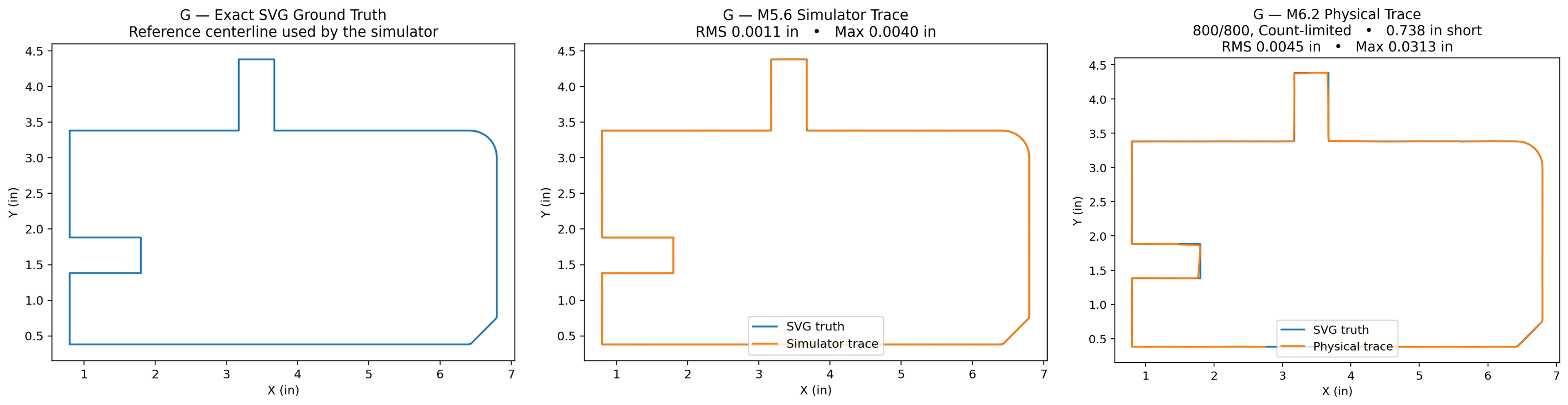
The current hardest test geometry is shape **G**, which contains straight sections, tabs, a 45-degree corner, a radius, and several sharp direction changes.
The latest physical run completed:
**800 / 800 planner steps with no HOLD**
It stopped only because Count was set to 800, about **0.738" short of completing the loop**.
Some comparison numbers:
M5.6 simulator full path: 21.5182"
M6.2 physical implied path: 21.5091"
Physical RMS error vs SVG: ~0.00446"
87.6% of path within: 0.005"
96.4% of path within: 0.010"
LinuxCNC itself followed the requested coordinated XY endpoints very closely, with an average endpoint miss of about **0.00045"**.
The remaining larger errors are concentrated around a few sharp vertices where the planner begins turning slightly early.
That is encouraging because the problem is becoming very specific rather than looking like general path instability.
## Where Help Would Be Useful
The biggest current planner question is how best to distinguish:
**continuous curvature / a radius**
from:
**a true sharp connected-path vertex**
For a radius, normal look-ahead following should continue.
For a true corner, I think the planner needs to recognize it, commit to the actual vertex, finish the incoming leg, then latch onto the outgoing leg.
Other areas where ideas or contributions would be welcome include:
* state estimation / Kalman-style approaches
* connected-path association and branch scoring
* confidence models
* machine vision
* diagnostics
* eventual continuous/velocity-based following
* LinuxCNC integration
## HISTORY.md
I added a `HISTORY.md` file to the repository specifically for anyone interested in the development side of the project.
It is a bit longer than the normal documentation, but I think it is worthwhile reading before digging into the planner because it explains **why the current architecture exists**.
It covers:
* the original local follower
* the Corner Assist experiments and why that approach was abandoned
* the move to persistent path state
* why record/replay was added
* why replay eventually led to the simulator
* what the simulator is intended to prove
* what the first physical tests exposed
* the A-G test geometry
* simulation vs real-machine results
* the major open design questions
There is also a condensed decision tree showing how one development problem led to the next.
I am hoping that gives potential contributors enough context to avoid having to reverse-engineer months of experiments from the commit history.
## Alpha Status
The safety philosophy has not changed.
FabScan only commands controlled X/Y tracing motion. It does not control Z, the torch, spindle, THC, Cycle Start, or any cutting process.
The real-machine follower is still deliberately conservative and uses bounded coordinated moves with independent safety checks and HOLD behavior when it cannot identify a continuation it trusts.
I am calling this **alpha** because I think the basic architecture has now been validated well enough in simulation and on the real machine that outside review would be genuinely useful.
If anyone has experience with LinuxCNC, machine vision, robotics, controls, state estimation, path planning, OpenCV, or simply sees a better way to approach part of the problem, I would appreciate comments, criticism, testing, ideas, or pull requests.
The goal is still pretty simple:
**A practical open-source LinuxCNC camera tracing tool that can capture real shop-floor geometry and produce useful DXF without trying to become a CAD system or machine controller.**
It is not finished yet, but I think it is getting close enough to be interesting.
FabScan has now reached:
**v0.6.0-alpha.1**
Project:
github.com/FabLabRacing/FabScan
I am definitely not calling it finished, but I think it has crossed an important enough milestone to call it an alpha and, more importantly, to start asking the open-source community for help improving it.
## What Changed
The biggest change since my original post is the tracing architecture.
The earlier versions were basically:
detect local line
→ calculate correction
→ move
→ repeat
That worked surprisingly well on simple geometry, but corners eventually exposed the limits of that approach. I spent quite a while developing various versions of "Corner Assist", but eventually concluded that I was trying to solve an architectural problem with more special-case logic.
The current v0.6 approach is closer to:
Camera / perception
↓
Persistent world-space path belief
↓
Connected-path prediction / look-ahead
↓
Planner
↓
Controller / safety
↓
LinuxCNC motion
The design principle that came out of that work is:
**Detectors observe. The model remembers. The planner decides. Motion executes.**
FabScan now tries to understand and follow the connected continuation of the profile rather than simply reacting to the latest local line fit.
## Record/Replay and Simulator
A fairly substantial development framework grew out of trying to debug the follower.
FabScan can now record complete physical tracing runs, including camera frames, calibration, planner state, motion, and diagnostics, then replay those runs deterministically.
Replay was extremely useful, but it has one unavoidable limitation: once a new planner chooses a different path than the old one, there are no recorded camera frames from that new location.
That led to an SVG ground-truth simulator using the exact A-G test geometry.
The simulator runs the real FabScan perception, estimator, and planner against a virtual camera that can move wherever the planner chooses. It also includes measured camera appearance, observation delay, and the actual configured motion limits from my LinuxCNC table.
That has become one of the most useful development tools in the project.
## Latest Real-Machine Result
The current hardest test geometry is shape **G**, which contains straight sections, tabs, a 45-degree corner, a radius, and several sharp direction changes.
The latest physical run completed:
**800 / 800 planner steps with no HOLD**
It stopped only because Count was set to 800, about **0.738" short of completing the loop**.
Some comparison numbers:
M5.6 simulator full path: 21.5182"
M6.2 physical implied path: 21.5091"
Physical RMS error vs SVG: ~0.00446"
87.6% of path within: 0.005"
96.4% of path within: 0.010"
LinuxCNC itself followed the requested coordinated XY endpoints very closely, with an average endpoint miss of about **0.00045"**.
The remaining larger errors are concentrated around a few sharp vertices where the planner begins turning slightly early.
That is encouraging because the problem is becoming very specific rather than looking like general path instability.
## Where Help Would Be Useful
The biggest current planner question is how best to distinguish:
**continuous curvature / a radius**
from:
**a true sharp connected-path vertex**
For a radius, normal look-ahead following should continue.
For a true corner, I think the planner needs to recognize it, commit to the actual vertex, finish the incoming leg, then latch onto the outgoing leg.
Other areas where ideas or contributions would be welcome include:
* state estimation / Kalman-style approaches
* connected-path association and branch scoring
* confidence models
* machine vision
* diagnostics
* eventual continuous/velocity-based following
* LinuxCNC integration
## HISTORY.md
I added a `HISTORY.md` file to the repository specifically for anyone interested in the development side of the project.
It is a bit longer than the normal documentation, but I think it is worthwhile reading before digging into the planner because it explains **why the current architecture exists**.
It covers:
* the original local follower
* the Corner Assist experiments and why that approach was abandoned
* the move to persistent path state
* why record/replay was added
* why replay eventually led to the simulator
* what the simulator is intended to prove
* what the first physical tests exposed
* the A-G test geometry
* simulation vs real-machine results
* the major open design questions
There is also a condensed decision tree showing how one development problem led to the next.
I am hoping that gives potential contributors enough context to avoid having to reverse-engineer months of experiments from the commit history.
## Alpha Status
The safety philosophy has not changed.
FabScan only commands controlled X/Y tracing motion. It does not control Z, the torch, spindle, THC, Cycle Start, or any cutting process.
The real-machine follower is still deliberately conservative and uses bounded coordinated moves with independent safety checks and HOLD behavior when it cannot identify a continuation it trusts.
I am calling this **alpha** because I think the basic architecture has now been validated well enough in simulation and on the real machine that outside review would be genuinely useful.
If anyone has experience with LinuxCNC, machine vision, robotics, controls, state estimation, path planning, OpenCV, or simply sees a better way to approach part of the problem, I would appreciate comments, criticism, testing, ideas, or pull requests.
The goal is still pretty simple:
**A practical open-source LinuxCNC camera tracing tool that can capture real shop-floor geometry and produce useful DXF without trying to become a CAD system or machine controller.**
It is not finished yet, but I think it is getting close enough to be interesting.
Last edit: 10 Sep 2026 12:50 by FabLabRacing.
Please Log in or Create an account to join the conversation.
- FabLabRacing
- Offline
- New Member
-
Less
More
- Posts: 18
- Thank you received: 13
10 Sep 2026 14:02 #349554
by FabLabRacing
Replied by FabLabRacing on topic FabScan - LinuxCNC Camera-Assisted Tracing / Scanning Project
I got to thinking, it might be helpful to see a comparison image, the image on the left is the actual image used for testing, the center is a trace using the simulator, and the right is an actual trace done on my machine.
The following user(s) said Thank You: tommylight
Please Log in or Create an account to join the conversation.
Moderators: snowgoer540
- Hardware & Machines
- CNC Machines
- Plasma & Laser
- FabScan - LinuxCNC Camera-Assisted Tracing / Scanning Project
Time to create page: 0.210 seconds