
finally on 2.9 from 2.8, xbox controller, user button questions.
- CNCFred
-
 Topic Author
- Offline
- Elite Member
-

Less
More
- Posts: 218
- Thank you received: 43
24 Oct 2026 10:31 #350437
by CNCFred
finally on 2.9 from 2.8, xbox controller, user button questions. was created by CNCFred
Dear all,
thank you for all the work that has been done in the last years to LINUXCNC.
I upgraded/changed years ago my machine hardware and then the project stopped, version 2.9 came and I missed the upgrade tool.
Now finally I found the time my hardware is ready setup & new qtplasmac is running and still can't get some of my old features.
Thank you for your patience and help.
xbox controller
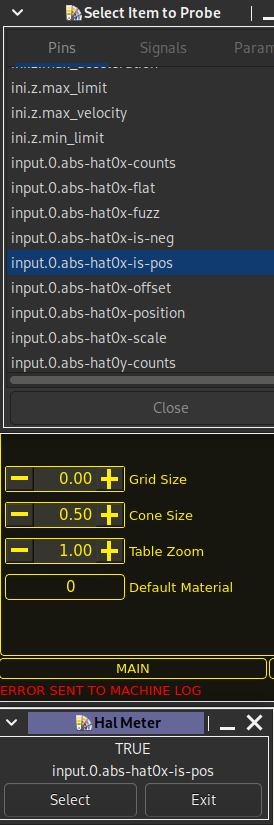
I was using a xbox controller which I setup now with pncconf, checked the pins and signals in halmeter, they are working.
Checked my hal, seems to be ok, but the thing will not jog , am I missing something (activate in Gui?)
User Button
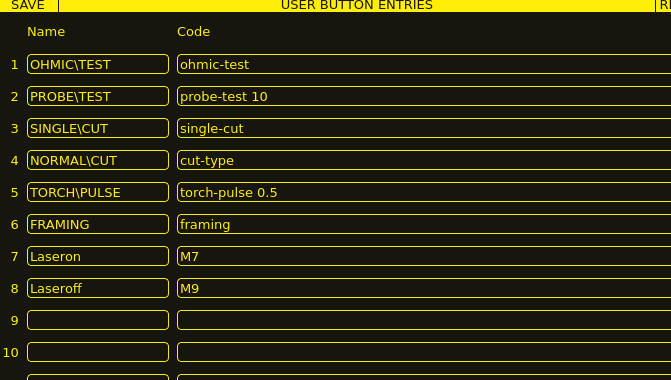
My crosslaser is connected to the mist I think 06 pin, and it works with offset setting etc.
I wanted to turn it on with a user button M7 on M9 off , did not work, I was not able to find in the documentation which commands are needed or possible in user button setup fields.
color change
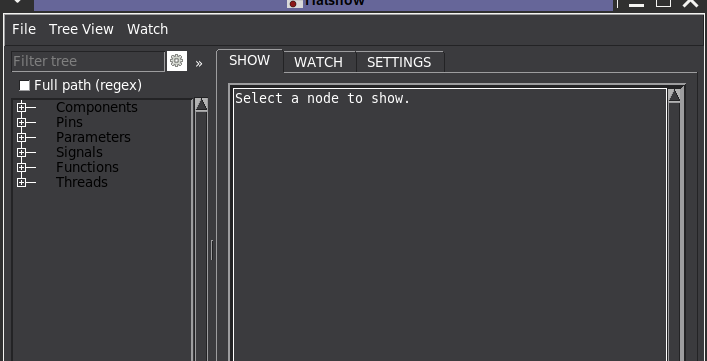
is it possible to change the color of the hallshow?
the tree is so dark , I changed the linux debian theme already but it did not help.
I hadn't played around with the system much due to setting up and configuring .
I was using before for the offset between torch and crosslaser a command as well on the xbox controller with a button
#connect mdi commands to button presses
net xbox-a halui.mdi-command-00
net xbox-b halui.mdi-command-01
net xbox-x halui.mdi-command-02
BUTTON_10_NAME = Laser\ON
BUTTON_10_CODE = M7
BUTTON_10_IMAGE =
BUTTON_11_NAME = Laser\OFF
BUTTON_11_CODE = M9
BUTTON_11_IMAGE =
BUTTON_12_NAME = Move\Reset
BUTTON_12_CODE = o<offsetmove> call
[HALUI]
MDI_COMMAND = M7
MDI_COMMAND = M9
MDI_COMMAND = o<offsetmove> call
so the offset was o<offsetmove> sub
G10 L20 P1 X0 Y0 Z0
G0 X31.787 Y19.331
G10 L20 P1 X0 Y0
o<offsetmove> endsubare these still possible to add to the xbox controller in the same way?? (custom.hal??)
Can the offset be set in the ini ?? manually or do I need to use the GUI so setup?
last question for this time when I run into the end stop, I need to got to settings, enable override limits , go to main power off on maschine then I can override the limits. is this the correct way?
I read that you only have to press the estop and it continues which does not work on my machine.
Big part will be the arc voltage which was on mine to high on torch start and phillc54 made an exception for me to get it running years ago, will test soon
I guess ingore arc ok may help.
thanks a lot,
Roman
thank you for all the work that has been done in the last years to LINUXCNC.
I upgraded/changed years ago my machine hardware and then the project stopped, version 2.9 came and I missed the upgrade tool.
Now finally I found the time my hardware is ready setup & new qtplasmac is running and still can't get some of my old features.
Thank you for your patience and help.
xbox controller
I was using a xbox controller which I setup now with pncconf, checked the pins and signals in halmeter, they are working.
Checked my hal, seems to be ok, but the thing will not jog , am I missing something (activate in Gui?)
User Button
My crosslaser is connected to the mist I think 06 pin, and it works with offset setting etc.
I wanted to turn it on with a user button M7 on M9 off , did not work, I was not able to find in the documentation which commands are needed or possible in user button setup fields.
color change
is it possible to change the color of the hallshow?
the tree is so dark , I changed the linux debian theme already but it did not help.
I hadn't played around with the system much due to setting up and configuring .
I was using before for the offset between torch and crosslaser a command as well on the xbox controller with a button
#connect mdi commands to button presses
net xbox-a halui.mdi-command-00
net xbox-b halui.mdi-command-01
net xbox-x halui.mdi-command-02
BUTTON_10_NAME = Laser\ON
BUTTON_10_CODE = M7
BUTTON_10_IMAGE =
BUTTON_11_NAME = Laser\OFF
BUTTON_11_CODE = M9
BUTTON_11_IMAGE =
BUTTON_12_NAME = Move\Reset
BUTTON_12_CODE = o<offsetmove> call
[HALUI]
MDI_COMMAND = M7
MDI_COMMAND = M9
MDI_COMMAND = o<offsetmove> call
so the offset was o<offsetmove> sub
G10 L20 P1 X0 Y0 Z0
G0 X31.787 Y19.331
G10 L20 P1 X0 Y0
o<offsetmove> endsubare these still possible to add to the xbox controller in the same way?? (custom.hal??)
Can the offset be set in the ini ?? manually or do I need to use the GUI so setup?
last question for this time
when I run into the end stop, I need to got to settings, enable override limits , go to main power off on maschine then I can override the limits. is this the correct way?I read that you only have to press the estop and it continues which does not work on my machine.
Big part will be the arc voltage which was on mine to high on torch start and phillc54 made an exception for me to get it running years ago, will test soon
I guess ingore arc ok may help.
thanks a lot,
Roman
Attachments:
Please Log in or Create an account to join the conversation.
Moderators: snowgoer540
Time to create page: 0.149 seconds