QtPyVCP Mill Touch V6

More
7 years 4 weeks ago #147041 by BigJohnT
Replied by BigJohnT on topic QtPyVCP Mill Touch V6
Yes you need to create a normal LinuxCNC configuration file and set the display and vcp options in the ini.

JT

Please Log in or Create an account to join the conversation.

More
6 years 10 months ago #152791 by hottabich
Replied by hottabich on topic QtPyVCP Mill Touch V6
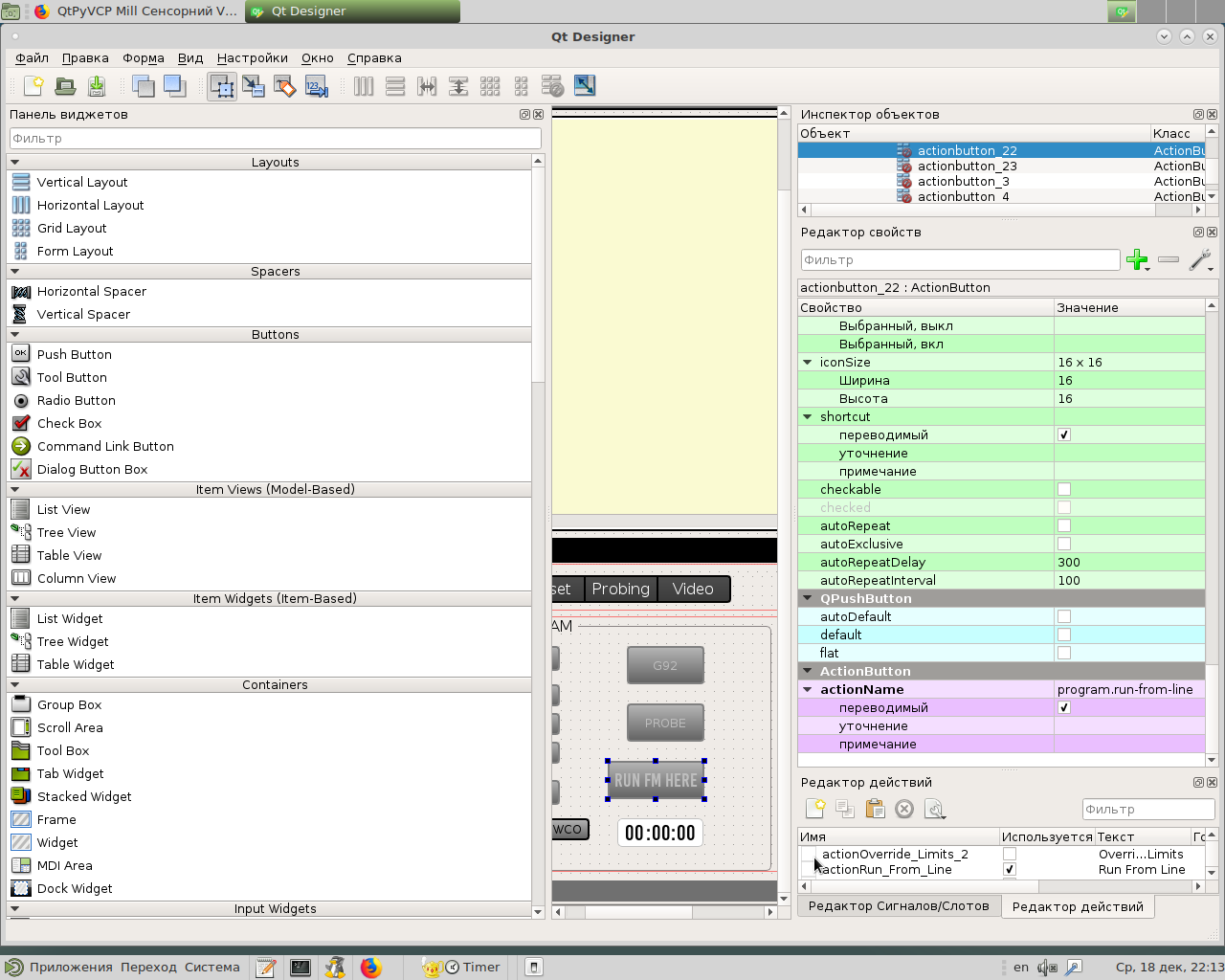
Hello! Tell me in detail how to add the run from line function to this interface? Thank you for your work.

Please Log in or Create an account to join the conversation.
More
6 years 10 months ago #152813 by hottabich
Replied by hottabich on topic QtPyVCP Mill Touch V6

hottabich wrote: Hello! Tell me in detail how to add the run from line function to this interface? Thank you for your work.

Sorry for the concern, the question is closed. I just added an action button and registered the run-from-line action. Everything works.

Please Log in or Create an account to join the conversation.

More
6 years 10 months ago - 6 years 10 months ago #152825 by Leon82
Replied by Leon82 on topic QtPyVCP Mill Touch V6

hottabich wrote:

hottabich wrote: Hello! Tell me in detail how to add the run from line function to this interface? Thank you for your work.

Sorry for the concern, the question is closed. I just added an action button and registered the run-from-line action. Everything works.


what was your action name to get it to work? did you use a line edit box?

it looks like its on the to do list currently
Last edit: 6 years 10 months ago by Leon82.

Please Log in or Create an account to join the conversation.

More
6 years 10 months ago - 6 years 10 months ago #152864 by BigJohnT
Replied by BigJohnT on topic QtPyVCP Mill Touch V6

Leon82 wrote: what was your action name to get it to work? did you use a line edit box?

it looks like its on the to do list currently


The action program.run has an option for the line number. The first example is a hard coded line number so not too useful, the second line gets the number from a qLineEdit. Very soon we will have a context menu in the gcode editor so you can right click on a line and select run from line. We actually have that working on a branch right now just waiting for it to be merged into master.
Code:
program.run:100 program.run:#<qLineEditName>

qtpyvcp.kcjengr.com/actions/program_actions.html

JT
Last edit: 6 years 10 months ago by BigJohnT.
The following user(s) said Thank You: Leon82, hottabich

Please Log in or Create an account to join the conversation.

More
6 years 10 months ago - 6 years 10 months ago #152875 by hottabich
Replied by hottabich on topic QtPyVCP Mill Touch V6
I did as in the screenshot. I copied the button from the probe_basic interface and pasted it into mine.
Last edit: 6 years 10 months ago by hottabich.
The following user(s) said Thank You: Leon82

Please Log in or Create an account to join the conversation.

Moderators: KCJ, Lcvette
Time to create page: 0.389 seconds
Powered by Kunena Forum
