
Install Probe Basic
- Doc_emmet
- Offline
- Junior Member
-

Less
More
- Posts: 25
- Thank you received: 2
16 May 2025 23:39 #328602
by Doc_emmet
Replied by Doc_emmet on topic Install Probe Basic
Hello, it looks like I've found the error.
It's related to my Mini PC
GMKtec K11 AMD Ryzen 9 Gaming Mini PC 8945HS(8C/16T, up to 5.2GHz),
32GB DDR5 4800MHz RAM 1TB PCIE Mini Computer, Oculink,
Dual NIC 2.5GbE LAN/HDMI/USB 4.0/WiFi 6/BT 5.2/DisplayPort/USB4*2
When I install the software on my old Intel i7 4 cores,
there are no error messages and the jitter is also better.
But it won't install on a new AMD Ryzen 9 PC.
Thank you very much for your help.
It's related to my Mini PC
GMKtec K11 AMD Ryzen 9 Gaming Mini PC 8945HS(8C/16T, up to 5.2GHz),
32GB DDR5 4800MHz RAM 1TB PCIE Mini Computer, Oculink,
Dual NIC 2.5GbE LAN/HDMI/USB 4.0/WiFi 6/BT 5.2/DisplayPort/USB4*2
When I install the software on my old Intel i7 4 cores,
there are no error messages and the jitter is also better.
But it won't install on a new AMD Ryzen 9 PC.
Thank you very much for your help.
Please Log in or Create an account to join the conversation.
- Benb
-

- Offline
- Elite Member
-

Less
More
- Posts: 184
- Thank you received: 61
16 May 2025 23:58 - 17 May 2025 00:15 #328603
by Benb
Replied by Benb on topic Install Probe Basic
Your amd pc is a new hardware and you might need debian 13 Trixie but again you did not have problems loading debian bookworm mistry! If you want to try Linuxcnc rip installation which might work with your amd pc since its compiled. I have atttached is a step by step procedure. It worked for me using i5 mini pc with debian 12 bookworm RT with xfce option for desktop environment.
edit: Once linuxcnc installed follow this procedure to instal qtpyvcp
edit: Once linuxcnc installed follow this procedure to instal qtpyvcp
Attachments:
Last edit: 17 May 2025 00:15 by Benb.
Please Log in or Create an account to join the conversation.
- Doc_emmet
- Offline
- Junior Member
-
Less
More
- Posts: 25
- Thank you received: 2
17 May 2025 16:20 #328639
by Doc_emmet
Replied by Doc_emmet on topic Install Probe Basic
I've installed everything.
Also:
sudo apt update
sudo apt --fix-broken install
sudo apt install python3-qtpyvcp
sudo apt install python3-probe-basic
cd ~
mkdir dev
cd dev
git clone github.com/Lcvette/qtpyvcp-bookworm-installer.git
cd qtpyvcp-bookworm-installer
./install_for_qtpyvcp.sh
./updater.sh
And yet I still get this error:
Traceback (most recent call last):
File "/usr/bin/probe_basic", line 8, in <module>
sys.exit(main())
^^^^^^
File "/usr/lib/python3/dist-packages/probe_basic/__init__.py", line 20, in main
qtpyvcp.run_vcp(opts, VCP_CONFIG_FILE)
File "/usr/lib/python3/dist-packages/qtpyvcp/__init__.py", line 26, in run_vcp
run(*args, **kwargs)
File "/usr/lib/python3/dist-packages/qtpyvcp/app/__init__.py", line 129, in run
launch_application(opts, config)
File "/usr/lib/python3/dist-packages/qtpyvcp/app/launcher.py", line 78, in launch_application
loadWindows(config)
File "/usr/lib/python3/dist-packages/qtpyvcp/app/launcher.py", line 230, in loadWindows
window = _initialize_object_from_dict(window_dict)
^^^^^^^^^^^^^^^^^^^^^^^^^^^^^^^^^^^^^^^^^
File "/usr/lib/python3/dist-packages/qtpyvcp/app/launcher.py", line 210, in _initialize_object_from_dict
return obj(*args, **kwargs)
^^^^^^^^^^^^^^^^^^^^
File "/usr/lib/python3/dist-packages/probe_basic/probe_basic.py", line 53, in __init__
self.load_user_tabs()
File "/usr/lib/python3/dist-packages/probe_basic/probe_basic.py", line 87, in load_user_tabs
user_tab_folders = os.listdir(user_tabs_path)
^^^^^^^^^^^^^^^^^^^^^^^^^^
FileNotFoundError: [Error 2] File or directory not found: 'user_tabs/ # REQUIRED Setting for Probe Basic'
Where is the 'user_tabs/' folder supposed to be? I've moved it to:
linux/configs and, just to be on the safe side, to linux/configs/My_Machine
Also:
sudo apt update
sudo apt --fix-broken install
sudo apt install python3-qtpyvcp
sudo apt install python3-probe-basic
cd ~
mkdir dev
cd dev
git clone github.com/Lcvette/qtpyvcp-bookworm-installer.git
cd qtpyvcp-bookworm-installer
./install_for_qtpyvcp.sh
./updater.sh
And yet I still get this error:
Traceback (most recent call last):
File "/usr/bin/probe_basic", line 8, in <module>
sys.exit(main())
^^^^^^
File "/usr/lib/python3/dist-packages/probe_basic/__init__.py", line 20, in main
qtpyvcp.run_vcp(opts, VCP_CONFIG_FILE)
File "/usr/lib/python3/dist-packages/qtpyvcp/__init__.py", line 26, in run_vcp
run(*args, **kwargs)
File "/usr/lib/python3/dist-packages/qtpyvcp/app/__init__.py", line 129, in run
launch_application(opts, config)
File "/usr/lib/python3/dist-packages/qtpyvcp/app/launcher.py", line 78, in launch_application
loadWindows(config)
File "/usr/lib/python3/dist-packages/qtpyvcp/app/launcher.py", line 230, in loadWindows
window = _initialize_object_from_dict(window_dict)
^^^^^^^^^^^^^^^^^^^^^^^^^^^^^^^^^^^^^^^^^
File "/usr/lib/python3/dist-packages/qtpyvcp/app/launcher.py", line 210, in _initialize_object_from_dict
return obj(*args, **kwargs)
^^^^^^^^^^^^^^^^^^^^
File "/usr/lib/python3/dist-packages/probe_basic/probe_basic.py", line 53, in __init__
self.load_user_tabs()
File "/usr/lib/python3/dist-packages/probe_basic/probe_basic.py", line 87, in load_user_tabs
user_tab_folders = os.listdir(user_tabs_path)
^^^^^^^^^^^^^^^^^^^^^^^^^^
FileNotFoundError: [Error 2] File or directory not found: 'user_tabs/ # REQUIRED Setting for Probe Basic'
Where is the 'user_tabs/' folder supposed to be? I've moved it to:
linux/configs and, just to be on the safe side, to linux/configs/My_Machine
Please Log in or Create an account to join the conversation.
- Aciera
-

- Offline
- Administrator
-

Less
More
- Posts: 4818
- Thank you received: 2176
17 May 2025 17:22 - 17 May 2025 17:22 #328642
by Aciera
Replied by Aciera on topic Install Probe Basic
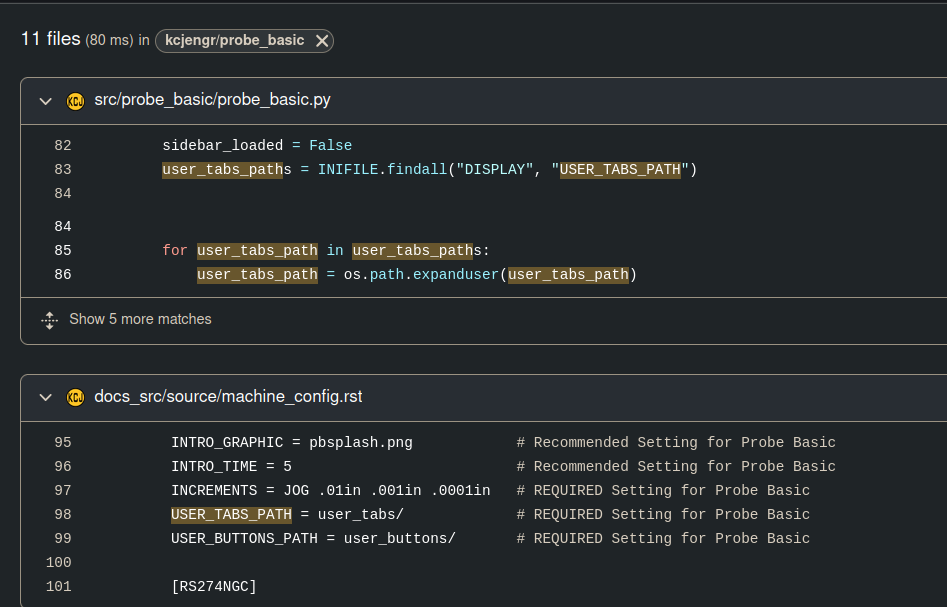
I don't really know but it seems to be set in the ini file:
Attachments:
Last edit: 17 May 2025 17:22 by Aciera.
Please Log in or Create an account to join the conversation.
- Benb
-
- Offline
- Elite Member
-
Less
More
- Posts: 184
- Thank you received: 61
17 May 2025 18:57 #328648
by Benb
Replied by Benb on topic Install Probe Basic
If you installed linuxcnc as RIP, before running qtpyvcp execute the following command at the prompt:
source ~/your rip path/linuxcnc/scripts/rip-environment
Note you don't need to run linuxcnc just source its environment this allows qtpyvcp to find what it needs to run
source ~/your rip path/linuxcnc/scripts/rip-environment
Note you don't need to run linuxcnc just source its environment this allows qtpyvcp to find what it needs to run
Please Log in or Create an account to join the conversation.
- Doc_emmet
- Offline
- Junior Member
-
Less
More
- Posts: 25
- Thank you received: 2
17 May 2025 20:33 #328656
by Doc_emmet
Replied by Doc_emmet on topic Install Probe Basic
Hello, I've finally found the error.
The problem is caused by importing entries from the "pb_required_ini_settings.ini" file.
This is the file:
[DISPLAY]
DISPLAY = probe_basic
OPEN_FILE = ~/linuxcnc/nc_files/pb_examples/blank.ngc
CONFIG_FILE = custom_config.yml
MAX_FEED_OVERRIDE = 2.000000 # Recommended Setting for Probe Basic
MAX_SPINDLE_OVERRIDE = 2.000000 # Recommended Setting for Probe Basic
MIN_SPINDLE_OVERRIDE = 0.500000 # Recommended Setting for Probe Basic
INCREMENTS = JOG .01in .001in .0001in # REQUIRED Setting for Probe Basic
USER_TABS_PATH = user_tabs/ # REQUIRED Setting for Probe Basic
USER_BUTTONS_PATH = user_buttons/ # REQUIRED Setting for Probe Basic
[RS274NGC]
RS274NGC_STARTUP_CODE = F10 S300 G20 G17 G40 G49 G54 G64 P0.001 G80 G90 G91.1 G92.1 G94 G97 G98
PARAMETER_FILE = probe_basic.var
OWORD_NARGS = 1
NO_DOWNCASE_OWORD = 1
SUBROUTINE_PATH = subroutines
[HAL]
POSTGUI_HALFILE = probe_basic_postgui.hal
TWOPASS = on
And here's the error: USER_TABS_PATH = user_tabs/ # REQUIRED Setting for Probe Basic
There must be no comments after USER_TABS_PATH = user_tabs/, no "#" because that causes the error!!!
The problem is caused by importing entries from the "pb_required_ini_settings.ini" file.
This is the file:
[DISPLAY]
DISPLAY = probe_basic
OPEN_FILE = ~/linuxcnc/nc_files/pb_examples/blank.ngc
CONFIG_FILE = custom_config.yml
MAX_FEED_OVERRIDE = 2.000000 # Recommended Setting for Probe Basic
MAX_SPINDLE_OVERRIDE = 2.000000 # Recommended Setting for Probe Basic
MIN_SPINDLE_OVERRIDE = 0.500000 # Recommended Setting for Probe Basic
INCREMENTS = JOG .01in .001in .0001in # REQUIRED Setting for Probe Basic
USER_TABS_PATH = user_tabs/ # REQUIRED Setting for Probe Basic
USER_BUTTONS_PATH = user_buttons/ # REQUIRED Setting for Probe Basic
[RS274NGC]
RS274NGC_STARTUP_CODE = F10 S300 G20 G17 G40 G49 G54 G64 P0.001 G80 G90 G91.1 G92.1 G94 G97 G98
PARAMETER_FILE = probe_basic.var
OWORD_NARGS = 1
NO_DOWNCASE_OWORD = 1
SUBROUTINE_PATH = subroutines
[HAL]
POSTGUI_HALFILE = probe_basic_postgui.hal
TWOPASS = on
And here's the error: USER_TABS_PATH = user_tabs/ # REQUIRED Setting for Probe Basic
There must be no comments after USER_TABS_PATH = user_tabs/, no "#" because that causes the error!!!
The following user(s) said Thank You: tommylight, Benb
Please Log in or Create an account to join the conversation.
- Lcvette
-

- Offline
- Moderator
-

Less
More
- Posts: 1681
- Thank you received: 783
21 May 2025 17:15 #328867
by Lcvette
Replied by Lcvette on topic Install Probe Basic
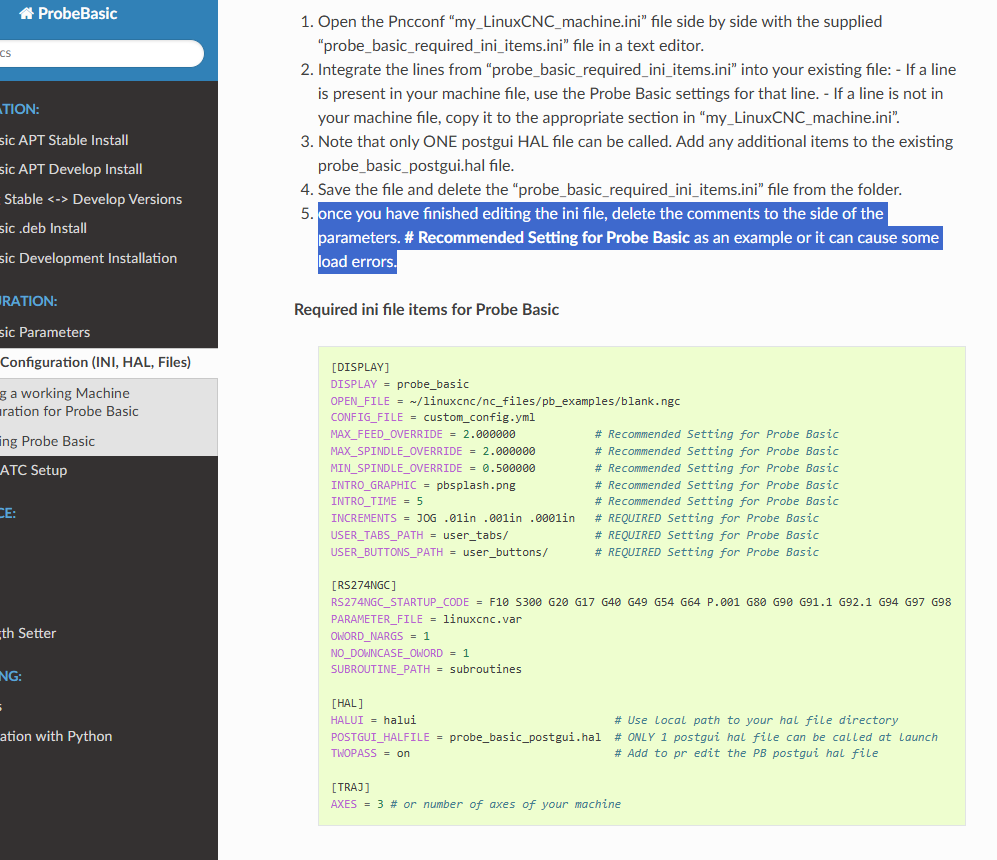
correct, this is explained int he instructions to remove the comments or you will receive errors.
Attachments:
Please Log in or Create an account to join the conversation.
- Lcvette
-
- Offline
- Moderator
-
Less
More
- Posts: 1681
- Thank you received: 783
22 May 2025 02:26 #328884
by Lcvette
Replied by Lcvette on topic Install Probe Basic
If you follow the instructions carefully it takes about an hour start to finish including creating and installing Linux on a clean system. I do it every few days for new builds and testing and it's not too bad considering what it is. The machine setup is the most challenging and that is really such a unique to user thing that is hard to make it simpler.
The following user(s) said Thank You: tommylight, Unlogic
Please Log in or Create an account to join the conversation.
- DavidR8
- Offline
- Junior Member
-
Less
More
- Posts: 21
- Thank you received: 2
24 May 2025 14:58 - 26 May 2025 02:10 #329049
by DavidR8
Replied by DavidR8 on topic Install Probe Basic
@lcvette I have LinucCNC 2.9 running on my computer now, installed using this:
linuxcnc.org/docs/stable/html/getting-st...th_preempt_rt_kernel
If I'm understanding the documentation correctly, the above link installs the Debian Bookworm distribution.
To install Probe Basic, do I start at the very beginning of this which seems to install Debian Bookworm.
kcjengr.github.io/probe_basic/stable_quick_start_apt.html
Or start here?
kcjengr.github.io/probe_basic/quick_start.html
linuxcnc.org/docs/stable/html/getting-st...th_preempt_rt_kernel
If I'm understanding the documentation correctly, the above link installs the Debian Bookworm distribution.
To install Probe Basic, do I start at the very beginning of this which seems to install Debian Bookworm.
kcjengr.github.io/probe_basic/stable_quick_start_apt.html
Or start here?
kcjengr.github.io/probe_basic/quick_start.html
Last edit: 26 May 2025 02:10 by DavidR8.
Please Log in or Create an account to join the conversation.
- Lcvette
-
- Offline
- Moderator
-
Less
More
- Posts: 1681
- Thank you received: 783
24 May 2025 16:38 #329060
by Lcvette
Replied by Lcvette on topic Install Probe Basic
for installing qtpyvcp and probe basic use the apt install, it stay updated and will update as updates are available when you run sudo apt update for the system.
the linuxcnc installation seems to be a moving target, i use my own instructions in the stable_quick_start_apt for installing debian and linuxcnc and it seems to be the most reliable. but you technically should be able to do it the way you outlined above. please report back if you get errors.
the linuxcnc installation seems to be a moving target, i use my own instructions in the stable_quick_start_apt for installing debian and linuxcnc and it seems to be the most reliable. but you technically should be able to do it the way you outlined above. please report back if you get errors.
The following user(s) said Thank You: DavidR8
Please Log in or Create an account to join the conversation.
Moderators: KCJ, Lcvette
Time to create page: 0.146 seconds