
QTvcp Cam View Dialog
- cmorley
- Offline
- Moderator
-

Less
More
- Posts: 7368
- Thank you received: 2181
14 Sep 2020 20:24 #182169
by cmorley
forgot - double click button 2 resets the cross
Replied by cmorley on topic QTvcp Cam View Dialog
I use a laptop to test - I hope a mouse will be the same.
button1 + scroll = zoom
button 2 + scroll = rotate cross
button 3 + scroll ( or button 1+2 + scroll) = circle diameter.
forgot - double click button 2 resets the cross
The following user(s) said Thank You: partec
Please Log in or Create an account to join the conversation.
- partec
- Offline
- Elite Member
-

Less
More
- Posts: 173
- Thank you received: 27
15 Sep 2020 06:46 - 17 Sep 2020 03:11 #182211
by partec
Replied by partec on topic QTvcp Cam View Dialog
Attachments:
Last edit: 17 Sep 2020 03:11 by partec.
Please Log in or Create an account to join the conversation.
- partec
- Offline
- Elite Member
-
Less
More
- Posts: 173
- Thank you received: 27
16 Sep 2020 13:56 - 17 Sep 2020 02:36 #182456
by partec
Replied by partec on topic QTvcp Cam View Dialog
Attachments:
Last edit: 17 Sep 2020 02:36 by partec.
Please Log in or Create an account to join the conversation.
- cmorley
- Offline
- Moderator
-
Less
More
- Posts: 7368
- Thank you received: 2181
16 Sep 2020 18:57 #182479
by cmorley
Replied by cmorley on topic QTvcp Cam View Dialog
What camview related data do you want to store ?
Please Log in or Create an account to join the conversation.
- cmorley
- Offline
- Moderator
-
Less
More
- Posts: 7368
- Thank you received: 2181
16 Sep 2020 22:15 #182496
by cmorley
Replied by cmorley on topic QTvcp Cam View Dialog
you might like this improvement:
forum.linuxcnc.org/qtvcp/40051-info-and-debug-messages?start=20
Adjustable rotation increments.
forum.linuxcnc.org/qtvcp/40051-info-and-debug-messages?start=20
Adjustable rotation increments.
The following user(s) said Thank You: partec
Please Log in or Create an account to join the conversation.
- partec
- Offline
- Elite Member
-
Less
More
- Posts: 173
- Thank you received: 27
16 Sep 2020 23:47 - 17 Sep 2020 15:45 #182501
by partec
Replied by partec on topic QTvcp Cam View Dialog
there is a revised pdf "cam-align - how to embed" further up
Last edit: 17 Sep 2020 15:45 by partec.
Please Log in or Create an account to join the conversation.
- partec
- Offline
- Elite Member
-
Less
More
- Posts: 173
- Thank you received: 27
17 Sep 2020 15:45 - 19 Sep 2020 07:15 #182575
by partec
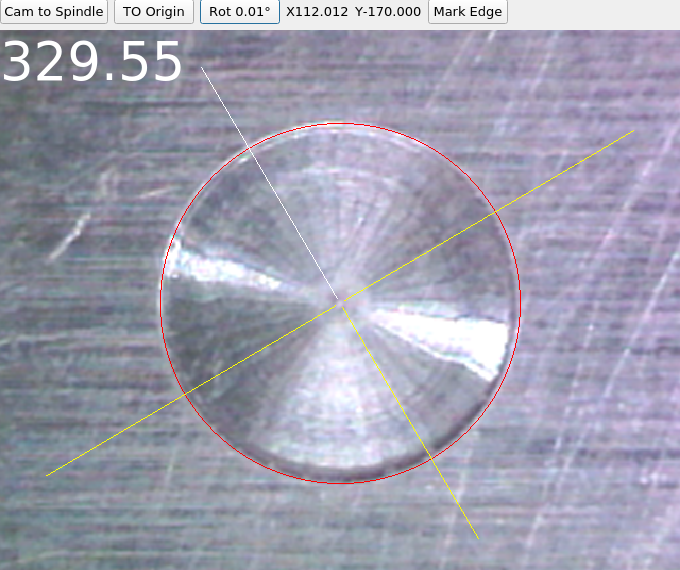
Replied by partec on topic QTvcp Cam View Dialog
Attachments:
Last edit: 19 Sep 2020 07:15 by partec.
Please Log in or Create an account to join the conversation.
- partec
- Offline
- Elite Member
-
Less
More
- Posts: 173
- Thank you received: 27
19 Sep 2020 05:03 - 19 Sep 2020 05:04 #182727
by partec
Replied by partec on topic QTvcp Cam View Dialog
phillc54 wrote
"Rot" toggles the rotation move from 1.00o to 0.10o to 0.01o
my question is:
do i have to customize things with cam_align embedding myself in designer and editing handler file
or will some properties become integrated to the standards of cam_align ?
"Rot" toggles the rotation move from 1.00o to 0.10o to 0.01o
my question is:
do i have to customize things with cam_align embedding myself in designer and editing handler file
or will some properties become integrated to the standards of cam_align ?
Last edit: 19 Sep 2020 05:04 by partec.
Please Log in or Create an account to join the conversation.
- cmorley
- Offline
- Moderator
-
Less
More
- Posts: 7368
- Thank you received: 2181
19 Sep 2020 23:06 #182811
by cmorley
Replied by cmorley on topic QTvcp Cam View Dialog
I will incorporate in next uodate, when I get a chance,
Please Log in or Create an account to join the conversation.
- hottabich
- Offline
- Platinum Member
-

Less
More
- Posts: 574
- Thank you received: 96
16 Oct 2020 04:44 #186271
by hottabich
Replied by hottabich on topic QTvcp Cam View Dialog
Hello! Please share your files for camera. Thanks!
Please Log in or Create an account to join the conversation.
Moderators: cmorley
Time to create page: 3.037 seconds