[QtDragon] Simple vismach window

More
4 years 7 months ago #236970 by cmorley
I don't see anywhere that I gave code to load vismach into qrdragon.
I did show how to load vismach using qtvcp into a qtvcp vcp panel.

qtdragon was not coded with thoughts to add user tabs easily.
It can be done but requires you to use custom qtdragon.ui and qtdragon_handler.py files.

Before I delve into that, I would like to confirm that the qtvcp panel works.

The scara example is included already as a qtvcp panel.

in a terminal:
qtvcp vismach_scara

Please Log in or Create an account to join the conversation.

More
4 years 7 months ago #236972 by cmorley
guessing that you already figured out how to modify qtdragon's handler.
The problem is that you are trying to place the vismach widget into a widget in qtdragon that does not exist. try this:

self.w.horizontalLayout_3.addWidget(machine)

Please Log in or Create an account to join the conversation.
More
4 years 7 months ago #236973 by RomeReactor
Thanks for the reply.
[ćode]
qtvcp vismach_scara
[/code]

does work in terminal.

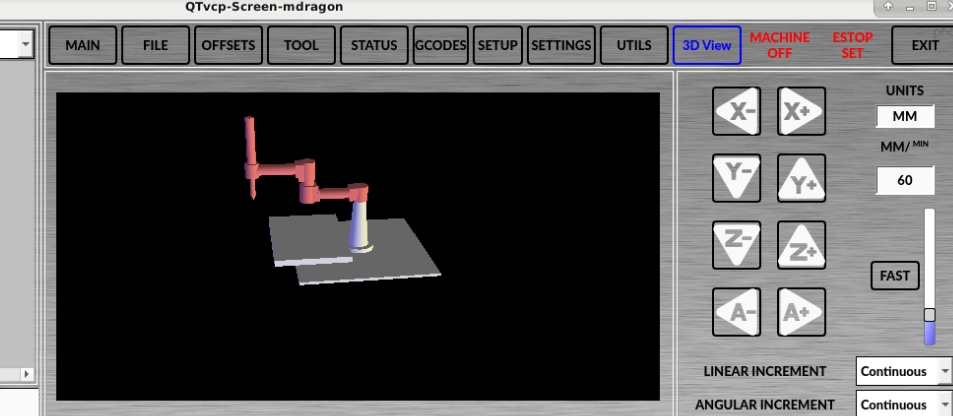
On the post I linked, annhandt09 seemed to be able to embed vsmach in qtdragon (see attached picture). 

Please Log in or Create an account to join the conversation.

More
4 years 7 months ago #236974 by RomeReactor
Thanks for your last reply. Embedding worked with:
Code:
import press_brake as MILL
and:
Code:
machine = MILL.Window() self.w.horizontalLayout_3.addWidget(machine)

Please Log in or Create an account to join the conversation.

More
4 years 7 months ago #236975 by cmorley
Excellent!
If you want it displayed as a tab of it's own in the main tab of qtdragon there would be more code changes needed.

I'm working on code to make this all easier but it's fairly involved.

If you come up with a nice model, please consider adding it to linuxcnc.

Chris
The following user(s) said Thank You: RomeReactor

Please Log in or Create an account to join the conversation.

More
4 years 7 months ago - 4 years 7 months ago #237272 by RomeReactor

If you want it displayed as a tab of it's own in the main tab of qtdragon there would be more code changes needed.

By adding:
Code:
import press_brake as MILL
and:
Code:
machine = MILL.Window() self.w.horizontalLayout_3.addWidget(machine)
to the handler file, and deleting GCodeGraphics from QtDragon we effectively replaced the plotter with our model:

If you come up with a nice model, please consider adding it to linuxcnc

Sure. Attached is the file for the model we're using. The original parts came from here: grabcad.com/library/press-brake-4
Last edit: 4 years 7 months ago by RomeReactor.

Please Log in or Create an account to join the conversation.

Moderators: cmorley
Time to create page: 0.292 seconds
Powered by Kunena Forum
