
LatheEasyStep – experimental QtVCP macro for step-by-step lathe programming
- aDm1N
-
 Topic Author
- Offline
- Senior Member
-

Less
More
- Posts: 53
- Thank you received: 24
15 Dec 2025 12:19 - 01 Mar 2026 18:44 #340123
by aDm1N
LatheEasyStep – experimental QtVCP macro for step-by-step lathe programming was created by aDm1N
Repository:
github.com/peter-pan08/LatheEasyStep LatheEasyStep is an experimental QtVCP panel for LinuxCNC that enables step-by-step conversational lathe programming directly at the machine — without external CAM software.The goal is fast, safe, and practical programming for typical workshop jobs.PurposeLatheEasyStep is designed for:
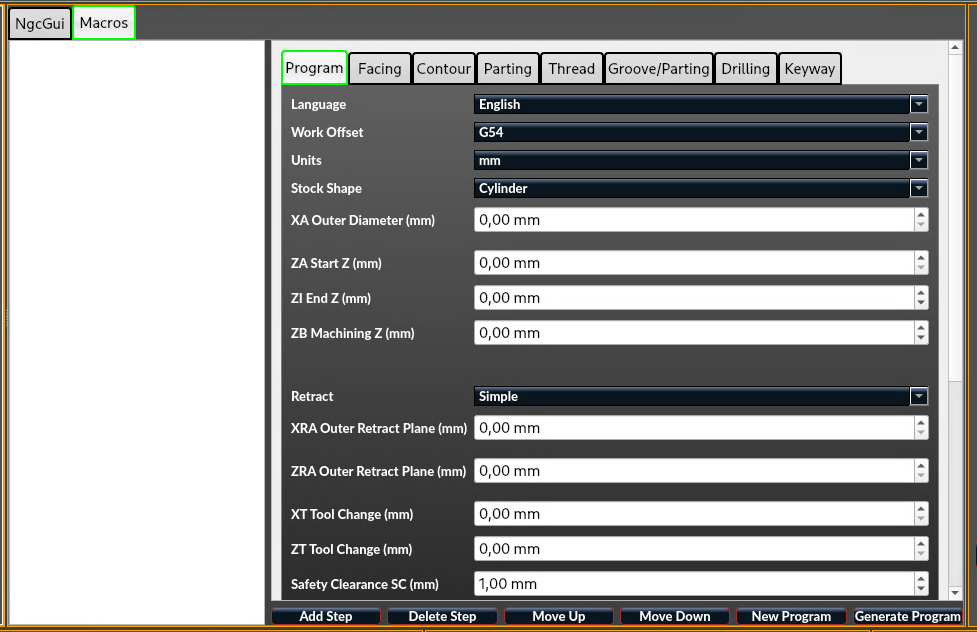
github.com/peter-pan08/LatheEasyStep LatheEasyStep is an experimental QtVCP panel for LinuxCNC that enables step-by-step conversational lathe programming directly at the machine — without external CAM software.The goal is fast, safe, and practical programming for typical workshop jobs.PurposeLatheEasyStep is designed for:
- Programming simple to medium turning operations directly at the machine
- Repetitive standard jobs (facing, contouring, grooving, drilling, threading, roughing)
- A workflow-focused approach:
Enter parameters → Verify preview → Generate G-code
- Program header with stock/workpiece parameters
(diameters, lengths, units, safety values) - Step-based program building with sortable operation list
- Save/load for single steps and full programs
- Bilingual UI (DE/EN)
- Facing
- Contour
- Groove / parting-style operations
- Drilling
- Threading
- Roughing (material removal)
- Keyway (macro-based)
- Live X/Z preview including reference geometry
- Dedicated chuck safety zone visualization (color-coded with legend)
- Context-aware retract/free-travel behavior per operation
- Material-aware retract decisions
- Extended chuck / no-go safety parameters:
- Chuck size
- Workpiece type
- Clamping mode
- Chuck profile
- Machine/workshop profile presets for faster setup
- Experimental
- Actively developed
- Designed for real machine workflows
- Iterative improvements based on practical use
- Not a full CAM replacement
- Complex freeform geometry is intentionally limited
- Machine-specific adaptation may be required
- Fast conversational programming at the machine
- Clear and understandable geometry visualization
- Safer default behavior for common turning tasks
- Continuous refinement driven by community feedback
- Brief machine/configuration info
- Reproducible steps
- Expected vs. actual behavior
- Optional screenshots, preview images, or G-code snippets
Attachments:
Last edit: 01 Mar 2026 18:44 by aDm1N. Reason: add pic
The following user(s) said Thank You: tommylight, besriworld, COFHAL
Please Log in or Create an account to join the conversation.
- cmorley
- Offline
- Moderator
-

Less
More
- Posts: 7368
- Thank you received: 2181
15 Dec 2025 13:53 #340127
by cmorley
Replied by cmorley on topic LatheEasyStep – experimental QtVCP macro for step-by-step lathe programming
This should be moved to the Qtvcp section.
Looks promising! Keep is updated! If you get stumped with the programming i can try to help.
Looks promising! Keep is updated! If you get stumped with the programming i can try to help.
Please Log in or Create an account to join the conversation.
- aDm1N
-
Topic Author
- Offline
- Senior Member
-
Less
More
- Posts: 53
- Thank you received: 24
15 Dec 2025 14:15 #340128
by aDm1N
Replied by aDm1N on topic LatheEasyStep – experimental QtVCP macro for step-by-step lathe programming
I've never moved anything in a forum before, how do I do that?
Please Log in or Create an account to join the conversation.
- tommylight
-

- Away
- Moderator
-
Less
More
- Posts: 21959
- Thank you received: 7478
15 Dec 2025 14:22 #340129
by tommylight
Thank you.
Replied by tommylight on topic LatheEasyStep – experimental QtVCP macro for step-by-step lathe programming
Done.This should be moved to the Qtvcp section..
Thank you.
Please Log in or Create an account to join the conversation.
- Surmetall
-

- Away
- Senior Member
-
Less
More
- Posts: 54
- Thank you received: 37
19 Dec 2025 13:38 #340302
by Surmetall
Replied by Surmetall on topic LatheEasyStep – experimental QtVCP macro for step-by-step lathe programming
Hi,
this looks really cool, thanks for sharing! I’ll definitely be testing it once my lathe is ready.
I really like the idea of solid onboard solutions. If this works well, you could do around 90% of lathe parts without external CAM, which would be a real improvement.
It reminds me a bit of Native CAM. Do you know it?
If so, I’d be interested in what made you decide to develop a completely new macro. From my point of view, Native CAM on the turning side is mainly missing proper G71 support and a polyline tool (which already exists in Native CAM Mill).
This is not meant as criticism, I generally find new developments very exciting. I’m not a programmer myself and can’t really judge the effort involved, which is why I’m asking.
Either way, very promising project. Looking forward to seeing how it develops
greetings
Tom
this looks really cool, thanks for sharing! I’ll definitely be testing it once my lathe is ready.
I really like the idea of solid onboard solutions. If this works well, you could do around 90% of lathe parts without external CAM, which would be a real improvement.
It reminds me a bit of Native CAM. Do you know it?
If so, I’d be interested in what made you decide to develop a completely new macro. From my point of view, Native CAM on the turning side is mainly missing proper G71 support and a polyline tool (which already exists in Native CAM Mill).
This is not meant as criticism, I generally find new developments very exciting. I’m not a programmer myself and can’t really judge the effort involved, which is why I’m asking.
Either way, very promising project. Looking forward to seeing how it develops
greetings
Tom
Please Log in or Create an account to join the conversation.
- cmorley
- Offline
- Moderator
-
Less
More
- Posts: 7368
- Thank you received: 2181
20 Dec 2025 02:56 #340328
by cmorley
Replied by cmorley on topic LatheEasyStep – experimental QtVCP macro for step-by-step lathe programming
I note you use the qtpy abstraction layer. This is not pulled in for our linuxcnc package, so could trip some people up. I would suggest adding a descriptive warning to the terminal if the module is not found.
Please Log in or Create an account to join the conversation.
- aDm1N
-
Topic Author
- Offline
- Senior Member
-
Less
More
- Posts: 53
- Thank you received: 24
20 Dec 2025 09:50 #340339
by aDm1N
Replied by aDm1N on topic LatheEasyStep – experimental QtVCP macro for step-by-step lathe programming
I'm still working on it. At the moment it is only partially useable. At the moment I am working on ensuring that the contour is implemented correctly. Especially with regard to circular arches. Thread already looks good. The goal is that 100% can be done on the machine. After I have implemented this with the contour, the goal is that a correction is included, depending on which tool is chosen. Means that the cutting geometry is included in the movement depending on which tool is chosen. If possible, the information should come from the Tool.db. In addition, a warning if the chipping with the tool is not possible. I can't say how quickly I can do it, but I'll try until I have a working solution. Anyone who has ever worked on Siemens controllers should certainly get along with the panel, because my experience with the machines certainly shows similarities.
The following user(s) said Thank You: Surmetall
Please Log in or Create an account to join the conversation.
- Surmetall
-
- Away
- Senior Member
-
Less
More
- Posts: 54
- Thank you received: 37
20 Dec 2025 12:59 #340344
by Surmetall
Replied by Surmetall on topic LatheEasyStep – experimental QtVCP macro for step-by-step lathe programming
Awesome, I’m really looking forward to your tool, and I think if this works out it’ll be an absolute game changer for lathes!I find all of this really interesting feel free to keep the camera running while testing and upload it somewhere. I’m pretty sure I’m not the only one watching this with excitement.A very cool project to make use of the time between the holidays.
Please Log in or Create an account to join the conversation.
- aDm1N
-
Topic Author
- Offline
- Senior Member
-
Less
More
- Posts: 53
- Thank you received: 24
22 Dec 2025 21:58 - 22 Dec 2025 22:01 #340401
by aDm1N
Replied by aDm1N on topic LatheEasyStep – experimental QtVCP macro for step-by-step lathe programming
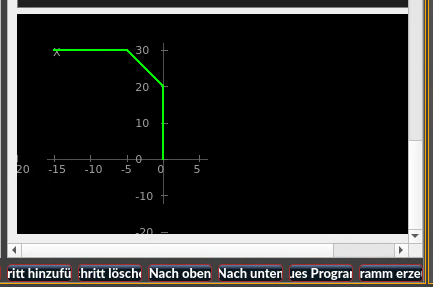
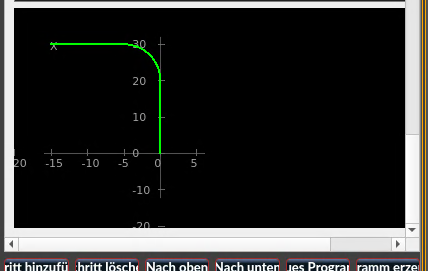
So, it seems I've managed to get the contour pretty well right. It's coming along slowly. It took me quite a while to get it to this point.
{
  "op_type": "contour",
  "params": {
    "start_x": 0.0,
    "start_z": 0.0,
    "coord_mode": 0.0,
    "segments": [
      {
        "mode": "xz",
        "x": 15.0,
        "z": 0.0,
        "x_empty": false,
        "z_empty": false,
        "edge": "radius",
        "edge_size": 5.0,
        "arc_side": "auto",
        "arc_side_raw": ""
      },
      {
        "mode": "xz",
        "x": 15.0,
        "z": -15.0,
        "x_empty": false,
        "z_empty": false,
        "edge": "none",
        "edge_size": 0.0,
        "arc_side": "auto",
        "arc_side_raw": ""
      }
    ],
    "name": "radius"
  },
  "primitives": [
    {
      "type": "line",
      "p1": [
        0.0,
        0.0
      ],
      "p2": [
        10.0,
        0.0
      ]
    },
    {
      "type": "arc",
      "p1": [
        10.0,
        0.0
      ],
      "p2": [
        15.0,
        -4.999999999999999
      ],
      "c": [
        10.0,
        -5.0
      ],
      "ccw": false
    },
    {
      "type": "line",
      "p1": [
        15.0,
        -4.999999999999999
      ],
      "p2": [
        15.0,
        -15.0
      ]
    }
  ]
}
{
"op_type": "contour",
"params": {
"start_x": 0.0,
"start_z": 0.0,
"coord_mode": 0.0,
"segments": [
{
"mode": "xz",
"x": 15.0,
"z": 0.0,
"x_empty": false,
"z_empty": false,
"edge": "chamfer",
"edge_size": 5.0,
"arc_side": "auto",
"arc_side_raw": ""
},
{
"mode": "xz",
"x": 15.0,
"z": -15.0,
"x_empty": false,
"z_empty": false,
"edge": "none",
"edge_size": 0.0,
"arc_side": "auto",
"arc_side_raw": ""
}
],
"name": "Fase"
},
"primitives": [
{
"type": "line",
"p1": [
0.0,
0.0
],
"p2": [
10.0,
0.0
]
},
{
"type": "line",
"p1": [
10.0,
0.0
],
"p2": [
15.0,
-5.0
]
},
{
"type": "line",
"p1": [
15.0,
-5.0
],
"p2": [
15.0,
-15.0
]
}
]
}
Last edit: 22 Dec 2025 22:01 by aDm1N.
The following user(s) said Thank You: Surmetall
Please Log in or Create an account to join the conversation.
- RotarySMP
-

- Offline
- Platinum Member
-

Less
More
- Posts: 1635
- Thank you received: 595
26 Dec 2025 17:54 - 26 Dec 2025 18:49 #340532
by RotarySMP
Replied by RotarySMP on topic LatheEasyStep – experimental QtVCP macro for step-by-step lathe programming
Do you already know Andy's lathe macros?
forum.linuxcnc.org/41-guis/26550-lathe-macros
The graphical interface is fantastic.
Rather than reinventing the wheel, have you considered what it is which you are adding with you macros? Maybe you can coordinate with Andy to make them even more awesome.
Cheers,
Mark
forum.linuxcnc.org/41-guis/26550-lathe-macros
The graphical interface is fantastic.
Rather than reinventing the wheel, have you considered what it is which you are adding with you macros? Maybe you can coordinate with Andy to make them even more awesome.
Cheers,
Mark
Last edit: 26 Dec 2025 18:49 by RotarySMP.
The following user(s) said Thank You: tommylight
Please Log in or Create an account to join the conversation.
Moderators: cmorley
Time to create page: 0.376 seconds