
Auto Tool Probe - not callable
- Thllll
- Offline
- Junior Member
-

Less
More
- Posts: 22
- Thank you received: 2
02 Jan 2026 03:37 #340866
by Thllll
Auto Tool Probe - not callable was created by Thllll
LinuxCNC 2.94
Qt_dragon_hd
Unable to change tools in QT Dragon using the command T2 M6 or any tool number. Debug shows the following
Ran the auto tool sim and that works, compared the .ini and .hal files to find no differences. Thought it wasnt getting to the qt_auto_probe_tool.ngc found in "/usr/share/linuxcnc/ncfiles/remap-subroutines:\" so I added it to the subroutines which didnt work either
Qt_dragon_hd
Unable to change tools in QT Dragon using the command T2 M6 or any tool number. Debug shows the following
is_callable(oword.qt_auto_probe_tool) = FALSERan the auto tool sim and that works, compared the .ini and .hal files to find no differences. Thought it wasnt getting to the qt_auto_probe_tool.ngc found in "/usr/share/linuxcnc/ncfiles/remap-subroutines:\" so I added it to the subroutines which didnt work either
SUBROUTINE_PATH =\
~/linuxcnc/nc_files/examples/ngcgui_lib:\
~/linuxcnc/nc_files/examples/ngcgui_lib/utilitysubs:\
~/linuxcnc/nc_files/examples/remap-subroutines:\
/usr/share/linuxcnc/ncfiles/remap-subroutines:\
~/linuxcnc/nc_files/examples/remap_libPlease Log in or Create an account to join the conversation.
- cmorley
- Offline
- Moderator
-

Less
More
- Posts: 7368
- Thank you received: 2181
02 Jan 2026 07:24 #340867
by cmorley
Replied by cmorley on topic Auto Tool Probe - not callable
is there this folder?
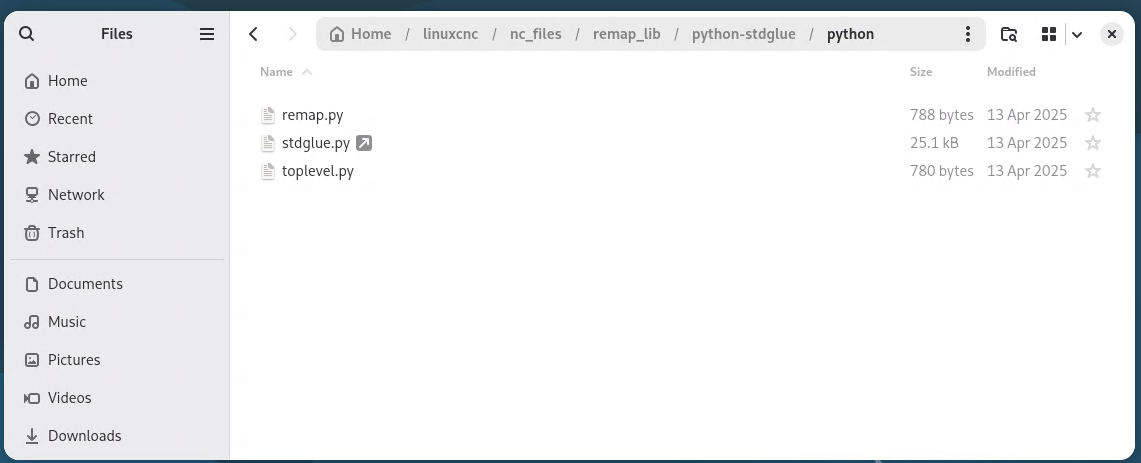
~/linuxcnc/nc_files/examples/remap_lib/python-stdglue/python
does that folder have these files?
remap.py
toplevel.py
is this link valid in that folder?
stdglue.py
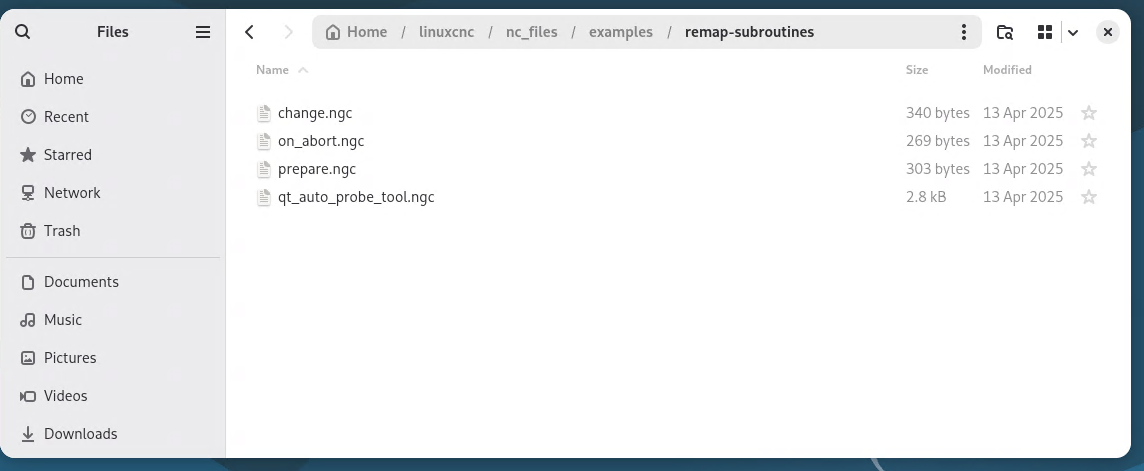
is there this path?
~/linuxcnc/nc_files/examples/remap-subroutines/qt_auto_probe_tool.ngc
~/linuxcnc/nc_files/examples/remap_lib/python-stdglue/python
does that folder have these files?
remap.py
toplevel.py
is this link valid in that folder?
stdglue.py
is there this path?
~/linuxcnc/nc_files/examples/remap-subroutines/qt_auto_probe_tool.ngc
Please Log in or Create an account to join the conversation.
- Thllll
- Offline
- Junior Member
-
Less
More
- Posts: 22
- Thank you received: 2
02 Jan 2026 14:18 #340883
by Thllll
Replied by Thllll on topic Auto Tool Probe - not callable
All correct, see attached screenshots
Please Log in or Create an account to join the conversation.
- cmorley
- Offline
- Moderator
-
Less
More
- Posts: 7368
- Thank you received: 2181
02 Jan 2026 18:29 - 02 Jan 2026 18:30 #340895
by cmorley
Replied by cmorley on topic Auto Tool Probe - not callable
ok.
I see there two entries for:
PROGRAM_PREFIX = /home/cnc/linuxcnc/nc_files
should only be one entry and they are both wrong. should be:
PROGRAM_PREFIX = ~/home/cnc/linuxcnc/nc_files
I don't think this is the problem bit please fix it anyways,
Then can you run linuxcnc from a terminal, do a MDI tool change and post the terminal output.
I see there two entries for:
PROGRAM_PREFIX = /home/cnc/linuxcnc/nc_files
should only be one entry and they are both wrong. should be:
PROGRAM_PREFIX = ~/home/cnc/linuxcnc/nc_files
I don't think this is the problem bit please fix it anyways,
Then can you run linuxcnc from a terminal, do a MDI tool change and post the terminal output.
Last edit: 02 Jan 2026 18:30 by cmorley.
Please Log in or Create an account to join the conversation.
- cmorley
- Offline
- Moderator
-
Less
More
- Posts: 7368
- Thank you received: 2181
02 Jan 2026 18:32 #340896
by cmorley
Replied by cmorley on topic Auto Tool Probe - not callable
Well i guess I should ask is the program prefix (~/home/cnc/linuxcnc/nc_files) a valid path too.
Please Log in or Create an account to join the conversation.
- Thllll
- Offline
- Junior Member
-
Less
More
- Posts: 22
- Thank you received: 2
03 Jan 2026 20:36 #340933
by Thllll
Replied by Thllll on topic Auto Tool Probe - not callable
I corrected the program prefix, to be one and have the "~" at the start. Ran again I am getting the following from the terminal. The path is valid as well. The following is from the terminal
I compared to the sim .ini file and found that the "~" was not part of the program_prefix. Running it again without the "~", cleared the error
Still does not work but this was noticable
Running the sim actually in debug shows the same thing..
home/cnc/linuxcnc/configs/New_TAIG_dragon/New_TAIG_dragon.ini:92: executing 'import sys
sys.path.append("/home/cnc/linuxcnc/nc_files/examples/remap_lib/python-stdglue/python")'
PythonPlugin: Python  '3.13.5 (main, Jun 25 2025, 18:55:22) [GCC 14.2.0]'
is_callable(__init__) = FALSE
[QTvcp.QTVCP.QT_ISTAT][WARNING]  Path not valid in INI File [DISPLAY] PROGRAM_PREFIX section (qt_istat.py:96)
[QTvcp.QTVCP.QT_ISTAT][WARNING]  INI Parsing Error, No MAX_LINEAR_VELOCITY Entry in DISPLAY, Using: 5 (qt_istat.py:532)
[QTvcp.QTVCP.QT_ISTAT][WARNING]  INI Parsing Error, No MAX_SPINDLE_POWER Entry in DISPLAY, Using: 1500 (qt_istat.py:532)
is_callable(oword.on_abort) = FALSE
task: main loop took 0.119162 seconds
is_callable(oword.qt_auto_probe_tool) = FALSE
I compared to the sim .ini file and found that the "~" was not part of the program_prefix. Running it again without the "~", cleared the error
[QTvcp.QTVCP.QT_ISTAT][WARNING] Path not valid in INI File [DISPLAY] PROGRAM_PREFIX section (qt_istat.py:96)Still does not work but this was noticable
PythonPlugin: Python  '3.13.5 (main, Jun 25 2025, 18:55:22) [GCC 14.2.0]'
is_callable(__init__) = FALSE
Running the sim actually in debug shows the same thing..
/home/cnc/linuxcnc/configs/sim.qtdragon.qtdragon_tool_probe/qtdragon_auto_tool_probe.ini:120: executing 'import sys
sys.path.append("/home/cnc/linuxcnc/nc_files/examples/remap_lib/python-stdglue/python")'
PythonPlugin: Python  '3.13.5 (main, Jun 25 2025, 18:55:22) [GCC 14.2.0]'
/home/cnc/linuxcnc/configs/sim.qtdragon.qtdragon_tool_probe/qtdragon_auto_tool_probe.ini:120: executing 'import sys
sys.path.append("/home/cnc/linuxcnc/nc_files/examples/remap_lib/python-stdglue/python")'
PythonPlugin: Python  '3.13.5 (main, Jun 25 2025, 18:55:22) [GCC 14.2.0]'
is_callable(__init__) = FALSE
Unexpected realtime delay on task 0 with period 100000
This Message will only display once per session.
Run the Latency Test and resolve before continuing.

Unexpected realtime delay on task 0 with period 100000
This Message will only display once per session.
Run the Latency Test and resolve before continuing.
is_callable(oword.on_abort) = FALSE
is_callable(oword.qt_auto_probe_tool) = FALSE
tool_result(id=2, xoffset=0.0, yoffset=0.0, zoffset=0.1, aoffset=0.0, boffset=0.0, coffset=0.0, uoffset=0.0, voffset=0.0, woffset=0.0, diameter=0.0625, frontangle=0.0, backangle=0.0, orientation=0)
Please Log in or Create an account to join the conversation.
- Thllll
- Offline
- Junior Member
-
Less
More
- Posts: 22
- Thank you received: 2
03 Jan 2026 20:46 #340934
by Thllll
Replied by Thllll on topic Auto Tool Probe - not callable
Made a solid jump in progress. The issue was the qt_dragon would appear to "freeze" thus looking at the terminal led me down this rabbit hole. The problem was the Message Dialog was not popping up (or maybe it was because you need to acknowelge it to do anything). Either way I am starting to think the "not callable" is normal?
After checking my .hal file and my postgui.hal file the problem was this wasy in my postgui.hal file, I was missing this in my postgui.hal file and I comment out all the unlinkp lines ande uncommented the toolchange signals.
Attached is what I have as the lastest and I was able to somewhat make progress, it goes to tool senosr and the message dialog appears now! However after I accept I get the next error
After checking my .hal file and my postgui.hal file the problem was this wasy in my postgui.hal file, I was missing this in my postgui.hal file and I comment out all the unlinkp lines ande uncommented the toolchange signals.
net tool-prepare-loopback iocontrol.0.tool-prepare => iocontrol.0.tool-preparedAttached is what I have as the lastest and I was able to somewhat make progress, it goes to tool senosr and the message dialog appears now! However after I accept I get the next error
Sat03 12:35: Auto Tool probe disabled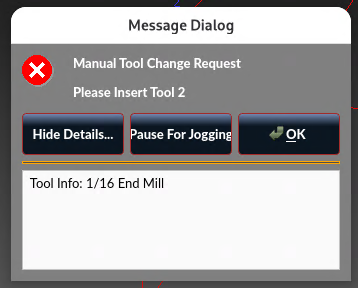
Please Log in or Create an account to join the conversation.
- Thllll
- Offline
- Junior Member
-
Less
More
- Posts: 22
- Thank you received: 2
03 Jan 2026 21:05 #340935
by Thllll
Replied by Thllll on topic Auto Tool Probe - not callable
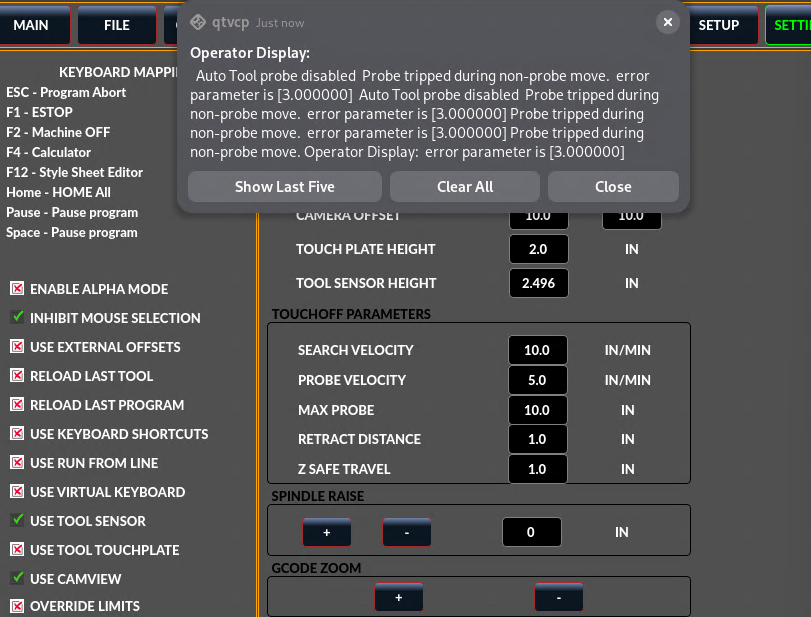
Okay figured that out too, the "Tool Measure" needs to be ON in the probe tab. So now I am able to T# M6, it moves to tool sensor, I get the pop up, I change the tool, it starts to probe down...suspense... touches the tool sensor and I get the error below.
On a side note the tool sensor does work. I would say to exclude out the "probe tripped during non-probe move" because when using the offset commands "Go to Sensor" and "Tool Sensor" it works and I do not get that error, what is the difference?
On a side note the tool sensor does work. I would say to exclude out the "probe tripped during non-probe move" because when using the offset commands "Go to Sensor" and "Tool Sensor" it works and I do not get that error, what is the difference?
The following user(s) said Thank You: tommylight
Please Log in or Create an account to join the conversation.
- cmorley
- Offline
- Moderator
-
Less
More
- Posts: 7368
- Thank you received: 2181
04 Jan 2026 01:28 #340945
by cmorley
Replied by cmorley on topic Auto Tool Probe - not callable
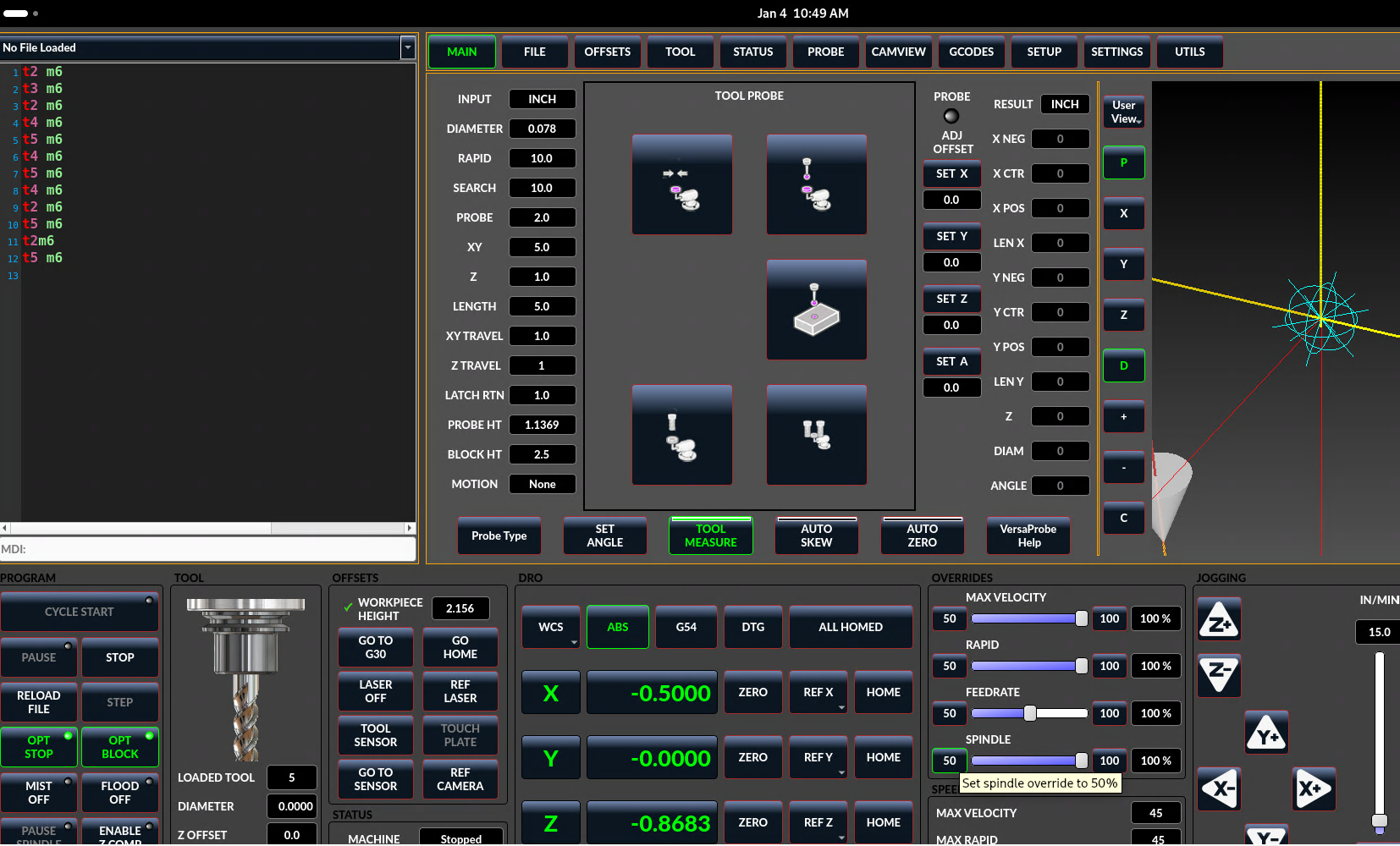
Can you show the probe parameters on the versa probe page please.
The following user(s) said Thank You: tommylight
Please Log in or Create an account to join the conversation.
- Thllll
- Offline
- Junior Member
-
Less
More
- Posts: 22
- Thank you received: 2
04 Jan 2026 19:09 - 04 Jan 2026 19:11 #340983
by Thllll
Replied by Thllll on topic Auto Tool Probe - not callable
I have attached the probe settings screenshot, however I found the issue. The .ini file had [VERSA_TOOLSETTER] Z=-2.49, changed it to 0 and it works!
Thanks for the help! I have two questions though
1. What is the difference between the tool sensor commands (in the offset section) compared to this auto tool length change? Wouldnt have been the same?
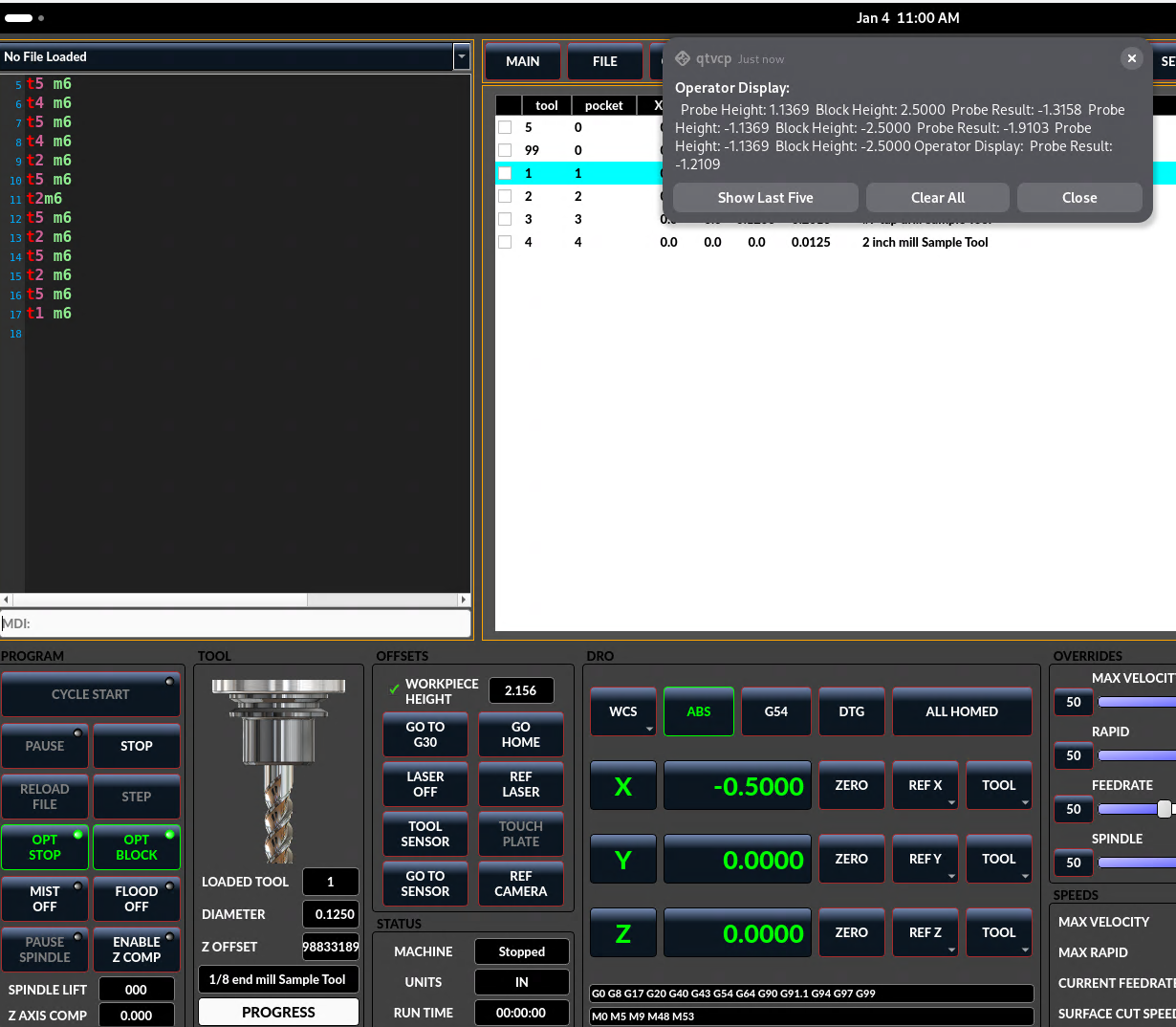
2. The other screenshot "Zoffset" shows a massive Z offset. Not a concern though the tool able takes the correct number
Thanks for the help! I have two questions though
1. What is the difference between the tool sensor commands (in the offset section) compared to this auto tool length change? Wouldnt have been the same?
2. The other screenshot "Zoffset" shows a massive Z offset. Not a concern though the tool able takes the correct number
Last edit: 04 Jan 2026 19:11 by Thllll.
Please Log in or Create an account to join the conversation.
Moderators: cmorley
Time to create page: 0.129 seconds