
- User Interfaces
- Qtvcp
- Connect external potmeters to rapid- and feedrate override sliders in QTDragon
Connect external potmeters to rapid- and feedrate override sliders in QTDragon
- Henk72
- Offline
- New Member
-

Less
More
- Posts: 6
- Thank you received: 0
25 Sep 2026 18:03 #349875
by Henk72
Connect external potmeters to rapid- and feedrate override sliders in QTDragon was created by Henk72
Dear forum members,
I am progressing well with the conversion of my 1980 MAHO MH300 to a linuxCNC based machine. I made a replacement console consisting of a high res screen (not a touch-screen) and keyboard + Estop etc. console (see attached image). I copied the layout of the console, including two potentiometers from a DMG machine. On the DMG these are intended for rapid traversal override and feed override. I am now trying to make QTDragon_HD to run and read that this GUI was not intended for keyboard use.... However, I do like the way the QTDragon gui screen is build up and would like to try to adapt it in such a manner that I can set these overrides with the potentiometers. Similar to the Estop I would like to go for an implementation where the console hardware (physical estop button and physical potentiometers) set the hal signals and that the QTDragon_HD GUI only displays (follows) the setting set by the button and potentiometers. For the Estop I think I made this work, but from what I have read thus far I think the QTDragon_HD does not allow these override sliders to be set by another HAL output. Is this indeed the case? I am still quite inexperienced in LinuxCNC, HAL and Qtvcp, maybe I overlooked something. Any help or suggestion is welcome!
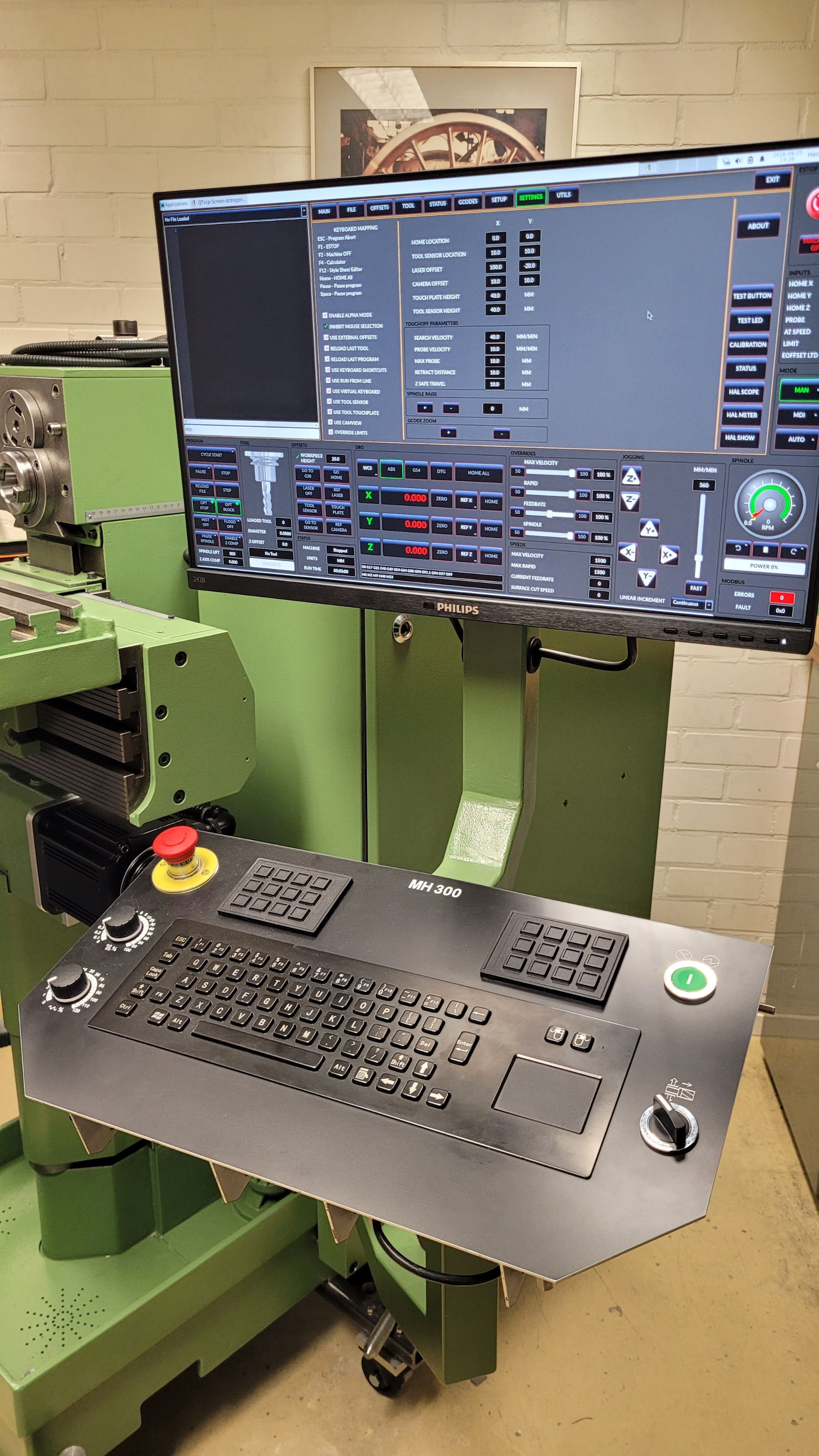
I am progressing well with the conversion of my 1980 MAHO MH300 to a linuxCNC based machine. I made a replacement console consisting of a high res screen (not a touch-screen) and keyboard + Estop etc. console (see attached image). I copied the layout of the console, including two potentiometers from a DMG machine. On the DMG these are intended for rapid traversal override and feed override. I am now trying to make QTDragon_HD to run and read that this GUI was not intended for keyboard use.... However, I do like the way the QTDragon gui screen is build up and would like to try to adapt it in such a manner that I can set these overrides with the potentiometers. Similar to the Estop I would like to go for an implementation where the console hardware (physical estop button and physical potentiometers) set the hal signals and that the QTDragon_HD GUI only displays (follows) the setting set by the button and potentiometers. For the Estop I think I made this work, but from what I have read thus far I think the QTDragon_HD does not allow these override sliders to be set by another HAL output. Is this indeed the case? I am still quite inexperienced in LinuxCNC, HAL and Qtvcp, maybe I overlooked something. Any help or suggestion is welcome!
Attachments:
Please Log in or Create an account to join the conversation.
- Henk72
- Offline
- New Member
-
Less
More
- Posts: 6
- Thank you received: 0
25 Sep 2026 18:24 #349877
by Henk72
Replied by Henk72 on topic Connect external potmeters to rapid- and feedrate override sliders in QTDragon
Dear forum,
I found more information related to what I am trying to do on section 2.8 of www.linuxcnc.org/docs/html/gui/qtvcp.html#cha:qtvcp . I will first try to go through these sections and see how far I can come...
@ the forum moderator: feel free to remove my question above.
I found more information related to what I am trying to do on section 2.8 of www.linuxcnc.org/docs/html/gui/qtvcp.html#cha:qtvcp . I will first try to go through these sections and see how far I can come...
@ the forum moderator: feel free to remove my question above.
Please Log in or Create an account to join the conversation.
- tommylight
-
- Offline
- Moderator
-

Less
More
- Posts: 21980
- Thank you received: 7481
25 Sep 2026 19:20 #349878
by tommylight
Thank you.
Replied by tommylight on topic Connect external potmeters to rapid- and feedrate override sliders in QTDragon
Leaving it for now, we can decide later if it would be better to leave or delete.
@ the forum moderator: feel free to remove my question above.
Thank you.
Please Log in or Create an account to join the conversation.
- rubes
- Offline
- Senior Member
-

Less
More
- Posts: 45
- Thank you received: 2
25 Sep 2026 20:16 - 25 Sep 2026 20:20 #349881
by rubes
Replied by rubes on topic Connect external potmeters to rapid- and feedrate override sliders in QTDragon
I was looking into this as well. I have a 7i73 board to use in the control panel, and google AI was pretty helpful in getting me pointed in the right direction. I have not completed the project though.
by the way, i was looking at using encoders rather than pots. because there could be a disconnect between the pot position and what QTdragon is expecting it to be when the machine restarts.
by the way, i was looking at using encoders rather than pots. because there could be a disconnect between the pot position and what QTdragon is expecting it to be when the machine restarts.
Last edit: 25 Sep 2026 20:20 by rubes.
Please Log in or Create an account to join the conversation.
- rodw
-

- Offline
- Platinum Member
-

Less
More
- Posts: 12156
- Thank you received: 4149
25 Sep 2026 20:27 #349882
by rodw
Replied by rodw on topic Connect external potmeters to rapid- and feedrate override sliders in QTDragon
There should be halui pins to do want you want to do. The halui docs say " halui is used to build a User Interface using hardware knobs and switches."
But over time I have found some guis use these pins which stops you from using them. guis don't have hardware knobs and switches so they should respect the boundaries of the original LinuxCNC design intent. I don't know if your GUI is using these pins or not.
But over time I have found some guis use these pins which stops you from using them. guis don't have hardware knobs and switches so they should respect the boundaries of the original LinuxCNC design intent. I don't know if your GUI is using these pins or not.
Please Log in or Create an account to join the conversation.
- cmorley
- Offline
- Moderator
-
Less
More
- Posts: 7368
- Thank you received: 2181
28 Sep 2026 01:58 #349944
by cmorley
Replied by cmorley on topic Connect external potmeters to rapid- and feedrate override sliders in QTDragon
Unfortuately HALUI doesn't integrate well with guis.
Overrides changes in HALUI will show in QtDragon but not HALUI jog speed.
There has been some work on this recently but it hasn't made it in linuxcnc yet.
It's possible to add custom code/pins to qtdragon to help with integration.
Can you be specifics about what you need?
Overrides changes in HALUI will show in QtDragon but not HALUI jog speed.
There has been some work on this recently but it hasn't made it in linuxcnc yet.
It's possible to add custom code/pins to qtdragon to help with integration.
Can you be specifics about what you need?
Please Log in or Create an account to join the conversation.
- Henk72
- Offline
- New Member
-
Less
More
- Posts: 6
- Thank you received: 0
28 Sep 2026 17:22 #349962
by Henk72
Replied by Henk72 on topic Connect external potmeters to rapid- and feedrate override sliders in QTDragon
Thanks again for setting me on the right track again, this is really appreciated. In my case I only included 2 potmeters on the console: one for rapid traverse override and one for feedrate override. I copied this from a DMU 50 console which we have at work...
Using HALshow and setting halui.rapid-override.direct-value to True (1) and then setting halui.rapid-override.counts to a manual value (I discovered that a value of 10 corresponds to 100%) works well together with QTDragon_HD. With that I mean that it will probably provide me with the functionality I need. I already wrote some HAL lines using the lincurve component to ensure that the output of the potmeters correspond to the tickmarks (it is not a linear scale...). By setting up the right net statements I should be able to connect these and have QTDragon follow this setting on the display. Same for halui.feed-override.direct-value and ..counts.
@cmorley: Luckily I didn't include a jog override pot on my console, as I now understand from you that this would not work in a similar manner. I did already buy a pendant (XHC with cable type) and maybe I will run into issues once I try to get that connected. For now I first want to get the spindle and servo's running .
.
Thank you all for helping me further.
Using HALshow and setting halui.rapid-override.direct-value to True (1) and then setting halui.rapid-override.counts to a manual value (I discovered that a value of 10 corresponds to 100%) works well together with QTDragon_HD. With that I mean that it will probably provide me with the functionality I need. I already wrote some HAL lines using the lincurve component to ensure that the output of the potmeters correspond to the tickmarks (it is not a linear scale...). By setting up the right net statements I should be able to connect these and have QTDragon follow this setting on the display. Same for halui.feed-override.direct-value and ..counts.
@cmorley: Luckily I didn't include a jog override pot on my console, as I now understand from you that this would not work in a similar manner. I did already buy a pendant (XHC with cable type) and maybe I will run into issues once I try to get that connected. For now I first want to get the spindle and servo's running
.Thank you all for helping me further.
Please Log in or Create an account to join the conversation.
Moderators: cmorley
- User Interfaces
- Qtvcp
- Connect external potmeters to rapid- and feedrate override sliders in QTDragon
Time to create page: 0.550 seconds