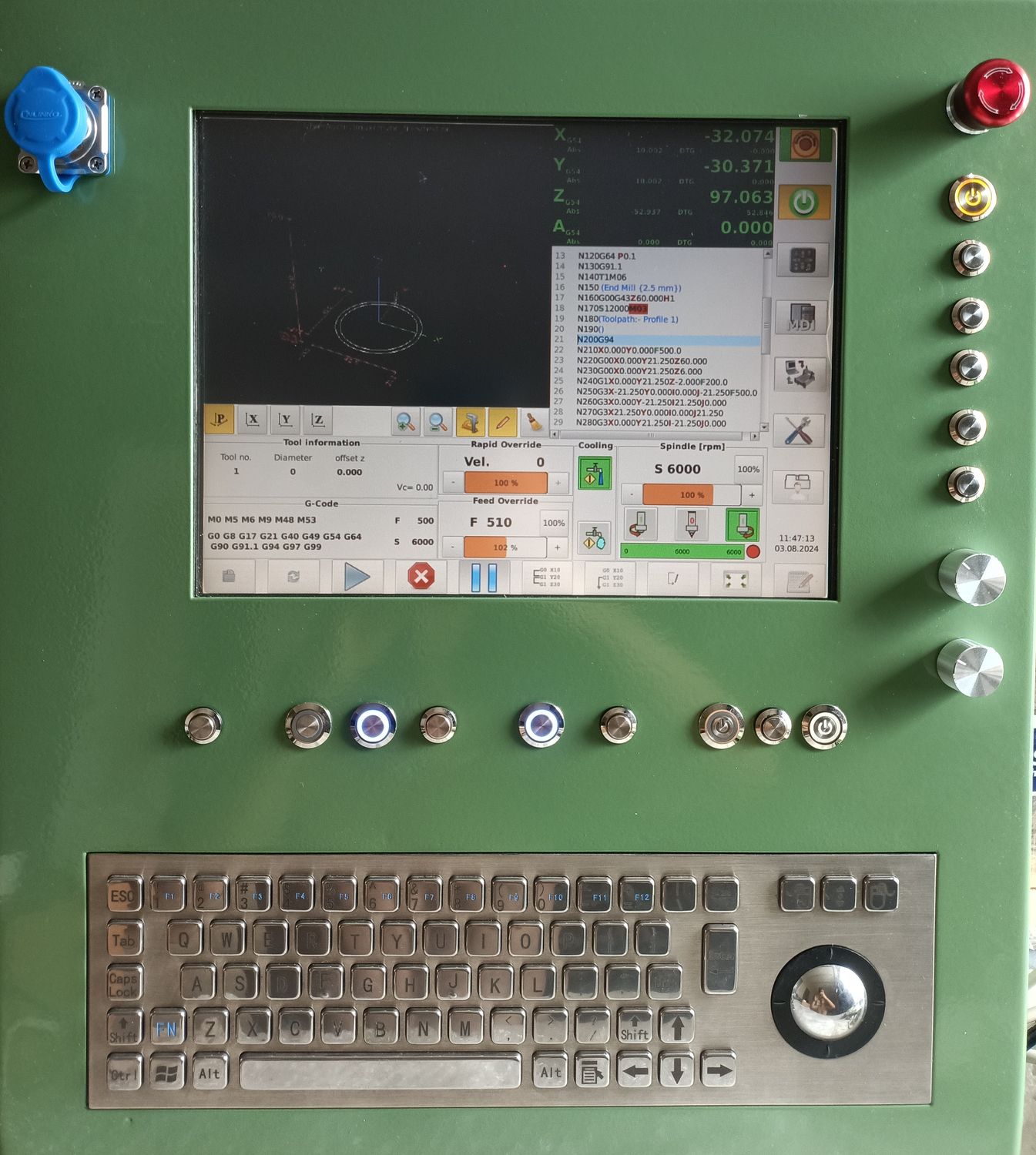
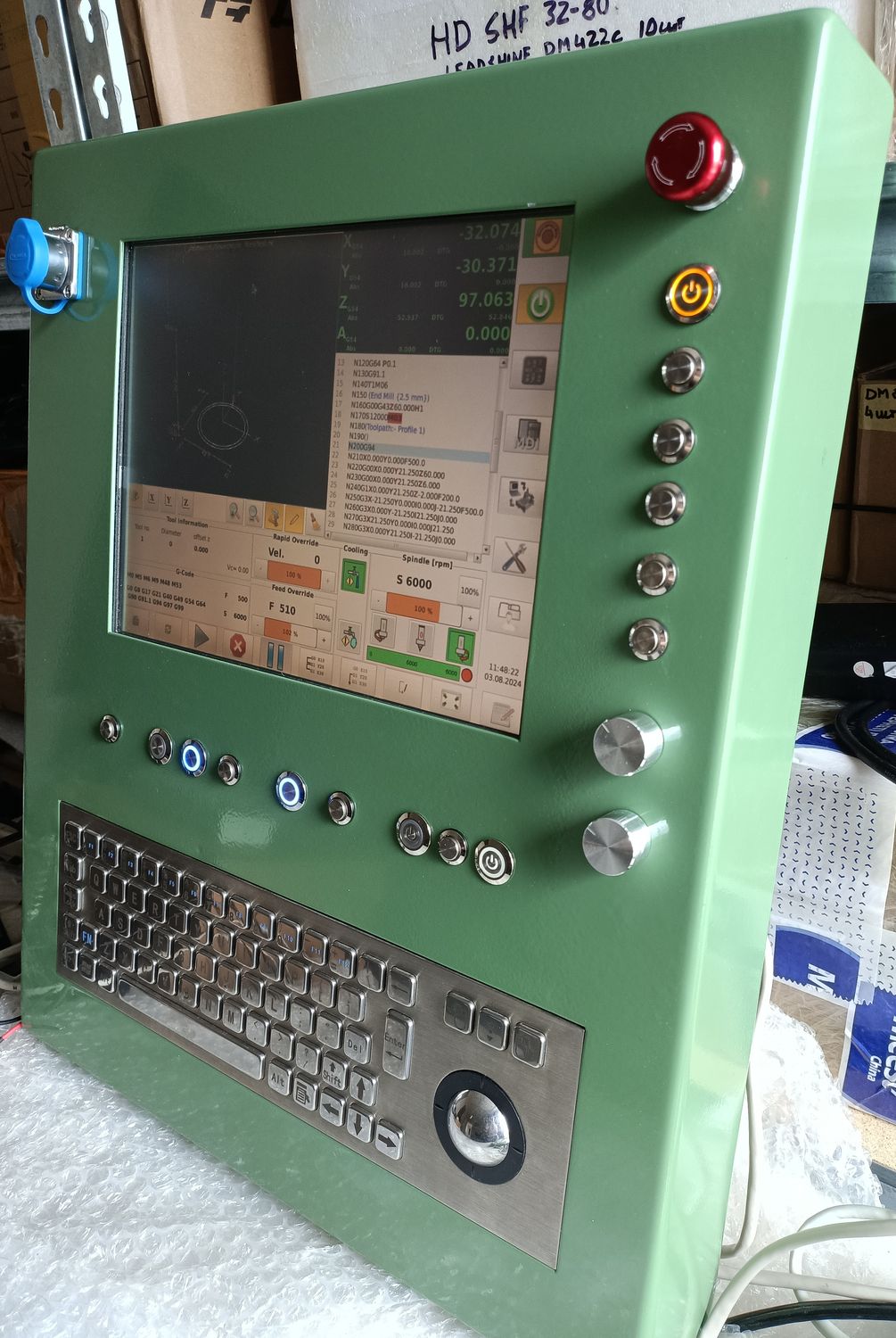
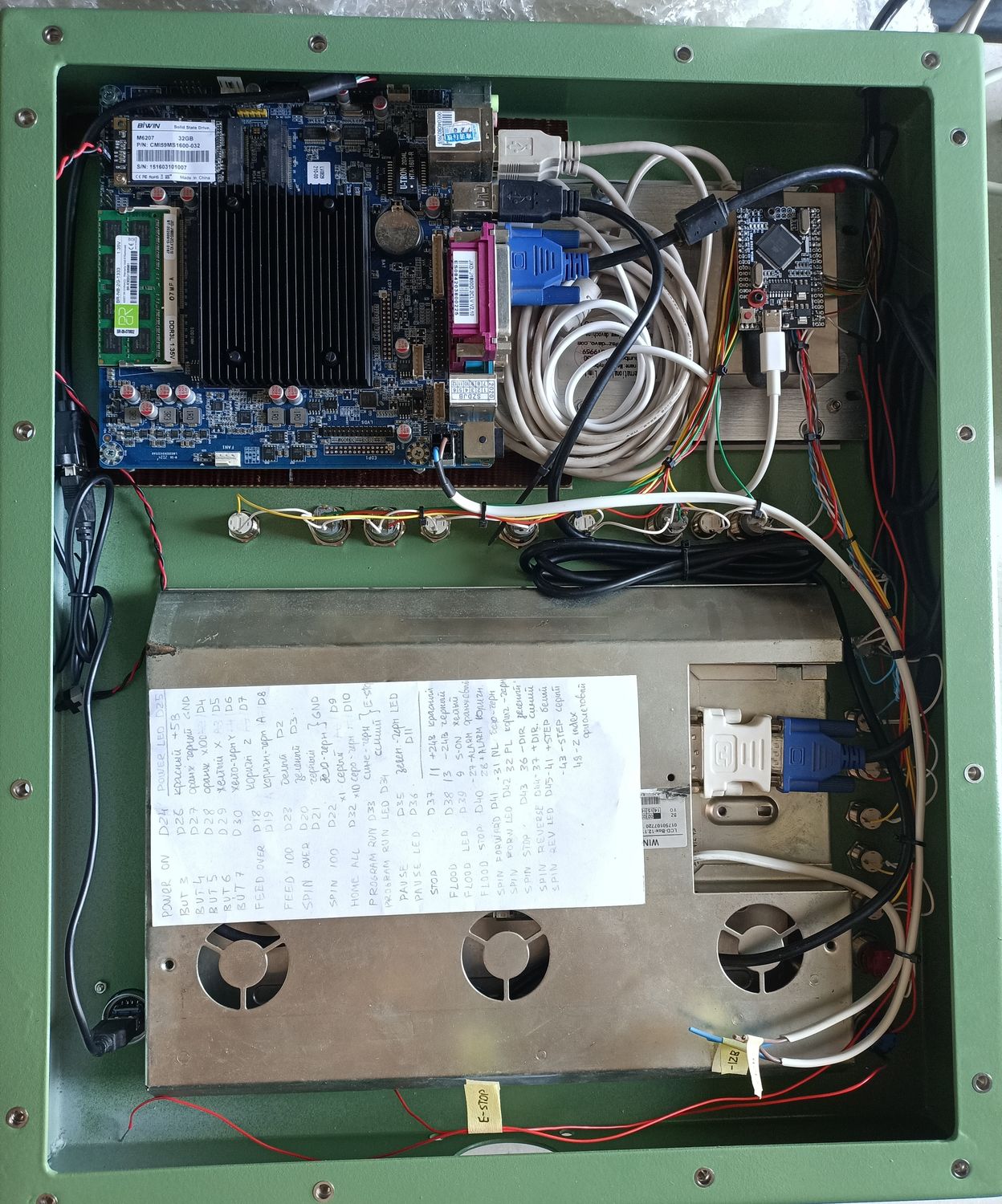
Control panel
- Mr. Mass
-
Topic Author
- Offline
- Senior Member
-
Less
More
- Posts: 73
- Thank you received: 50
03 Aug 2024 11:49 #306839
by Mr. Mass
Control panel was created by Mr. Mass
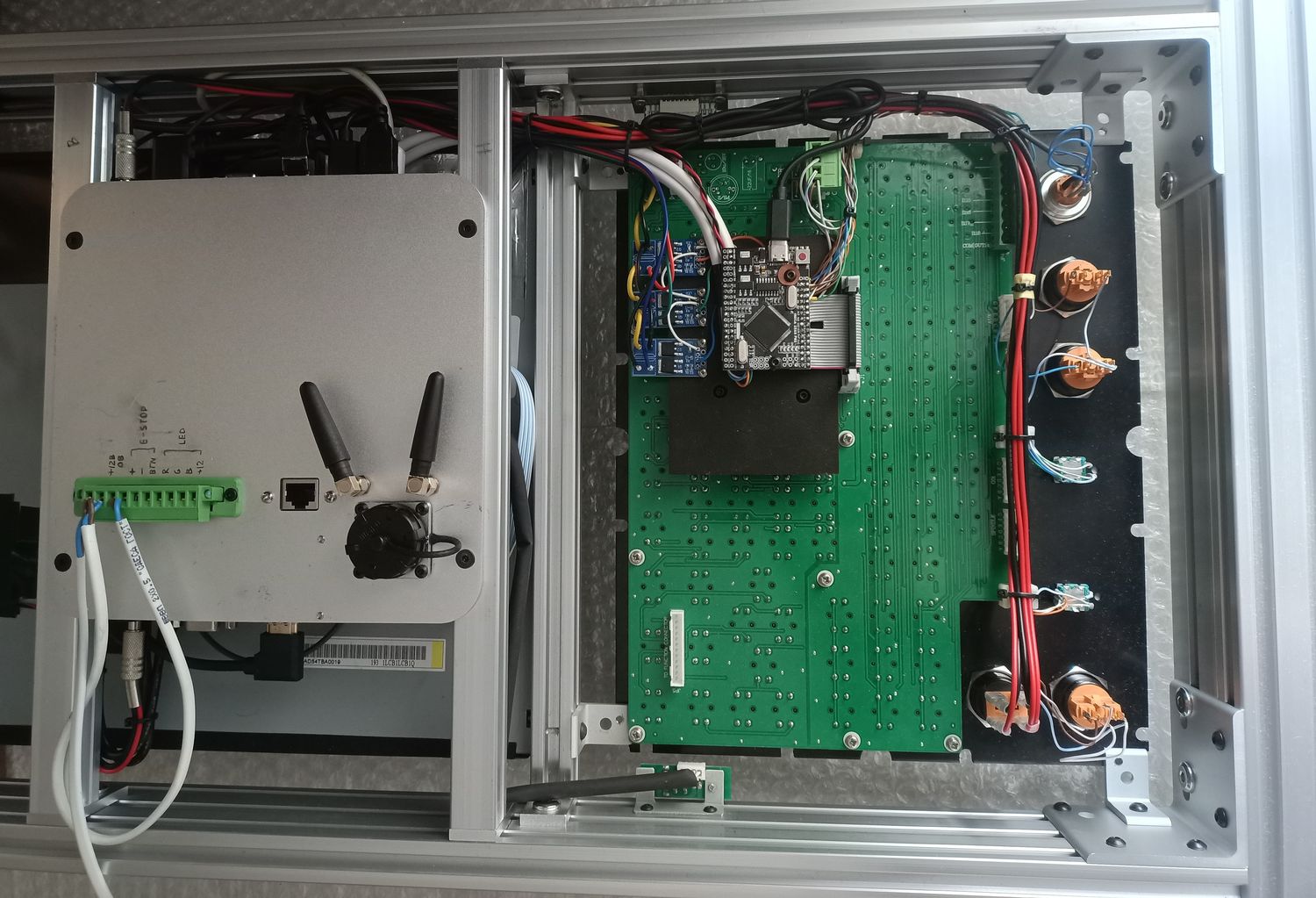
My new project is a control panel. Always wanted to make one, but something kept getting in the way. Now I finally managed to realize it. Nothing special, the case itself is bent and welded from 2mm sheet metal, 12" touch screen monitor, industrial keyboard and all the buttons, computer also fits. All the buttons and MPG are connected via adruino. As usual, in many things had to figure out from scratch, the config turned out perhaps the most complex of those that I have ever done. But in the end, everything works as it should, thanks to this forum, I was able to find answers to all my questions here.
Attachments:
The following user(s) said Thank You: tommylight, meister, rodw, besriworld, COFHAL, spumco, phomann, onceloved, Yacou
Please Log in or Create an account to join the conversation.
- cmorley
- Offline
- Moderator
-
Less
More
- Posts: 7338
- Thank you received: 2162
04 Aug 2024 01:28 #306890
by cmorley
Replied by cmorley on topic Control panel
How do you like that keyboard and track ball?
Please Log in or Create an account to join the conversation.
- Mr. Mass
-
Topic Author
- Offline
- Senior Member
-
Less
More
- Posts: 73
- Thank you received: 50
04 Aug 2024 06:11 #306902
by Mr. Mass
Replied by Mr. Mass on topic Control panel
The keyboard is generally comfortable, only the spacebar button is fuzzy, you have to press it only in the middle. The track ball is unfamiliar to me, but it works well. I don't think it will be used often, the touch screen and keyboard covers 99% of all requests.
Please Log in or Create an account to join the conversation.
- Mr. Mass
-
Topic Author
- Offline
- Senior Member
-
Less
More
- Posts: 73
- Thank you received: 50
14 Feb 2026 13:49 - 14 Feb 2026 15:47 #342936
by Mr. Mass
Replied by Mr. Mass on topic Control panel
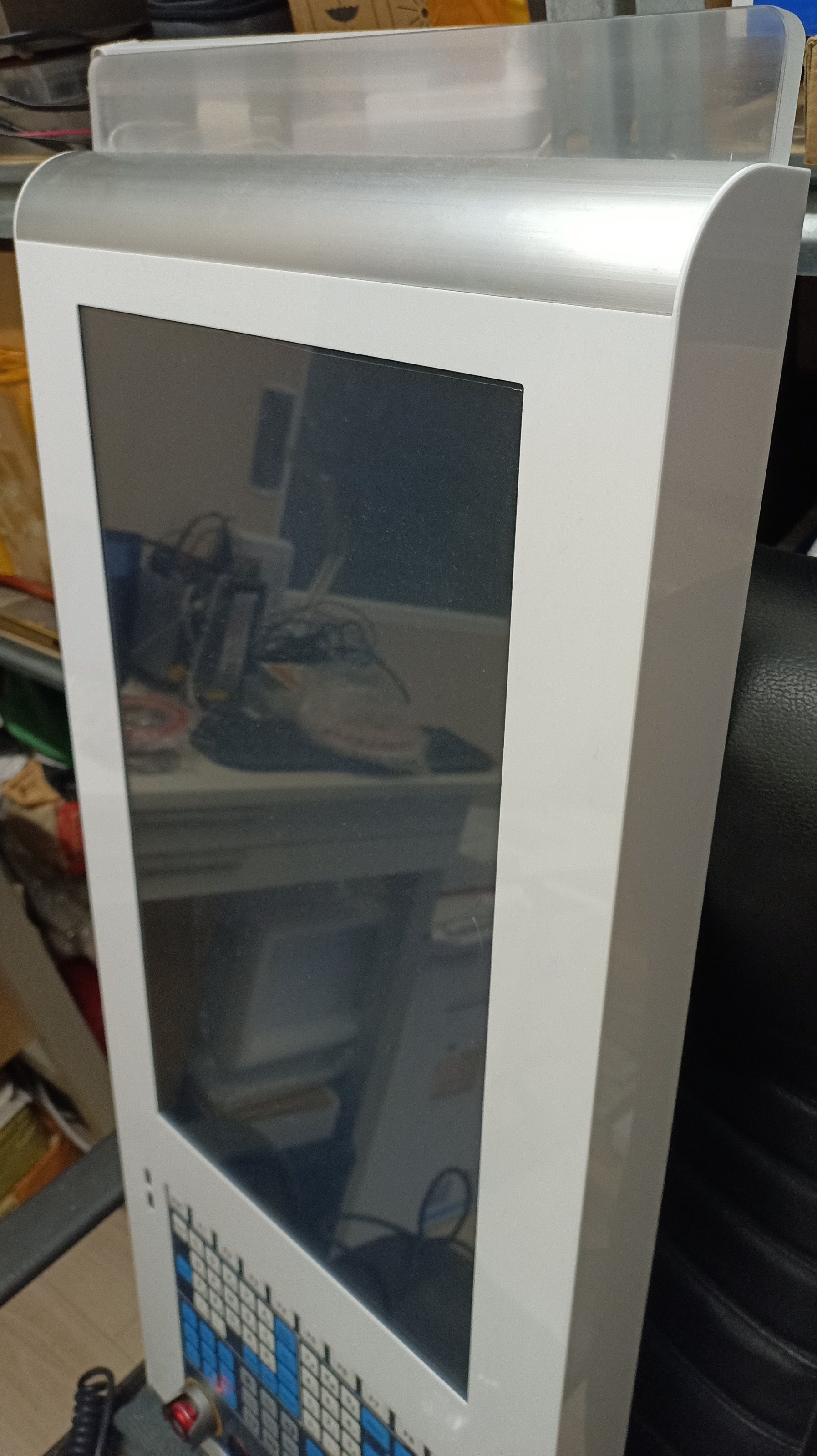
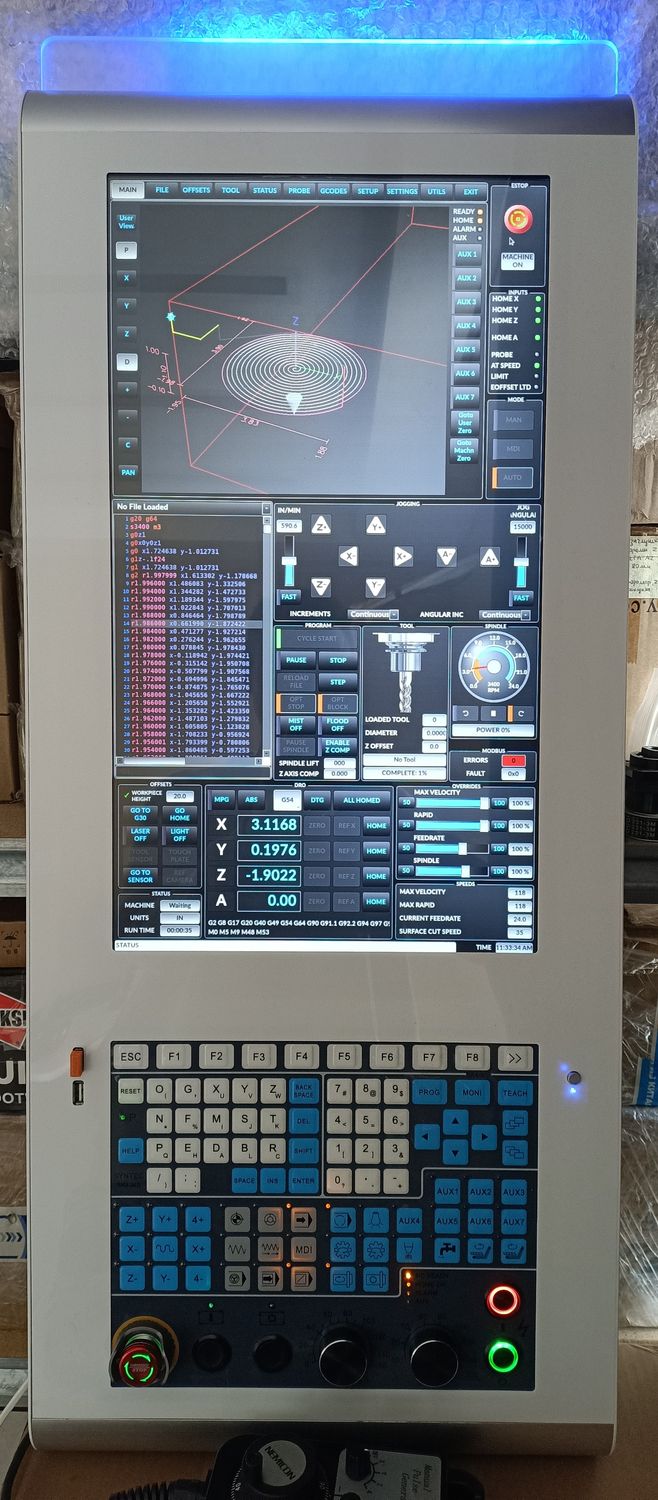
I finally finished a project I had been working on for over a year (not every day, of course, but still). It is a control panel with a vertical 22" touchscreen monitor, an industrial keyboard, and a built-in computer. The frame is made of 20 series aluminum profile, with 1mm HIPS overlays. The interface is a modified Qtdragon_hd. The buttons and keyboard are connected via Arduino. Many thanks to everyone on this forum whose thoughts and ideas I have used. But a special thanks to cmorley, without whose help I would never have been able to achieve the functionality that it has. Thank you, Chris.
Short video of the work: youtube.com/shorts/eyDQwiEkxz0
Last edit: 14 Feb 2026 15:47 by Mr. Mass.
The following user(s) said Thank You: cmorley, RotarySMP, tommylight, pommen, rodw, Hakan, GeckoWorks, NWE
Please Log in or Create an account to join the conversation.
- cmorley
- Offline
- Moderator
-
Less
More
- Posts: 7338
- Thank you received: 2162
15 Feb 2026 05:51 #342984
by cmorley
Replied by cmorley on topic Control panel
Is that a custom keypad now?
Looks good!
Looks good!
The following user(s) said Thank You: GeckoWorks
Please Log in or Create an account to join the conversation.
- Mr. Mass
-
Topic Author
- Offline
- Senior Member
-
Less
More
- Posts: 73
- Thank you received: 50
15 Feb 2026 13:02 #343000
by Mr. Mass
Replied by Mr. Mass on topic Control panel
Thank you. This is an industrial keyboard from SYNTEK, model SK4-MB. It is made on a single board, but electrically there are two keyboards. The upper part with letters and numbers is a standard PS/2 (I had to figure out how to remap it). The lower part is a matrix keyboard combined with LEDs. Connecting and configuring it was the most time-consuming part of the job.
The following user(s) said Thank You: GeckoWorks
Please Log in or Create an account to join the conversation.
- GeckoWorks
- Offline
- Senior Member
-
Less
More
- Posts: 60
- Thank you received: 8
13 Jul 2026 10:51 - 13 Jul 2026 13:15 #347736
by GeckoWorks
Replied by GeckoWorks on topic Control panel
Oh, can't believe I hadn't even searched for Syntec here.
I have literally spent the last week looking for used SK panels and trying to figure out what's what with them.I would be very, very interested in hearing more about your exact board and what's underneath your Arduino and next to it.
Now, feel free to skip to the bottom as next I was asking questions that you have actually answered already - I just didn't know enough to realize:)
Skip From Here...
Newer SK panels have a small "matrix chip" surface mounted to the button side of the PCB (just inbetween button switches), older ones have a larger one on the backside (often a Holtek) and even older ones have a whole daughter board attached to the back side with a what Syntec calls a "decoder module". I always assumed the chip would spit out a proprietary serial link. I had no idea they were talking PS/2... Well, I thought perhaps the older ones were based on the Holtek model numbers.
But I have been trying to avoid newer boards because I wanted easy access to the matrix. I also had no idea the matrix is actually availble on the "HK Connector" - but that's how it looks from your picture. It looks like the Arduino is connecting to the HK. Or is the HK sending out PS/2 to your arduino? In which case your panel must indeed still have a "matrix chip somewhere" and your Arduino turns PS/2 into USB?
Also, how do you control the button LEDs?
If you could find time to share some more on how you made this work, I would be very grateful. I would mostly likely go this way as apart from ideally wanting more overide knobs, the SK4/6M panels have a really nice set of control buttons - plus the alphanumeric keys, too.
On a related note - as for turning the matrix into USB, when I asked AI about how to hack older SK panels it suggested this approach but to also make a combo USB protocol of HID plus a gamepad or joystick library. That way, supposedly, when doing the HAL connections you don't have to venture into weird combo USB presses to map the buttons that HID has no library for. So, you'd use HID for the regular stuff it already has and then gamepad library for everything "CNC" and it would just be passed through as button 1, button 2, etc.
Also, I did talk to a Chinese vendor had to check back with the factory on the protocols and how open they actually are but between the language barrier and me only wanting to buy one, he kinda lost interest, haha. But I think he said they could deliver bare matrix, USB-HID and more.
Skip To Here:)
[EDIT] I really should learn to read. You specifically explained the SK panel does both PS/2 and matrix. So, now I think the PS/2 signal may be coming into your arduino from that 5 pin connector in the corner of the board that says "to keyboard" and the matrix comes out of the HK Connector. Also, you even said the matrix is shared for both buttons and LEDs. So, there we have it:) What wonderful detective work you have done to make these panels work!
So... would you be inclined to share the code and pin mapping to help others along:)?
I have literally spent the last week looking for used SK panels and trying to figure out what's what with them.I would be very, very interested in hearing more about your exact board and what's underneath your Arduino and next to it.
Now, feel free to skip to the bottom as next I was asking questions that you have actually answered already - I just didn't know enough to realize:)
Skip From Here...
Newer SK panels have a small "matrix chip" surface mounted to the button side of the PCB (just inbetween button switches), older ones have a larger one on the backside (often a Holtek) and even older ones have a whole daughter board attached to the back side with a what Syntec calls a "decoder module". I always assumed the chip would spit out a proprietary serial link. I had no idea they were talking PS/2... Well, I thought perhaps the older ones were based on the Holtek model numbers.
But I have been trying to avoid newer boards because I wanted easy access to the matrix. I also had no idea the matrix is actually availble on the "HK Connector" - but that's how it looks from your picture. It looks like the Arduino is connecting to the HK. Or is the HK sending out PS/2 to your arduino? In which case your panel must indeed still have a "matrix chip somewhere" and your Arduino turns PS/2 into USB?
Also, how do you control the button LEDs?
If you could find time to share some more on how you made this work, I would be very grateful. I would mostly likely go this way as apart from ideally wanting more overide knobs, the SK4/6M panels have a really nice set of control buttons - plus the alphanumeric keys, too.
On a related note - as for turning the matrix into USB, when I asked AI about how to hack older SK panels it suggested this approach but to also make a combo USB protocol of HID plus a gamepad or joystick library. That way, supposedly, when doing the HAL connections you don't have to venture into weird combo USB presses to map the buttons that HID has no library for. So, you'd use HID for the regular stuff it already has and then gamepad library for everything "CNC" and it would just be passed through as button 1, button 2, etc.
Also, I did talk to a Chinese vendor had to check back with the factory on the protocols and how open they actually are but between the language barrier and me only wanting to buy one, he kinda lost interest, haha. But I think he said they could deliver bare matrix, USB-HID and more.
Skip To Here:)
[EDIT] I really should learn to read. You specifically explained the SK panel does both PS/2 and matrix. So, now I think the PS/2 signal may be coming into your arduino from that 5 pin connector in the corner of the board that says "to keyboard" and the matrix comes out of the HK Connector. Also, you even said the matrix is shared for both buttons and LEDs. So, there we have it:) What wonderful detective work you have done to make these panels work!
So... would you be inclined to share the code and pin mapping to help others along:)?
Last edit: 13 Jul 2026 13:15 by GeckoWorks.
Please Log in or Create an account to join the conversation.
- Mr. Mass
-
Topic Author
- Offline
- Senior Member
-
Less
More
- Posts: 73
- Thank you received: 50
14 Jul 2026 12:58 #347762
by Mr. Mass
Replied by Mr. Mass on topic Control panel
Ha, that's spot on—I really did feel like a detective sometimes
The top part is a standard PS/2 keyboard; I connected it to the computer using a PS/2-USB adapter. I remapped the keys, mainly to access lowercase characters (Remap the Shift + button, just like in the original system).
The lower part is connected via an Arduino and an ArduinoConnector (forum.linuxcnc.org/show-your-stuff/48630-arduino-io-expansion).
On this keyboard, the pinout is rotated 90 degrees relative to the visual orientation, and not all pins are used. I added a pinout; I hope this helps.
P.S. The SK6 keyboard has a visually different circuit board; I haven't checked it, so all of this applies only to the SK4.
The top part is a standard PS/2 keyboard; I connected it to the computer using a PS/2-USB adapter. I remapped the keys, mainly to access lowercase characters (Remap the Shift + button, just like in the original system).
The lower part is connected via an Arduino and an ArduinoConnector (forum.linuxcnc.org/show-your-stuff/48630-arduino-io-expansion).
On this keyboard, the pinout is rotated 90 degrees relative to the visual orientation, and not all pins are used. I added a pinout; I hope this helps.
P.S. The SK6 keyboard has a visually different circuit board; I haven't checked it, so all of this applies only to the SK4.
The following user(s) said Thank You: GeckoWorks
Please Log in or Create an account to join the conversation.
- GeckoWorks
- Offline
- Senior Member
-
Less
More
- Posts: 60
- Thank you received: 8
14 Jul 2026 14:42 - 14 Jul 2026 15:42 #347766
by GeckoWorks
Replied by GeckoWorks on topic Control panel
Mass - thanks so, so much!
This is sweet. I will dive deeper into it in the days to come and the project you linked to. But I am almost sure I will buy a (used) SK4/6 panel. I wouldn't be surprised if they all come with the PS/2 + matrix combo. (Some will possibly be USB+matrix but that would just be a win). I know, no guarentees - also in terms of pinout and such, but the main foundation is certainly there as you have shown. And most important, nothing locked behind a proprietary serial protocol either, it seems.
But any chance you could share the code, too?
Having looked at the github for the Arduino-LCNC project a bit, I now realize that the matrix never gets turned into USB-HID or gamepad protocol, at all. Interesting. Maybe a better more direct approach.
Not that I really know what I will be looking at but with the help of Gemini, I managed to make a nice custom version of the NanoELS FW (an open source electronic leadscrew project) for my little lathe. Had to get DRO scales implemented and add some other features - and I actually managed to do so on code level. So, hopefully the robots can help me on this project, too.
Various Panels
As for SK4/6 I actually think they share the same layout 100%. I think I have even seen some SK6s with SK4 printed on the PCBs - but I could be wrong as I have looked at sooo many pics lately.
But there's also an SK5 which does have a slightly different layout. (Attaching pics of SK4/5/6).
Most often SK4 has membrane buttons whereas the SK6 often has tactile ones. I am leaning towards the latter.
But looking at SK PCBs get confusing very fast as there are so many different itirations of the SK4/5 plus a bunch of clones.
Encoder Overrides?
BTW, it looks like you swapped out the clicky rotary switches for pots or encoders? So, no hardstops at each end but possibly better "sync" between screen and knob, is that it?
I think I will try to stay with the rotaries and see how they feel.
This is sweet. I will dive deeper into it in the days to come and the project you linked to. But I am almost sure I will buy a (used) SK4/6 panel. I wouldn't be surprised if they all come with the PS/2 + matrix combo. (Some will possibly be USB+matrix but that would just be a win). I know, no guarentees - also in terms of pinout and such, but the main foundation is certainly there as you have shown. And most important, nothing locked behind a proprietary serial protocol either, it seems.
But any chance you could share the code, too?
Having looked at the github for the Arduino-LCNC project a bit, I now realize that the matrix never gets turned into USB-HID or gamepad protocol, at all. Interesting. Maybe a better more direct approach.
Not that I really know what I will be looking at but with the help of Gemini, I managed to make a nice custom version of the NanoELS FW (an open source electronic leadscrew project) for my little lathe. Had to get DRO scales implemented and add some other features - and I actually managed to do so on code level. So, hopefully the robots can help me on this project, too.
Various Panels
As for SK4/6 I actually think they share the same layout 100%. I think I have even seen some SK6s with SK4 printed on the PCBs - but I could be wrong as I have looked at sooo many pics lately.
But there's also an SK5 which does have a slightly different layout. (Attaching pics of SK4/5/6).
Most often SK4 has membrane buttons whereas the SK6 often has tactile ones. I am leaning towards the latter.
But looking at SK PCBs get confusing very fast as there are so many different itirations of the SK4/5 plus a bunch of clones.
Encoder Overrides?
BTW, it looks like you swapped out the clicky rotary switches for pots or encoders? So, no hardstops at each end but possibly better "sync" between screen and knob, is that it?
I think I will try to stay with the rotaries and see how they feel.
Last edit: 14 Jul 2026 15:42 by GeckoWorks.
Please Log in or Create an account to join the conversation.
- Mr. Mass
-
Topic Author
- Offline
- Senior Member
-
Less
More
- Posts: 73
- Thank you received: 50
16 Jul 2026 10:44 #347804
by Mr. Mass
Replied by Mr. Mass on topic Control panel
I used the code from the link above; you just need to add your own pins in config section(yours may be different). If it helps clarify things, I've attached my version of the code.
As for the difference between the SK4 and SK6—I've held both versions in my hands; the button layout is the same, but the circuit boards are different. So if you have the SK6, things might be different there.
Yes, I replaced the original rotary switches with encoders. I find encoders much more convenient—I don’t have to check their position every time; I can just turn them in the right direction. And they have a button; I’ve mapped pressing it to set FRO and SRO to 100%. Plus, if you use the stock ones, you won’t be able to adjust the settings from the screen (to avoid confusion in the readings, you’ll have to disable the on-screen sliders and leave only the current value displayed). That’s why we’ll always use only these rotary switches. With encoders, there’s no such problem—you can adjust the FRO and SRO both from the screen and using the encoders.
As for the difference between the SK4 and SK6—I've held both versions in my hands; the button layout is the same, but the circuit boards are different. So if you have the SK6, things might be different there.
Yes, I replaced the original rotary switches with encoders. I find encoders much more convenient—I don’t have to check their position every time; I can just turn them in the right direction. And they have a button; I’ve mapped pressing it to set FRO and SRO to 100%. Plus, if you use the stock ones, you won’t be able to adjust the settings from the screen (to avoid confusion in the readings, you’ll have to disable the on-screen sliders and leave only the current value displayed). That’s why we’ll always use only these rotary switches. With encoders, there’s no such problem—you can adjust the FRO and SRO both from the screen and using the encoders.
Please Log in or Create an account to join the conversation.
Time to create page: 0.213 seconds