Perpetual License CAM
- trackwhack
- Offline
- Junior Member
-
Less
More
- Posts: 30
- Thank you received: 6
01 Oct 2026 03:44 #350027
by trackwhack
Replied by trackwhack on topic Perpetual License CAM
Hi All,
Thank you everyone for the already great response. The 50% discount offer closes on 4th October, just a few more days to grab it.
We will be launching Takshak Turn for mill turn and Takshak Burn for Lasers, EDMs, Waterjets and Plasma Cutter between October and November. They will launch with a discount as well.
Thanks all for the support
Thank you everyone for the already great response. The 50% discount offer closes on 4th October, just a few more days to grab it.
We will be launching Takshak Turn for mill turn and Takshak Burn for Lasers, EDMs, Waterjets and Plasma Cutter between October and November. They will launch with a discount as well.
Thanks all for the support
Please Log in or Create an account to join the conversation.
- Plasmanfm
- Offline
- Premium Member
-
Less
More
- Posts: 130
- Thank you received: 22
01 Oct 2026 14:19 - 01 Oct 2026 14:27 #350046
by Plasmanfm
Replied by Plasmanfm on topic Perpetual License CAM
Das Handbuch kommt immer noch nicht…
Es kommt aber nur der Fehler :Not running on one of the supported Live systems“
So wie es aus sieht fehlt mir die Datai das appimaged.service in /etc/systemd/user/
wie bekomme ich das da rein ?
king regard
Juergen
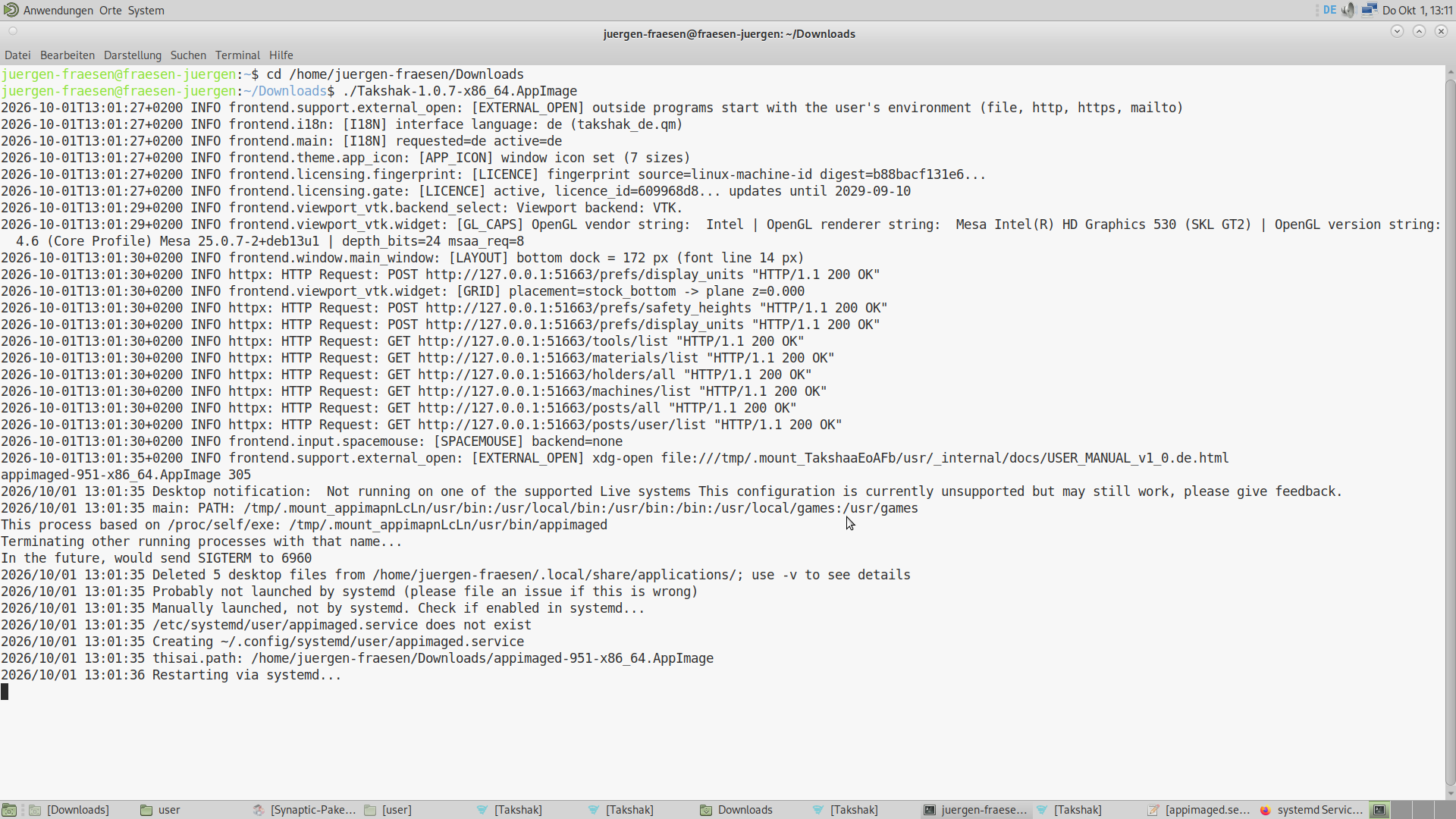
Es kommt aber nur der Fehler :Not running on one of the supported Live systems“
So wie es aus sieht fehlt mir die Datai das appimaged.service in /etc/systemd/user/
wie bekomme ich das da rein ?
king regard
Juergen
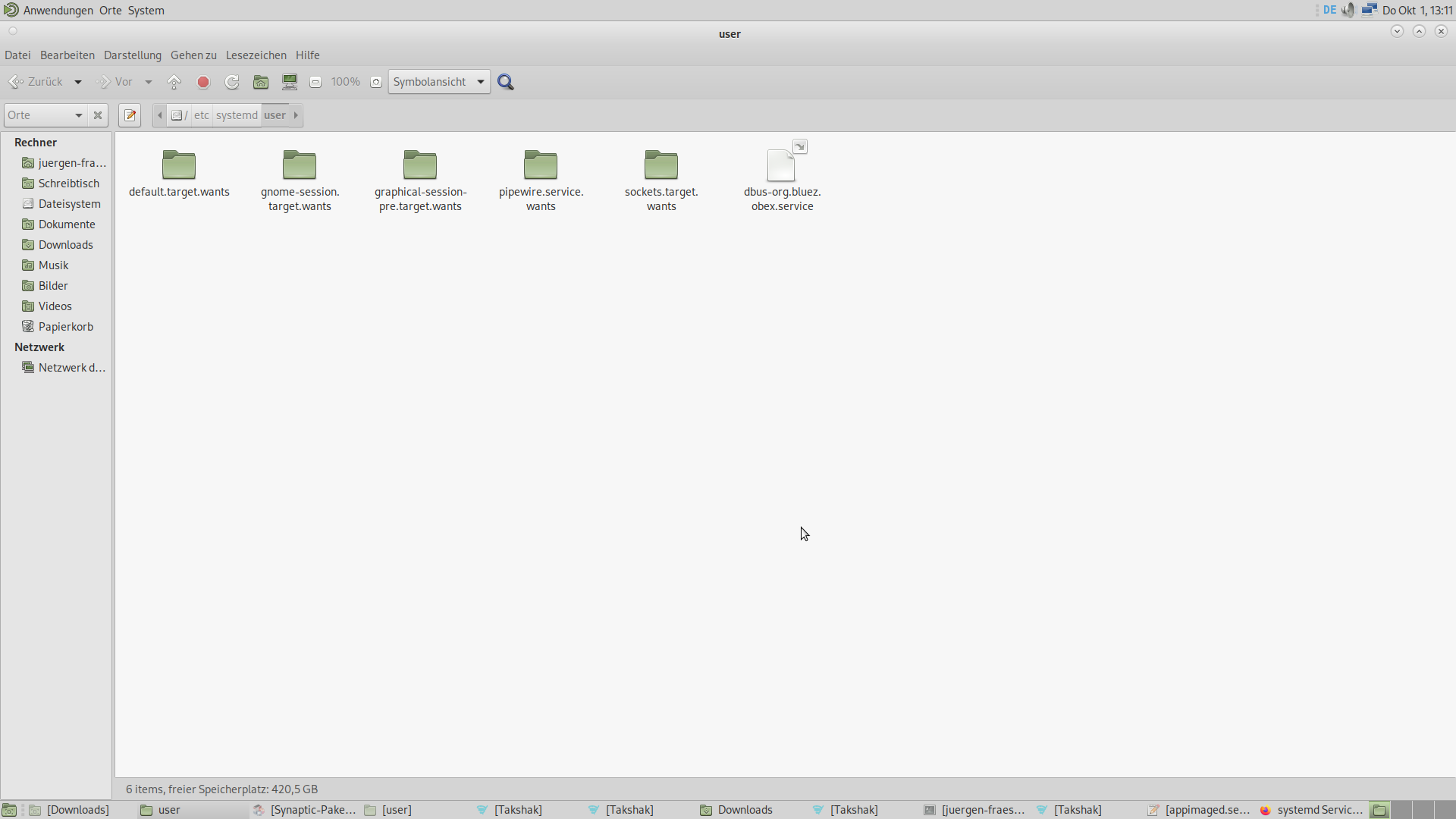
Last edit: 01 Oct 2026 14:27 by Plasmanfm.
Please Log in or Create an account to join the conversation.
- dbtayl
- Offline
- Senior Member
-
Less
More
- Posts: 48
- Thank you received: 46
01 Oct 2026 23:29 - 02 Oct 2026 22:51 #350057
by dbtayl
Replied by dbtayl on topic Perpetual License CAM
So far a mixed bag for me. For context, I normally use FreeCAD's CAM, which is honestly really good most of the time... except for occasionally breaking in seemingly incredibly dumb ways (ie, simple contour operations have gotten broken multiple times). That's been frustrating enough I was willing to try throwing some money at the problem- looking for a stop-gap "works" solution until FreeCAD stabilizes enough to stop driving me up the wall. No matter how good a standalone CAM package gets, not being integrated with your CAD is a hindrance.
Most of the stuff I do is multiple tools, generally "2.5D" (ie, very little surfacing), but operations on multiple sides and undercuts are common. Normally I'll use adaptive to rough the inside and outside- sometimes different areas w/ different stepdowns to optimize MRR- then add some contours/finishing passes to clean up edges/corners. Drill, undercut, chamfer/deburr, then cut off and flip for the other side.
The below is a "review" of version 1.0.7. Full disclosure I've only messed with it for a couple hours, so I may be wrong about some of these things! It's possible I just haven't figured out how to do stuff yet.
My current take is that it's a nice teaser/tech demo, but doesn't have nearly enough control to make parts in practice. Everything I listed in the "bad" section below is pretty much a breaking issue for me (YMMV!). That said, I really don't want to be too negative here- the core (actual toolpath generation) seems to work really well! It "just"- fully recognizing that may be a huge task- needs maybe 2-3x as many options for controlling the details of those paths to make it actually useful. (again, for me- YMMV)
If it looks like progress is being made a couple weeks from now I'll probably think it's worth gambling the $200 that it'll get usable for me someday, otherwise I'll be considering the 30-day refund policy.
The good:
The odd:
The bad (a lot of these boil down to "not enough control"):
I haven't tried a lot of stuff (surfacing, tapping, drilling, actually posting g-code, ...).I tried the automatic feature recognition a bit, and it was hit-and-miss. (Issues with the AFR do not appear to be with AFR itself, but rather things I selected after that showing up in the AFR list. So of course me selecting nonsense looked like bad AFR. Still a problem, just a very different one, and not AFR itself) I have not tried the tool library functionality enough to know how good a job it does of remembering speeds/feeds for different materials/operations/etc.
I somehow thought there was a simulator included, but on further inspection it looks like I made that up based on the collision detection feature, so that's on me. Can always use Camotics, but bouncing between 3 programs while making a model is more obnoxious than just 2.
Most of the stuff I do is multiple tools, generally "2.5D" (ie, very little surfacing), but operations on multiple sides and undercuts are common. Normally I'll use adaptive to rough the inside and outside- sometimes different areas w/ different stepdowns to optimize MRR- then add some contours/finishing passes to clean up edges/corners. Drill, undercut, chamfer/deburr, then cut off and flip for the other side.
The below is a "review" of version 1.0.7. Full disclosure I've only messed with it for a couple hours, so I may be wrong about some of these things! It's possible I just haven't figured out how to do stuff yet.
My current take is that it's a nice teaser/tech demo, but doesn't have nearly enough control to make parts in practice. Everything I listed in the "bad" section below is pretty much a breaking issue for me (YMMV!). That said, I really don't want to be too negative here- the core (actual toolpath generation) seems to work really well! It "just"- fully recognizing that may be a huge task- needs maybe 2-3x as many options for controlling the details of those paths to make it actually useful. (again, for me- YMMV)
If it looks like progress is being made a couple weeks from now I'll probably think it's worth gambling the $200 that it'll get usable for me someday, otherwise I'll be considering the 30-day refund policy.
The good:
- Runs on Linux, perpetual license- want to encourage that!
- Speed seems good, both in general use and generating toolpaths (though have only tried small models)- again, very nice in a world full of (eg) node.js burn-your-cpu-to-render-1-fps nonsense.
- Not mysteriously 10 GB for reasons I can't comprehend!
- Adaptive toolpaths!!!
- Actually runs offline- Wireshark confirms that (only ran it for a few minutes, so hardly a conclusive test), manual is offline as well
- Supported 3Dconnexion mouse out of the box
The odd:
- Defaults: G43 disabled, 3D mouse Z inverted
- Output includes "2026-09-30T20:03:01-0500 INFO frontend.licensing.gate: [LICENCE] active, licence_id=xxxxxxxx... updates until 2029-09-27", maybe just a placeholder ETA for when this major version will be done
- Payment tripped fraud alert, made 3-4 authorizations, though only one of them turned into a real charge
- UI/workflow is definitely different from FreeCAD and Fusion 360. It seems buggy to me (creating/deleting operations, notably), but I'm trying to withhold judgement until I've used it more.
The bad (a lot of these boil down to "not enough control"):
- Adaptive ONLY appears to machine the inside of your part- if you want to rough the outside, too bad, I guess?
- Adaptive has no option to force specific depths- it has a stepdown setting, but will always do Z plane detection and cut any depth it finds one. Really breaks the high-DOC-low-WOC idea of adaptive in practice- especially since it cuts top-down, instead of cutting the bulk out from the bottom, then rest-machining the next layer up, and so on.
- Chamfer operation is real rough. Sometimes it works when you select a top or bottom face (to chamfer all edges of said face), sometimes it doesn't. Manually selecting edges kinda works, but the hit box for edges is tiny, and the closed loop detection seems to only sometimes work. You can't seem to de-select edges by clicking on them in the model, you need to find them in the list. Some edges it seems to entirely refuse to recognize.
- No option I can find for ramping into pockets- helix or plunge only. Problematic if you have a long, narrow pocket that you want to ease into, but no space for a helix. Literally the only time I accept a plunge entry is drilling.
- Lead-in/-out options are limited- you can pick a lead-in radius on some operations, but not others, and you can't add a slight overlap between the lead-in and -out points on closed contours
Collision detection seems over-sold- eg, the chamfer operation will happily crash into a wall where the edge you're chamfering meets another face.See below- I misinterpreted the website, my fault.- I'm also not seeing a way to control where an operation starts or to add offsets to start/stop points to manually work around that. Looks like it only does collision detection for 3D operations
I haven't tried a lot of stuff (surfacing, tapping, drilling, actually posting g-code, ...).
I somehow thought there was a simulator included, but on further inspection it looks like I made that up based on the collision detection feature, so that's on me. Can always use Camotics, but bouncing between 3 programs while making a model is more obnoxious than just 2.
Last edit: 02 Oct 2026 22:51 by dbtayl. Reason: Formatting, clarifying points I got incorrect
The following user(s) said Thank You: trackwhack
Please Log in or Create an account to join the conversation.
- trackwhack
- Offline
- Junior Member
-
Less
More
- Posts: 30
- Thank you received: 6
02 Oct 2026 09:11 #350066
by trackwhack
Replied by trackwhack on topic Perpetual License CAM
Hi @dbtayl. Thank you for the observations. Here are some thoughts on the ODD and Bad.
The Odd
1) Both Z43 and Mouse behaviour can be set in preferences.
2) Updates will be available for upto 24 months from a product launch. After that the product works as is forever. We expect to release a new product that keeps up with changes in OS and tech. You can continue using the old one forever.
3) We use Paddle - a UK based MOR. We are adding Paypal directly to the options soon to make it easier.
4) Let us know if you face any specific bugs and we can address it. We have a community hub website. We track all bugs live there and currently the queue is clean.
The Bad
1) Yes you can, the op specific parameters allow you to choose between sihouette and Bounding box
2) We will refine the strategy in the coming weeks. Thank you for the input
3) Understood, this is a likely bug where the face picker may be masking the edge picker. We will investigate and fix
4) Ramps for pocket is scheduled as a 1.0.10 update. About 3 weeks out from today.
5) Yes, we limited it to the operations we thought needed it. Can you kindly tell us which other ops you find it useful and missing
6) Our website states that collision detection is available only for 3D Ops and Complex Rotary Ops. Never oversold. If some literature miscommunicated the same, kindly let us know.
7) We have pick start in the op config section for the ops that we thought needed it. Once again, if you can help us identify other ops you think qualify for it, we'd be happy to take a look at it.
Your comment on AFR being a hit or miss is especially worrying to us as this is the first time we received this as feedback. All other customers are very happy with it and have not reported any false positives yet. Can you tell us how bad the miss was?
In process stock is scheduled for 1.0.12, which is about 5 weeks off.
Overall we thank you for an unbiased critical view of our app and we are certain we can improve all of these to meet your expectations.
The Odd
1) Both Z43 and Mouse behaviour can be set in preferences.
2) Updates will be available for upto 24 months from a product launch. After that the product works as is forever. We expect to release a new product that keeps up with changes in OS and tech. You can continue using the old one forever.
3) We use Paddle - a UK based MOR. We are adding Paypal directly to the options soon to make it easier.
4) Let us know if you face any specific bugs and we can address it. We have a community hub website. We track all bugs live there and currently the queue is clean.
The Bad
1) Yes you can, the op specific parameters allow you to choose between sihouette and Bounding box
2) We will refine the strategy in the coming weeks. Thank you for the input
3) Understood, this is a likely bug where the face picker may be masking the edge picker. We will investigate and fix
4) Ramps for pocket is scheduled as a 1.0.10 update. About 3 weeks out from today.
5) Yes, we limited it to the operations we thought needed it. Can you kindly tell us which other ops you find it useful and missing
6) Our website states that collision detection is available only for 3D Ops and Complex Rotary Ops. Never oversold. If some literature miscommunicated the same, kindly let us know.
7) We have pick start in the op config section for the ops that we thought needed it. Once again, if you can help us identify other ops you think qualify for it, we'd be happy to take a look at it.
Your comment on AFR being a hit or miss is especially worrying to us as this is the first time we received this as feedback. All other customers are very happy with it and have not reported any false positives yet. Can you tell us how bad the miss was?
In process stock is scheduled for 1.0.12, which is about 5 weeks off.
Overall we thank you for an unbiased critical view of our app and we are certain we can improve all of these to meet your expectations.
Please Log in or Create an account to join the conversation.
- trackwhack
- Offline
- Junior Member
-
Less
More
- Posts: 30
- Thank you received: 6
02 Oct 2026 09:20 #350067
by trackwhack
Replied by trackwhack on topic Perpetual License CAM
Danke Juergen, wir werden es uns ansehen.
Please Log in or Create an account to join the conversation.
- trackwhack
- Offline
- Junior Member
-
Less
More
- Posts: 30
- Thank you received: 6
02 Oct 2026 16:26 #350073
by trackwhack
Replied by trackwhack on topic Perpetual License CAM
Hi @dbtayl, a follow-up on the chamfer point. You were right, and we've reproduced it.
When the edge you chamfer ends against a wall, the path runs the tool to the end of the edge, and the tool's side cuts into the wall. That was 3 mm with a 6 mm V-bit on our test part. Collision detection doesn't come into it: the chamfer path should never touch that wall in the first place.
While chasing it, we found a second issue in Mill Chamfer: the outside corners of an open chain of edges are cut up to 0.8 mm too deep. Closed loops (outer rims, pocket rims) are not affected by either.
Both are logged on our community hub. The fixes will be in the next update (1.0.8).
Thanks again. This is exactly the kind of report that makes the product better.
When the edge you chamfer ends against a wall, the path runs the tool to the end of the edge, and the tool's side cuts into the wall. That was 3 mm with a 6 mm V-bit on our test part. Collision detection doesn't come into it: the chamfer path should never touch that wall in the first place.
While chasing it, we found a second issue in Mill Chamfer: the outside corners of an open chain of edges are cut up to 0.8 mm too deep. Closed loops (outer rims, pocket rims) are not affected by either.
Both are logged on our community hub. The fixes will be in the next update (1.0.8).
Thanks again. This is exactly the kind of report that makes the product better.
Please Log in or Create an account to join the conversation.
- dbtayl
- Offline
- Senior Member
-
Less
More
- Posts: 48
- Thank you received: 46
02 Oct 2026 22:43 #350076
by dbtayl
Replied by dbtayl on topic Perpetual License CAM
I've updated my initial comments to reflect where I mis-represented things.
I'll try to move more detailed bug reporting to your actual system, but quick notes below. Also a reminder that I'm just one voice- what I say isn't law, and the way I expect things to work isn't necessarily "right". So long as you can get to the same end result, there's room for interpretation. It's when you literally can't do what you need to that there's a problem.
Adaptive doesn't clear outside stock, regardless of bounding box vs silhouette selection. This is with bbox (silhouette is even more constrained):
(you can also see it cutting a bunch of layers, when I'd really like it to do one depth on the outside and one on the inside- at least the option to control that)
Re AFR: This appears to be a different bug than I presented- it appears cuts you add manually subsequently show up in the AFR list- that caused me to believe it was partially detecting features, when in fact I had only partially selected them.
Re chamfer: The highlighted face is one giving me problems. There's no chamfer modeled on it- I just want to do a slight edge break. The entire contour has tangent end points- tiny radii in the "sharp" corners. If I select the face and try to chamfer, I get an error about the geometry. If I select auto loop, it only touches the outside of the "U" shape. I have yet to get manual selection to work- it's really tedious, and the couple times I've tried it's said it's an open loop and can't connect the edges.
Separate chamfer issue- maybe your fix mentioned above will correct it- but it's not just walls. In this case, trying to deburr (again, add a small 0.1mm edge break to the slot in the bottom) will run into the boss marked in yellow. This is one of the places where being able to adjust the start point would be helpful- normally what I do in these cases is to manually offset the start of the path to skip the area that's problematic.
Re lead-in/-out: This is more about options than operations that I saw that need it. There are lots of places where more control over the lead is required. Different leads for the lead-in and -out may be appropriate. Sometimes you want to lead in with a tangent line, not an arc. Sometimes you want an arc, but only 60 degrees, not 90.
New thing I just found: Pocket operation doesn't seem to respect the entry method for more than the first pass- you can see one helix entry, then a plunge on the outside pass. Doesn't seem to matter if I check the "keep tool down" box or not.
(this also illustrates a second thing I think is a bug- that green face is stuck highlighted, makes it hard to see the toolpaths)
And while I'm being picky... controlling the helix angle is important. Some tools choke at more than 1 degree, others are fine at 5 degrees.
OK, that wasn't that quick... but I'd like to end on a positive note here. Like I said in my initial post, I think the core looks really good here, and you're clearly dedicated to making things better. I really like to see that, and am optimistic you'll get there quickly.
I'll try to move more detailed bug reporting to your actual system, but quick notes below. Also a reminder that I'm just one voice- what I say isn't law, and the way I expect things to work isn't necessarily "right". So long as you can get to the same end result, there's room for interpretation. It's when you literally can't do what you need to that there's a problem.
Adaptive doesn't clear outside stock, regardless of bounding box vs silhouette selection. This is with bbox (silhouette is even more constrained):
(you can also see it cutting a bunch of layers, when I'd really like it to do one depth on the outside and one on the inside- at least the option to control that)
Re AFR: This appears to be a different bug than I presented- it appears cuts you add manually subsequently show up in the AFR list- that caused me to believe it was partially detecting features, when in fact I had only partially selected them.
Re chamfer: The highlighted face is one giving me problems. There's no chamfer modeled on it- I just want to do a slight edge break. The entire contour has tangent end points- tiny radii in the "sharp" corners. If I select the face and try to chamfer, I get an error about the geometry. If I select auto loop, it only touches the outside of the "U" shape. I have yet to get manual selection to work- it's really tedious, and the couple times I've tried it's said it's an open loop and can't connect the edges.
Separate chamfer issue- maybe your fix mentioned above will correct it- but it's not just walls. In this case, trying to deburr (again, add a small 0.1mm edge break to the slot in the bottom) will run into the boss marked in yellow. This is one of the places where being able to adjust the start point would be helpful- normally what I do in these cases is to manually offset the start of the path to skip the area that's problematic.
Re lead-in/-out: This is more about options than operations that I saw that need it. There are lots of places where more control over the lead is required. Different leads for the lead-in and -out may be appropriate. Sometimes you want to lead in with a tangent line, not an arc. Sometimes you want an arc, but only 60 degrees, not 90.
New thing I just found: Pocket operation doesn't seem to respect the entry method for more than the first pass- you can see one helix entry, then a plunge on the outside pass. Doesn't seem to matter if I check the "keep tool down" box or not.
(this also illustrates a second thing I think is a bug- that green face is stuck highlighted, makes it hard to see the toolpaths)
And while I'm being picky... controlling the helix angle is important. Some tools choke at more than 1 degree, others are fine at 5 degrees.
OK, that wasn't that quick... but I'd like to end on a positive note here. Like I said in my initial post, I think the core looks really good here, and you're clearly dedicated to making things better. I really like to see that, and am optimistic you'll get there quickly.
Attachments:
The following user(s) said Thank You: trackwhack
Please Log in or Create an account to join the conversation.
- dbtayl
- Offline
- Senior Member
-
Less
More
- Posts: 48
- Thank you received: 46
02 Oct 2026 23:07 #350077
by dbtayl
Replied by dbtayl on topic Perpetual License CAM
For context, this is what I'd expect to be able to get out of the Adaptive operation:
That lets me set the speeds/feeds to optimize MRR within my machine's limits, based on the depth of cut I know it's taking. If it starts taking variable depths of cut, I'm running far slower than I need to for the shallow stepdowns. Not to say Z level detection is a bad feature at all! if I weren't so obsessive about trying to optimize toolpaths, it'd be great to have a one-click option. But it's suboptimal if you're trying to optimize cut time.
I'll try not to be a broken record about this, but IMO give me the dumbest, most manual way of specifying an operation first. Once that's bombproof, make it nicer/easier. Doesn't matter how easy it is if I have no way to get the output I want.
And again... I have strong opinions, they may not reflect the general public's. You should design your software to work for your target demographic, not a single squeaky wheel on a forum.
That lets me set the speeds/feeds to optimize MRR within my machine's limits, based on the depth of cut I know it's taking. If it starts taking variable depths of cut, I'm running far slower than I need to for the shallow stepdowns. Not to say Z level detection is a bad feature at all! if I weren't so obsessive about trying to optimize toolpaths, it'd be great to have a one-click option. But it's suboptimal if you're trying to optimize cut time.
I'll try not to be a broken record about this, but IMO give me the dumbest, most manual way of specifying an operation first. Once that's bombproof, make it nicer/easier. Doesn't matter how easy it is if I have no way to get the output I want.
And again... I have strong opinions, they may not reflect the general public's. You should design your software to work for your target demographic, not a single squeaky wheel on a forum.
Attachments:
The following user(s) said Thank You: trackwhack
Please Log in or Create an account to join the conversation.
- trackwhack
- Offline
- Junior Member
-
Less
More
- Posts: 30
- Thank you received: 6
03 Oct 2026 05:25 #350078
by trackwhack
Replied by trackwhack on topic Perpetual License CAM
Hi @dbtayl
Thanks for taking the time to write all of this up, and for the screenshots -- they made every point easy to follow.
Here's where each one stands.
Chamfer running into a wall (your first report): fixed for 1.0.8. An edge run that ends against the part -- a wall, a pocket corner, a slot or step just past the end, a fillet rising from it -- now stops each pass where the tool would touch the part, and a notice tells you how much of the edge is left and where. A free end is cut through, with the tool running on past it into air, and a convex corner runs out the way a CAD chamfer on that edge would. While we were in there we also fixed Mill Chamfer cutting into the faces at the corners of an open chain, and a link between passes that cut across the corner. Every case was measured against the finished part.
AFR list: you were right that something was off -- features you picked by hand were being listed in the AFR panel as if AFR had found them. The AFR list now shows only what AFR detected. Fixed for 1.0.8.
Edge break on a face (your U-shaped top face): picking a flat face for a chamfer currently looks for a modelled chamfer on it, hence the geometry error. We're changing it so that picking a face breaks all of its edges, inside and out, at the width you enter -- the one-click edge break you were after. Auto loop should already walk the whole boundary of that face, and on a look-alike part it does, so something in your geometry stops it. The STEP would let us find out what (see below).
Edge break hitting the boss: reproduced. The rim of a slot is a closed loop, and nothing checked the tool against the rest of the part along the pass. We're extending the check to the whole pass: where the tool would hit the part, it lifts over and carries on past, and tells you what it skipped. Start point control is still on the list as well.
Pocket entry: confirmed. Only the first entry at each depth uses the helix. After a retract -- and a pocket with an island retracts between rings -- the tool comes back down with a straight plunge, and the island also switches Keep tool down off. Every re-entry will follow the entry method you chose: link through area already cleared where it can, otherwise come down in cleared area, otherwise helix, and plunge only when no helix fits, with a notice.
Helix angle: today it's fixed at 3 degrees (you can only set the pitch per turn). We're adding a max ramp angle to each tool in the library, which fills in a ramp angle on every op with a helix or ramp entry, so you can still change it per op.
The green highlight: that's the selected op's picked faces, kept lit on purpose so you can see what the op cuts. It shouldn't hide the toolpath, though -- we'll change how it's drawn once the op has a toolpath.
Adaptive: I couldn't reproduce the stock outside the part being left behind -- a test part with 50 mm of stock all round cleared right to the edge -- so something about your setup is different. On depth of cut, you're right: Adaptive adds extra levels at flat floors, so the depths vary. We'll add a fixed-stepdown option, where every level is the same depth and the floors are left for a finishing op.
Leads: separate lead-in and lead-out, a line or an arc, the arc's sweep -- all noted. That's a bigger piece of work, and it's on the list after the items above.
And I agree with your broader point: give people the plain manual control first, then the convenience. We're going through each Mill op's settings with exactly that in mind.
One ask: could you attach the project file (.tks) and the part's STEP to your bug report on the hub (hub.takshakcam.com)? That will let us see why Adaptive left the outside stock and what stops Auto loop on that face.
Thanks again for the detailed write-up and the kind words. I'll post here when 1.0.8 is out.
Kind Regards,
George
Thanks for taking the time to write all of this up, and for the screenshots -- they made every point easy to follow.
Here's where each one stands.
Chamfer running into a wall (your first report): fixed for 1.0.8. An edge run that ends against the part -- a wall, a pocket corner, a slot or step just past the end, a fillet rising from it -- now stops each pass where the tool would touch the part, and a notice tells you how much of the edge is left and where. A free end is cut through, with the tool running on past it into air, and a convex corner runs out the way a CAD chamfer on that edge would. While we were in there we also fixed Mill Chamfer cutting into the faces at the corners of an open chain, and a link between passes that cut across the corner. Every case was measured against the finished part.
AFR list: you were right that something was off -- features you picked by hand were being listed in the AFR panel as if AFR had found them. The AFR list now shows only what AFR detected. Fixed for 1.0.8.
Edge break on a face (your U-shaped top face): picking a flat face for a chamfer currently looks for a modelled chamfer on it, hence the geometry error. We're changing it so that picking a face breaks all of its edges, inside and out, at the width you enter -- the one-click edge break you were after. Auto loop should already walk the whole boundary of that face, and on a look-alike part it does, so something in your geometry stops it. The STEP would let us find out what (see below).
Edge break hitting the boss: reproduced. The rim of a slot is a closed loop, and nothing checked the tool against the rest of the part along the pass. We're extending the check to the whole pass: where the tool would hit the part, it lifts over and carries on past, and tells you what it skipped. Start point control is still on the list as well.
Pocket entry: confirmed. Only the first entry at each depth uses the helix. After a retract -- and a pocket with an island retracts between rings -- the tool comes back down with a straight plunge, and the island also switches Keep tool down off. Every re-entry will follow the entry method you chose: link through area already cleared where it can, otherwise come down in cleared area, otherwise helix, and plunge only when no helix fits, with a notice.
Helix angle: today it's fixed at 3 degrees (you can only set the pitch per turn). We're adding a max ramp angle to each tool in the library, which fills in a ramp angle on every op with a helix or ramp entry, so you can still change it per op.
The green highlight: that's the selected op's picked faces, kept lit on purpose so you can see what the op cuts. It shouldn't hide the toolpath, though -- we'll change how it's drawn once the op has a toolpath.
Adaptive: I couldn't reproduce the stock outside the part being left behind -- a test part with 50 mm of stock all round cleared right to the edge -- so something about your setup is different. On depth of cut, you're right: Adaptive adds extra levels at flat floors, so the depths vary. We'll add a fixed-stepdown option, where every level is the same depth and the floors are left for a finishing op.
Leads: separate lead-in and lead-out, a line or an arc, the arc's sweep -- all noted. That's a bigger piece of work, and it's on the list after the items above.
And I agree with your broader point: give people the plain manual control first, then the convenience. We're going through each Mill op's settings with exactly that in mind.
One ask: could you attach the project file (.tks) and the part's STEP to your bug report on the hub (hub.takshakcam.com)? That will let us see why Adaptive left the outside stock and what stops Auto loop on that face.
Thanks again for the detailed write-up and the kind words. I'll post here when 1.0.8 is out.
Kind Regards,
George
The following user(s) said Thank You: dbtayl
Please Log in or Create an account to join the conversation.
- dbtayl
- Offline
- Senior Member
-
Less
More
- Posts: 48
- Thank you received: 46
03 Oct 2026 20:08 #350085
by dbtayl
Replied by dbtayl on topic Perpetual License CAM
Looking forward to the 1.0.8 release, sounds like some great improvements!
I'm happy to share the part with you, but I don't really want to post it publicly if I can avoid it. Looks like I can submit a support ticket and attach it there if that works for you.
Please Log in or Create an account to join the conversation.
Time to create page: 0.383 seconds