
CSS/G96 for other than X-axis?
- Aciera
-

- Offline
- Administrator
-

- Posts: 4819
- Thank you received: 2176
So the NML description in the LCNC manual isn't accurate? Or perhaps not exactly clear what happens?
Not sure but looking at motion/control.c gives me the impression that 'GET_JOINT_ACTIVE_FLAG(joint)' is used in motion mode FREE only:
github.com/LinuxCNC/linuxcnc/blob/c760c1...ontrol.c#L1217-L1219
but apparently not in modes TELEOP and COORD. So maybe it was only ever needed in FREE mode but who knows.
However I'm not sure this is the right place to implement what we want as we would still seems to cut things after the trajectory planner. Even if we are not updating the pos-cmd pin for that joint the internal position in the planner might still be updated and cause problems when reactivating the joint.
Please Log in or Create an account to join the conversation.
- Aciera
-
- Offline
- Administrator
-
- Posts: 4819
- Thank you received: 2176
github.com/LinuxCNC/linuxcnc/compare/mas..._axes_in_interpreter
Adds a magic comment (disable,xyzabcuvw) to the interpreter. This allows the operator to disable any axis words (ie any of 'xyzabcuvw') in the interpreter. If the interpreter finds a disabled axis word in a line of gcode an error is raised.
Works for MDI and Gcode programs.
Interpreter: Add magic comment to disable certain axis words
(disable,<if none of 'xyzabcuvw'> )    ->  no restrictions apply [default]
(disable, z)   ->  if the interpreter finds a 'z' word an error is raised
(disable,zAb)  ->  if the interpreter finds a 'z', 'a', or 'b' word an error is raised

Notes:
 Only the first nine (9) characters (including spaces) after the comma (,) are considered.
Upper- and/or lowercase letters can be usedPlease Log in or Create an account to join the conversation.
- spumco
- Offline
- Platinum Member
-

- Posts: 2171
- Thank you received: 896
I set AXIS_X & JOINT_0 max velocity to 0 in a test INI file and LCNC started up with no complaints.
Z-axis homed first, then X just sat there doing nothing - as expected.
Next test will be to edit the switchkins M-code and try it after everything is homed.
Please Log in or Create an account to join the conversation.
- spumco
- Offline
- Platinum Member
-
- Posts: 2171
- Thank you received: 896
I removed all the jog-disconnect stuff from the M-codes and substituted
hal setp ini.v.max_velocity    0
hal setp ini.0.max_velocity    0
in the switched-mode M-code file, and the opposite in the normal-mode M-code.
Switchkins still works: parting slide is still connected to the X-axis controls, but the V-axis/Joint_0 simply doesn't move.
- Axis GUI jog controls do nothing (!)
- G-code V-axis moves do nothing
- MDI does nothing
- V-axis jogging does nothing (via MPG or continuous buttons)
- No following errors or other issues noted
I'm probably missing some odd situation where this could bite me, but the fact is I'm only planning to use this switched mode briefly while the parting tool is in action (during a program) and then immediately restore the kinematics.
See any 'gotchas' with this?
Please Log in or Create an account to join the conversation.
- Aciera
-
- Offline
- Administrator
-
- Posts: 4819
- Thank you received: 2176
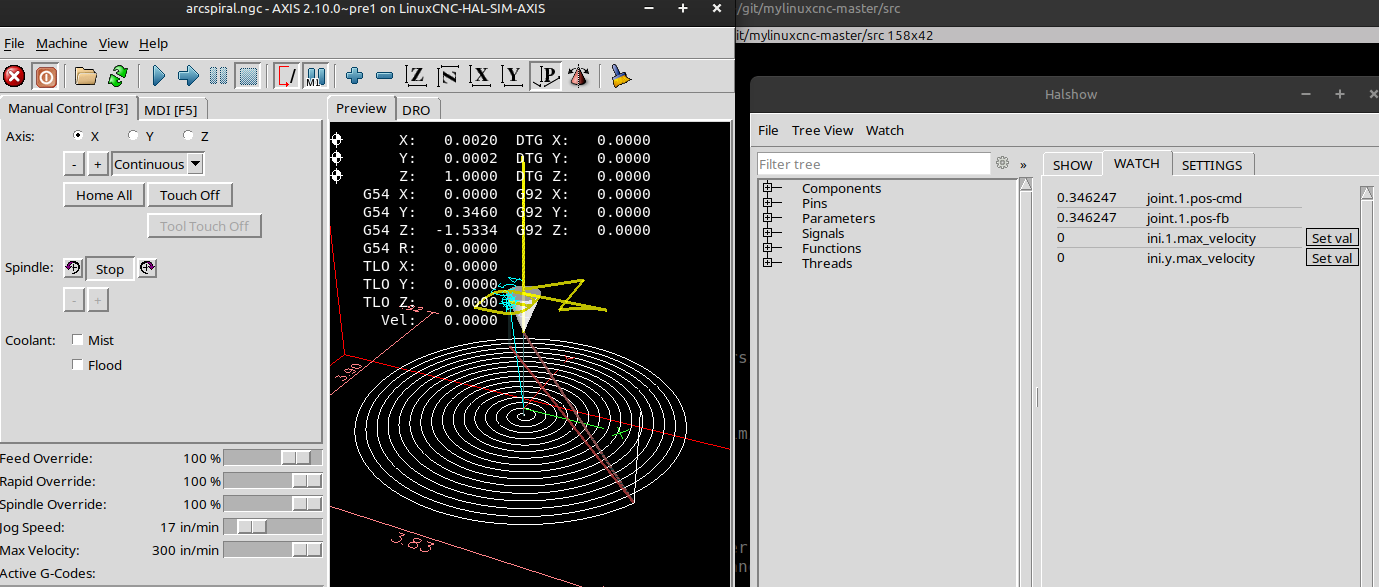
Same on 2.9.8
Attachments:
Please Log in or Create an account to join the conversation.
- spumco
- Offline
- Platinum Member
-
- Posts: 2171
- Thank you received: 896
My backplot jumps when I do the switchkins switch, but no amount of fiddling could get the hardware X-axis to move when I had velocity set to zero.
Please Log in or Create an account to join the conversation.
- spumco
- Offline
- Platinum Member
-
- Posts: 2171
- Thank you received: 896
I cut the parting slide stepgen scale by half (JOINT_3) so the V-axis can be programmed in diameter mode. When set like this jogging/MDI/g-code is just like X in diameter mode - very intuitive.
Getting ready to test G96 CSS and double-checking everything - set G54 offsets, etc. I enable switchkins and everything's fine...
But now the virtual X parting slide is only moving half the distance it should. DRO is following the movement - it's moving at half the distance it should as well.
Ok, got it - I've got the scale cut in half, and LCNC is cutting that in half again when I switch the kinematics and am commanding an X move.
Easy solution: change the JOINT_3 scale back to full-distance value when switchkins is active. But...
LCNC instantly throws a JOINT_3 following error when the scale switches. Bugger.
I can double the V-axis/JOINT_3 scale and fiddle with the jog values, but that will still leave the V-axis G54 offset wonky. I write the V-axis offset to the X-axis when switchkins is enabled (along with max/min limits) so the parting slide tool-tip at centerline can be set to "X0" for CSS.
How can I have my cake and eat it, too?
- V-axis/JOINT_3 to be in diameter mode when switchkins is not enabled, and
- X-axis/JOINT_3 to be in diameter mode when switchkins is enabled
- No following error when enabling switchkins
- All programming in G7 mode - switching back and forth between G7/G8 is going to cause my brain to hurt and a crash.
Please Log in or Create an account to join the conversation.
- Aciera
-
- Offline
- Administrator
-
- Posts: 4819
- Thank you received: 2176
Using the initial example with V-axis/joint2:
Forward:
case 0:
pos->tran.x = j[0];
pos->tran.z = j[1];
pos->v = 2*j[2];
break;
case 1:
pos->tran.x = j[2];
pos->tran.z = j[1];
pos->v = 2*j[0];
break;
Inverse:
switch (switchkins_type) {
case 0:
j[0] = pos->tran.x;
j[1] = pos->tran.z;
j[2] = 0.5* pos->v;
break;
case 1:
j[2] = pos->tran.x;
j[1] = pos->tran.z;
j[0] = 0.5*pos->v;
break;
}Please Log in or Create an account to join the conversation.
- spumco
- Offline
- Platinum Member
-
- Posts: 2171
- Thank you received: 896
Just so Im clear, the pos->v = 2*j[2];function results in the V-axis moving twice the distance of JOINT_2?
And the reverse forj[2] =0.5* pos->v;in the Inverse section?
Which means in case 1 I'd want to adjust the X-axis:pos->tran.x = 2*j[2];So the X-axis moves the correct distance when connected to the parting slide joint?
Which means I can adjust the INI stepgen position scale so it's not cut in half, and then adjust both case 0 and case 1 so the V-axis moves half the distance (diameter mode).
case 0:
            pos->tran.x = j[0];
            pos->tran.z = j[1];
            pos->v        = 0.5*j[2];
            break;
        case 1:
            pos->tran.x = j[2];
            pos->tran.z = j[1];
            pos->v        = 0.5*j[0];
break;- Don't adjust the case 1 X-axis/joint_2 relationship, because X-axis will move at half-distance when in diameter mode.
- DO adjust the case 1 V-axis/joint_0 relationship, because LCNC doesn't have a diameter mode for any axis other than X.
Make sense, or have I got something wrong?
Please Log in or Create an account to join the conversation.
- Aciera
-
- Offline
- Administrator
-
- Posts: 4819
- Thank you received: 2176
yes, the dro readout for V will show the double of the joint_2 position or, in other words, joint_2 will move half the commanded V axis position.
Just so Im clear, the pos->v = 2*j[2];function results in the V-axis moving twice the distance of JOINT_2?
And the reverse forj[2] =0.5* pos->v;in the Inverse section?
Sounds correct. Famous last words
Don't adjust the case 1 X-axis/joint_2 relationship, because X-axis will move at half-distance when in diameter mode.
DO adjust the case 1 V-axis/joint_0 relationship, because LCNC doesn't have a diameter mode for any axis other than X.

Please Log in or Create an account to join the conversation.