
LinuxCNC compatible industrial PC
- tommylight
-

- Offline
- Moderator
-

Less
More
- Posts: 21998
- Thank you received: 7488
13 May 2025 19:21 - 13 May 2025 21:26 #328410
by tommylight
Replied by tommylight on topic LinuxCNC compatible industrial PC
Yeah, sorry LangdonS, but do not use inexpensive power supplies, not worth the headache they cause, the time wasted finding they are the problem, nor the damage they might cause, and some are danger to life by not being isolated from the mains.
At a minimum use MeanWell or even better Delta, the price difference is not big.
Also, using old laptop power supplies is a very good idea, they are very high quality and do not fail.
For 5V supplies, there are very cheap and good quality ones form Anker, Baseus, Satechi, Gembird, just look for 5V only, so no QC or PD, always under 10$, isolated, protected, low ripple, etc.
-
Another good idea is those same companies but the 65W PD adapters, use a trigger board set to 20V, they can be found on sale for 15-20$. I have plenty of these, like everywhere.
Waiting for 140W/28V ones to drop in price, one of these can easily handle 4 of so called TB6600 drives at full load with low inductance motors.
Although from experience, they really do not like back EMF. I killed one testing drones, as soon as you pull back the throttle fast = they die! Anker 65W, only the output in use died, the second output still works fine.
At a minimum use MeanWell or even better Delta, the price difference is not big.
Also, using old laptop power supplies is a very good idea, they are very high quality and do not fail.
For 5V supplies, there are very cheap and good quality ones form Anker, Baseus, Satechi, Gembird, just look for 5V only, so no QC or PD, always under 10$, isolated, protected, low ripple, etc.
-
Another good idea is those same companies but the 65W PD adapters, use a trigger board set to 20V, they can be found on sale for 15-20$. I have plenty of these, like everywhere.
Waiting for 140W/28V ones to drop in price, one of these can easily handle 4 of so called TB6600 drives at full load with low inductance motors.
Although from experience, they really do not like back EMF. I killed one testing drones, as soon as you pull back the throttle fast = they die!
Anker 65W, only the output in use died, the second output still works fine.
Last edit: 13 May 2025 21:26 by tommylight. Reason: typo
Please Log in or Create an account to join the conversation.
- tommylight
-
- Offline
- Moderator
-
Less
More
- Posts: 21998
- Thank you received: 7488
13 May 2025 21:25 #328422
by tommylight
Replied by tommylight on topic LinuxCNC compatible industrial PC
Sorry, typo, fixing it now.
Please Log in or Create an account to join the conversation.
- dbtayl
- Offline
- Senior Member
-

Less
More
- Posts: 49
- Thank you received: 47
13 May 2025 23:06 #328425
by dbtayl
Years back I was working with Intel NUCs in an automotive application. They would have all sorts of strange behavior- crashes, reboots, stuttering, video artifacts, ...- when run off a cheap inverter. Apparently the inverter was sufficient to cause problems... after going through the 110Vac -> 19V DC adapter, and the internal 19Vdc -> 12/5/3.3/1.8Vdc converters.
Slightly more on topic, I've got a fanless Celeron PC like this one (looks like it at least, I don't have the exact model, but it's a J6412 chipset): www.amazon.com/HUNSN-Fanless-Industrial-...g/dp/B0CGLR51SL?th=1
It's... fine. Jitter numbers are nothing special (~30000 ns IIRC), but I also haven't had any thermal issues with it. I admittedly haven't watched the CPU temperature directly to have hard data to back that up, and my shop space is stably at a relatively low temperature. I specifically wanted fanless so there was no place for dust, metal chips, etc. to ingress.
I suspect you can lock the CPU frequency at the lowest to keep temps down, though I haven't bothered.
Replied by dbtayl on topic LinuxCNC compatible industrial PC
Definitely this! Bad power supplies are a nightmare. Maybe they work OK. Maybe they just die early. Worse cases are fire/shock, impossible-to-diagnose issues, dying and taking your entire system with it, etc. Some of the cheap supplies are terrifyingly bad.do not use inexpensive power supplies, not worth the headache they cause, the time wasted finding they are the problem, nor the damage they might cause, and some are danger to life by not being isolated from the mains.
Years back I was working with Intel NUCs in an automotive application. They would have all sorts of strange behavior- crashes, reboots, stuttering, video artifacts, ...- when run off a cheap inverter. Apparently the inverter was sufficient to cause problems... after going through the 110Vac -> 19V DC adapter, and the internal 19Vdc -> 12/5/3.3/1.8Vdc converters.
Slightly more on topic, I've got a fanless Celeron PC like this one (looks like it at least, I don't have the exact model, but it's a J6412 chipset): www.amazon.com/HUNSN-Fanless-Industrial-...g/dp/B0CGLR51SL?th=1
It's... fine. Jitter numbers are nothing special (~30000 ns IIRC), but I also haven't had any thermal issues with it. I admittedly haven't watched the CPU temperature directly to have hard data to back that up, and my shop space is stably at a relatively low temperature. I specifically wanted fanless so there was no place for dust, metal chips, etc. to ingress.
I suspect you can lock the CPU frequency at the lowest to keep temps down, though I haven't bothered.
The following user(s) said Thank You: tommylight
Please Log in or Create an account to join the conversation.
- tommylight
-
- Offline
- Moderator
-
Less
More
- Posts: 21998
- Thank you received: 7488
13 May 2025 23:16 #328427
by tommylight
Replied by tommylight on topic LinuxCNC compatible industrial PC
In Linux you can always check temperatures with
sensors
in a terminal, it will show something like this
sensors
in a terminal, it will show something like this
cnc@512NVME:~$ sensors
coretemp-isa-0000
Adapter: ISA adapter
Package id 0:  +38.0°C  (high = +80.0°C, crit = +100.0°C)
Core 0:        +30.0°C  (high = +80.0°C, crit = +100.0°C)
Core 4:        +31.0°C  (high = +80.0°C, crit = +100.0°C)
Core 8:        +27.0°C  (high = +80.0°C, crit = +100.0°C)
Core 12:       +31.0°C  (high = +80.0°C, crit = +100.0°C)
Core 16:       +32.0°C  (high = +80.0°C, crit = +100.0°C)
Core 20:       +30.0°C  (high = +80.0°C, crit = +100.0°C)
Core 28:       +32.0°C  (high = +80.0°C, crit = +100.0°C)
Core 29:       +32.0°C  (high = +80.0°C, crit = +100.0°C)
Core 30:       +32.0°C  (high = +80.0°C, crit = +100.0°C)
Core 31:       +32.0°C  (high = +80.0°C, crit = +100.0°C)

hidpp_battery_0-hid-3-3
Adapter: HID adapter
in0:           0.00 V

acpitz-acpi-0
Adapter: ACPI interface
temp1:        +27.8°C

amdgpu-pci-0300
Adapter: PCI adapter
vddgfx:      768.00 mV
fan1:           0 RPM  (min =    0 RPM, max = 3000 RPM)
edge:         +41.0°C  (crit = +100.0°C, hyst = -273.1°C)
                       (emerg = +105.0°C)
junction:     +43.0°C  (crit = +110.0°C, hyst = -273.1°C)
                       (emerg = +115.0°C)
mem:          +44.0°C  (crit = +100.0°C, hyst = -273.1°C)
                       (emerg = +105.0°C)
PPT:          10.00 W  (cap = 219.00 W)

nvme-pci-0400
Adapter: PCI adapter
Composite:    +31.9°C  (low  = -273.1°C, high = +69.8°C)
                       (crit = +79.8°C)

cnc@512NVME:~$
Please Log in or Create an account to join the conversation.
- workshop54
- Offline
- Junior Member
-

Less
More
- Posts: 39
- Thank you received: 9
28 May 2025 08:14 #329296
by workshop54
Replied by workshop54 on topic LinuxCNC compatible industrial PC
I did some configuration and testing on the Fitlet3.
I made changes in the BIOS, ran the script created by mozmck ( forum.linuxcnc.org/38-general-linuxcnc-q...ead-and-irq-affinity ) and did the latency test (results in the thread forum.linuxcnc.org/38-general-linuxcnc-q...ead-and-irq-affinity ). It doesn't look too good so far for the Fitlet3.
Does anyone have ideas on how to improve it because I'm all out of ideas (for now)
I made changes in the BIOS, ran the script created by mozmck ( forum.linuxcnc.org/38-general-linuxcnc-q...ead-and-irq-affinity ) and did the latency test (results in the thread forum.linuxcnc.org/38-general-linuxcnc-q...ead-and-irq-affinity ). It doesn't look too good so far for the Fitlet3.
Does anyone have ideas on how to improve it because I'm all out of ideas (for now)
Please Log in or Create an account to join the conversation.
- unknown
- Offline
- Platinum Member
-

Less
More
- Posts: 887
- Thank you received: 323
28 May 2025 08:45 #329297
by unknown
Replied by unknown on topic LinuxCNC compatible industrial PC
Just run the latency tests that come with linuxcnc. If they look ok go with it.
But I've never had much faith with the Atom platform for Linuxcnc.
But I've never had much faith with the Atom platform for Linuxcnc.
Please Log in or Create an account to join the conversation.
- workshop54
- Offline
- Junior Member
-
Less
More
- Posts: 39
- Thank you received: 9
28 May 2025 10:06 #329305
by workshop54
Replied by workshop54 on topic LinuxCNC compatible industrial PC
I started with the latency tests, but then I found the script to run latency tests.
The best result I got with with latency-histogram --nobase was about 230000
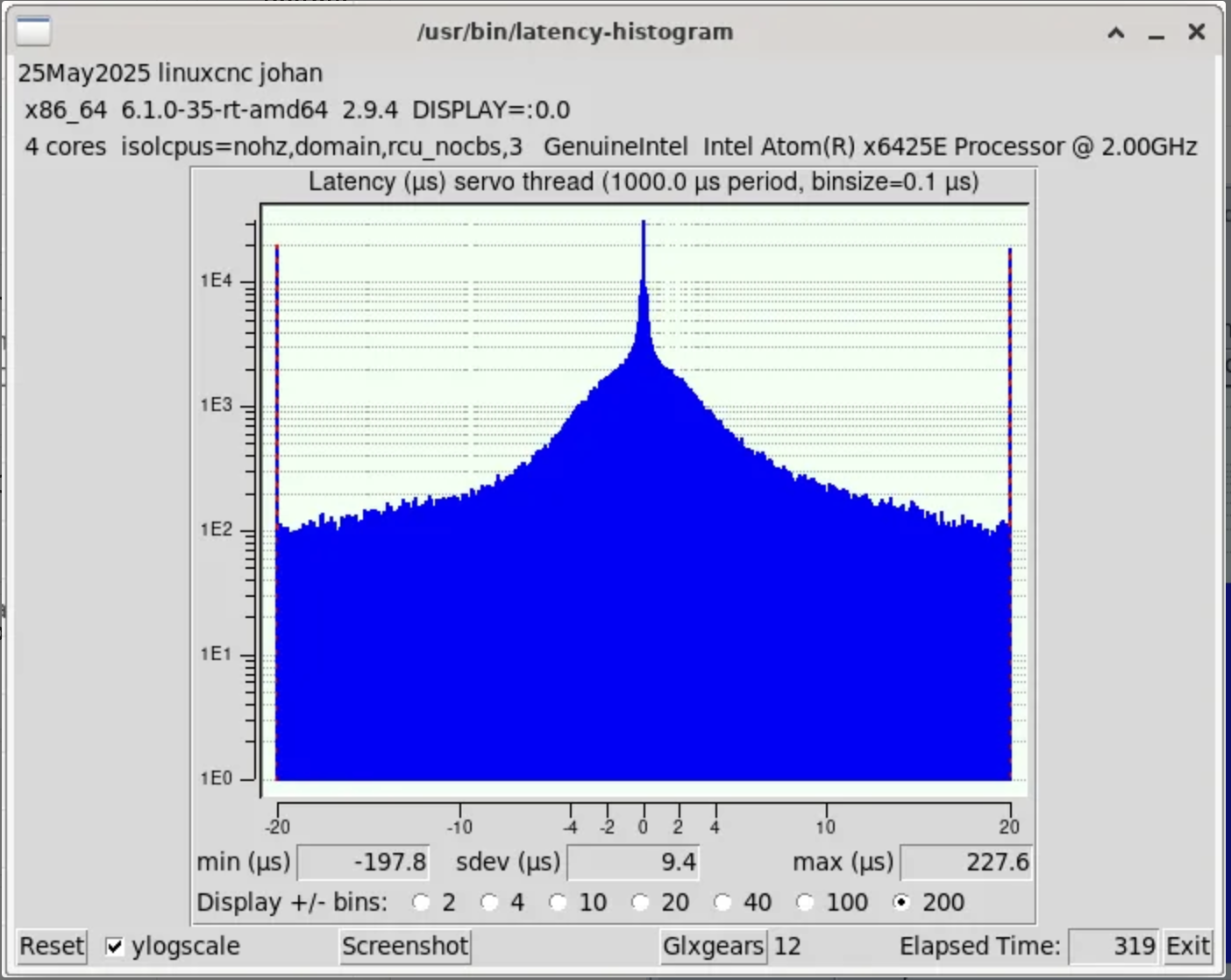
I logged every change I made and the results after the change, which gives me some nice insights what happens, but I cannot get the latency any lower.
I mentioned the "Atom platform", but I don't have enough experience with hardware to know exactly what you mean by that. I can make an educated guess, but that's basically it.
So instead of looking for PC's of a specific brand and type, would it be better to look at platforms that work well?
The best result I got with with latency-histogram --nobase was about 230000
I logged every change I made and the results after the change, which gives me some nice insights what happens, but I cannot get the latency any lower.
I mentioned the "Atom platform", but I don't have enough experience with hardware to know exactly what you mean by that. I can make an educated guess, but that's basically it.
So instead of looking for PC's of a specific brand and type, would it be better to look at platforms that work well?
Attachments:
Please Log in or Create an account to join the conversation.
- unknown
- Offline
- Platinum Member
-
Less
More
- Posts: 887
- Thank you received: 323
28 May 2025 11:58 #329310
by unknown
Replied by unknown on topic LinuxCNC compatible industrial PC
try isolcpus=2,3
Please Log in or Create an account to join the conversation.
- unknown
- Offline
- Platinum Member
-
Less
More
- Posts: 887
- Thank you received: 323
28 May 2025 12:06 #329313
by unknown
Replied by unknown on topic LinuxCNC compatible industrial PC
Atom is the cpu.
I've had good results with 3rd gen 4 core i5s, specifically Lenovo M73 tower, works well enough for software step generation.
Ex corporate PCs (x86/64 platforms)seem to be best bang for buck, RPi5 with a NVMe drive are quite quick, latency is usable, I've had one on the test bench communicating with a 7i92 for a few weeks with no issues. Spent a few weeks in January putting together the RPi Linuxcnc images that are for upload.
Odroid have a good range of compact x86/64 boards, I have an earlier model H3 plus that's been in for 4 or 5 years.
Asrok J series MB work well, either 4 or dual core.
I've had good results with 3rd gen 4 core i5s, specifically Lenovo M73 tower, works well enough for software step generation.
Ex corporate PCs (x86/64 platforms)seem to be best bang for buck, RPi5 with a NVMe drive are quite quick, latency is usable, I've had one on the test bench communicating with a 7i92 for a few weeks with no issues. Spent a few weeks in January putting together the RPi Linuxcnc images that are for upload.
Odroid have a good range of compact x86/64 boards, I have an earlier model H3 plus that's been in for 4 or 5 years.
Asrok J series MB work well, either 4 or dual core.
The following user(s) said Thank You: workshop54
Please Log in or Create an account to join the conversation.
- workshop54
- Offline
- Junior Member
-
Less
More
- Posts: 39
- Thank you received: 9
31 May 2025 16:48 #329453
by workshop54
Replied by workshop54 on topic LinuxCNC compatible industrial PC
I tried your suggestion, but that didn't work either.
I decided to follow the advice you guys gave me earlier and just buy and old PC (a Lenovo ThinkCentre M83 SFF). Let's hope that will yield better results.
I decided to follow the advice you guys gave me earlier and just buy and old PC (a Lenovo ThinkCentre M83 SFF). Let's hope that will yield better results.
Please Log in or Create an account to join the conversation.
Time to create page: 0.959 seconds