

- Posts: 50
- Thank you received: 1
Keyboard re-mapping (key binding)
14 years 11 months ago #14675
by ioiotutu
Keyboard re-mapping (key binding) was created by ioiotutu
Hi,
is it possible remap some commands keys?
I need to swap arrow-left/arrow-right (X moving) with arrow-up/arrow-dn (Y moving). Is there a config file for this?
Thanks,
Michele
is it possible remap some commands keys?
I need to swap arrow-left/arrow-right (X moving) with arrow-up/arrow-dn (Y moving). Is there a config file for this?
Thanks,
Michele
Please Log in or Create an account to join the conversation.

14 years 11 months ago #14677
by BigJohnT
Replied by BigJohnT on topic Re:Keyboard re-mapping (key binding)
AFAIK you have edit axis.py to change keyboard mapping. Are you wanting to do this because your machine jogs backwards?
John
John
Please Log in or Create an account to join the conversation.

14 years 11 months ago - 14 years 11 months ago #14678
by andypugh
Replied by andypugh on topic Re:Keyboard re-mapping (key binding)
ioiotutu wrote:
I think so.
linuxcnc.org/docs/html/gui_axis.html#r1_11_4
Though I don't know if that allows you to re-map keys which are already allocated. I also have no idea what the correct syntax is, but you can probably just copy the program lines from inside Axis.
is it possible remap some commands keys?
I think so.
linuxcnc.org/docs/html/gui_axis.html#r1_11_4
Though I don't know if that allows you to re-map keys which are already allocated. I also have no idea what the correct syntax is, but you can probably just copy the program lines from inside Axis.
Last edit: 14 years 11 months ago by andypugh.
Please Log in or Create an account to join the conversation.
14 years 11 months ago #14680
by ioiotutu
Replied by ioiotutu on topic Re:Keyboard re-mapping (key binding)
Thanks,
when i'm in front of the machine i see Y axis: moving right + direction, moving left - direction. X axis moving to me + direction and far to me - direction.
Home position is right - up (far to me).
I hope you understand my bad english!
So when push arrow key i need:
arrow-right -> Y +
arrow-left -> Y -
arrow-up -> X-
arrow-down -> X+
where can i find axis.py?
Please Log in or Create an account to join the conversation.
14 years 11 months ago #14683
by BigJohnT
Replied by BigJohnT on topic Re:Keyboard re-mapping (key binding)
Normally when you stand in front of a XYZ machine the X axis is the one that goes left/right, the Y in/out, the Z up,down. Normal machines X+ jogs the tool to the right and Y+ jogs the tool away from you and Z+ jogs the tool up. I say tool because some machines move the spindle in XY and some move the material in XY but relative to the material the tool movement is what you want to move in the correct directions.
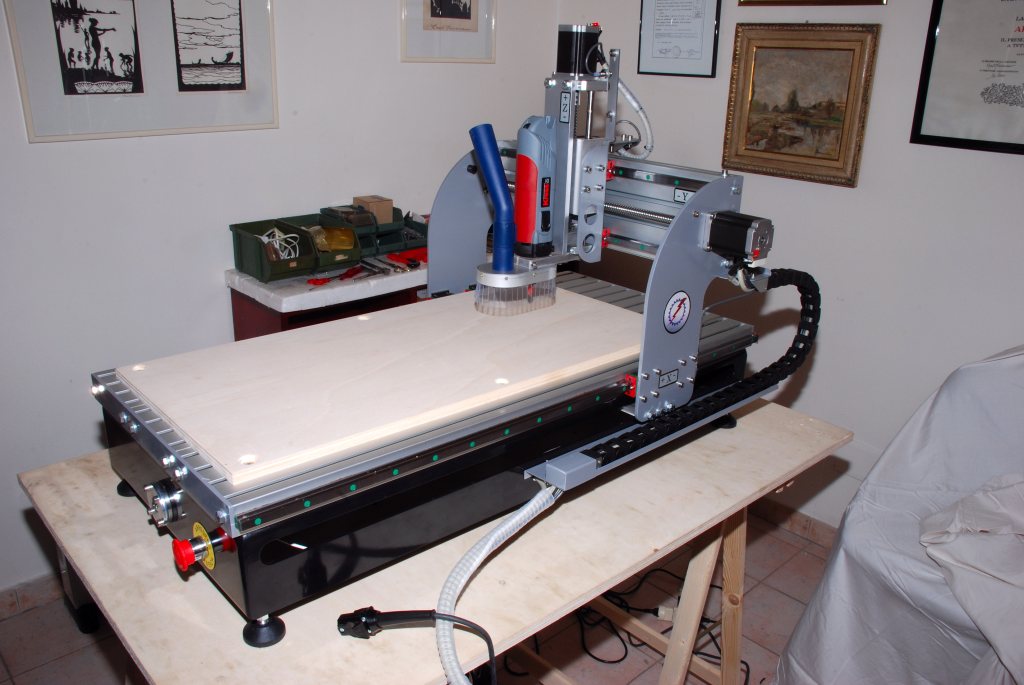
Unless you have some strange machine... do you have a photo of it?
John
Unless you have some strange machine... do you have a photo of it?
John
Please Log in or Create an account to join the conversation.
14 years 11 months ago #14685
by ioiotutu
Replied by ioiotutu on topic Re:Keyboard re-mapping (key binding)
Here is the photo.
If i stay left side all is ok, but usually i stay in front and i confuse me with jog. image missing http://www.linuxcnc.org/media/kunena/attachments/legacy/images/DSC_8980.jpg
If i stay left side all is ok, but usually i stay in front and i confuse me with jog. image missing http://www.linuxcnc.org/media/kunena/attachments/legacy/images/DSC_8980.jpg
Please Log in or Create an account to join the conversation.
Time to create page: 0.565 seconds