
Simple/Manual Centre Finder
- Waldemar
-
 Topic Author
- Offline
- Senior Member
-

Less
More
- Posts: 40
- Thank you received: 16
01 Sep 2025 23:06 #334246
by Waldemar
Replied by Waldemar on topic Simple/Manual Centre Finder
Just been perusing some of the threads on Flex - really interesting. I'll definitely have a closer look..!
The following user(s) said Thank You: JT
Please Log in or Create an account to join the conversation.
- andypugh
-

- Offline
- Moderator
-

Less
More
- Posts: 19899
- Thank you received: 4655
04 Sep 2025 22:36 - 04 Sep 2025 23:15 #334448
by andypugh
Replied by andypugh on topic Simple/Manual Centre Finder
This captured my interest, so I made one.
Drop the two attached files into the same folder as your INI file.
Then, in the [DISPLAY] section of the INI file add:Be careful with the buttons, they are not tested on real hardware.Set Zero - should set the coordinate system zero to be the centre of the probed circle (considers G54 etc but not G92 at the moment)GotoZero does a Z-hop of (currently) 20mm then G0 X0 Y0.The diameter measured has 6mm subtracted from it to allow for probe diameter.The Z-hop and probe diameter are constants defined near the top of the python file. Feel free to edit to suit.This uses GladeVCP. As has been suggested elsewhere, there are other VCP frameworks, but Glade works well enough with Axis.
Drop the two attached files into the same folder as your INI file.
Then, in the [DISPLAY] section of the INI file add:
EMBED_TAB_NAME=Centre Finder
EMBED_TAB_COMMAND=halcmd loadusr -Wn gladevcp gladevcp -c gladevcp -x {XID} -u ./CentreFinder.py ./CentreFinder.ui
Last edit: 04 Sep 2025 23:15 by andypugh.
The following user(s) said Thank You: Waldemar
Please Log in or Create an account to join the conversation.
- andypugh
-
- Offline
- Moderator
-
Less
More
- Posts: 19899
- Thank you received: 4655
04 Sep 2025 22:39 - 04 Sep 2025 23:11 #334450
by andypugh
I have just realised that my thingy requires you to type in the values. That's not as ergonomic as one might hope. Give me a few minutes.
Files updated
Replied by andypugh on topic Simple/Manual Centre Finder
Files updated
Last edit: 04 Sep 2025 23:11 by andypugh.
The following user(s) said Thank You: Waldemar
Please Log in or Create an account to join the conversation.
- Waldemar
-
Topic Author
- Offline
- Senior Member
-
Less
More
- Posts: 40
- Thank you received: 16
09 Sep 2025 07:37 #334675
by Waldemar
Replied by Waldemar on topic Simple/Manual Centre Finder
Cheers Andy,
I'll get hold of 2.9.5 and try it out on the sim!
I'll get hold of 2.9.5 and try it out on the sim!
Please Log in or Create an account to join the conversation.
- pgf
- Offline
- Premium Member
-

Less
More
- Posts: 127
- Thank you received: 25
04 Nov 2025 22:18 #337844
by pgf
Replied by pgf on topic Simple/Manual Centre Finder
This is a good thread!
My probing support is in sort of a middle ground, niether fully manual, nor fully automatic. My automatic touchoff probes, and my manual touchoffs, all get logged to a file, courtesy LOGAPPEND/LOG/LOG_CLOSE. For a long time that log wasn't used -- it was just a byproduct of some sample code I'd started with over a decade ago.
But earlier this year I had a need to match the machines coordinate system to my workpiece. ((It was easier than trying to get it clamped down in perfect alignment.) So I wrote some (external) code to pull data from that probe logfile. The code took the last couple of touchoff points, and calculated the rotation angle of a line drawn through those points. And then printed the g-code command necessary to adjust the current coordinate system's rotation, i.e. "G10 L2 P0 R $angle". Later, I realized I could also use the log to find the center point between two probes, so I added that. If the two most recent probes were both done in the same direction, then they were likely probing an edge, and it prints the angle of the edge. If they were done in opposite directions, they were likely probing two edges (inside or out) of something whose center I'm interested in.
And then today, after finding this thread, I enhanced it a little more: It can now also look at the last three probes in the log file and give me the center point of the circle they describe.
All without any data entry, or modifications to my existing probing code. It runs from a button on my desktop (i.e. outside of and beside Axis), and puts up a window with its results. I simply copy the g-code commands it gives to the MDI window.
I'm happy to share what I have, but with caveats: a) it's written in shell, because that's what I like to do, and b), it calls out to a calculator program for the floating point. Almost any other language would have avoided 'b'.
Anyway, thanks for the inspiration, and for the center-finding equations.
My probing support is in sort of a middle ground, niether fully manual, nor fully automatic. My automatic touchoff probes, and my manual touchoffs, all get logged to a file, courtesy LOGAPPEND/LOG/LOG_CLOSE. For a long time that log wasn't used -- it was just a byproduct of some sample code I'd started with over a decade ago.
But earlier this year I had a need to match the machines coordinate system to my workpiece. ((It was easier than trying to get it clamped down in perfect alignment.) So I wrote some (external) code to pull data from that probe logfile. The code took the last couple of touchoff points, and calculated the rotation angle of a line drawn through those points. And then printed the g-code command necessary to adjust the current coordinate system's rotation, i.e. "G10 L2 P0 R $angle". Later, I realized I could also use the log to find the center point between two probes, so I added that. If the two most recent probes were both done in the same direction, then they were likely probing an edge, and it prints the angle of the edge. If they were done in opposite directions, they were likely probing two edges (inside or out) of something whose center I'm interested in.
And then today, after finding this thread, I enhanced it a little more: It can now also look at the last three probes in the log file and give me the center point of the circle they describe.
All without any data entry, or modifications to my existing probing code. It runs from a button on my desktop (i.e. outside of and beside Axis), and puts up a window with its results. I simply copy the g-code commands it gives to the MDI window.
I'm happy to share what I have, but with caveats: a) it's written in shell, because that's what I like to do, and b), it calls out to a calculator program for the floating point. Almost any other language would have avoided 'b'.
Anyway, thanks for the inspiration, and for the center-finding equations.
The following user(s) said Thank You: Waldemar
Please Log in or Create an account to join the conversation.
- Waldemar
-
Topic Author
- Offline
- Senior Member
-
Less
More
- Posts: 40
- Thank you received: 16
28 Aug 2026 09:40 #349074
by Waldemar
Replied by Waldemar on topic Simple/Manual Centre Finder
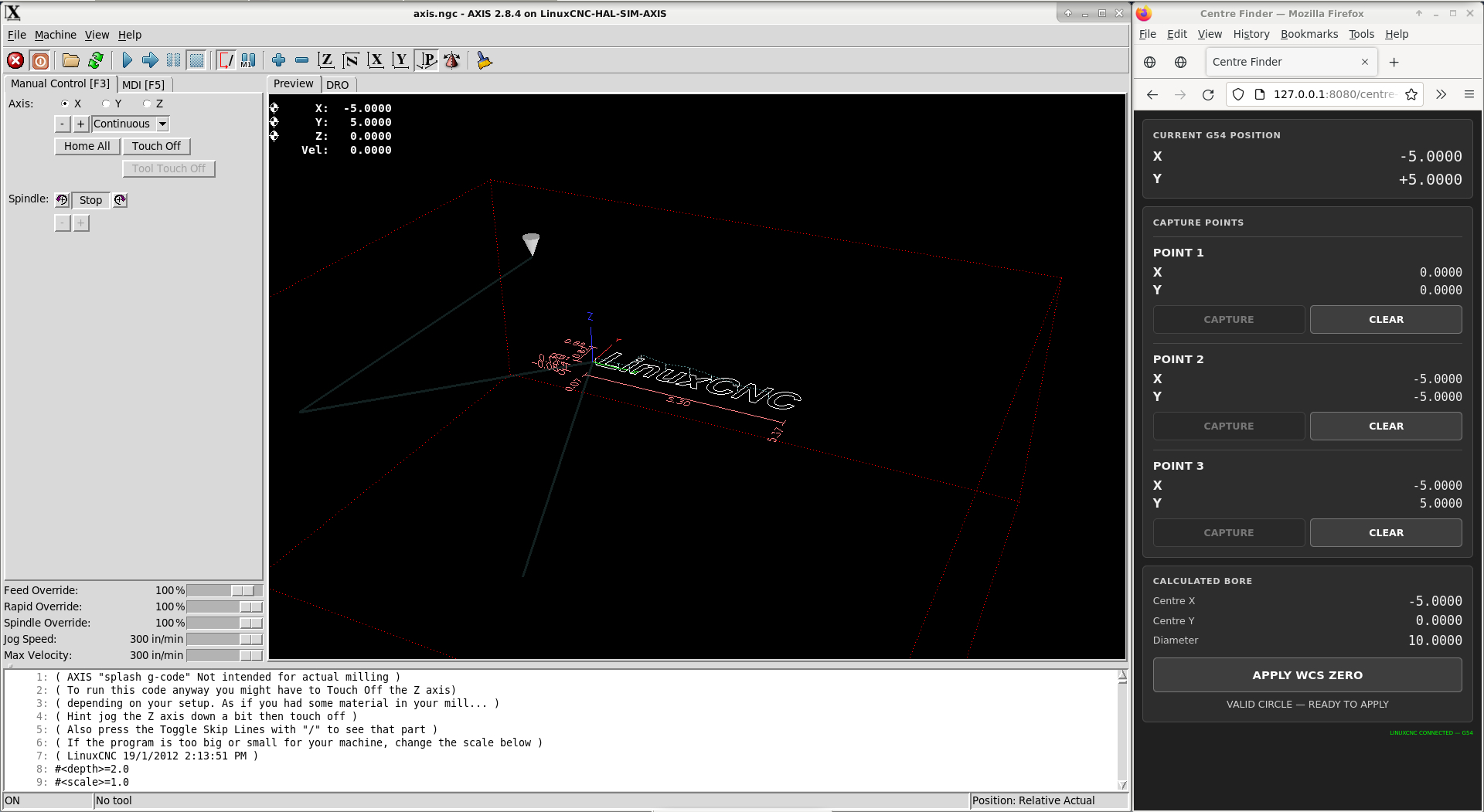
I went back to this recently and looked into an alternative approach. I simply don't have the knowledge (or courage!) to directly poke about with LinuxCNC, potentially breaking things as I go... Anyway, this approach is browser based and uses a small Python bridging app, which (of course) ChatGPT wrote. I'll attach the relevant files below. To use them:
With LinuxCNC running, open a terminal in the directory containing the files and run python centre-finder.py, then open http://127.0.0.1:8080/centre-finder.html in Firefox.
The UI is pretty chonky, but I'll see about thinning it down in time.
Manually jog the tool to three points on the bore/cylinder, hit CAPTURE at each one, and it calculates the circle centre and sets the active WCS XY zero to that point. It doesn't move the machine — it's essentially a convenient operator interface sitting on top of LinuxCNC's Python interface. Currently working on 2.8.x/Python 2.7, with an eventual possibility of adding a horizontal electrical probe.
Once done and Firefox is closed, the Python server simply remains idle in the background waiting for another HTTP request; it does not generate motion or continuously interact with the LinuxCNC motion system, so it should have no meaningful effect on machine motion or step generation.
HOW IT WORKS:
The command the Python bridge sends to LinuxCNC is:
G10 L2 P0 X... Y...
Specifically, it constructs it as:
COMMAND.mdi("G10 L2 P0 X%.12f Y%.12f" % (new_wcs_x, new_wcs_y))
The important bit is P0: P0 means the currently active coordinate system. So if you're in G54, it writes G54. If you're in G55, it writes G55, etc.
COMPATIBILITY:
Developed and tested on LinuxCNC 2.8.x / Python 2.7. The browser interface is deliberately lightweight and the WCS write uses the standard LinuxCNC G10 L2 P0 command, so the underlying approach should be familiar across LinuxCNC versions. However, the Python bridge uses the LinuxCNC Python API and may need minor changes on significantly older/newer installations. Test in a SIM configuration before using it on a machine.
It is intended to set the active WCS XY offset; it does not move the machine.
Disclaimer: I've developed and tested this on a LinuxCNC 2.8.4 HAL SIM configuration and satisfied myself that the three-point calculation, active-WCS update and general workflow behave as intended. That said, this is very much a "use at your own risk" utility — please test it on your own configuration/SIM and verify the resulting coordinates before trusting it on a real machine. I accept no responsibility for damage to the machine, tooling or workpiece.
With LinuxCNC running, open a terminal in the directory containing the files and run python centre-finder.py, then open http://127.0.0.1:8080/centre-finder.html in Firefox.
The UI is pretty chonky, but I'll see about thinning it down in time.
Manually jog the tool to three points on the bore/cylinder, hit CAPTURE at each one, and it calculates the circle centre and sets the active WCS XY zero to that point. It doesn't move the machine — it's essentially a convenient operator interface sitting on top of LinuxCNC's Python interface. Currently working on 2.8.x/Python 2.7, with an eventual possibility of adding a horizontal electrical probe.
Once done and Firefox is closed, the Python server simply remains idle in the background waiting for another HTTP request; it does not generate motion or continuously interact with the LinuxCNC motion system, so it should have no meaningful effect on machine motion or step generation.
HOW IT WORKS:
The command the Python bridge sends to LinuxCNC is:
G10 L2 P0 X... Y...
Specifically, it constructs it as:
COMMAND.mdi("G10 L2 P0 X%.12f Y%.12f" % (new_wcs_x, new_wcs_y))
The important bit is P0: P0 means the currently active coordinate system. So if you're in G54, it writes G54. If you're in G55, it writes G55, etc.
COMPATIBILITY:
Developed and tested on LinuxCNC 2.8.x / Python 2.7. The browser interface is deliberately lightweight and the WCS write uses the standard LinuxCNC G10 L2 P0 command, so the underlying approach should be familiar across LinuxCNC versions. However, the Python bridge uses the LinuxCNC Python API and may need minor changes on significantly older/newer installations. Test in a SIM configuration before using it on a machine.
It is intended to set the active WCS XY offset; it does not move the machine.
Disclaimer: I've developed and tested this on a LinuxCNC 2.8.4 HAL SIM configuration and satisfied myself that the three-point calculation, active-WCS update and general workflow behave as intended. That said, this is very much a "use at your own risk" utility — please test it on your own configuration/SIM and verify the resulting coordinates before trusting it on a real machine. I accept no responsibility for damage to the machine, tooling or workpiece.
The following user(s) said Thank You: NWE
Please Log in or Create an account to join the conversation.
- JT
-

- Away
- Administrator
-

Less
More
- Posts: 1103
- Thank you received: 593
28 Aug 2026 22:33 - 28 Aug 2026 23:01 #349100
by JT
Replied by JT on topic Simple/Manual Centre Finder
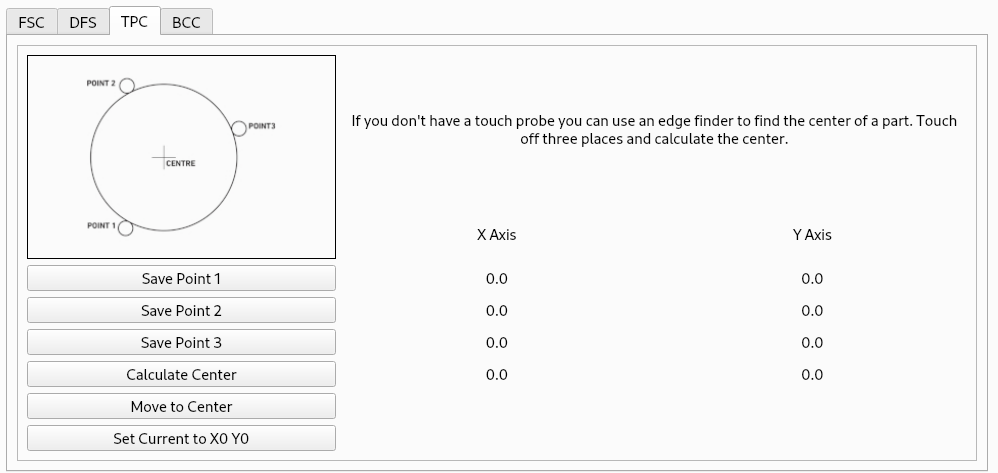
A 3 point center finder is included with the Flex GUI...
JT
JT
Attachments:
Last edit: 28 Aug 2026 23:01 by JT.
The following user(s) said Thank You: NWE
Please Log in or Create an account to join the conversation.
- Waldemar
-
Topic Author
- Offline
- Senior Member
-
Less
More
- Posts: 40
- Thank you received: 16
29 Aug 2026 10:17 #349113
by Waldemar
Replied by Waldemar on topic Simple/Manual Centre Finder
Yeah, I've seen that, but I'm very reluctant to start nuts and bolts messing with a system that works for me. Had a good look at Flex, but the installation etc. is still pretty opaque to me - add to that the fact that my LinuxCNC PC is sat offline everything becomes that bit more complicated..!
Please Log in or Create an account to join the conversation.
- JT
-
- Away
- Administrator
-
Less
More
- Posts: 1103
- Thank you received: 593
29 Aug 2026 20:30 - 29 Aug 2026 20:30 #349131
by JT
Replied by JT on topic Simple/Manual Centre Finder
Installation is dead nuts simple, download the deb, use sneaker net to copy to your pc and install it...
JT
JT
Last edit: 29 Aug 2026 20:30 by JT.
Please Log in or Create an account to join the conversation.
- cmorley
- Offline
- Moderator
-
Less
More
- Posts: 7368
- Thank you received: 2181
30 Aug 2026 01:25 #349134
by cmorley
Replied by cmorley on topic Simple/Manual Centre Finder
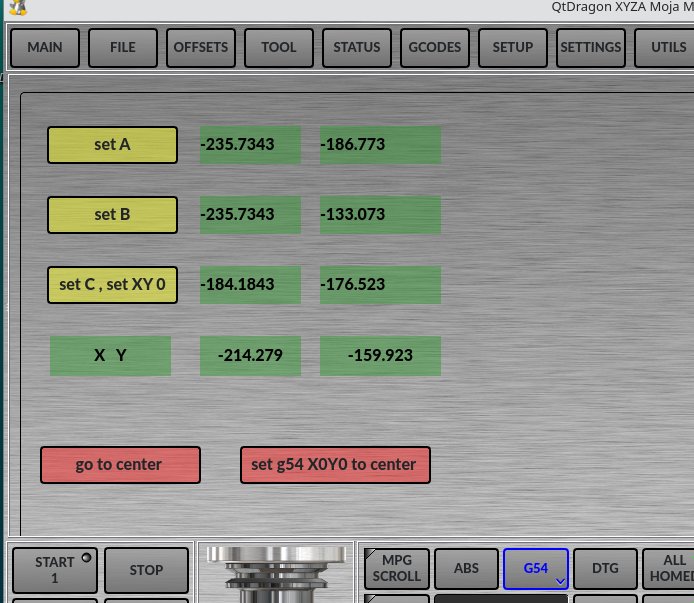
If your willing to donate the code, I'll add it to linuxcnc.I used your formulas for calculating the center of a circle and created a widget for qtdragon that does it.
(There's also a Python function that calculates the center from three coordinates.)
You're using axis, so it probably won't be useful to you.
Please Log in or Create an account to join the conversation.
Time to create page: 1.620 seconds