

- Posts: 19311
- Thank you received: 4655
XHC-HB04 wireless MPG pendant HAL module
11 years 9 months ago #55523
by andypugh
Replied by andypugh on topic XHC-HB04 wireless MPG pendant HAL module
It finds the XHB
It looks like perhaps the USB port or the device might be faulty. (but that is a total guess)
I am a bit worried by this too:
Which might or might not be related.
Do you have any other USB ports you can try?
Code:
xhc-hb04: waiting for XHC-HB04 device
xhc-hb04: found XHC-HB04 device
xhc-hb04: connection lost, cleaning up
It looks like perhaps the USB port or the device might be faulty. (but that is a total guess)
I am a bit worried by this too:
Code:
[ 4367.563239] spurious APIC interrupt on CPU#1, should never happen.
Do you have any other USB ports you can try?
Please Log in or Create an account to join the conversation.
11 years 9 months ago #55525
by andypugh
I missed that. Ignore my comments about USB for a while, that error might be the disconnect.
Does that pin exist at any point?
Replied by andypugh on topic XHC-HB04 wireless MPG pendant HAL module
ArcEye wrote: One of the errors is regards a pin on axis 3 ie. A axis
I missed that. Ignore my comments about USB for a while, that error might be the disconnect.
Code:
/usr/local/bin/xhc-hb04.hal:23: Pin 'axis.3.jog-enable' does not exist
Does that pin exist at any point?
Please Log in or Create an account to join the conversation.

11 years 9 months ago - 11 years 9 months ago #55531
by garulus
Replied by garulus on topic XHC-HB04 wireless MPG pendant HAL module
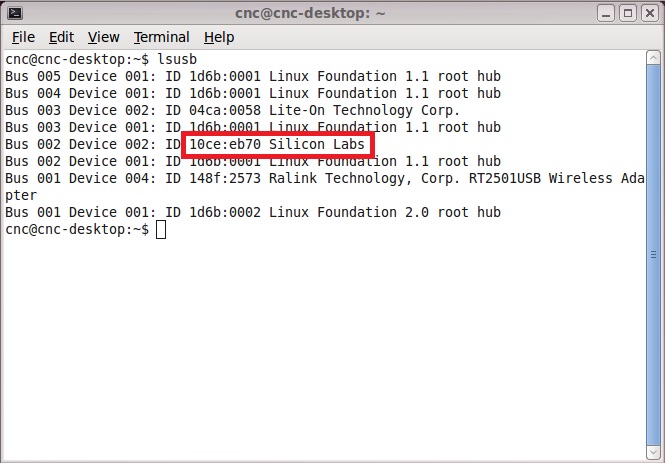
Thanks for replays. I just made fresh install of linuxcnc 2.6.5 and my pendant is plugged in. After command lsusb is shoving nicely as 10ce:eb70 Silicon Labs, so what next?
Last edit: 11 years 9 months ago by garulus.
Please Log in or Create an account to join the conversation.

11 years 9 months ago #55533
by dgarrett
Replied by dgarrett on topic XHC-HB04 wireless MPG pendant HAL module
Since you have now told us you have a 2.6 version,
you can try a sim config:
These sim configs will be copied to ~/linuxcnc/configs/
and there are instructions in the README for
modifying another configuration.
you can try a sim config:
Code:
1) Plug in the pendant USB adapter
2) Start linuxcnc
3) In the Configuration Selector, select the xhc-hb04 directory:
Sample Configurations
sim
axis
xhc-hb04
Note: click on the + (plus sign) box to open
each directory, click on the directory
name to see its README, click on the
configuration name to select it and
see any configuration-specific information.
4) Select one of the sim configurations:
xhc-hb04-layout1
xhc-hb04-layout2
xhc-hb04-layout2_mm
And click OK to start the sim config
and there are instructions in the README for
modifying another configuration.
Please Log in or Create an account to join the conversation.
11 years 9 months ago #55534
by garulus
Replied by garulus on topic XHC-HB04 wireless MPG pendant HAL module
Great! It works! Previously I tried Sample Configurations/apps/xhc-....tomorrow will continue... 
Please Log in or Create an account to join the conversation.
11 years 9 months ago #55536
by dgarrett
Replied by dgarrett on topic XHC-HB04 wireless MPG pendant HAL module
The Sample Configurations/apps/ directory provides sample applications for demonstration and test but they are not complete linuxcnc configurations.
Sample Configurations/apps/xhc-hb04/README:
The standalone app allows one to test that the buttons and jogwheel are working and you can verify the button names for the different pendant button layouts.
Sample Configurations/apps/xhc-hb04/README:
Code:
xhc-hbo4 standalone tests
Use to test button layouts for a USB wireless xhc-hb04 pendant.
xhc-hb04-layout1.demo -- test with layout1 (16 buttons)
xhc-hb04-layout2.demo -- test with layout2 (18 buttons)
xhc-hb04.demo -test with no predefined button layout
(Connect a xhc-hb04 pendant and turn it on to use these programs)
The standalone app allows one to test that the buttons and jogwheel are working and you can verify the button names for the different pendant button layouts.
The following user(s) said Thank You: emcocnc
Please Log in or Create an account to join the conversation.
Time to create page: 0.373 seconds