Which Mesa Card Should I Buy?

More
2 years 8 months ago - 2 years 8 months ago #292653 by spumco
7 - IO QUANTITY & TYPE

Once the command signal type is determined, the next step is to make a list of all inputs & outputs (IO) required or desired.  Include all sensors, switches, buttons, relays, etc.; all hardware which needs to signal or be triggered by LCNC should be on the list.
      
    • Inputs to LCNC
        ◦ Voltage supplied (or required) by component
        ◦ Current/amps consumed/supplied by component
        ◦ Analog inputs?  i.e. potentiometer, pressure transducer, etc.
    • Outputs from LCNC
        ◦ Does the component sink or source voltage? Or either?
        ◦ What voltage?
        ◦ Current/amps consumed/supplied by component

Are there lots of IO or just a few?  Are most of the IO for an operator control panel, or lots of relays to drive auxiliary functions (coolant pumps, lube pumps, lights, air cylinder valves, etc.)?  Do your drives require an enable signal?

Note that many newer, but not all, Mesa cards can be configured for both sinking and sourcing inputs & outputs.

Answering the questions above will help you form an idea of how many and what type of IO you need.

ADDITIONAL CONSIDERATIONS
Beyond axis drive command signals and general IO, you should consider the following questions:
    • Spindle - how do you plan to control the spindle(s)?
        ◦ On/off relays with manual speed control?
        ◦ 0-10v speed control?
        ◦ PWM?
        ◦ Analog or Step-dir servo?
    • Encoders - do you plan to add linear encoders for closed-loop feedback to LCNC?
        ◦ Do you have 'dumb' analog servo drives and LCNC will close the loop?
        ◦ Do you need/want a spindle encoder?
    • Operator console - do you plan to add/build a feature-rich (i.e. complicated) operator station with physical controls?  These can eat up IO quickly with lots of buttons, switches, and lights
    • Plasma - not specifically detailed in this guide, but the THCAD series of frequency to voltage cards are widely used for plasma arc sensing.  Additional research on which FPGA cards are most recommended for use with the THCAD would be prudent.
    • Expansion - do you think you might want any/all of the above in the future? Some Mesa FPGA cards are more expandable than others, depending on what it is you want to add in the future.

 
Last edit: 2 years 8 months ago by spumco. Reason: REV2
The following user(s) said Thank You: behai

Please Log in or Create an account to join the conversation.
More
2 years 8 months ago - 2 years 3 months ago #292656 by spumco
8 - PUTTING IT ALL TOGETHER

To review:
    • Determine the host connection type, based on your computer
        ◦ Ethernet
        ◦ Plug-N-Go
        ◦ Direct plug-in (RPii)
    • Determine your drive input signal type and quantity
        ◦ Step-dir or PWM
        ◦ Analog
    • Determine your IO type & quantity requirements
        ◦ Digital in/out
        ◦ Analog in/out
        ◦ Sink/source (or both)
        ◦ Voltage level(s)
    • Determine additional features, immediate or future
        ◦ FPGA expansion capability
        ◦ Encoder inputs
        ◦ Spindle control & feedback
    • Determine physical mounting restrictions
        ◦ Do you have room for a 'big' board?
        ◦ Is your operator console remote from the main enclosure?

Having sorted out all of the above:
    • Required - select an FPGA card
    • Optional (depends on FPGA) - select compatible daughter card(s)
    • Optional - select sserial daughter cards
    • Recommended - double check that your intended cards will do what you want
        ◦ Count the number of drives supported, compare to your list
        ◦ Count the number & type of IO, compare to your list
        ◦ Count the expansion ports and see if you have enough ports to plug everything together

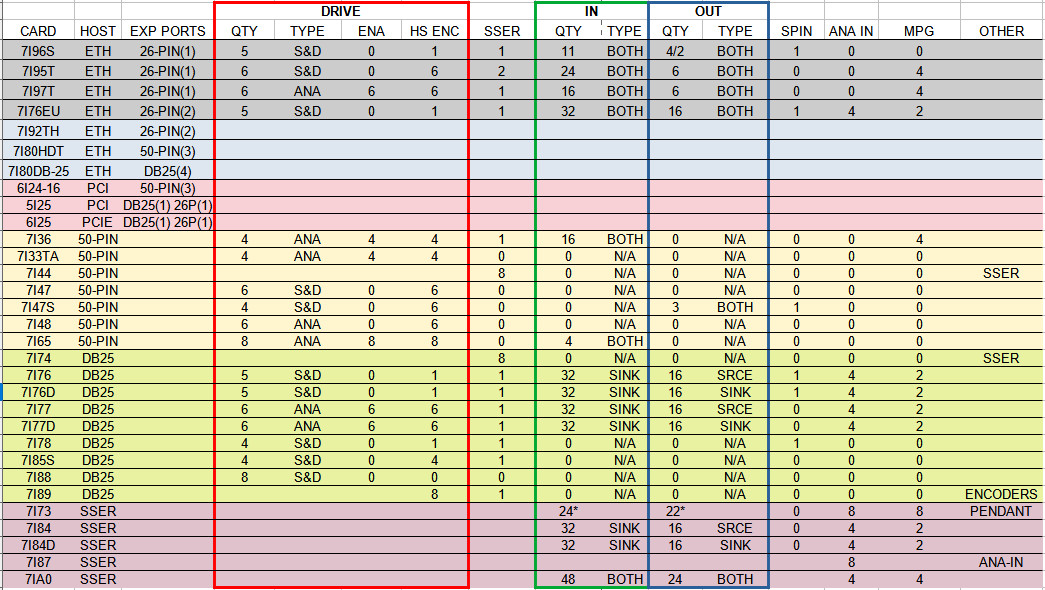
Below is a sample chart of common Mesa cards, reasonably accurate as of the thread posting date.  Double check the values in the chart and use it to narrow down your selection(s).


EDIT 2024-07-30
"MPG" column refers to dedicated MPG inputs which are pre-configured for use with typical handwheel encoders.  Even if a board shows "0" for MPG inputs in the table if there are enough free inputs a board & LCNC can usually be configured to accept low-speed A/B encoder inputs - it just may not be as easy as with those boards with dedicated MPG inputs.

Note that the dedicated MPG inputs can also be configured as standard inputs.

As with most things in LCNC, there are many ways to accomplish the same outcome.
Last edit: 2 years 3 months ago by spumco. Reason: REV3
The following user(s) said Thank You: GeckoWorks, behai

Please Log in or Create an account to join the conversation.

More
2 years 8 months ago - 2 years 8 months ago #292658 by spumco
9 - EXAMPLE WORK-LISTS

1. Manual lathe to CNC conversion
    • 2 axes, closed-loop stepper motors
    • 2 drive alarm signals
    • 2 home switches, no additional limits
    • 1 spindle motor driven by VFD
    • 1 spindle encoder for threading
    • Operator station
        ◦ 2 MPGs (one for each axis)
        ◦ 1 axis selector switch (2 positions)
        ◦ 1 jog increment switch (3 positions)
        ◦ 1 spindle override potentiometer
        ◦ 1 feed override potentiometer
        ◦ 1 external emergency stop
        ◦ 2 buttons (start & feed-hold)
    • Result:
        ◦ Drives - 2 S&D
        ◦ IO
            ▪ 10/ea digital in
            ▪ 2 MPG
            ▪ 2 analog in
            ▪ 1 analog out
            ▪ 2 digital out (spindle FWD/REV)
    • Mesa card suggestion:
        ◦ 7i96S + 7i73 for the operator station


2. Self-built CNC router
    • 4 axes, step-dir servo motors
    • 4 drive alarms
    • 4 drive enable
    • 4 home switches, no additional limits
    • 1 spindle motor driven by VFD
    • Operator station
        ◦ 1 MPGs
        ◦ 1 axis selector switch (2 positions)
        ◦ 1 jog increment switch (3 positions)
        ◦ 1 feed override encoder w/reset switch
        ◦ 1 external emergency stop
        ◦ 8 buttons
            ▪ jog-continous POS/NEG XYZ
            ▪ start & feed hold
    • Result:
        ◦ Drives - 4 S&D
        ◦ IO
            ▪ 8 digital in to main enclosure
            ▪ 13 digital in to operator station
            ▪ 4 MPG
            ▪ 1 analog out
            ▪ 6 digital out
    • Mesa card suggestion:
        ◦ 7i96S + 7i73 using 4x8 matrix for the operator station


Good luck, and please let me know if there are any errors.
-Spumco
Last edit: 2 years 8 months ago by spumco. Reason: REV2
The following user(s) said Thank You: GeckoWorks, behai, trooper

Please Log in or Create an account to join the conversation.

More
2 years 8 months ago - 2 years 8 months ago #292665 by jmelson

Agreed on all counts.
Also, including Pico, i keep forgetting about them, sorry Jon :(
We can do the same for Pico in a separate topic, if Jon is OK with it.
-

 
Yes, we (Pico Systems) have parallel port connected motion interface boards that have been used with LinuxCNC since the beginning.  I do have a "getting started" entry in the Driver Boards section of the forum, called Pico Systems FAQ.  It gives a rundown on what each of our systems do and what else is required.  As for parallel ports, we do sell PCIe parallel port cards for machines that don't have it built-in.
Jon
 
Last edit: 2 years 8 months ago by jmelson.
The following user(s) said Thank You: tommylight, spumco, GeckoWorks

Please Log in or Create an account to join the conversation.

More
2 years 8 months ago #292691 by spumco
Thank you for the comment Jon.

Based on that feedback, I think this guide should stay here in the forums so there isn't any unintentional 'preference' conveyed to new users.  I'll do my best to compose this in a forum-friendly format.
The following user(s) said Thank You: Clive S

Please Log in or Create an account to join the conversation.

More
2 years 8 months ago #292708 by Cant do this anymore bye all
Great work, just for the direct connection (spi), might be an idea for the time being to mention the RPi5 is unsupported at the moment. Wouldn't want anyone to throw money at something that doesn't work yet (grumble grumble grumble).
The following user(s) said Thank You: spumco

Please Log in or Create an account to join the conversation.

Moderators: PCW, jmelson
Time to create page: 0.488 seconds
Powered by Kunena Forum
