
- Posts: 1029
- Thank you received: 286
Mini wannabe datron build
- ihavenofish
- Topic Author
- Offline
- Platinum Member
-

Less
More
3 years 1 month ago - 3 years 1 month ago #279860
by ihavenofish
Replied by ihavenofish on topic Mini wannabe datron build
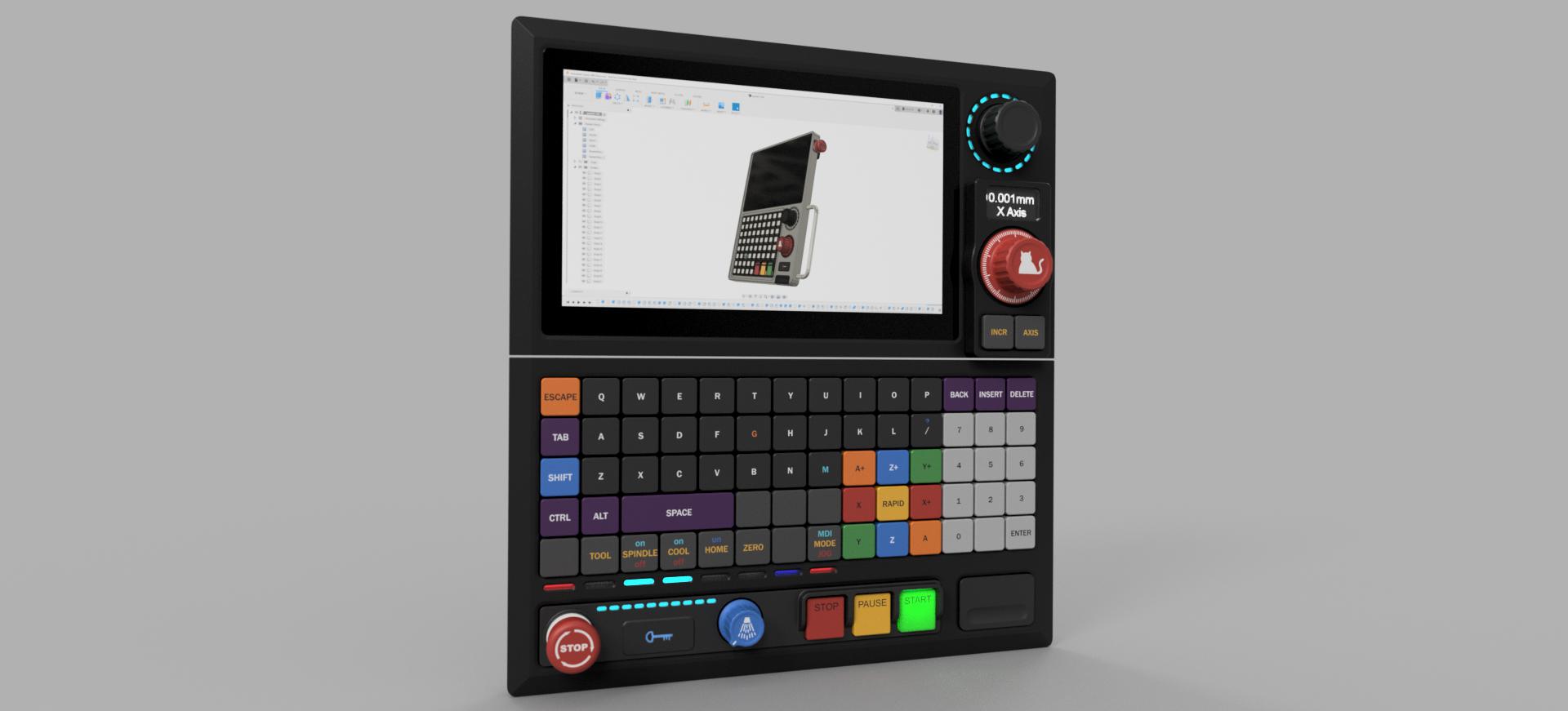
Hmmmmm
Last edit: 3 years 1 month ago by ihavenofish.
Please Log in or Create an account to join the conversation.
- ihavenofish
- Topic Author
- Offline
- Platinum Member
-
Less
More
- Posts: 1029
- Thank you received: 286
3 years 1 month ago #279864
by ihavenofish
Replied by ihavenofish on topic Mini wannabe datron build
Oh, correction. the screen is not 7". not sure why i had that stuck in my head. It is 9".... cause i just found they dont sell it anymore, hahaha. they do have a very similar 8" though.
Please Log in or Create an account to join the conversation.
- besriworld
- Offline
- Platinum Member
-
Less
More
- Posts: 327
- Thank you received: 92
3 years 1 month ago #279871
by besriworld
Replied by besriworld on topic Mini wannabe datron build
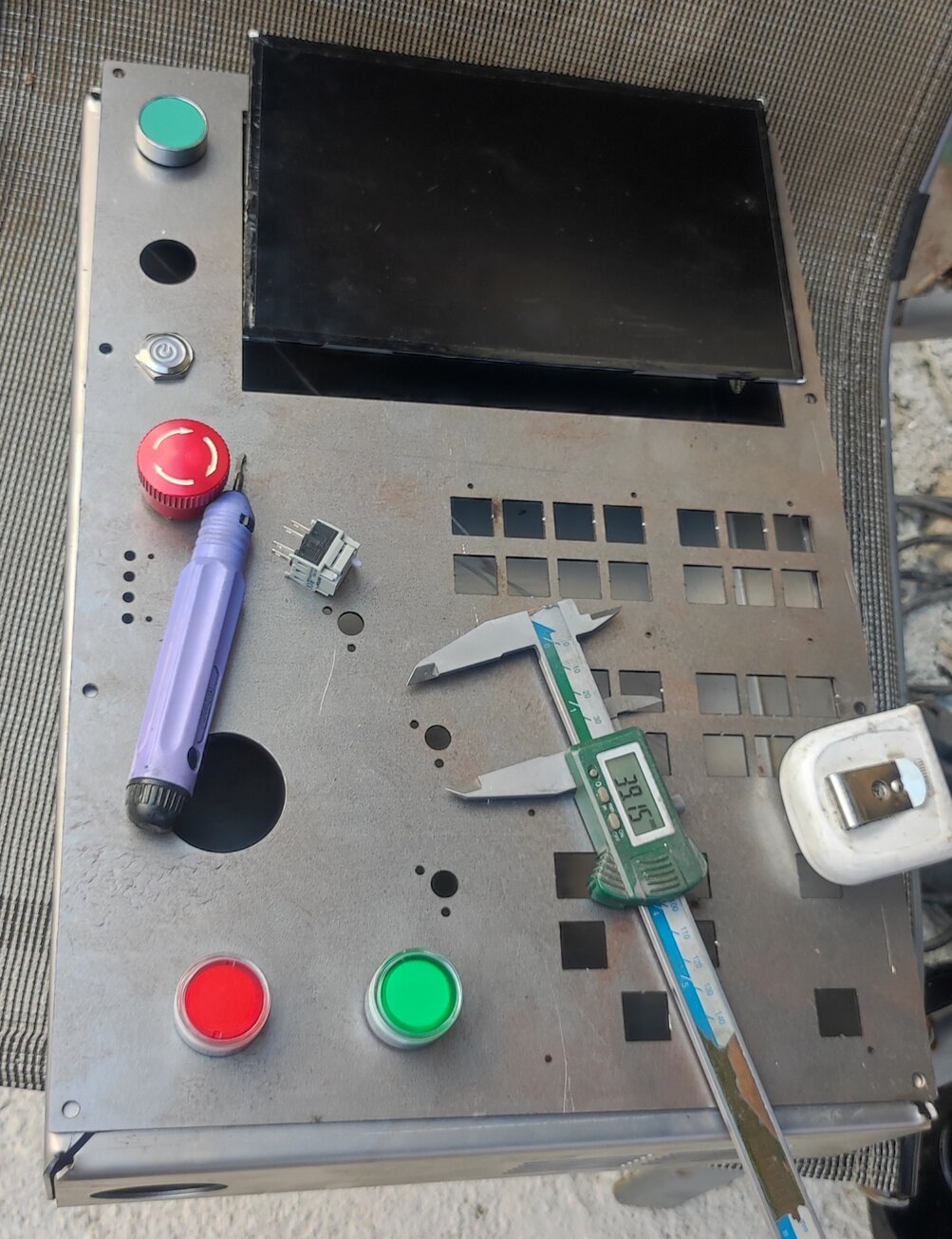
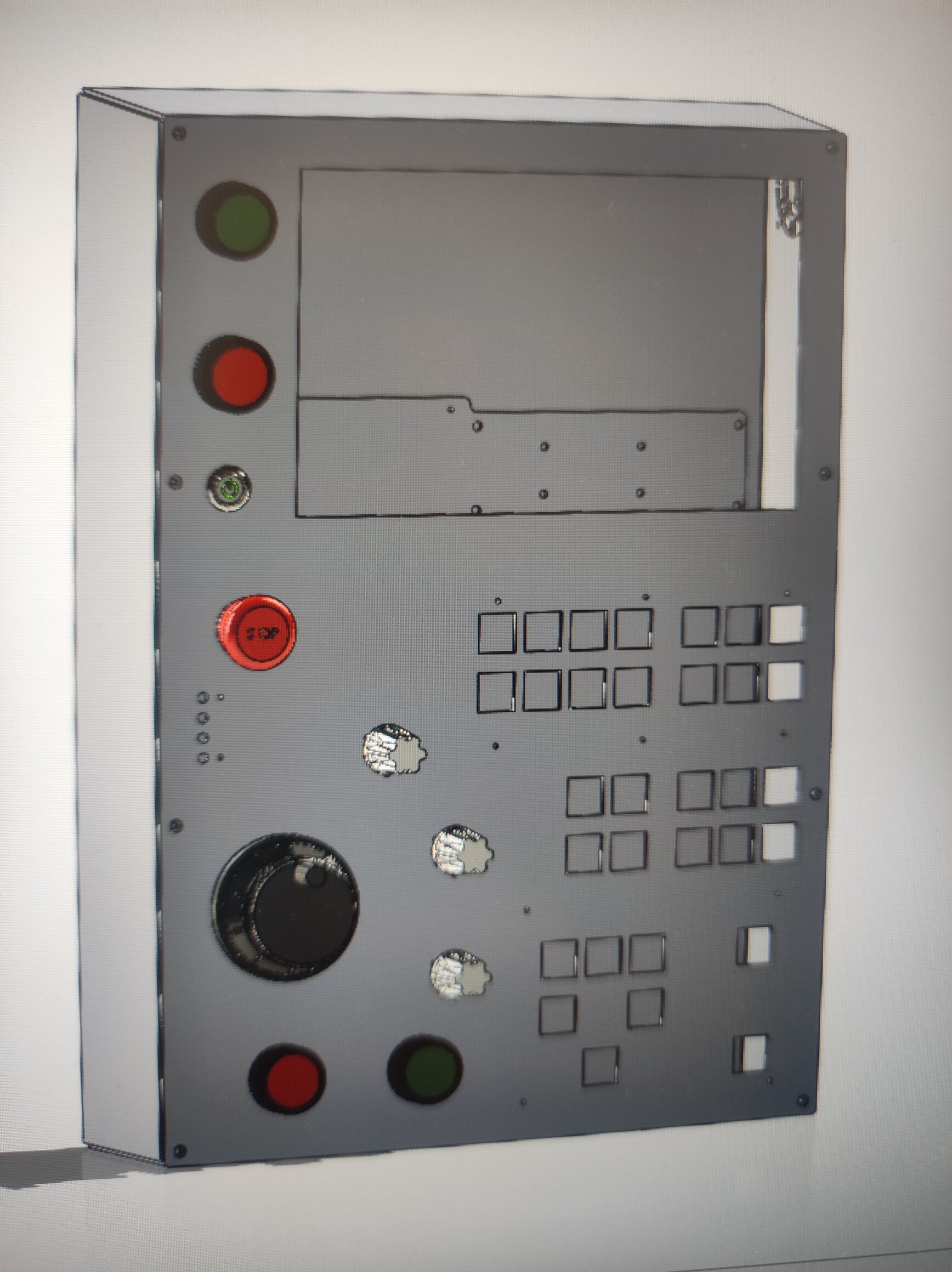
Looks very good! Black base looks better. Have you tried the virtual keyboard? I will show my lathe project. The screen is small 10.1" . In normal operation it is good to have a knob for speed , spindle speed , rapid travel limit , MPEG .. How will you make the keys , will there be a custom board ? How will you control the digital LEDs ?
Please Log in or Create an account to join the conversation.
- ihavenofish
- Topic Author
- Offline
- Platinum Member
-
Less
More
- Posts: 1029
- Thank you received: 286
3 years 1 month ago #279873
by ihavenofish
Replied by ihavenofish on topic Mini wannabe datron build
Cool!
The keyboard will be a custom pcb that will take cherry switches. The controller is a rp2040 board that will socket in. this will take care of the usb side, as well as "funneling" keystrokes to the mesa.
The LED's are still a mystery as they really need 2 way communication. Torque isnt too hard i think. Read the torque from the drive to the RP2040, translate that into pretty colours on the leds, and trip a pin on the mesa for overload warnings etc and flash leds red etc.
The rest is a bit tricky. if you change mdi mode for example, how does the keyboard know to light that led the right colour. Likewise the override ring. It needs to get that info back from linuxcnc in the form of a number cause all the dial is doing is incrementing.
The global "stale" leds are easier cause they can just be 2 or 3 pins, one for "error", one for "running" and one for "idle" (or maybe a lack of the other 2 means idle). That led is not on the control itself. it is a 50mm long strip i have that will be up high on the door.
I found a new 8" lcd for it. so it got 1 row of keys smaller. I don;t know if i want the lower panel to be smaller though as the key layout is working well.
Pondering haha.
The keyboard will be a custom pcb that will take cherry switches. The controller is a rp2040 board that will socket in. this will take care of the usb side, as well as "funneling" keystrokes to the mesa.
The LED's are still a mystery as they really need 2 way communication. Torque isnt too hard i think. Read the torque from the drive to the RP2040, translate that into pretty colours on the leds, and trip a pin on the mesa for overload warnings etc and flash leds red etc.
The rest is a bit tricky. if you change mdi mode for example, how does the keyboard know to light that led the right colour. Likewise the override ring. It needs to get that info back from linuxcnc in the form of a number cause all the dial is doing is incrementing.
The global "stale" leds are easier cause they can just be 2 or 3 pins, one for "error", one for "running" and one for "idle" (or maybe a lack of the other 2 means idle). That led is not on the control itself. it is a 50mm long strip i have that will be up high on the door.
I found a new 8" lcd for it. so it got 1 row of keys smaller. I don;t know if i want the lower panel to be smaller though as the key layout is working well.
Pondering haha.
Please Log in or Create an account to join the conversation.
- ihavenofish
- Topic Author
- Offline
- Platinum Member
-
Less
More
- Posts: 1029
- Thank you received: 286
3 years 1 month ago - 3 years 1 month ago #279884
by ihavenofish
Replied by ihavenofish on topic Mini wannabe datron build
ok, new 8" screen. keyboard is the same, it just extends to the flange which is not a big deal.
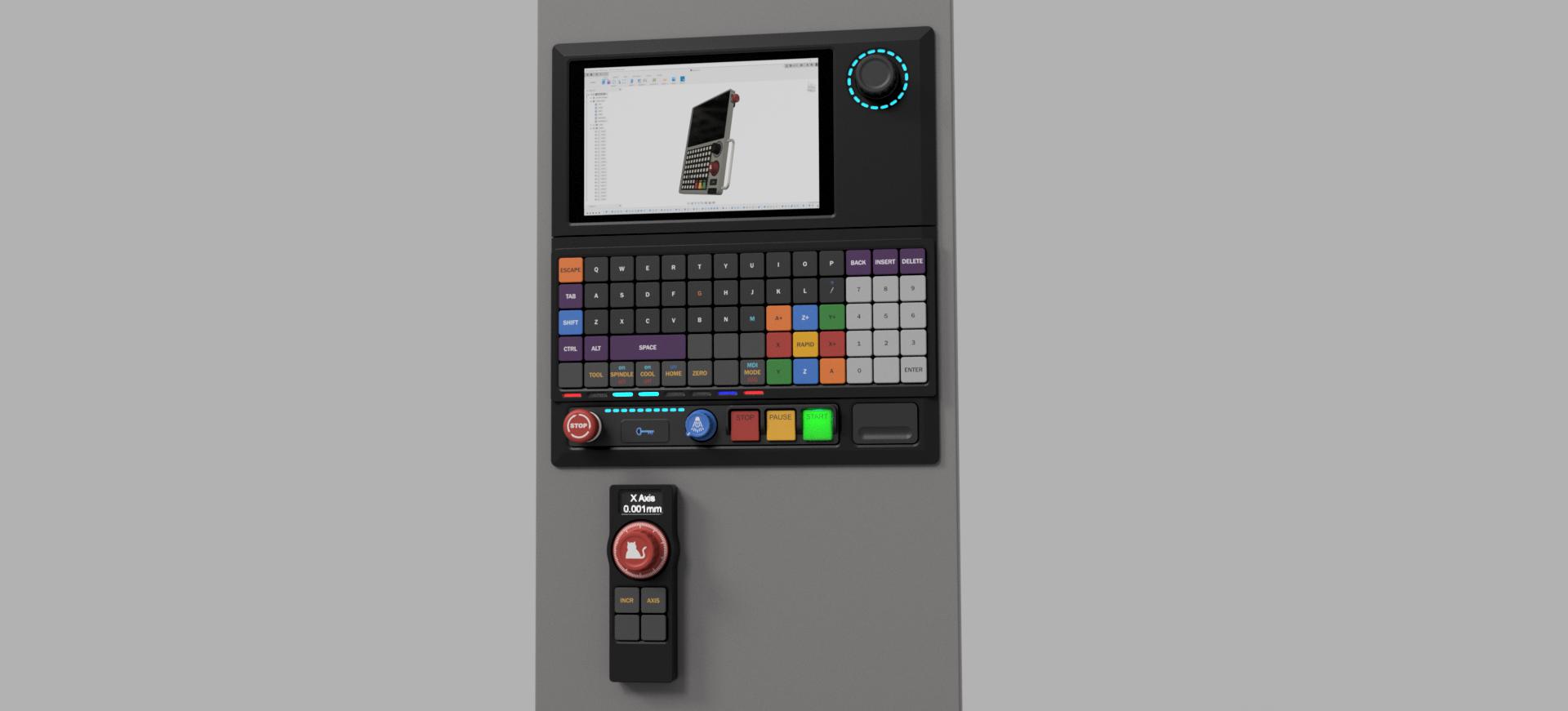
There is nor enough room really on the top now for the mpg features, so it is a fully separate unit. it is still controlled by the rp2040, so it has no "brain" inside of it.
If anyone is wondering why the size constraints and why its 2 pieces. it is partly cause that's all the width there is on the cabinet, and partly because that's the size that can fit in my vise jaws for milling. I will be using a big plate of scrap 25mm mic6, so that is dictating some things as well.
There is nor enough room really on the top now for the mpg features, so it is a fully separate unit. it is still controlled by the rp2040, so it has no "brain" inside of it.
If anyone is wondering why the size constraints and why its 2 pieces. it is partly cause that's all the width there is on the cabinet, and partly because that's the size that can fit in my vise jaws for milling.
I will be using a big plate of scrap 25mm mic6, so that is dictating some things as well.
Last edit: 3 years 1 month ago by ihavenofish.
Please Log in or Create an account to join the conversation.
3 years 1 month ago #279965
by spumco
As you noted you may run in to issues mapping the dedicated control buttons via keystrokes.
As an alternative you might have a look at hal_input.comp to connect the 'second' keyboard (i.e. the dedicated controls) to HAL functions. Mapping in HAL (vs. GUI keystrokes) would have an added benefit of not being overwritten if you update LCNC. I've not used this comp, but it looks promising.
If you do go this route all, I mentioned Multiswitch as it is (to me) one of a family of HAL components intended, I think, to increase (or enhance) the number of functions of simple pushbutton inputs.
Multiswitch could be used to consolidate the axis/increment selection in to a single input. If you ignore the 'down' input, repeatedly pressing the axis button would cycle through the different axes and then roll-over back to the first. Same thing for the increments. And one of the selection 'slots' can be left blank to act as an MPG-disabled setting.
Replied by spumco on topic Mini wannabe datron build
I'm not sure what the multiswitch does for me. I have no switches on the mesa.
As you noted you may run in to issues mapping the dedicated control buttons via keystrokes.
As an alternative you might have a look at hal_input.comp to connect the 'second' keyboard (i.e. the dedicated controls) to HAL functions. Mapping in HAL (vs. GUI keystrokes) would have an added benefit of not being overwritten if you update LCNC. I've not used this comp, but it looks promising.
If you do go this route all, I mentioned Multiswitch as it is (to me) one of a family of HAL components intended, I think, to increase (or enhance) the number of functions of simple pushbutton inputs.
Multiswitch could be used to consolidate the axis/increment selection in to a single input. If you ignore the 'down' input, repeatedly pressing the axis button would cycle through the different axes and then roll-over back to the first. Same thing for the increments. And one of the selection 'slots' can be left blank to act as an MPG-disabled setting.
Please Log in or Create an account to join the conversation.
Time to create page: 0.070 seconds