
Which kernel version is best for real time?
- DarkPhoinix
- Offline
- Premium Member
-

- Posts: 107
- Thank you received: 6
I opened a post here:
forum.linuxcnc.org/38-general-linuxcnc-q...st-ambiguous-results
So I decided to do it my way and not Debian's way.
www.kernel.org/
I have always used Debian but as always this time I will have to compile the kernel by hand, hoping that there are not too many changes since the last time I did it, but I doubt it.
Can anyone please tell me which kernel is best for RT?
Thanks a lot.
Please Log in or Create an account to join the conversation.
- DarkPhoinix
- Offline
- Premium Member
-
- Posts: 107
- Thank you received: 6
Perhaps try this:
Save your config files somewhere very safe.
Open your PC and remove all unnecessary hardware (except the GPU).
Reinstall LinuxCNC from the official ISO. (The latest version, or perhaps some earlier version).
Set CPU governor to performance.
Run latency test.
See if latency is improved.
Changing the scaling govenor to performance reduced my latency a noticable amount.
Now i try
echo performance | sudo tee /sys/devices/system/cpu/cpu*/cpufreq/scaling_governorin my bios conf i have:
Enhanced Intel SpeedStep Technology: Disabled
Turbo Mode: Disabled
CPU C3 Report: Disabled
CPU C6 Report: Disabled
i need to enable all for change governor?
i have another SSD ready with same version of linuxcnc 2.9.4 i try to install kernel 6.6 for test, make monolithic for first if see error go modular kernel with initrd image with SATA driver in.
Please Log in or Create an account to join the conversation.
- unknown
- Offline
- Platinum Member
-

- Posts: 888
- Thank you received: 325
You have to make sure that you select the proper RT kernel in the config.
Some kernel require a patch so that Linuxcnc recognises that there is a RT kernel running.
The kernel provided with the 2.9.5 iso works, is stable and is in use by many users with no issues.
Please Log in or Create an account to join the conversation.
- DarkPhoinix
- Offline
- Premium Member
-
- Posts: 107
- Thank you received: 6
I also answered you in the other post!
Please Log in or Create an account to join the conversation.
- DarkPhoinix
- Offline
- Premium Member
-
- Posts: 107
- Thank you received: 6
Please Log in or Create an account to join the conversation.
- unknown
- Offline
- Platinum Member
-
- Posts: 888
- Thank you received: 325
Try not to get bogged down with latency.
Test the machine running code, if it works don't worry too much about it.
I took the gcode file that loads when you first start Axis, made it into a loop, loops thru the gcode about a hundred times,if I don't get any errors I'm confident it will be fine.
I really don't think there will be much difference between a modular or monolithic kernel.
You can gain a bit by fiddling with mount options, looking for any background services that aren't needed, I generally disable sound and I'll disable wifi if it's not required.
You'll find this forum a lot different to cnczone, for one no one on here gets caught playing my rapids are this fast, also you won't here anyone saying that you need to be a programmer to use Linuxcnc. It works and works well.
Almost any issues you have will have been discussed many many ten times over.
99.99% of the reason Linuxcnc won't start is a typo somewhere in the hal & ini files.
Sometimes I think that running the latest kernel on older CPUs isn't the best course of action. Far better to have some extra latency and a stable system.
Look you can spend a lot of time building different kernels and trying all the tricks in the book to lower latency, but as long as latency is, as a rule thumb, below 100,000 ns for an external step/direction generator you're good to go.
Then again network latency can be a PITA to sort sometimes.
Please Log in or Create an account to join the conversation.
- DarkPhoinix
- Offline
- Premium Member
-
- Posts: 107
- Thank you received: 6
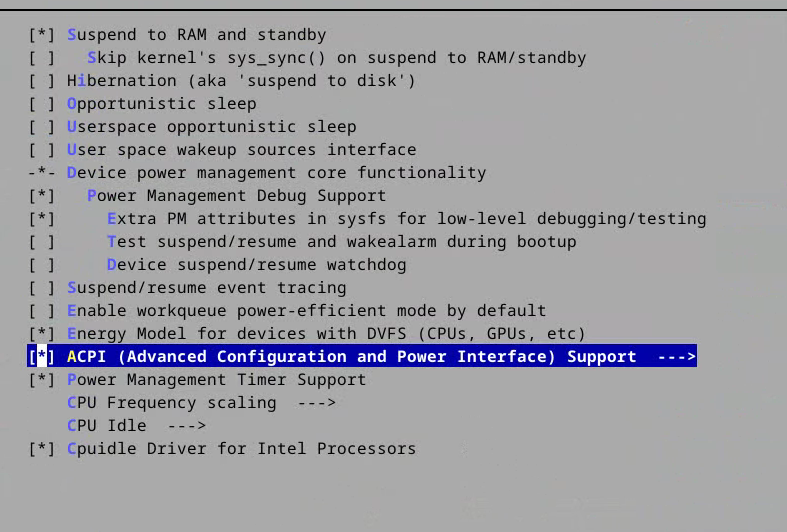
Why in the kernel of linuxcnc why are hibernation and other acpi function active?
Is not a problem?
Attachments:
Please Log in or Create an account to join the conversation.
- DarkPhoinix
- Offline
- Premium Member
-
- Posts: 107
- Thank you received: 6
Yes i have Realtek card but i solved the problem with the r8168-dkms module.
Warning: Spoiler!Sorry I meant 2.9.4 Try not to get bogged down with latency. Test the machine running code, if it works don't worry too much about it. I took the gcode file that loads when you first start Axis, made it into a loop, loops thru the gcode about a hundred times,if I don't get any errors I'm confident it will be fine. I really don't think there will be much difference between a modular or monolithic kernel. You can gain a bit by fiddling with mount options, looking for any background services that aren't needed, I generally disable sound and I'll disable wifi if it's not required. You'll find this forum a lot different to cnczone, for one no one on here gets caught playing my rapids are this fast, also you won't here anyone saying that you need to be a programmer to use Linuxcnc. It works and works well. Almost any issues you have will have been discussed many many ten times over. 99.99% of the reason Linuxcnc won't start is a typo somewhere in the hal & ini files. Sometimes I think that running the latest kernel on older CPUs isn't the best course of action. Far better to have some extra latency and a stable system. Look you can spend a lot of time building different kernels and trying all the tricks in the book to lower latency, but as long as latency is, as a rule thumb, below 100,000 ns for an external step/direction generator you're good to go. Then again network latency can be a PITA to sort sometimes.
Please Log in or Create an account to join the conversation.
- DarkPhoinix
- Offline
- Premium Member
-
- Posts: 107
- Thank you received: 6
root@cnc:/home/cnc/kernel/linux-6.12.27# cat .config | grep -i Preempt
# CONFIG_PREEMPT_NONE is not set
# CONFIG_PREEMPT_VOLUNTARY is not set
# CONFIG_PREEMPT is not set
CONFIG_PREEMPT_RT=y
CONFIG_PREEMPT_COUNT=y
CONFIG_PREEMPTION=y
CONFIG_PREEMPT_RCU=y
CONFIG_HAVE_PREEMPT_DYNAMIC=y
CONFIG_HAVE_PREEMPT_DYNAMIC_CALL=y
# CONFIG_DEBUG_PREEMPT is not set
# CONFIG_PREEMPT_TRACER is not set
# CONFIG_PREEMPTIRQ_DELAY_TEST is not set
ok?
Please Log in or Create an account to join the conversation.
- unknown
- Offline
- Platinum Member
-
- Posts: 888
- Thank you received: 325
As for the kernel config, the most important settings are the preempt_rt ones, infact one of the easiest ways is to base the config for the new kernel on the running one.
If you really feel the issue is with the GPU I don't think a different kernel will fix much.
Please Log in or Create an account to join the conversation.