
Ver 10 NEW install
- 5280
- Offline
- Junior Member
-

Less
More
- Posts: 21
- Thank you received: 0
07 Aug 2026 17:09 #348541
by 5280
Replied by 5280 on topic Ver 10 NEW install
Thanks 4 the info
but I have not been able to get to the terminal yet
cant get past name and password screen yet.
have done 4-5 fresh install of the OS. they all hang up at the same place name and password screen
Thanks
but I have not been able to get to the terminal yet
cant get past name and password screen yet.
have done 4-5 fresh install of the OS. they all hang up at the same place name and password screen
Thanks
Please Log in or Create an account to join the conversation.
- tuxcnc
- Offline
- Elite Member
-

Less
More
- Posts: 249
- Thank you received: 44
07 Aug 2026 17:34 #348542
by tuxcnc
Replied by tuxcnc on topic Ver 10 NEW install
If you see GRUB but after only blank screen, this may be graphic card issue. In this case try apply nomodeset kernel parameter at grub screen (there are many tutorials on internet).cant get past name and password screen yet.
Please Log in or Create an account to join the conversation.
- 5280
- Offline
- Junior Member
-
Less
More
- Posts: 21
- Thank you received: 0
07 Aug 2026 19:59 #348544
by 5280
Replied by 5280 on topic Ver 10 NEW install
Good thought but its a laptop an older Dell no video card other than built in Video
don't know if it matters but password login error screen says... "your password is incorrect try again" cancel / log in boxes ...... nothing else and the same thing over and over when entering the password. I was super careful in the setup of these areas during setup
Tks
don't know if it matters but password login error screen says... "your password is incorrect try again" cancel / log in boxes ...... nothing else and the same thing over and over when entering the password. I was super careful in the setup of these areas during setup
Tks
Please Log in or Create an account to join the conversation.
- MaHa
- Offline
- Platinum Member
-

Less
More
- Posts: 540
- Thank you received: 240
07 Aug 2026 22:50 #348546
by MaHa
Replied by MaHa on topic Ver 10 NEW install
I was able to reproduce this in a virtualbox test-installation. After entering a wrong name/passw i was locked out. This solution gave me access again. And after that procedure, even entering the password wrong once, did'nt lock me out. Just enter correct password and login.
after this popup
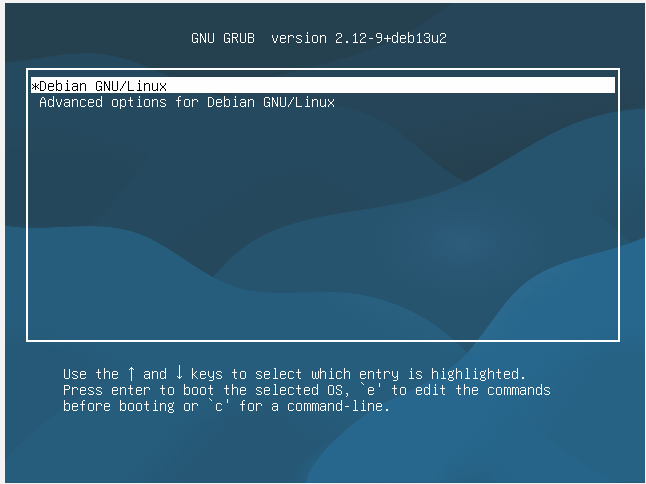
Press the e key to open the boot parameter editor
Locate the text snippet ro quiet splash (or just ro).
Replace ro with rw and append init=/bin/bash to the end of the line. The end of your line should look exactly like this:
rw quiet splash init=/bin/bash
Press F10 to boot with these temporary settings.
Reset Your Password
The system will bypass the usual login screen and drop you directly into a root command prompt terminal (indicated by #).
Ensure the system partition is writeable by running:
mount -n -o remount,rw /
If you do not remember your exact system username, view it by typing:
ls /home
Type the password reset command followed by your account username:
passwd username
Enter your new password twice when prompted. Note: The text will not appear on the screen
Restart Computer
after this popup
Press the e key to open the boot parameter editor
Warning: Spoiler!
Locate the text snippet ro quiet splash (or just ro).
Replace ro with rw and append init=/bin/bash to the end of the line. The end of your line should look exactly like this:
rw quiet splash init=/bin/bash
Press F10 to boot with these temporary settings.
Reset Your Password
The system will bypass the usual login screen and drop you directly into a root command prompt terminal (indicated by #).
Ensure the system partition is writeable by running:
mount -n -o remount,rw /
If you do not remember your exact system username, view it by typing:
ls /home
Type the password reset command followed by your account username:
passwd username
Enter your new password twice when prompted. Note: The text will not appear on the screen
Restart Computer
Attachments:
Please Log in or Create an account to join the conversation.
- 5280
- Offline
- Junior Member
-
Less
More
- Posts: 21
- Thank you received: 0
08 Aug 2026 16:11 #348560
by 5280
Replied by 5280 on topic Ver 10 NEW install
thanks for the effort.. I think it is called a locked loop I have seen this also.
I have found that if i do a
ctrl + alt + F3
it takes me to the terminal login screen at which point I am able to log in with user name and password that was setup during setup and then do things in terminal mode. terminal mode seems to be working just fine. I have done the updates and the upgrade. per info on terminal screens but nothing past that at this point.
AI says there is fix for this locked loop thing but I have not done it yet. will do it later on.. now i have to learn all the command line stuff if i live that long .?
Thanks again for the help.
Ken
I have found that if i do a
ctrl + alt + F3
it takes me to the terminal login screen at which point I am able to log in with user name and password that was setup during setup and then do things in terminal mode. terminal mode seems to be working just fine. I have done the updates and the upgrade. per info on terminal screens but nothing past that at this point.
AI says there is fix for this locked loop thing but I have not done it yet. will do it later on.. now i have to learn all the command line stuff if i live that long .?
Thanks again for the help.
Ken
Please Log in or Create an account to join the conversation.
- tommylight
-

- Away
- Moderator
-

Less
More
- Posts: 21901
- Thank you received: 7465
08 Aug 2026 17:33 - 08 Aug 2026 17:35 #348563
by tommylight
Replied by tommylight on topic Ver 10 NEW install
hmmm that might also be a hardware issue, usually dry capacitors or memory problems, although memory problems will show up during boot in most cases.
You might want to try Linux Mint Debian Edition, after install and reboot:
sudo apt update
sudo apt install linuxcnc-uspace
But this will be an older version of 2.9, not the master version or 2.10
Edit:
if you want to continue with ctrl+alt+F3 , type startx and check what errors it shows up.
You might want to try Linux Mint Debian Edition, after install and reboot:
sudo apt update
sudo apt install linuxcnc-uspace
But this will be an older version of 2.9, not the master version or 2.10
Edit:
if you want to continue with ctrl+alt+F3 , type startx and check what errors it shows up.
Last edit: 08 Aug 2026 17:35 by tommylight.
Please Log in or Create an account to join the conversation.
- 5280
- Offline
- Junior Member
-
Less
More
- Posts: 21
- Thank you received: 0
08 Aug 2026 22:50 #348574
by 5280
Replied by 5280 on topic Ver 10 NEW install
good afternoon Sir
the startx command takes me into the debain program no errors.
windows 10 ran just fine. BUT it was Microsoft windows 10 (UGH)
what a back door just to run the debian OS
but it seems to work
is this something that might need to be looked at by the powers that be.? as a possible fix.
the startx command takes me into the debain program no errors.
windows 10 ran just fine. BUT it was Microsoft windows 10 (UGH)
what a back door just to run the debian OS
but it seems to work
is this something that might need to be looked at by the powers that be.? as a possible fix.
Please Log in or Create an account to join the conversation.
- NWE
-

- Offline
- Elite Member
-
Less
More
- Posts: 259
- Thank you received: 80
08 Aug 2026 23:59 - 09 Aug 2026 00:01 #348577
by NWE
Replied by NWE on topic Ver 10 NEW install
run the following cammand at the terminal:
systemctl get-default
if it replies with
multi-user.target
then that is what is wrong. Run
sudo systemctl set-default graphical.target
or if it replied with
graphical.target
then this is not the problem, it takes more diagnostics.
systemctl get-default
if it replies with
multi-user.target
then that is what is wrong. Run
sudo systemctl set-default graphical.target
or if it replied with
graphical.target
then this is not the problem, it takes more diagnostics.
Last edit: 09 Aug 2026 00:01 by NWE.
Please Log in or Create an account to join the conversation.
- 5280
- Offline
- Junior Member
-
Less
More
- Posts: 21
- Thank you received: 0
09 Aug 2026 01:56 #348580
by 5280
Replied by 5280 on topic Ver 10 NEW install
When should i run the systemctl get-default
before startx
or
after from with in the OS terminal after everything is running
before startx
or
after from with in the OS terminal after everything is running
Please Log in or Create an account to join the conversation.
- NWE
-
- Offline
- Elite Member
-
Less
More
- Posts: 259
- Thank you received: 80
09 Aug 2026 02:03 #348581
by NWE
Replied by NWE on topic Ver 10 NEW install
It doesn't matter. If you have it running now, just open a terminal window and run the command. Or doing it before startx should work the same.
Please Log in or Create an account to join the conversation.
Time to create page: 0.845 seconds