
cant run latency histogram
- rubes
- Offline
- Senior Member
-

Less
More
- Posts: 45
- Thank you received: 2
08 Aug 2026 17:12 #348561
by rubes
cant run latency histogram was created by rubes
i installed linuxcnc 2.9.10 via the released ISO. when i run the latency histogram from the application menu, it logs me out and pops up the login screen. i login again, and then the latency histogram program wont run at all. neither will the regular latency test. if i reboot, i can run the regular latency test, but if i try the histogram, it logs me out again.
is this a bug or maybe something wrong with my new system?
i have
this motherboard , basically because i have one in my daily desktop, and it was cheap
this graphics card , because it is AMD not Nvida that was causing issues with scrambled screen
this network card , because it uses the intel chipset rather than the realtek one on the motherboard
is this a bug or maybe something wrong with my new system?
i have
this motherboard , basically because i have one in my daily desktop, and it was cheap
this graphics card , because it is AMD not Nvida that was causing issues with scrambled screen
this network card , because it uses the intel chipset rather than the realtek one on the motherboard
Please Log in or Create an account to join the conversation.
- tommylight
-

- Away
- Moderator
-

Less
More
- Posts: 21979
- Thank you received: 7478
08 Aug 2026 17:28 #348562
by tommylight
Replied by tommylight on topic cant run latency histogram
Download the ISO again, check the md5sum or sha256 or whatever there is to make sure the ISO is OK, write to usb using DD in Linux or Balena etcher on windows (work on Linux also), try again.
If it fails after all that, disable "secure boot" in BIOS. You can try this first with the existing usb, might just work.
If it fails after all that, disable "secure boot" in BIOS. You can try this first with the existing usb, might just work.
Please Log in or Create an account to join the conversation.
- rubes
- Offline
- Senior Member
-
Less
More
- Posts: 45
- Thank you received: 2
08 Aug 2026 19:08 #348568
by rubes
Replied by rubes on topic cant run latency histogram
this is where i fall flat on my face with linux, cant find an MD5 checksum for linuxcnc_2.9.10-amd64.hybrid.iso anywhere.
this page still shows the 2.9.8 checksums.
here is what i get when using windows command promt:
MD5 hash of c:\linuxcnc_2.9.10-amd64.hybrid.iso:
fc1aa63d54babf5fc840e1b6471cd75a
CertUtil: -hashfile command completed successfully.
this page still shows the 2.9.8 checksums.
here is what i get when using windows command promt:
MD5 hash of c:\linuxcnc_2.9.10-amd64.hybrid.iso:
fc1aa63d54babf5fc840e1b6471cd75a
CertUtil: -hashfile command completed successfully.
Please Log in or Create an account to join the conversation.
- rubes
- Offline
- Senior Member
-
Less
More
- Posts: 45
- Thank you received: 2
08 Aug 2026 19:53 #348569
by rubes
Replied by rubes on topic cant run latency histogram
cant find any mention of secure boot in the BIOS anywher. and as much as i hate AI, this is what i get when asking google...
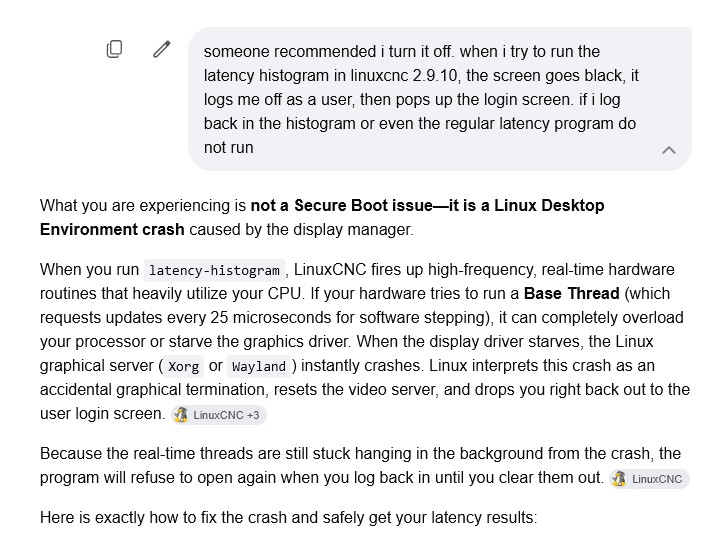
guess i made a bad hardware choice.
guess i made a bad hardware choice.
Attachments:
Please Log in or Create an account to join the conversation.
- PCW
-

- Offline
- Moderator
-
Less
More
- Posts: 18103
- Thank you received: 5326
08 Aug 2026 20:07 - 08 Aug 2026 20:08 #348570
by PCW
Replied by PCW on topic cant run latency histogram
Try running the latency test with a slower base thread rate (or no base thread at all if you do not intend to use a parallel port)
latency-histogram --base 100000
( for a 10 KHz base thread )
or
latency-histogram --nobase
for a servo thread only latency test
latency-histogram --base 100000
( for a 10 KHz base thread )
or
latency-histogram --nobase
for a servo thread only latency test
Last edit: 08 Aug 2026 20:08 by PCW.
Please Log in or Create an account to join the conversation.
- rubes
- Offline
- Senior Member
-
Less
More
- Posts: 45
- Thank you received: 2
08 Aug 2026 21:08 #348571
by rubes
Replied by rubes on topic cant run latency histogram
yep, not intending to use a paraport as i have a Mesa 7i96s. Which brings up a question, if i use the P1 parallel expansion port on the 7i96s, is the base thread still irrelevant? not that i would use that for step.direction, just GPIO.
I guess I really need to learn ALOT more about Linux and command prompt use. I'm a windows user so always gravitate to graphical UI rather than terminal. so just picking histogram from the dropdown i get what i get. I dont know enough about the terminal commands to know any better.
thanx for the help though.
p.s. not tryin to be an azz but??
latency-histogram --base 100000
( for a 10 KHz base thread )
isnt that 100KHz??

I guess I really need to learn ALOT more about Linux and command prompt use. I'm a windows user so always gravitate to graphical UI rather than terminal. so just picking histogram from the dropdown i get what i get. I dont know enough about the terminal commands to know any better.
thanx for the help though.
p.s. not tryin to be an azz but??
latency-histogram --base 100000
( for a 10 KHz base thread )
isnt that 100KHz??
Please Log in or Create an account to join the conversation.
- PCW
-
- Offline
- Moderator
-
Less
More
- Posts: 18103
- Thank you received: 5326
08 Aug 2026 22:31 #348573
by PCW
Replied by PCW on topic cant run latency histogram
P1 can be used for step/dir with the right firmware (that puts stepgens on those pins)
Mesa Ethernet cards don't use the base thread at all.
latency-histogram --base 100000
Means the base thread _period_ is 100000 ns = 100 us, 1/100us = 10 Khz
Mesa Ethernet cards don't use the base thread at all.
latency-histogram --base 100000
Means the base thread _period_ is 100000 ns = 100 us, 1/100us = 10 Khz
Please Log in or Create an account to join the conversation.
- rubes
- Offline
- Senior Member
-
Less
More
- Posts: 45
- Thank you received: 2
08 Aug 2026 23:35 #348575
by rubes
Replied by rubes on topic cant run latency histogram
doh!!!! thanx for the reminder in how to do basic frequency conversions...LOL
Please Log in or Create an account to join the conversation.
- NWE
-

- Offline
- Elite Member
-

Less
More
- Posts: 261
- Thank you received: 80
08 Aug 2026 23:45 #348576
by NWE
Replied by NWE on topic cant run latency histogram
Google ai's answer is quite incorrect. I don't see what cpu you got, but with the motherboard you listed, I think any CPU it would be compatible with would have many times more capacity than what LinuxCNC could possibly use.
There are a couple different things that could cause your problem:
1. Possible data error during iso file download and install. Download a second copy and try that or maybe install 7zip which is one program I think of right now which makes it convenient to check sum files in Windows.
2. USB memory device error - try a different one.
3. Motherboard/hardware incompatibility. What you got certainly is fast and powerful enough for LinuxCNC but sometimes odd incompatibilities pop up between hardware/firmware/OS.
There are a couple different things that could cause your problem:
1. Possible data error during iso file download and install. Download a second copy and try that or maybe install 7zip which is one program I think of right now which makes it convenient to check sum files in Windows.
2. USB memory device error - try a different one.
3. Motherboard/hardware incompatibility. What you got certainly is fast and powerful enough for LinuxCNC but sometimes odd incompatibilities pop up between hardware/firmware/OS.
Please Log in or Create an account to join the conversation.
- tommylight
-
- Away
- Moderator
-
Less
More
- Posts: 21979
- Thank you received: 7478
09 Aug 2026 01:28 #348578
by tommylight
Replied by tommylight on topic cant run latency histogram
Open a terminal and type:
glxgears
if it crashes = change the graphic cars ... that usually can not be done as they are inside the CPU, but if you have a spare PCI-E slot, find an old one and give it a try.
If it runs fine, still i would insist on disabling secure boot and/or trying another ISO/USB.
glxgears
if it crashes = change the graphic cars ... that usually can not be done as they are inside the CPU, but if you have a spare PCI-E slot, find an old one and give it a try.
If it runs fine, still i would insist on disabling secure boot and/or trying another ISO/USB.
The following user(s) said Thank You: NWE
Please Log in or Create an account to join the conversation.
Time to create page: 0.219 seconds