

- Posts: 4819
- Thank you received: 2177
XYZA Simulation Install Problems
4 months 3 weeks ago - 4 months 3 weeks ago #346993
by Aciera
Replied by Aciera on topic XYZA Simulation Install Problems
For a preview with A axis work side rotation have a look at the '!' feature that can be used in the [DISPLAY] GEOMETRY setting in the ini file:
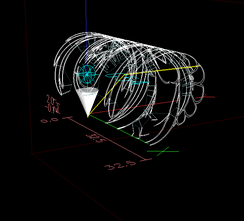
Note that the above option cannot handle offsets.
See this thread for more:
forum.linuxcnc.org/10-advanced-configura...axis-display?start=0
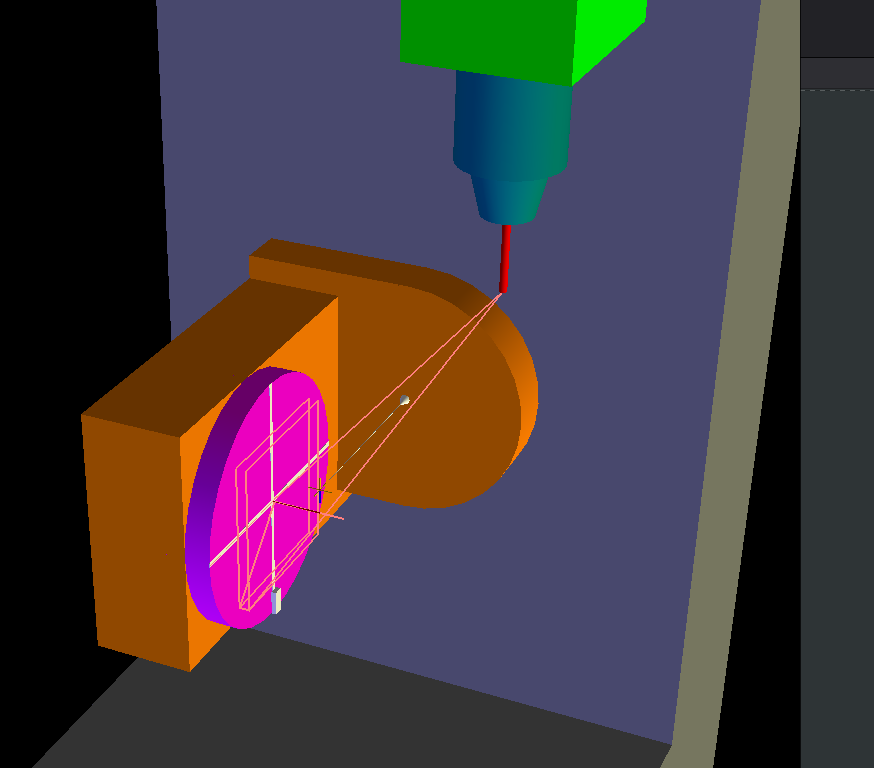
If you want a vismach model to run the code and have the tool path rotating with the part have a look at:
configs/sim/axis/vismach/5axis/table-dual-rotary
This is an XYZAB kinematic with A being a work side rotation (for your purpose you can simply ignore the B axis and the 'TCP' mode):
Code:
GEOMETRY = !AXYZ
Note that the above option cannot handle offsets.
See this thread for more:
forum.linuxcnc.org/10-advanced-configura...axis-display?start=0
If you want a vismach model to run the code and have the tool path rotating with the part have a look at:
configs/sim/axis/vismach/5axis/table-dual-rotary
This is an XYZAB kinematic with A being a work side rotation (for your purpose you can simply ignore the B axis and the 'TCP' mode):
Last edit: 4 months 3 weeks ago by Aciera.
The following user(s) said Thank You: grandixximo
Please Log in or Create an account to join the conversation.

4 months 3 weeks ago #346999
by currinh
Replied by currinh on topic XYZA Simulation Install Problems
YES. I finally found a simulation model, sim.axis.wrapped-rotary, using XYZA. I added the line GEOMETRY = !AXYZ to [DISPLAY] and the axis display acts as it should for a rotary table on A. The "!" did the trick.
I loaded the vismach axis sim model. The axis display has the same problem as above, I'll try the "!" fix which I expect will also work here. The vismach display does function as I expected, moving part with table(s).
These should work for me. Thank you very much for the help. I will have to change units to inches and the envelope size of the machine before my code(s) will run. Also figure out how these simulations implement tool offsets. But thanks to you I see a light at the end of the tunnel.
THANK YOU!
I loaded the vismach axis sim model. The axis display has the same problem as above, I'll try the "!" fix which I expect will also work here. The vismach display does function as I expected, moving part with table(s).
These should work for me. Thank you very much for the help. I will have to change units to inches and the envelope size of the machine before my code(s) will run. Also figure out how these simulations implement tool offsets. But thanks to you I see a light at the end of the tunnel.
THANK YOU!
Please Log in or Create an account to join the conversation.
4 months 3 weeks ago #347000
by currinh
Replied by currinh on topic XYZA Simulation Install Problems
Tommy: I finally found one as "sim.axis.wrapped-rotary". If you, or others, know of more I'd like to hear of them. But you're not missing anything I see, it's more my search skills that are missing.
Aciera's comment regarding adding a "!" to [DISPLAY] GEOMETRY line implements a rotary axis over a tilting spindle motion. That seems to be the missing link to get "axis" working for my implementation.
Thank you.
Aciera's comment regarding adding a "!" to [DISPLAY] GEOMETRY line implements a rotary axis over a tilting spindle motion. That seems to be the missing link to get "axis" working for my implementation.
Thank you.
Please Log in or Create an account to join the conversation.
- tommylight
-

- Away
- Moderator
-

4 months 3 weeks ago #347007
by tommylight
Replied by tommylight on topic XYZA Simulation Install Problems
Beside what Aciera and you already found, there are several under Vismach section of Axis GUI, gmoccappy and QtDragon have some for 4 and/or 5 axis, WoodPecker also has some.
And, Vismach also shows a machine working in 3D.
And, Vismach also shows a machine working in 3D.
Please Log in or Create an account to join the conversation.
4 months 3 weeks ago #347008
by currinh
Replied by currinh on topic XYZA Simulation Install Problems
Thank you. I have the axis.viismach 5 axis working as a simulator. Still getting the additional vismach machine running, but the axis view is fine for what I'm doing (4th axis positioning). gmoccappy looks to be for touch screens? The QtDragon sure has a nice clean presentation. But I'm so used to the axis screen, from working in the shop, I'll probably leave the simulator an axis based version for now.
Thank you again. What a great forum.
Thank you again. What a great forum.
The following user(s) said Thank You: tommylight
Please Log in or Create an account to join the conversation.
Time to create page: 0.099 seconds