LinuxCNC Install using MX Linux 19.4 - Geared Toward New Users

More
2 years 7 months ago #296355 by phillc54
It looks like the link to the ISO gets corrupted in the PDF and it then points you to the latest version.

Try this one:
Code:
https://sourceforge.net/projects/mx-linux/files/Old/MX-19.4/MX-19.4_x64.iso/download
 
The following user(s) said Thank You: snowgoer540

Please Log in or Create an account to join the conversation.

More
2 years 7 months ago #296357 by snowgoer540
Thanks Phill.

This is interesting, I opened the Install Guide 1, and clicked both links on page 3, and they both take me to the correct place.  I am using Adobe Reader though, I wonder if it has to do with whatever program opens it?  

My favorite thing about computers is how they all work the same image missing /media/kunena/emoticons/silly.png

Please Log in or Create an account to join the conversation.

More
2 years 7 months ago - 2 years 7 months ago #296363 by acourtjester
Thanks Phill
I will give that a try in the morning.
AS usual you guy are very helpful, I will report my progress.
I just went to the page listed on the first instructions I followed and here is what I show from that site
The "/Old/MX-19.4/MX19.4_..-19.4/MX19.4_x64.iso" file could not be found or is not available. Please select another file.
I now have the correct ISO downloaded Things are looking up 
Last edit: 2 years 7 months ago by acourtjester.
The following user(s) said Thank You: snowgoer540

Please Log in or Create an account to join the conversation.

More
2 years 7 months ago #296370 by phillc54
I don't have Adobe Reader...

On my Mac in both Safari (browser) and Preview (file viewer) if I click the link then copy/paste  the result is:
Code:
https://sourceforge.net/projects/mx-linux/files/Old/MX-19.4/MX-

If I highlight all the text  then copy/paste the result is:
Code:
https://sourceforge.net/projects/mx-linux/files/Old/MX-19.4/MX- 19.4_x64.iso/download

It obviously puts a newline where the link is split.
 
The following user(s) said Thank You: snowgoer540

Please Log in or Create an account to join the conversation.
More
2 years 7 months ago #296384 by snowgoer540
Weird. I wonder what happens if I remove the hyperlink. Maybe that’s the problem?

Please Log in or Create an account to join the conversation.

More
2 years 7 months ago #296407 by acourtjester
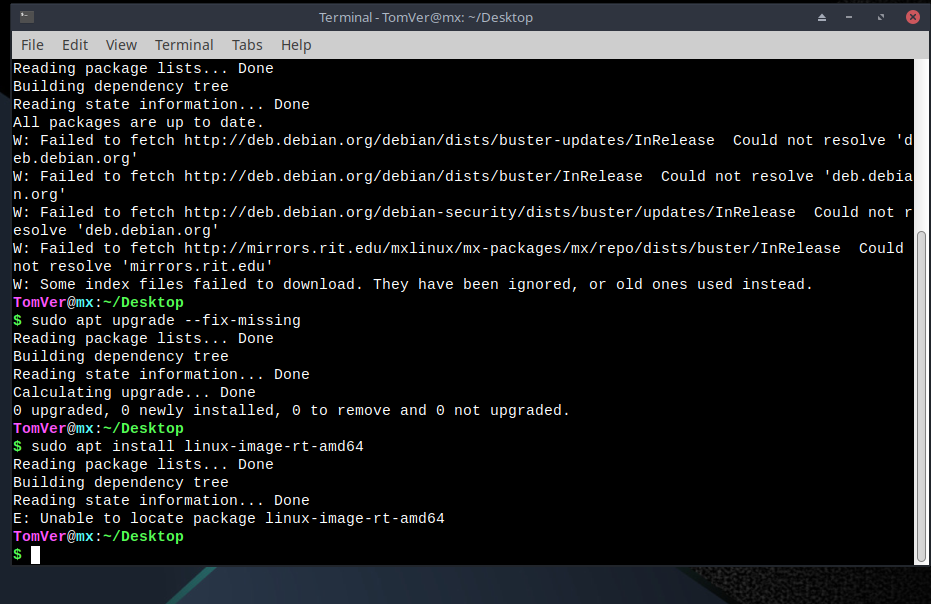
Well I have blown most of the day trying to get things going. Linux seems to be constantly changing. I have gone through the install many times today and hit a brick wall.  First problem was getting the bios so it would see the hard drive after reboot, on this Dell it must be in legacy.  I did get it to do the install for MX and boot fine after that.  But down where update and upgrade section.  See attached screen shot, it could not fine the files to upload.  Also if you remove the USB stick before the install shuts down it will not shutdown on it own.  I keep getting the goal posts being moved.
What is bad is I talked a guy into going the linuxcnc way and I am unable to get my own table controller back running again.  It ran fine with axis for router work but plasma (QTPlasmaC) had glitches, so I looked for another version.  sorry for the whining ):  ):

Please Log in or Create an account to join the conversation.

Time to create page: 0.341 seconds
Powered by Kunena Forum
