LinuxCNC on Raspberry Pi 5

More
2 years 7 months ago #295779 by elovalvo
Replied by elovalvo on topic LinuxCNC on Raspberry Pi 5
I recently noticed that the Raspbian update on Pi5 installs version 6.6.20+rpt-rpi-2712.

Therefore I thought about updating the PREEMPT_RT version

So I started with a fresh installation of the Raspberry Pi OS 64 bit via Raspberry Pi Imager.
I updated to version 6.6.20 with the usual commands:
sudo apt update
sudo apt upgrade

and I rebooted.

The uname -a command now returns the following indication
Linux raspberrypi5 6.6.20+rpt-rpi-2712 #1 SMP PREEMPT Debian 1:6.6.20-1+rpt1 (2024-03-07) aarch64 GNU/

I then compiled a new version of the Raspbian OS that included the PREEMPT_RT
For convenience I used the procedure here
forums.raspberrypi.com/viewtopic.php?t=343387

The kernel with the PREEMPT_RT is kernel-6.6.21-v8-16k-elv.zip
and can be downloaded from here
drive.google.com/file/d/1FKLQIBdXTh43kjC...48d/view?usp=sharing

To install it, just copy it to /tmp and then run these commands

cd /
sudo unzip /tmp/kernel-6.6.21-v8-16k-elv.zip

overwriting all files with the All option

So I edited the cmdline.txt with
sudo nano "/boot/firmware/cmdline.txt"
adding the following commands to the end of the line
   isolcpus=2.3 rcu_nocbs=2.3 nohz_full=2.3 max.processor.cstate=1
   
At the next reboot the uname -a command reports the following indication
Linux raspberrypi5 6.6.21-rpi999-rpi-2712 #1 SMP PREEMPT_RT Tue Mar 12 15:59:56 CET 2024 aarch64 GNU/Linux
   
To install linuxcnc simply type the following commands
 sudo apt update
 sudo apt install linuxcnc-uspace linuxcnc-uspace-dev

   
However, to date the installed version is the following
   LINUXCNC - 2.9.0~pre1+git20230208.f1270d6ed7
   
If you want version 2.9.2 you can do it this way:
   
cd /tmp
wget linuxcnc.org/dists/bookworm/2.9-uspace/b...pace_2.9.2_arm64.deb
wget linuxcnc.org/dists/bookworm/2.9-uspace/b...-dev_2.9.2_arm64.deb
wget linuxcnc.org/dists/bookworm/2.9-uspace/b...doc-en_2.9.2_all.deb

sudo apt install ./linuxcnc-uspace_2.9.2_arm64.deb
sudo apt install ./linuxcnc-uspace-dev_2.9.2_arm64.deb
sudo apt install ./linuxcnc-doc-en_2.9.2_all.deb


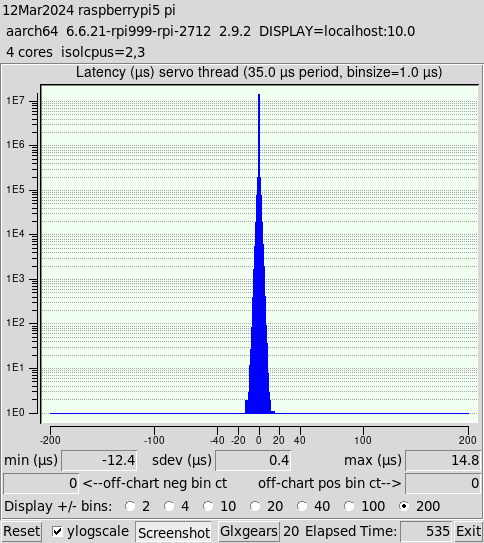
The result of the latency-histogram (latency-histogram --nobase --sbinsize 1000 --show --servo 35000) is however always very interesting
 
For those who do not want to retrace all the steps previously exposed, you can find the ready-made image (Lcnc292_pi5.img) here:
drive.google.com/file/d/1dd8oiYhcs_UComc...fNF/view?usp=sharing
The following user(s) said Thank You: kostas, phillc54, MX_Master, zmrdko

Please Log in or Create an account to join the conversation.

More
2 years 7 months ago #295790 by rodw
Replied by rodw on topic LinuxCNC on Raspberry Pi 5
Looks good. It would be interesting to retry using the debian kernel rather than your compied one and compare latency results. I suspect what you have will be better.sudo apt-install -y linux-image-rt-arm64 linux-headers-rt-arm64
The following user(s) said Thank You: elovalvo

Please Log in or Create an account to join the conversation.

More
2 years 7 months ago #295866 by Cant do this anymore bye all
Always wonder why you use such a low servo thread, which isn't a real world scenario, and don't show a 1ms servo thread and a base thread.

It would be interesting to see a 1ms servo thread without isolating any cpus. And the aforementioned 1ms servo thread & base thread isolating the required cpus to get a real life scenario. Some users can judge whether it would suit a real life setup without having to go through buying a RPi5, installing Linuxcnc and running the latency tests. Something that would give them confidence in a particular setup.

Please Log in or Create an account to join the conversation.

More
2 years 7 months ago #295904 by elovalvo
Replied by elovalvo on topic LinuxCNC on Raspberry Pi 5

Looks good. It would be interesting to retry using the debian kernel rather than your compied one and compare latency results. I suspect what you have will be better.sudo apt-install -y linux-image-rt-arm64 linux-headers-rt-arm64
I tried the procedure you suggested but, in addition to the fact that version 6.1.0-18-rt-arm64 is currently available (and therefore not aligned with version 6.6.20+rpt-rpi-2712), the installation reports that these versions of initramfs and kernel are unsupported.
Code:
pi@raspberrypi5:~ $ uname -a Linux raspberrypi5 6.6.20+rpt-rpi-2712 #1 SMP PREEMPT Debian 1:6.6.20-1+rpt1 (2024-03-07) aarch64 GNU/Linux pi@raspberrypi5:~ $ sudo apt update Hit:1 http://deb.debian.org/debian bookworm InRelease Hit:2 http://deb.debian.org/debian-security bookworm-security InRelease Hit:3 http://deb.debian.org/debian bookworm-updates InRelease Hit:4 http://archive.raspberrypi.com/debian bookworm InRelease Reading package lists... Done Building dependency tree... Done Reading state information... Done All packages are up to date. pi@raspberrypi5:~ $ sudo apt upgrade Reading package lists... Done Building dependency tree... Done Reading state information... Done Calculating upgrade... Done 0 upgraded, 0 newly installed, 0 to remove and 0 not upgraded. pi@raspberrypi5:~ $ pi@raspberrypi5:~ $ sudo apt install -y linux-image-rt-arm64 linux-headers-rt-arm64 Reading package lists... Done Building dependency tree... Done Reading state information... Done The following additional packages will be installed:   linux-headers-6.1.0-18-common-rt linux-headers-6.1.0-18-rt-arm64 linux-image-6.1.0-18-rt-arm64   linux-kbuild-6.1 Suggested packages:   linux-doc-6.1 debian-kernel-handbook The following NEW packages will be installed:   linux-headers-6.1.0-18-common-rt linux-headers-6.1.0-18-rt-arm64 linux-headers-rt-arm64   linux-image-6.1.0-18-rt-arm64 linux-image-rt-arm64 linux-kbuild-6.1 0 upgraded, 6 newly installed, 0 to remove and 0 not upgraded. Need to get 67.8 MB of archives. After this operation, 405 MB of additional disk space will be used. Get:1 http://deb.debian.org/debian bookworm/main arm64 linux-headers-6.1.0-18-common-rt all 6.1.76-1 [8,308 kB] Get:2 http://archive.raspberrypi.com/debian bookworm/main arm64 linux-kbuild-6.1 arm64 1:6.1.73-1+rpt1 [913 kB] Get:3 http://deb.debian.org/debian bookworm/main arm64 linux-headers-6.1.0-18-rt-arm64 arm64 6.1.76-1 [1,306 kB] Get:4 http://deb.debian.org/debian bookworm/main arm64 linux-headers-rt-arm64 arm64 6.1.76-1 [1,408 B] Get:5 http://deb.debian.org/debian bookworm/main arm64 linux-image-6.1.0-18-rt-arm64 arm64 6.1.76-1 [57.2 MB] Get:6 http://deb.debian.org/debian bookworm/main arm64 linux-image-rt-arm64 arm64 6.1.76-1 [1,444 B] Fetched 67.8 MB in 4s (18.5 MB/s) Selecting previously unselected package linux-headers-6.1.0-18-common-rt. (Reading database ... 125884 files and directories currently installed.) Preparing to unpack .../0-linux-headers-6.1.0-18-common-rt_6.1.76-1_all.deb ... Unpacking linux-headers-6.1.0-18-common-rt (6.1.76-1) ... Selecting previously unselected package linux-kbuild-6.1. Preparing to unpack .../1-linux-kbuild-6.1_1%3a6.1.73-1+rpt1_arm64.deb ... Unpacking linux-kbuild-6.1 (1:6.1.73-1+rpt1) ... Selecting previously unselected package linux-headers-6.1.0-18-rt-arm64. Preparing to unpack .../2-linux-headers-6.1.0-18-rt-arm64_6.1.76-1_arm64.deb ... Unpacking linux-headers-6.1.0-18-rt-arm64 (6.1.76-1) ... Selecting previously unselected package linux-headers-rt-arm64. Preparing to unpack .../3-linux-headers-rt-arm64_6.1.76-1_arm64.deb ... Unpacking linux-headers-rt-arm64 (6.1.76-1) ... Selecting previously unselected package linux-image-6.1.0-18-rt-arm64. Preparing to unpack .../4-linux-image-6.1.0-18-rt-arm64_6.1.76-1_arm64.deb ... Unpacking linux-image-6.1.0-18-rt-arm64 (6.1.76-1) ... Selecting previously unselected package linux-image-rt-arm64. Preparing to unpack .../5-linux-image-rt-arm64_6.1.76-1_arm64.deb ... Unpacking linux-image-rt-arm64 (6.1.76-1) ... Setting up linux-image-6.1.0-18-rt-arm64 (6.1.76-1) ... /etc/kernel/postinst.d/initramfs-tools: update-initramfs: Generating /boot/initrd.img-6.1.0-18-rt-arm64 ERROR: Unsupported initramfs version (6.1.0-18-rt-arm64) /etc/kernel/postinst.d/z50-raspi-firmware: ERROR: Unsupported kernel version (6.1.0-18-rt-arm64) Setting up linux-headers-6.1.0-18-common-rt (6.1.76-1) ... Setting up linux-image-rt-arm64 (6.1.76-1) ... Setting up linux-kbuild-6.1 (1:6.1.73-1+rpt1) ... Setting up linux-headers-6.1.0-18-rt-arm64 (6.1.76-1) ... Setting up linux-headers-rt-arm64 (6.1.76-1) ... pi@raspberrypi5:~ $
The following user(s) said Thank You: rodw

Please Log in or Create an account to join the conversation.

More
2 years 7 months ago #295916 by rodw
Replied by rodw on topic LinuxCNC on Raspberry Pi 5
It was worth a try.
Often, where multiple kernel versions are in play, I have used 
sudo apt install linux-image-$(uname -r)-rt-arm64 linux-headers-$(uname -r)-rt-arm64
Not sure if Debian knows about your kernel.
The following user(s) said Thank You: elovalvo

Please Log in or Create an account to join the conversation.

More
2 years 7 months ago #295926 by zmrdko
Replied by zmrdko on topic LinuxCNC on Raspberry Pi 5
Nice latency test elovalvo.
Just to rise awareness, isn't here anybody able and willing to modify rpi5 macb driver for EtherCAT?

forum.linuxcnc.org/ethercat/52032-ethercat-on-raspberry-pi-5

Please Log in or Create an account to join the conversation.

Time to create page: 0.132 seconds
Powered by Kunena Forum