
Determining Angular Scale - Help w/ Microsteps
- notJamesLee
- Offline
- Senior Member
-

Less
More
- Posts: 60
- Thank you received: 5
16 Apr 2025 15:34 #326468
by notJamesLee
Replied by notJamesLee on topic Determining Angular Scale - Help w/ Microsteps
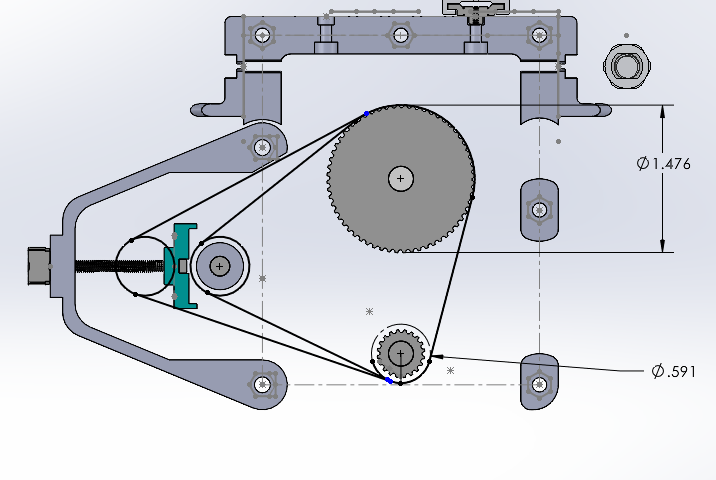
No, sorry i should've explain it better. Its just one belt.
The reason there are two loops; i only had a few closed loop belt size (length) options off the shelf from amazon, i needed to make sure the tensioner i was designing could make putting one of those belts on easier. So you'll see a one 'loop' goes around the interior most path and the opposite it true for the outer path.
Its one belt around three components, motor, driveshaft, tensioner. i attached a smaller slice, hopefully my rambles make sense.
The reason there are two loops; i only had a few closed loop belt size (length) options off the shelf from amazon, i needed to make sure the tensioner i was designing could make putting one of those belts on easier. So you'll see a one 'loop' goes around the interior most path and the opposite it true for the outer path.
Its one belt around three components, motor, driveshaft, tensioner. i attached a smaller slice, hopefully my rambles make sense.
Please Log in or Create an account to join the conversation.
- tommylight
-

- Away
- Moderator
-

Less
More
- Posts: 21928
- Thank you received: 7468
16 Apr 2025 16:25 #326473
by tommylight
Replied by tommylight on topic Determining Angular Scale - Help w/ Microsteps
That is a single belt in that drawing, it just shows where it would be when tightened completely.
And he already mentioned he is using a single belt...
And he already mentioned he is using a single belt...
The following user(s) said Thank You: notJamesLee
Please Log in or Create an account to join the conversation.
- notJamesLee
- Offline
- Senior Member
-
Less
More
- Posts: 60
- Thank you received: 5
16 Apr 2025 17:25 #326480
by notJamesLee
Replied by notJamesLee on topic Determining Angular Scale - Help w/ Microsteps
correct, thank you.
I wanted a closed loop belt for a lot of reasons. Its next to impossible to get on a closed loop belt without some sort of tensioning device.
I am with you on avoiding complexity, this is the third rev of this cutting head for that exact reason.
I wanted a closed loop belt for a lot of reasons. Its next to impossible to get on a closed loop belt without some sort of tensioning device.
I am with you on avoiding complexity, this is the third rev of this cutting head for that exact reason.
Please Log in or Create an account to join the conversation.
- notJamesLee
- Offline
- Senior Member
-
Less
More
- Posts: 60
- Thank you received: 5
16 Apr 2025 18:42 - 16 Apr 2025 18:43 #326485
by notJamesLee
Replied by notJamesLee on topic Determining Angular Scale - Help w/ Microsteps
Friends,
from what I can only assume is inconsistencies in diameter or something but 533.33 is the number.
with 533 after 20+ revolutions you can see the starting point creep earlier -- indicating its just short of the number of steps to complete a full circle.
with 534 after 20+ it goes the opposite way.
I have a few follow up questions:
- what should i have the dip switches set to? Now that we've figured out they don't do anything to effect the steps per revolution is there an optimal value for this? I dont need insane amounts of torque or rpms
- is this something i can easily fix with the encoder once i do move to LCNC and tune in the encoder error?
thanks all for sanity checking me thus far, nice to know im not 100% crazy.
from what I can only assume is inconsistencies in diameter or something but 533.33 is the number.
with 533 after 20+ revolutions you can see the starting point creep earlier -- indicating its just short of the number of steps to complete a full circle.
with 534 after 20+ it goes the opposite way.
I have a few follow up questions:
- what should i have the dip switches set to? Now that we've figured out they don't do anything to effect the steps per revolution is there an optimal value for this? I dont need insane amounts of torque or rpms
- is this something i can easily fix with the encoder once i do move to LCNC and tune in the encoder error?
thanks all for sanity checking me thus far, nice to know im not 100% crazy.
Last edit: 16 Apr 2025 18:43 by notJamesLee.
Please Log in or Create an account to join the conversation.
- spumco
- Offline
- Platinum Member
-

Less
More
- Posts: 2171
- Thank you received: 896
17 Apr 2025 16:33 #326528
by spumco
Sounds like you're still struggling with the driver, yes?
Maybe I missed it, but what brand/model driver do you have? Asking because some drivers can be tuned via software (in addition to dip switches), and there may be a setting (or another dip) that disables the external dip switches.
Replied by spumco on topic Determining Angular Scale - Help w/ Microsteps
Friends,
from what I can only assume is inconsistencies in diameter or something but 533.33 is the number.
with 533 after 20+ revolutions you can see the starting point creep earlier -- indicating its just short of the number of steps to complete a full circle.
with 534 after 20+ it goes the opposite way.
I have a few follow up questions:
- what should i have the dip switches set to? Now that we've figured out they don't do anything to effect the steps per revolution is there an optimal value for this? I dont need insane amounts of torque or rpms
- is this something i can easily fix with the encoder once i do move to LCNC and tune in the encoder error?
thanks all for sanity checking me thus far, nice to know im not 100% crazy.
Sounds like you're still struggling with the driver, yes?
Maybe I missed it, but what brand/model driver do you have? Asking because some drivers can be tuned via software (in addition to dip switches), and there may be a setting (or another dip) that disables the external dip switches.
Please Log in or Create an account to join the conversation.
- spumco
- Offline
- Platinum Member
-
Less
More
- Posts: 2171
- Thank you received: 896
18 Apr 2025 02:00 #326556
by spumco
Replied by spumco on topic Determining Angular Scale - Help w/ Microsteps
So it looks like the drive is software-configurable.
I'd suggest going back to basics and connecting the drive to a Windows PC and verifying all the drive settings via the drive tuning software.
SIDE NOTE: make sure the motor's encoder count (1000/4000) matches what the drive is expecting.
Set the dip switches to 'software' (i.e. all ON). The reason is that you can (probably) set the microsteps to a useful number in software and are not limited to one of the 200/800/1600/etc values as with dip switches.
This will allow you to set the microstepping to a value that makes the steps per spindle rev a whole number, making the math for LCNC much easier.
Since LCNC's rotary axes units are set in INI [TRAJ] ANGULAR_UNITS = DEGREES, you need the [JOINT_N] STEP_SCALE to be in steps per degree.
For a 3:1 belt reduction and a 1.8deg motor, if you set the microsteps to 2400/rev (12x microsteps), you will wind up with 20 steps per spindle degree.
If you find that 12x is too fine and the positional accuracy is kinda 'ish', you can go down to 1200/rev (6x) and adjust INI to 10 steps per degree. That might give the drive a bit more of a chance to hit a particular position rather than somewhere close-ish on either side of the target. Either way you're still below the encoder's resolution so the drive isn't going to be totally guessing on a position.
And while you're in there, you should adjust the drive's following error tolerance. I've found that Stepperonline's drives have a following error alarm set extremely high. As in the motor could be 1/2 a full rotation out of position before it alarms out - not OK for CNC use.
I'd suggest going back to basics and connecting the drive to a Windows PC and verifying all the drive settings via the drive tuning software.
SIDE NOTE: make sure the motor's encoder count (1000/4000) matches what the drive is expecting.
Set the dip switches to 'software' (i.e. all ON). The reason is that you can (probably) set the microsteps to a useful number in software and are not limited to one of the 200/800/1600/etc values as with dip switches.
This will allow you to set the microstepping to a value that makes the steps per spindle rev a whole number, making the math for LCNC much easier.
Since LCNC's rotary axes units are set in INI [TRAJ] ANGULAR_UNITS = DEGREES, you need the [JOINT_N] STEP_SCALE to be in steps per degree.
For a 3:1 belt reduction and a 1.8deg motor, if you set the microsteps to 2400/rev (12x microsteps), you will wind up with 20 steps per spindle degree.
If you find that 12x is too fine and the positional accuracy is kinda 'ish', you can go down to 1200/rev (6x) and adjust INI to 10 steps per degree. That might give the drive a bit more of a chance to hit a particular position rather than somewhere close-ish on either side of the target. Either way you're still below the encoder's resolution so the drive isn't going to be totally guessing on a position.
And while you're in there, you should adjust the drive's following error tolerance. I've found that Stepperonline's drives have a following error alarm set extremely high. As in the motor could be 1/2 a full rotation out of position before it alarms out - not OK for CNC use.
The following user(s) said Thank You: notJamesLee
Please Log in or Create an account to join the conversation.
- timo
- Offline
- Elite Member
-

Less
More
- Posts: 210
- Thank you received: 61
18 Apr 2025 04:38 - 18 Apr 2025 05:08 #326564
by timo
What is confusing me: Is the encoder in the belt loop or is it on the motor? If the encoder is connected to the motor and the driver is matching, a closed loop system should produce an error if loosing steps. Or not?
Are you sure the pulleys are not slipping. (do not ask me why I ask this )
)
Had a similar situation, where things went slightly off. (at first I did not notice that the pulleys were not 1:1) after correcting that it was still doing weird stuff. I started searching for an electrical problem, but finally noticed that the set screw thread on the encoder belt pulley was not cut through all the way. It felt tight but it was not, result was the encoder was counting too less.
p.s. Another encounter I had was too short step input pulses to the driver, then the driver "thinks" it needs to move e.g. 1090 steps, but the controller was pulsing 1294 times and some of the pulses (not all) were skipped.
Some drivers have settings for input pulse duration. (just an idea)
pps. Thanks to my skillful EMC design I managed to drive the Z-axis down based on spindle rpm in a random pattern.
Replied by timo on topic Determining Angular Scale - Help w/ Microsteps
Yes, I would first check if the unloaded motor is doing what it should.Really bizzare.
Try the motor sans belt, draw a notch on the pulley attached to the motor and count how many revolutions it makes.
What is confusing me: Is the encoder in the belt loop or is it on the motor? If the encoder is connected to the motor and the driver is matching, a closed loop system should produce an error if loosing steps. Or not?
Are you sure the pulleys are not slipping. (do not ask me why I ask this
) Had a similar situation, where things went slightly off. (at first I did not notice that the pulleys were not 1:1) after correcting that it was still doing weird stuff. I started searching for an electrical problem, but finally noticed that the set screw thread on the encoder belt pulley was not cut through all the way. It felt tight but it was not, result was the encoder was counting too less.
p.s. Another encounter I had was too short step input pulses to the driver, then the driver "thinks" it needs to move e.g. 1090 steps, but the controller was pulsing 1294 times and some of the pulses (not all) were skipped.
Some drivers have settings for input pulse duration. (just an idea)
pps. Thanks to my skillful EMC design I managed to drive the Z-axis down based on spindle rpm in a random pattern.
Last edit: 18 Apr 2025 05:08 by timo. Reason: rephrase, I think I misunderstood something.
Please Log in or Create an account to join the conversation.
- andypugh
-

- Offline
- Moderator
-
Less
More
- Posts: 19898
- Thank you received: 4654
18 Apr 2025 10:38 #326587
by andypugh
Replied by andypugh on topic Determining Angular Scale - Help w/ Microsteps
I don't understand the problem here, really.
But with 1600 pulses per rev and a 3:1 belt ratio, the scale is just 1600/3 = 533.3333333333333333333333
If you see a creep, it could be the missing threes.
But, LinuxCNC expects pulser per _degree_ for a rotary axis, so you might actually want 1.481481481481481
But with 1600 pulses per rev and a 3:1 belt ratio, the scale is just 1600/3 = 533.3333333333333333333333
If you see a creep, it could be the missing threes.
But, LinuxCNC expects pulser per _degree_ for a rotary axis, so you might actually want 1.481481481481481
Please Log in or Create an account to join the conversation.
- notJamesLee
- Offline
- Senior Member
-
Less
More
- Posts: 60
- Thank you received: 5
19 Apr 2025 21:12 #326736
by notJamesLee
Replied by notJamesLee on topic Determining Angular Scale - Help w/ Microsteps
Hi Friends,
catching up on replies now, i was out traveling for work the last few days. Here are the links to the motor and driver i am using.
Motor
Driver
Ill try to reply to everyone in this one reply to avoid any confusion, and ill to to work backwards as much as possible.
@Langdons
- Does speed make a difference?
No it doesn't seem like it. The Arduino code i am running does a slow loop and a fast loop changing the delay int between steps and its been consistent every time. Although i haven't cranked the speed up and don't plan on it.
@andypugh
- you are correct, i am trying to understand the most optimal way to get this into Lcnc and based on previous posts I can maybe modify the drivers software to make that a whole number. Still investigating this though.
@timo
- I have and it works as expected and repeatably. The issues comes up when i put it into the pulley system, with the reduction i can't hone in a precise step/rev, from which i can derive the steps/deg for a rotary axis in LCNC.
- in regard to the pulleys, I am certain the motor pulley isn't (the ole sharpie method) the idler doesn't count, and no am im not 100% certain that the drive shaft is fixed in place, however with everything powered down i can turn the drive shaft and it turns the motor pulley. that on top of the low speeds and it being uploaded gives me a decent amount of confidence in my answer.
- I also haven't even begun to tackle any of the encoder/ pid error stuff because when i tried initially i discovered this the issue we're dealing with now, that comes next once i have this setup pretty good.
@spumco
- This is my plan. I have the cable and am able to get it to talk to my PC, the issue is once i get it its all french to me. How would i verify the 4:1 encoder resolution? Should the drive be connected to the motor when i do this? I am going to spend the next few hours messing with it on the software side and ill report back what i learn or how i mess up.
Thank you all again,
catching up on replies now, i was out traveling for work the last few days. Here are the links to the motor and driver i am using.
Motor
Driver
Ill try to reply to everyone in this one reply to avoid any confusion, and ill to to work backwards as much as possible.
@Langdons
- Does speed make a difference?
No it doesn't seem like it. The Arduino code i am running does a slow loop and a fast loop changing the delay int between steps and its been consistent every time. Although i haven't cranked the speed up and don't plan on it.
@andypugh
- you are correct, i am trying to understand the most optimal way to get this into Lcnc and based on previous posts I can maybe modify the drivers software to make that a whole number. Still investigating this though.
@timo
- I have and it works as expected and repeatably. The issues comes up when i put it into the pulley system, with the reduction i can't hone in a precise step/rev, from which i can derive the steps/deg for a rotary axis in LCNC.
- in regard to the pulleys, I am certain the motor pulley isn't (the ole sharpie method) the idler doesn't count, and no am im not 100% certain that the drive shaft is fixed in place, however with everything powered down i can turn the drive shaft and it turns the motor pulley. that on top of the low speeds and it being uploaded gives me a decent amount of confidence in my answer.
- I also haven't even begun to tackle any of the encoder/ pid error stuff because when i tried initially i discovered this the issue we're dealing with now, that comes next once i have this setup pretty good.
@spumco
- This is my plan. I have the cable and am able to get it to talk to my PC, the issue is once i get it its all french to me. How would i verify the 4:1 encoder resolution? Should the drive be connected to the motor when i do this? I am going to spend the next few hours messing with it on the software side and ill report back what i learn or how i mess up.
Thank you all again,
Please Log in or Create an account to join the conversation.
- notJamesLee
- Offline
- Senior Member
-
Less
More
- Posts: 60
- Thank you received: 5
19 Apr 2025 21:29 #326738
by notJamesLee
Replied by notJamesLee on topic Determining Angular Scale - Help w/ Microsteps
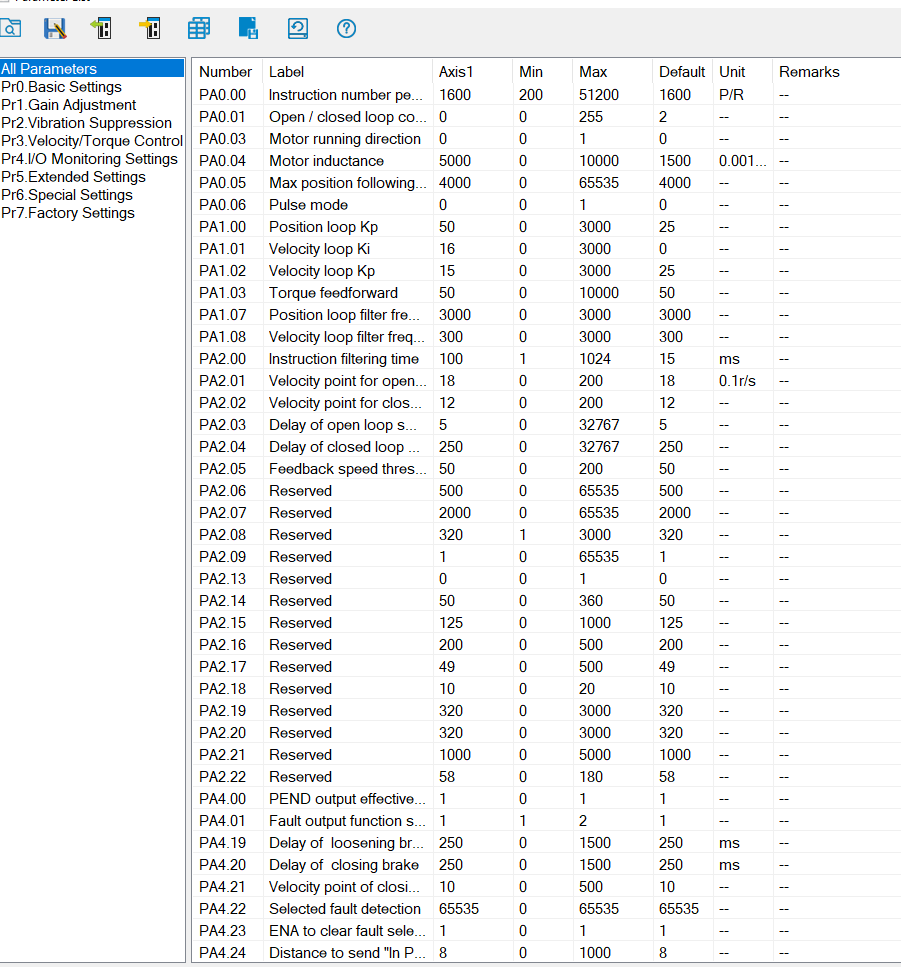
Okay so i confirmed that 1600 is the number, but this just makes me question what the micro steps are doing. Its clear i don't know what the step/rev actually translate to.
I guess i am just looking for what the optimal dip switch stetting is for my setup and what this number should be.
This software seems to have a decent scope as well. Is there any reason i shouldn't use this to tune the PID and get it close before moving to LCNC? It just easier when its all on the test bench. I know alot of wiring noise factors in it final resting place will make a difference but could i get it close here? or would the new environment completely change the PID settings?
I guess i am just looking for what the optimal dip switch stetting is for my setup and what this number should be.
This software seems to have a decent scope as well. Is there any reason i shouldn't use this to tune the PID and get it close before moving to LCNC? It just easier when its all on the test bench. I know alot of wiring noise factors in it final resting place will make a difference but could i get it close here? or would the new environment completely change the PID settings?
Please Log in or Create an account to join the conversation.
Time to create page: 0.368 seconds