

- Posts: 295
- Thank you received: 125
Ethercat HAL driver
6 years 5 months ago - 6 years 5 months ago #168037
by chimeno
Replied by chimeno on topic Ethercat HAL generic on raspberry 4 rt (working with beckhoff)
Hi @theshade,
, the .xml file that you need you have to generate with TWINCAT3, this is the easiest way if you don't have much knowledge.
If you do not know programming, the easiest way is to use the generic mode, I will attach an example, it would be from line 18.
Greeting
Chimeno
No, that is the description file for TWINCAT3 to recognize it, you must put that fileIs that the xml file I need?(attached)
Code:
C: \ TwinCAT \ 3.1 \ Config \ Io \ EtherCAT
Here you have different examples¿Conoces más herramientas, códigos, documentos o ejemplos de un paso a paso más similar que pueda usar como punto de partida?
Code:
https://github.com/sittner/linuxcnc-ethercat/tree/master/examples
If you do not know programming, the easiest way is to use the generic mode, I will attach an example, it would be from line 18.
Code:
https://github.com/sittner/linuxcnc-ethercat/blob/master/examples/generic-complex/ethercat-conf.xml
Greeting
Chimeno
Last edit: 6 years 5 months ago by chimeno. Reason: Edit
The following user(s) said Thank You: theshade
Please Log in or Create an account to join the conversation.

6 years 5 months ago - 6 years 5 months ago #168088
by theshade
Replied by theshade on topic Ethercat HAL generic on raspberry 4 rt (working with beckhoff)
Hi @chimeno,
Thank you again for your help.
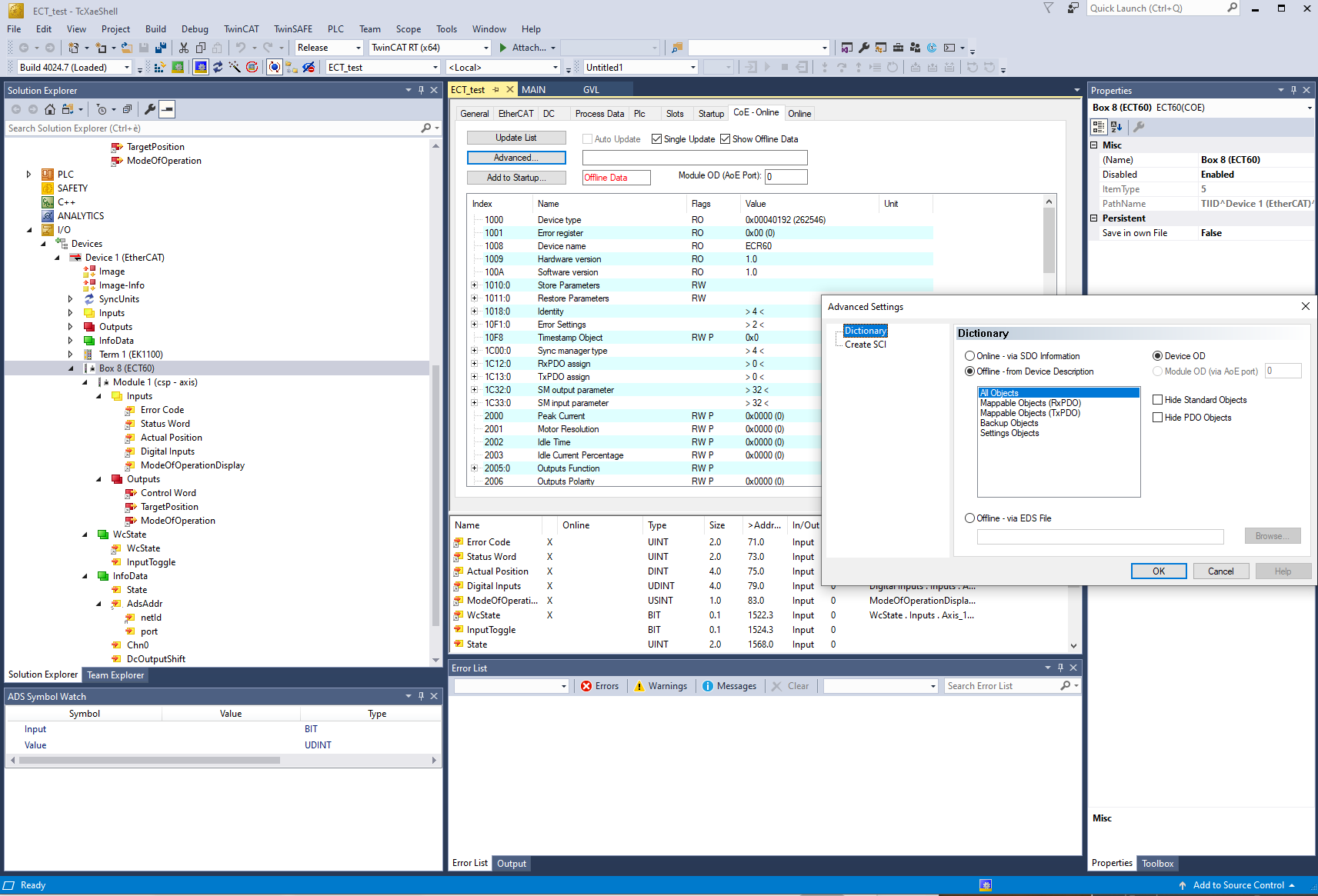
Yes I did put the .xml in TWINCAT 3 already here
and it works, I was able to make an axis in the twincat and I have an "offline" drive. (see screenshot)
I will receive the ECT60 drives next week and I am not in a rush, but how and where do I export the .xml from twincat3 or do I need to I need to do anything else in it like configure drives parameters or such?
All the parameters or config files I can export from a simulated axis are exporting as ".lis" ,".xti", ".csi" ..but I couldn't find where to export an .xml.
Which menu should I use or what do I need to export?
The ethercat-conf.xml I use in linux CNC looks currently like this and it works in linuxCNC for the Beckhoff modules, I understand I will need to add the 4x ECT60 to it with SDOs and PDOs definitions
And yes I can code in C if needed, (I find my way in most languages from assembly, C, matlab, python and even R when needed) but for a first shot I'd rather do the generic xml to get things done and understand my way around.
Greetings.
Thank you again for your help.
Yes I did put the .xml in TWINCAT 3 already here
Code:
C: \ TwinCAT \ 3.1 \ Config \ Io \ EtherCAT
I will receive the ECT60 drives next week and I am not in a rush, but how and where do I export the .xml from twincat3 or do I need to I need to do anything else in it like configure drives parameters or such?
All the parameters or config files I can export from a simulated axis are exporting as ".lis" ,".xti", ".csi" ..but I couldn't find where to export an .xml.
Which menu should I use or what do I need to export?
The ethercat-conf.xml I use in linux CNC looks currently like this and it works in linuxCNC for the Beckhoff modules, I understand I will need to add the 4x ECT60 to it with SDOs and PDOs definitions
Code:
<masters>
<master idx="0" appTimePeriod="1000000" refClockSyncCycles="1000">
<slave idx="0" type="EK1100" name="D1"/>
<slave idx="1" type="EL1008" name="D2"/>
<slave idx="2" type="EL1008" name="D3"/>
<slave idx="3" type="EL1008" name="D4"/>
<slave idx="4" type="EL2008" name="D6"/>
<slave idx="5" type="EL4102" name="D7"/>
<!-- <slave idx="6" type="DeASDA" name="3A1">
<dcConf assignActivate="300" sync0Cycle="*1" sync0Shift="-25000"/>
</slave>
<slave idx="7" type="DeASDA" name="3A2">
<dcConf assignActivate="300" sync0Cycle="*1" sync0Shift="-25000"/>
</slave>
<slave idx="8" type="DeASDA" name="4A3">
<dcConf assignActivate="300" sync0Cycle="*1" sync0Shift="-25000"/>
</slave>-->
</master>
</masters>
And yes I can code in C if needed, (I find my way in most languages from assembly, C, matlab, python and even R when needed) but for a first shot I'd rather do the generic xml to get things done and understand my way around.
Greetings.
Last edit: 6 years 5 months ago by theshade.
Please Log in or Create an account to join the conversation.
6 years 5 months ago - 6 years 5 months ago #168174
by chimeno
Replied by chimeno on topic Ethercat HAL generic on raspberry 4 rt (working with beckhoff)
Hi @theshade
resguard
Chimeno
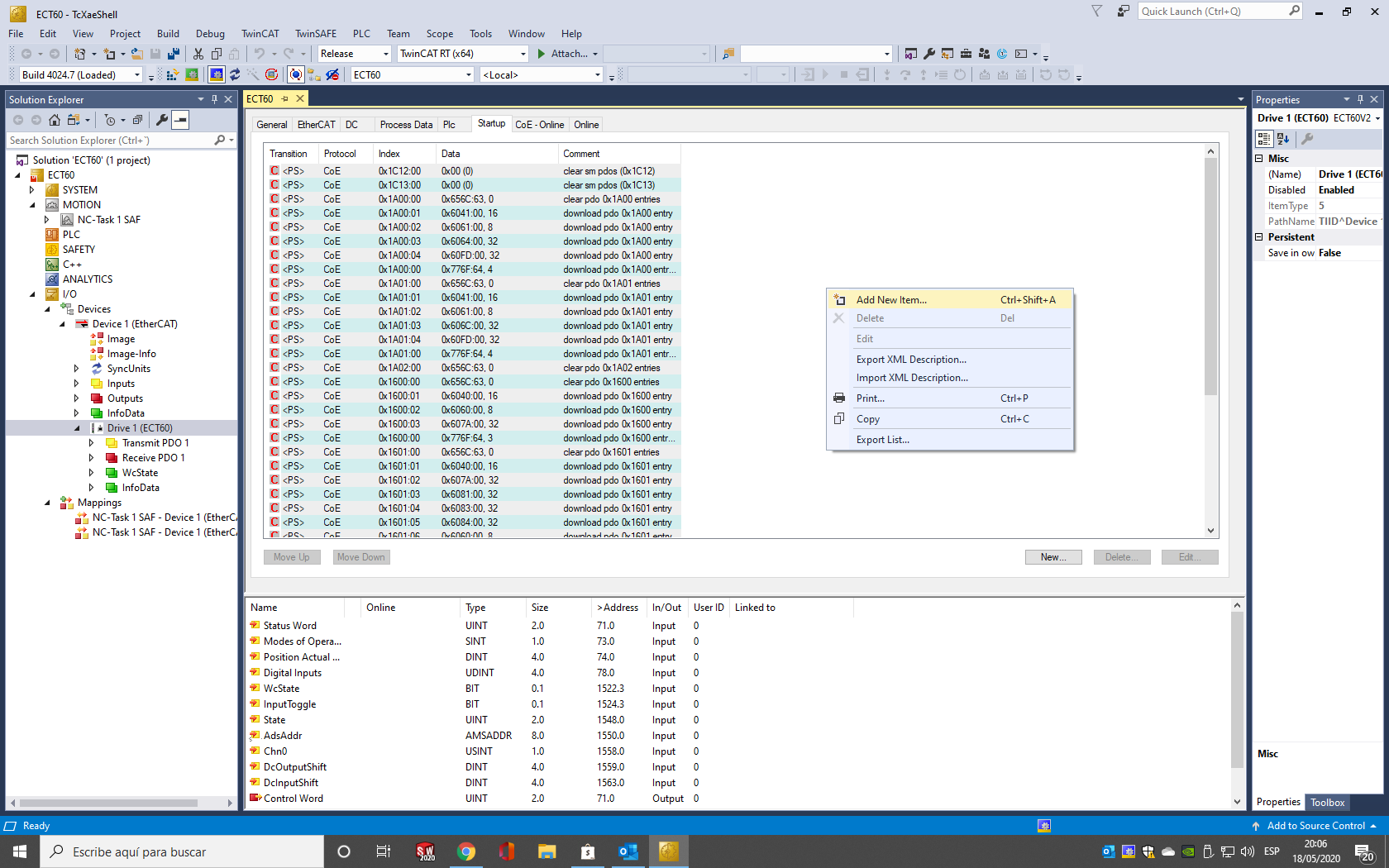
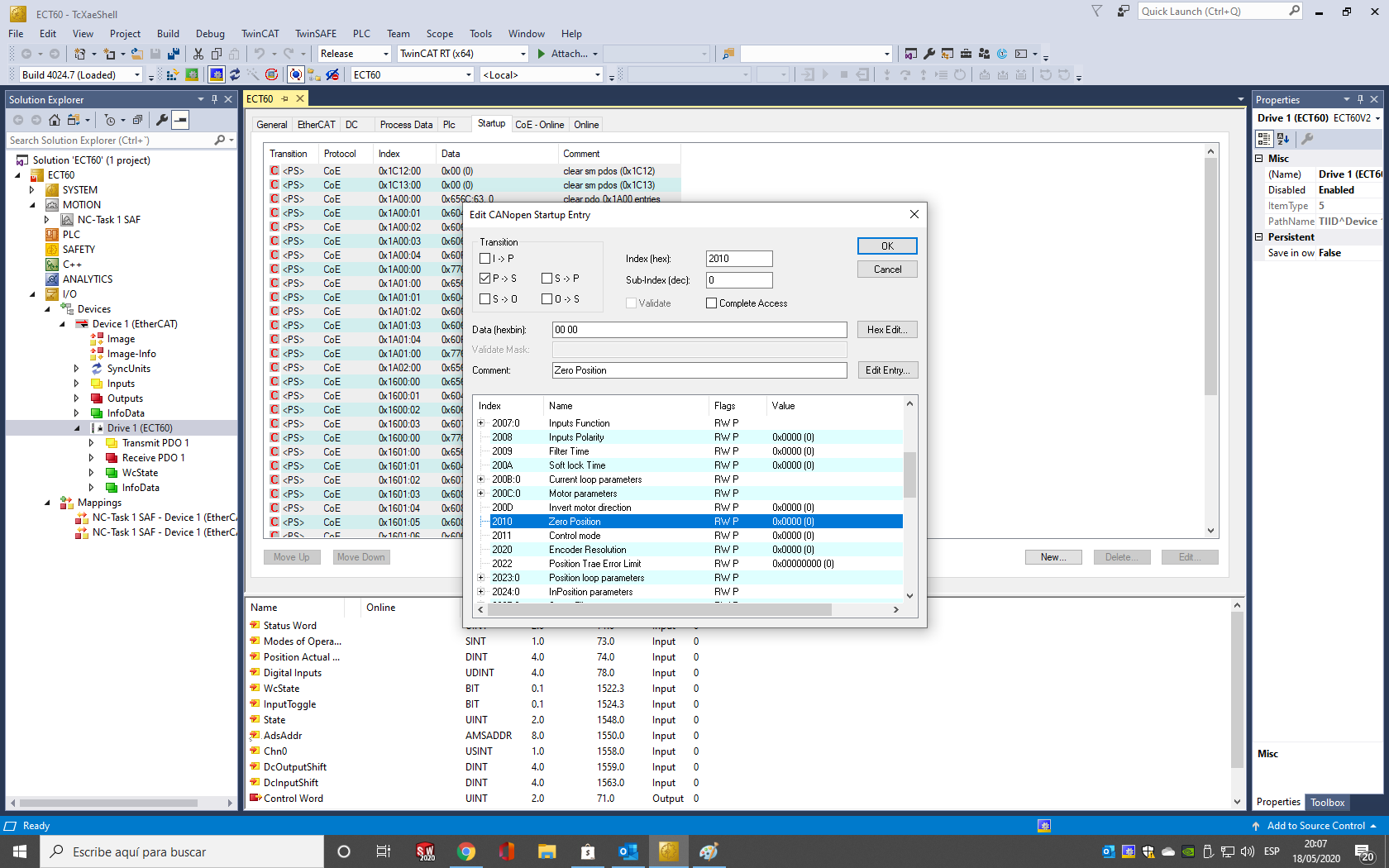
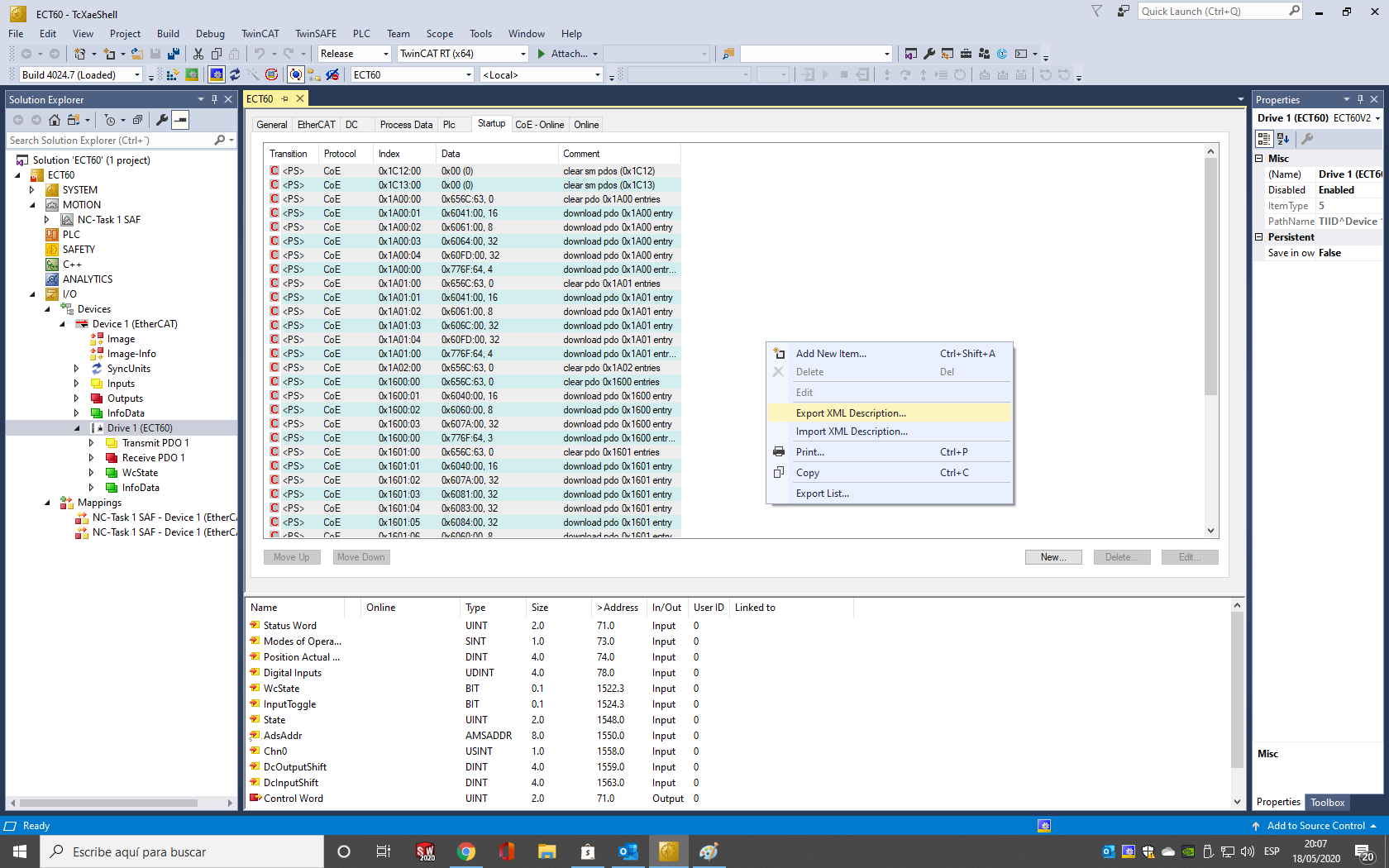
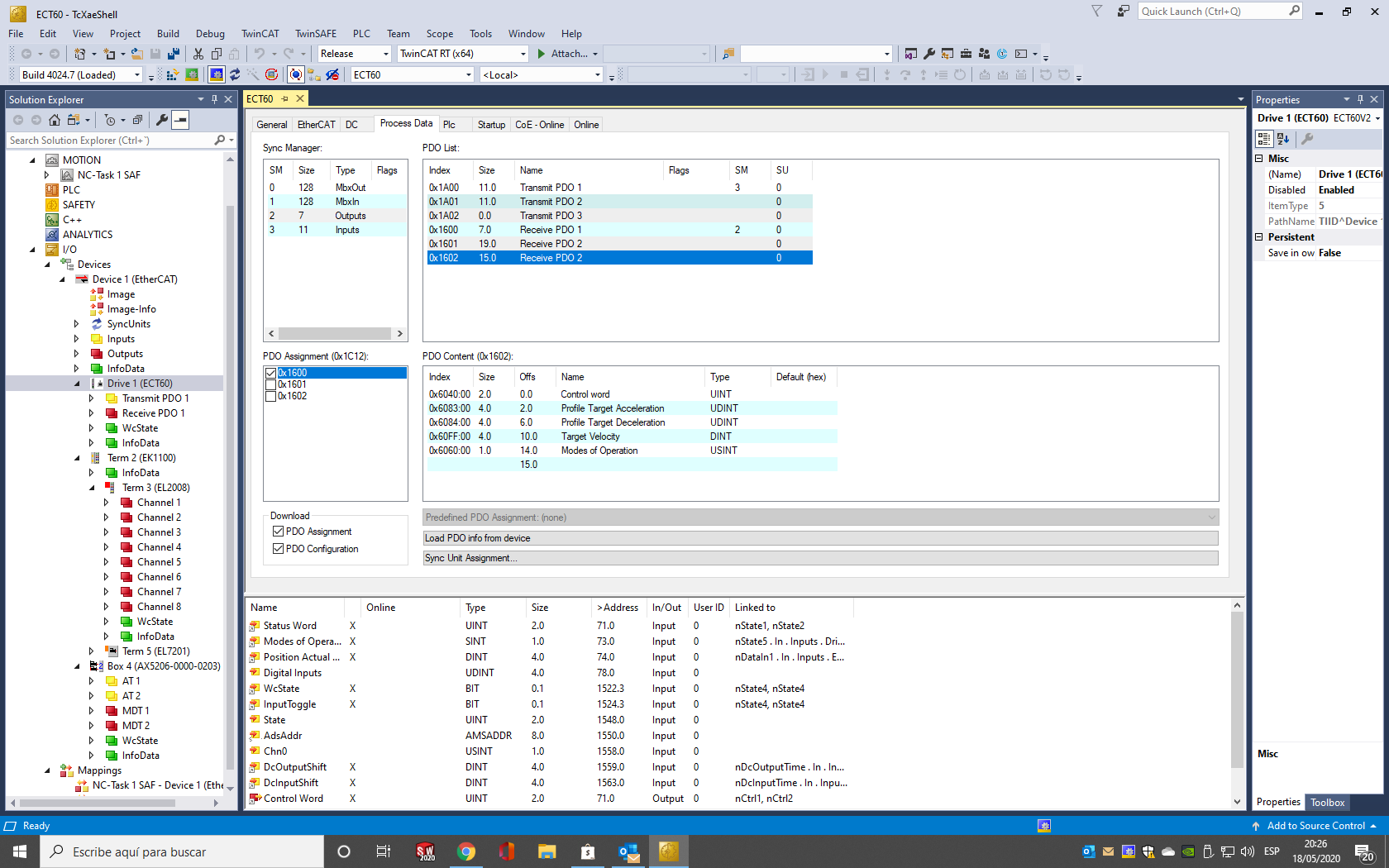
you have to add to the "startup" tab the configuration that changes from the default, then export the .xml file description, attached a couple of images to guide you.I will receive the ECT60 drives next week and I am not in a rush, but how and where do I export the .xml from twincat3 or do I need to I need to do anything else in it like configure drives parameters or such?
I am attaching a screenshot of where the PDOs are located and I am also attaching a new general configuration file for linuxcnc-ethercat, things are missing so you can fill it yourself.The ethercat-conf.xml I use in linux CNC looks currently like this and it works in linuxCNC for the Beckhoff modules, I understand I will need to add the 4x ECT60 to it with SDOs and PDOs definitions
resguard
Chimeno
Last edit: 6 years 5 months ago by chimeno. Reason: Edit PDO
The following user(s) said Thank You: theshade
Please Log in or Create an account to join the conversation.
6 years 5 months ago #168191
by theshade
Replied by theshade on topic Ethercat HAL generic on raspberry 4 rt (working with beckhoff)
Thank you Chimeno for your example and time,
I think I understand,
the .xml will setup the registers at startup (steps, modes, etc..) and also define the "PDO telegram"
Now I know how to start experimenting...
Thank you again,
Cheers
I think I understand,
the .xml will setup the registers at startup (steps, modes, etc..) and also define the "PDO telegram"
Now I know how to start experimenting...
Thank you again,
Cheers
Please Log in or Create an account to join the conversation.
6 years 5 months ago #168462
by CORBETT
Replied by CORBETT on topic Ethercat HAL driver
@Chimeno
@sqmathlete
and anyone else
Albert and Dan,
Ok, I have been reading and learning TC3 and can hook up my EK1100 with EL5152 terminal, then in config mode go online, and do a Scan, and under the IO tab pull up the EK1100 & EL5152.
I have been able to set up a virtual PLC and then in ladder programming build a simple motor contactor with a start push button and stop push button. Also have been learning to link a few things together in Structured Text programming, but still have a lot to learn.
The main goal is to get my EL5152 commissioned so that I can see the encoder counts and make sure all of my EL5151’s and the 5152 are good and not junk terminals. I simply believe all of them have been setup in another type of mode and that is why I cannot get any of them working in LinuxCNC.
What I thought to do in TC3 was to setup a Virtual PLC and build a simple conveyor program in ladder logic so that I could simulate the conveyor movement when turning the encoder shaft.
BUT this sounds like a lot of work as compared to simply building one NC PTP axis under the MOTION tab to link the encoder and see the counts this way. I am not sure what is the best approach so if you guy’s have a better idea, then please let me know your thoughts.
Albert, I haven’t flashed the EPROM yet as I would like to learn how to configure the EL515x terminal so that I can “SEE” the encoder working in TwinCAT. As Dan said in the past, you need TwinCAT to be able to fix or tweak any of the terminals and I would like to figure this all out for future problems even though this is really the only terminal that I am having problems with. Beckhoff seems to have done a really good job with TC3, it is much better to get working than TC2 in my opinion.
Thanks,
Robert
Please Log in or Create an account to join the conversation.
6 years 5 months ago - 6 years 5 months ago #168521
by chimeno
Replied by chimeno on topic Ethercat HAL driver
Hi @CORBETT
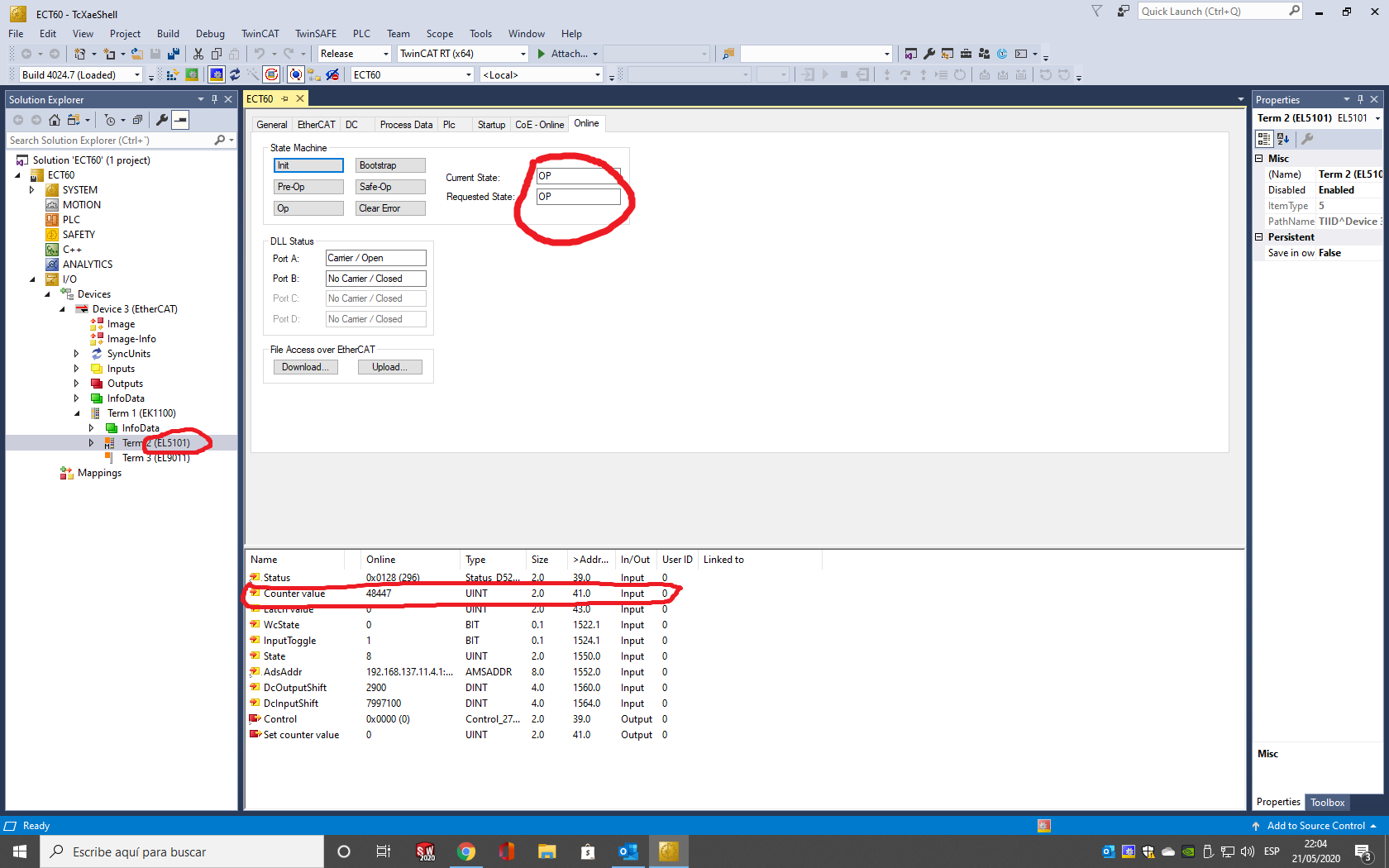
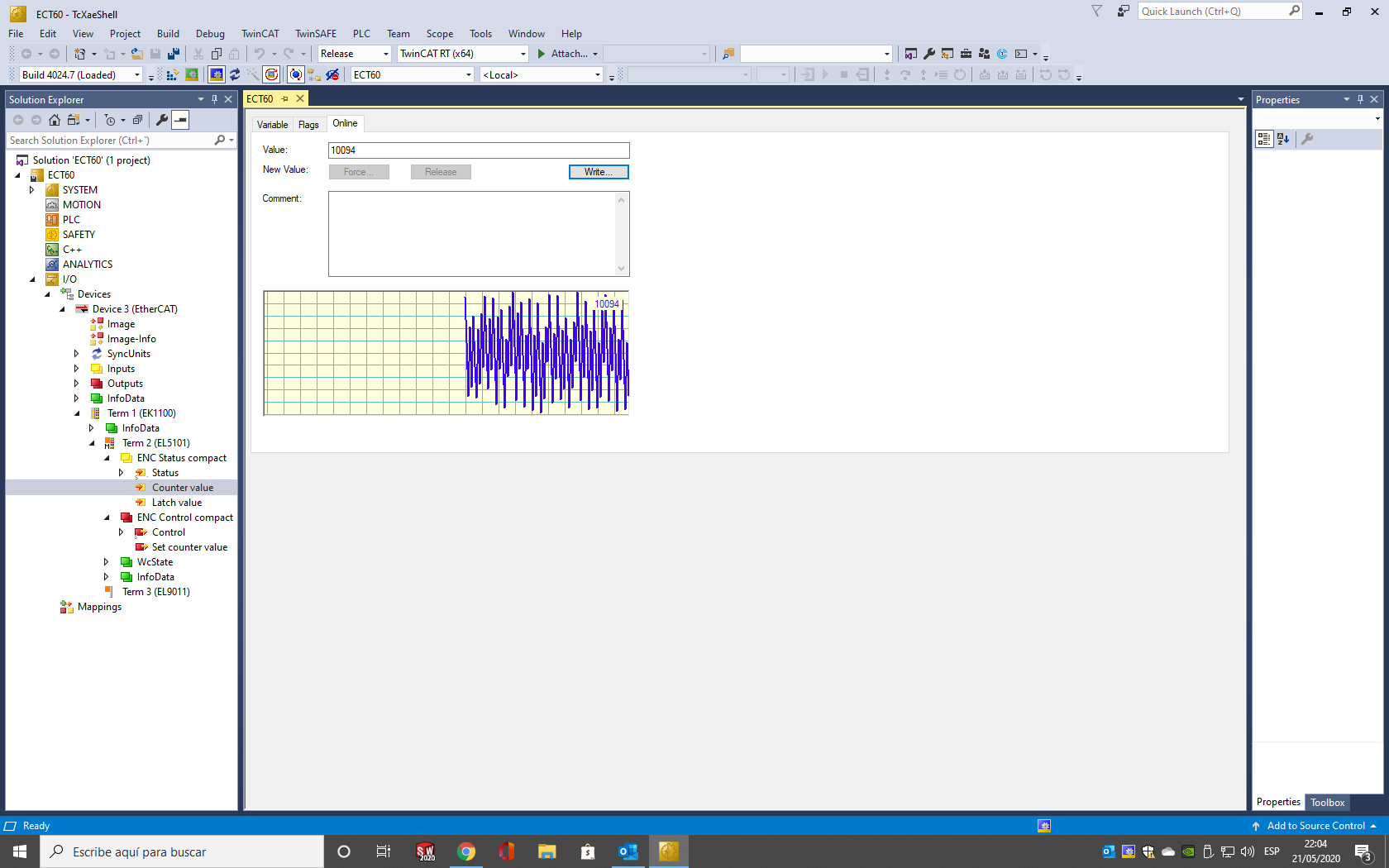
I think you don't need to do all that to know if it works correctly, which would be to reset the factory settings, since linuxcnc-ethercat uses the default function, then you see if the device has the correct name, it is in OP mode and what if You connect an encoder to it, count the values, I hope you are lucky.
reguard
Chimeno
Last edit: 6 years 5 months ago by chimeno.
The following user(s) said Thank You: CORBETT
Please Log in or Create an account to join the conversation.
Time to create page: 0.109 seconds