

- Posts: 1317
- Thank you received: 454
EtherCAT XML Configuration help (Elmo drive)
1 year 8 months ago #322672
by Hakan
Replied by Hakan on topic EtherCAT XML Configuration help (Elmo drive)
I looked at the ethercat-conf.xml you attached. This can be easy.
They are cia402 drives.
Check out here for a complete, small example on how to connect cia402 drives.
github.com/dbraun1981/hal-cia402/tree/main/example
They are cia402 drives.
Check out here for a complete, small example on how to connect cia402 drives.
github.com/dbraun1981/hal-cia402/tree/main/example
The following user(s) said Thank You: SteveCap
Please Log in or Create an account to join the conversation.

1 year 8 months ago #322763
by SteveCap
Replied by SteveCap on topic EtherCAT XML Configuration help (Elmo drive)
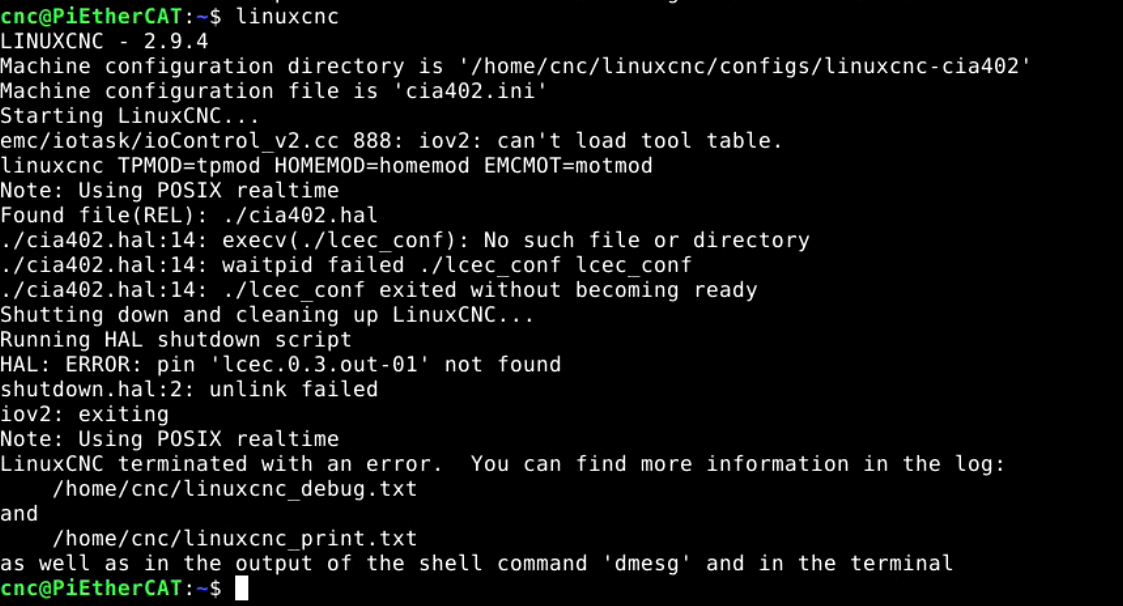
Thank you for all the help so far. I've been running into an issue and feared it may have been caused by my fumbling earlier on and some weird state I may have put the installation into. To resolve this, I started a fresh install from current ISO and so far it has been much smoother given that I have a little more understanding. However, I have still ended up getting stuck at the same place, lol. I have included a screenshot and some config files to assist troubleshooting.
Thanks,
Steve Cap
Thanks,
Steve Cap
Please Log in or Create an account to join the conversation.
1 year 8 months ago - 1 year 8 months ago #322769
by Hakan
Replied by Hakan on topic EtherCAT XML Configuration help (Elmo drive)
There are probably several things. But let's start with the line
"loadusr -W ./lcec_conf ethercat-conf.xml'"
Remove the ./ and it will find the lcec_conf module at /usr/lib/linuxcnc/modules/lcec_conf.so
The filename ethercat-conf.xml on that line must match the file name where you have the config. You attach ethercat-conf_2025-02-26.xml. If that's the one you use use the line "loadusr -W lcec_conf ethercat-conf_2025_02_26.xml".
You will get error because slave 0 and 2 do not have hal pins with the mentioned names. You had them as basic cia402 in the earlier xml file. Either go back to that or change the pin name in ethercat-conf.xml the "halPin" value there.
There is no slave 3 in ethercat-conf.xml so you will get errors when trying to use lcec.0.3.out-03 in the hal file.
Last edit: 1 year 8 months ago by Hakan. Reason: lcec_conf instead of lcec
Please Log in or Create an account to join the conversation.
1 year 8 months ago - 1 year 8 months ago #322796
by SteveCap
Replied by SteveCap on topic EtherCAT XML Configuration help (Elmo drive)
Thanks for the reply again Hakan,
I have been trying numerous files from different cia402 examples, and im having a hard time understanding what is what. for example, my `lcec_configgen` output seems a bit disjointed. for example it seems to show some drives as "generic" and some as "basic_cia402", but they are indeed all the same make and model of drive. How does `lcec_configgen` generate this information? Is the a basic .hal, .xml & .ini available that has only the bare minimum to establish a connection? I have made the suggested changes and now have an error at "lcec.0.0.cia-statusword".
Thanks again for your patience
Steve Cap
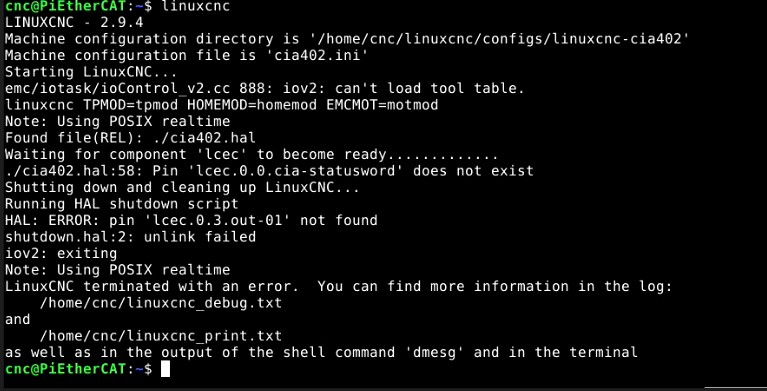
I have been trying numerous files from different cia402 examples, and im having a hard time understanding what is what. for example, my `lcec_configgen` output seems a bit disjointed. for example it seems to show some drives as "generic" and some as "basic_cia402", but they are indeed all the same make and model of drive. How does `lcec_configgen` generate this information? Is the a basic .hal, .xml & .ini available that has only the bare minimum to establish a connection? I have made the suggested changes and now have an error at "lcec.0.0.cia-statusword".
Thanks again for your patience
Steve Cap
Last edit: 1 year 8 months ago by SteveCap.
Please Log in or Create an account to join the conversation.
1 year 8 months ago - 1 year 8 months ago #322799
by Hakan
Replied by Hakan on topic EtherCAT XML Configuration help (Elmo drive)
Good so far.
lcec_configgen reads the info from the ELMO drives and formats it in a suitable way.
You can read out the info yourself with "ethercat -p 0 sdos", "ethercat -p 0 pdos" and "ethercat -p 0 -v slaves"
For the error you have, was kind of expected. No easy way I know off to know the halpin names of a built-in device like the basic_cia402.
But you can find out with this series of commands (linuxcnc not started)
From that output you should be able to find something that resembles cia-statusword (index 0x6041). Do the same for the other missing variables.
So with that info, you replace lcec.0.0.cia-statusword with whatever the output above says for 0x6041.
One can also look up the index of interest, any places but here are two basic ones
doc-legacy.synapticon.com/software/44/ob...pdo/rxpdo/index.html
doc-legacy.synapticon.com/software/44/ob...pdo/txpdo/index.html
You will probably need that for the other halpins, I guess they will give the same type of error.
lcec_configgen reads the info from the ELMO drives and formats it in a suitable way.
You can read out the info yourself with "ethercat -p 0 sdos", "ethercat -p 0 pdos" and "ethercat -p 0 -v slaves"
For the error you have, was kind of expected. No easy way I know off to know the halpin names of a built-in device like the basic_cia402.
But you can find out with this series of commands (linuxcnc not started)
Code:
halcmd loadusr -W lcec_conf ethercat-conf-right-name-here.xml
halcmd loadrt lcec
halcmd show pin
So with that info, you replace lcec.0.0.cia-statusword with whatever the output above says for 0x6041.
One can also look up the index of interest, any places but here are two basic ones
doc-legacy.synapticon.com/software/44/ob...pdo/rxpdo/index.html
doc-legacy.synapticon.com/software/44/ob...pdo/txpdo/index.html
You will probably need that for the other halpins, I guess they will give the same type of error.
Last edit: 1 year 8 months ago by Hakan.
Please Log in or Create an account to join the conversation.
1 year 8 months ago - 1 year 8 months ago #322805
by SteveCap
Replied by SteveCap on topic EtherCAT XML Configuration help (Elmo drive)
I have attached the output of those commands. I am having a hard time understanding what information to take from the `show pin` output and where (cia402.hal?) to put it exactly. for that line regarding statusword it shows:
" 10 u32 OUT 0x00000000 lcec.0.D1.srv-cia-statusword"
and I could not find any reference to 0x6041 anywhere.
Also, after running `halcmd loadrt lcec` , the ethercat network activity stops, where usually it's blinking. not sure if that is expected or not.
Steve Cap
" 10 u32 OUT 0x00000000 lcec.0.D1.srv-cia-statusword"
and I could not find any reference to 0x6041 anywhere.
Also, after running `halcmd loadrt lcec` , the ethercat network activity stops, where usually it's blinking. not sure if that is expected or not.
Steve Cap
Last edit: 1 year 8 months ago by SteveCap.
Please Log in or Create an account to join the conversation.
Time to create page: 0.290 seconds