
- GCode and Part Programs
- CAD CAM
- Post Processors
- Fusion 360
- Gcode from Postprocessor "LinuxCNC Turning" does not run with linuxcnc ...
Gcode from Postprocessor "LinuxCNC Turning" does not run with linuxcnc ...
- Roman Simon
- Offline
- New Member
-

Less
More
- Posts: 17
- Thank you received: 1
07 Jul 2022 08:04 #246785
by Roman Simon
Gcode from Postprocessor "LinuxCNC Turning" does not run with linuxcnc ... was created by Roman Simon
Hello,
I have a new sherline cnc lathe and for a sample part I use Fusion 360 and choose the postprocessor "LinuxCNC Turning"
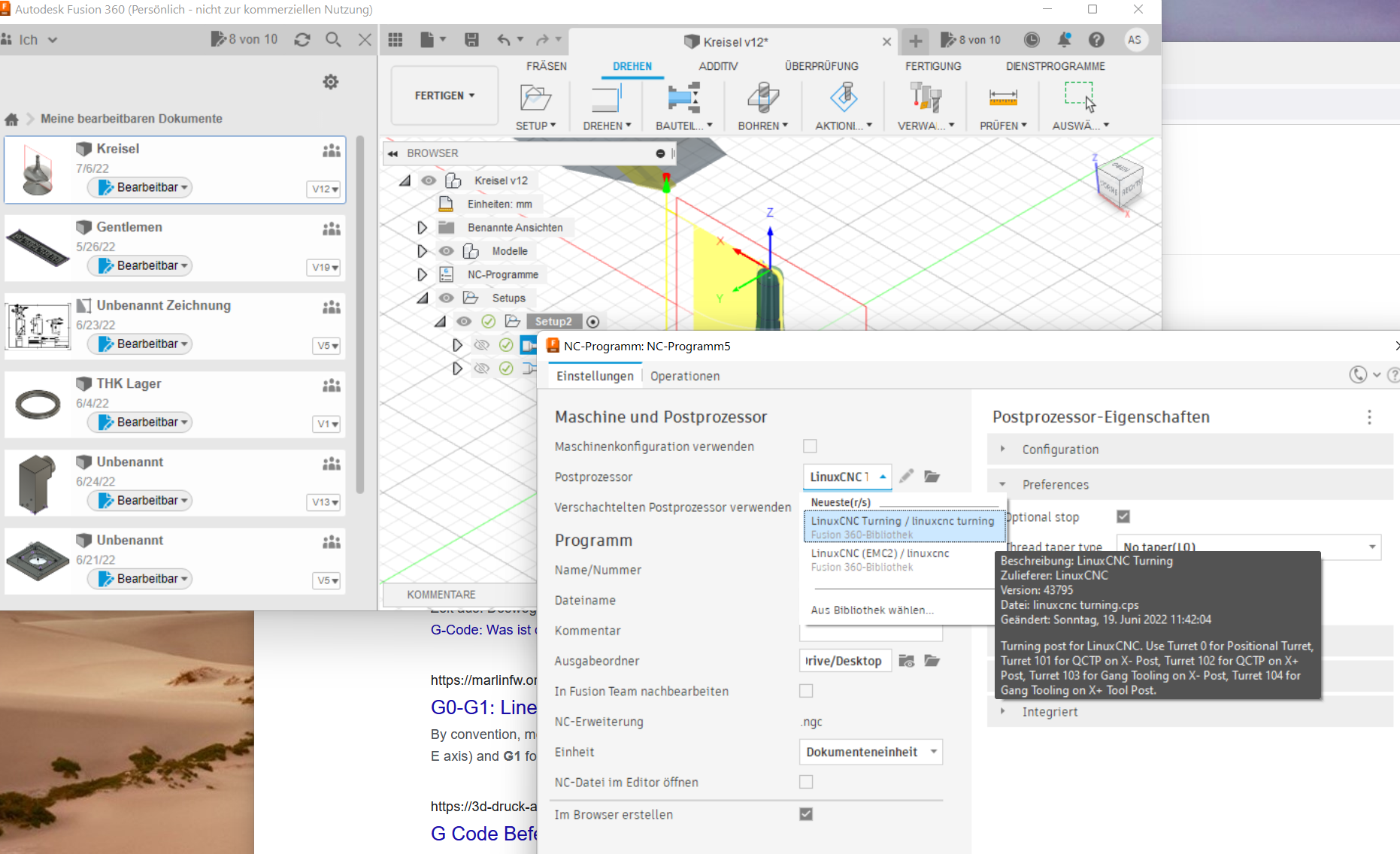
But the generated gcode is not valid
%
(1001)
N10 G7
N11 G18
N12 G90
N13 G21
(WHEN USING FUSION 360 FOR PERSONAL USE, THE FEEDRATE OF)
(RAPID MOVES IS REDUCED TO MATCH THE FEEDRATE OF CUTTING)
(MOVES, WHICH CAN INCREASE MACHINING TIME. UNRESTRICTED RAPID)
(MOVES ARE AVAILABLE WITH A FUSION 360 SUBSCRIPTION.)
N14 G28 U0. (First error: Linux CNC do not know character U ....)
N15 G28 W0.
(PROFIL-SCHRUPPEN1)
N16 T2 M6
N18 G54
N19 M8
N20 G97 S950 M4
N21 G95
N22 G90 G0 X67. Z5.4
N23 G96 D3500 S200 M4
N24 G1 Z0.381 F1. (Secound error, LinuxCNC stops here, maybee because of F1, a ver slow feed???)
N25 X46.4
N26 Z-36.854
N27 G3 Z-37.715 I-7.437 K-0.43
N28 G1 Z-62.922
N29 X47.
...
I would be very happy about any help.
Thanks & Best Regards
Simon
I have a new sherline cnc lathe and for a sample part I use Fusion 360 and choose the postprocessor "LinuxCNC Turning"
But the generated gcode is not valid
%
(1001)
N10 G7
N11 G18
N12 G90
N13 G21
(WHEN USING FUSION 360 FOR PERSONAL USE, THE FEEDRATE OF)
(RAPID MOVES IS REDUCED TO MATCH THE FEEDRATE OF CUTTING)
(MOVES, WHICH CAN INCREASE MACHINING TIME. UNRESTRICTED RAPID)
(MOVES ARE AVAILABLE WITH A FUSION 360 SUBSCRIPTION.)
N14 G28 U0. (First error: Linux CNC do not know character U ....)
N15 G28 W0.
(PROFIL-SCHRUPPEN1)
N16 T2 M6
N18 G54
N19 M8
N20 G97 S950 M4
N21 G95
N22 G90 G0 X67. Z5.4
N23 G96 D3500 S200 M4
N24 G1 Z0.381 F1. (Secound error, LinuxCNC stops here, maybee because of F1, a ver slow feed???)
N25 X46.4
N26 Z-36.854
N27 G3 Z-37.715 I-7.437 K-0.43
N28 G1 Z-62.922
N29 X47.
...
I would be very happy about any help.
Thanks & Best Regards
Simon
Attachments:
Please Log in or Create an account to join the conversation.
- roland
-

- Offline
- Premium Member
-

Less
More
- Posts: 140
- Thank you received: 64
07 Jul 2022 09:11 - 07 Jul 2022 09:12 #246788
by roland
Replied by roland on topic Gcode from Postprocessor "LinuxCNC Turning" does not run with linuxcnc ...
You can switch the "Safe Retracts" method from G28 to G53 in the postprocess.
The G-code will then be generated without the U- and W-axis.
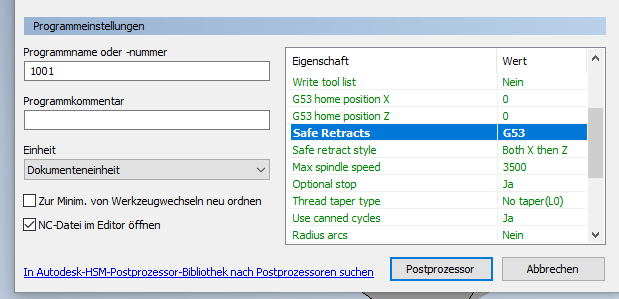
The example here is from Inventor CAM, but should also work in Fusion360
The G-code will then be generated without the U- and W-axis.
The example here is from Inventor CAM, but should also work in Fusion360
Attachments:
Last edit: 07 Jul 2022 09:12 by roland.
The following user(s) said Thank You: Roman Simon
Please Log in or Create an account to join the conversation.
- Roman Simon
- Offline
- New Member
-
Less
More
- Posts: 17
- Thank you received: 1
07 Jul 2022 12:39 #246800
by Roman Simon
Replied by Roman Simon on topic Gcode from Postprocessor "LinuxCNC Turning" does not run with linuxcnc ...
thank you very much, the reason for the secound error was "G96" - a constant surface speed command. This was activated under tools in fusion... best regard
Please Log in or Create an account to join the conversation.
- andypugh
-

- Offline
- Moderator
-

Less
More
- Posts: 19898
- Thank you received: 4654
19 Jun 2026 14:25 #347165
by andypugh
Replied by andypugh on topic Gcode from Postprocessor "LinuxCNC Turning" does not run with linuxcnc ...
This is rather annoying as G28 U0 is very much not a LinuxCNC style thing.
It's valid G-code but I don't imagine very many LinuxCNC lathes are using the U and W axes.
It's valid G-code but I don't imagine very many LinuxCNC lathes are using the U and W axes.
Please Log in or Create an account to join the conversation.
- andypugh
-
- Offline
- Moderator
-
Less
More
- Posts: 19898
- Thank you received: 4654
19 Jun 2026 15:37 #347166
by andypugh
Replied by andypugh on topic Gcode from Postprocessor "LinuxCNC Turning" does not run with linuxcnc ...
It also (i just discovered) omits the G43 after a tool change, which is likely to cause trouble.
Please Log in or Create an account to join the conversation.
- spumco
- Offline
- Platinum Member
-

Less
More
- Posts: 2180
- Thank you received: 905
21 Jun 2026 22:09 #347201
by spumco
If the control is in G90 (absolute) mode you can make an incremental move without switching to G91 by programming a "Gn Un Wn" line.
The G0 G28 U0 W0 the F360 post puts out is Fanuc for 'Go to home position, with no intermediate stops.'
Regarding G43... yes, it omits this. I've modified my post - still in progress TBH - to include a number of changes, including stealing a few ideas from the Tormach lathe post:
- INCLUDE G43 ON SAME LINE AS M6
- ADD M210/M211 AIR THROUGH TOOL
- CHANGE DEFAULT FROM G28 TO G53
- CHANGE DEFAULT RETRACT TO ONLY-Z
- ADD APPROACH SCHEME COPIED FROM TORMACH: X THEN Z
I've attached it in case anyone wants to use it. I'm not sure how successful the LCNC community will be approaching Autodesk in the hopes of getting the standard post fixed.
Replied by spumco on topic Gcode from Postprocessor "LinuxCNC Turning" does not run with linuxcnc ...
G28 U0 W0 is a carry-over from Fanuc dialect. The U and W are not referring to U/W axes, they refer to incremental moves in X & Z.This is rather annoying as G28 U0 is very much not a LinuxCNC style thing.
It's valid G-code but I don't imagine very many LinuxCNC lathes are using the U and W axes.
If the control is in G90 (absolute) mode you can make an incremental move without switching to G91 by programming a "Gn Un Wn" line.
The G0 G28 U0 W0 the F360 post puts out is Fanuc for 'Go to home position, with no intermediate stops.'
Regarding G43... yes, it omits this. I've modified my post - still in progress TBH - to include a number of changes, including stealing a few ideas from the Tormach lathe post:
- INCLUDE G43 ON SAME LINE AS M6
- ADD M210/M211 AIR THROUGH TOOL
- CHANGE DEFAULT FROM G28 TO G53
- CHANGE DEFAULT RETRACT TO ONLY-Z
- ADD APPROACH SCHEME COPIED FROM TORMACH: X THEN Z
I've attached it in case anyone wants to use it. I'm not sure how successful the LCNC community will be approaching Autodesk in the hopes of getting the standard post fixed.
The following user(s) said Thank You: Aciera
Please Log in or Create an account to join the conversation.
- GCode and Part Programs
- CAD CAM
- Post Processors
- Fusion 360
- Gcode from Postprocessor "LinuxCNC Turning" does not run with linuxcnc ...
Time to create page: 0.238 seconds