
MonoKrom - QtPyVCP GUI for PlasmaC and Mill
- Sandro
- Offline
- Senior Member
-

Less
More
- Posts: 77
- Thank you received: 38
03 Dec 2025 18:53 #339698
by Sandro
Replied by Sandro on topic MonoKrom - QtPyVCP GUI for PlasmaC and Mill
Hello Rodw,
I’m also using the Plasmac post from SheetCam. I followed your advice and changed the SheetCam setting to output .ngc instead of .tap. Unfortunately, as long as the Monokrom filter is enabled, it doesn’t work—I get the error:
“unknown word where unary operation could be.”
This happens both on my actual machine and with the Monokrom simulation configuration. With QtPlasmaC, I don’t have any issues. Maybe over the weekend I can share a G-code test file that fails for me.
Is there a way to manually apply the Monokrom filter plasma_gcode_preprocessor to a G-code file outside of Monokrom, just to see what the output looks like?
I’m also using the Plasmac post from SheetCam. I followed your advice and changed the SheetCam setting to output .ngc instead of .tap. Unfortunately, as long as the Monokrom filter is enabled, it doesn’t work—I get the error:
“unknown word where unary operation could be.”
This happens both on my actual machine and with the Monokrom simulation configuration. With QtPlasmaC, I don’t have any issues. Maybe over the weekend I can share a G-code test file that fails for me.
Is there a way to manually apply the Monokrom filter plasma_gcode_preprocessor to a G-code file outside of Monokrom, just to see what the output looks like?
Please Log in or Create an account to join the conversation.
- rodw
-

- Offline
- Platinum Member
-

Less
More
- Posts: 12125
- Thank you received: 4140
03 Dec 2025 20:02 #339703
by rodw
Replied by rodw on topic MonoKrom - QtPyVCP GUI for PlasmaC and Mill
I can't help here. I had a feeling that a linuxcnc filter was a program that accepted an input file and wrote out an output file so you should be able to run the filter stand alone. The file name will be in the ini file. ref:.linuxcnc.org/docs/html/gui/filter-programs.html
Please Log in or Create an account to join the conversation.
- andypugh
-

- Offline
- Moderator
-

Less
More
- Posts: 19896
- Thank you received: 4648
10 Dec 2025 15:02 #339946
by andypugh
You might be able to view the file-as-run in the GUI though, and see something odd around (I stress "around" as the reported line number can be off by several lines)
Unary operators are things like SIN[] COS[] etc so I would be looking for unexpected square brackets.
Replied by andypugh on topic MonoKrom - QtPyVCP GUI for PlasmaC and Mill
Does Monokrom have an option to save the current G-code file? (I can see that it might well not have, as you can't typically change the file in the GUI, so there is no point).Is there a way to manually apply the Monokrom filter plasma_gcode_preprocessor to a G-code file outside of Monokrom, just to see what the output looks like?
You might be able to view the file-as-run in the GUI though, and see something odd around (I stress "around" as the reported line number can be off by several lines)
Unary operators are things like SIN[] COS[] etc so I would be looking for unexpected square brackets.
Please Log in or Create an account to join the conversation.
- Sandro
- Offline
- Senior Member
-
Less
More
- Posts: 77
- Thank you received: 38
26 Dec 2025 12:22 #340520
by Sandro
Replied by Sandro on topic MonoKrom - QtPyVCP GUI for PlasmaC and Mill
Okay it is possible to pre-process the g-code manually like this:
1) Launch an instance of Monokrom (sim)
2) Navigate to the Monokrom Simulation Config Directory. Open terminal there and set environment variables
3) Call preprocessor in terminal with the input.ngc processed by the SheetCam PlasmaC Post
The output is the processed.ngc. The first few lines are below:
This is why I get the error in input.ngc line 1: Unknown word where unary operation could be. The first line contains "Filter name: from-ini func: <function from_ini at 0x7ff0a03176a0>".
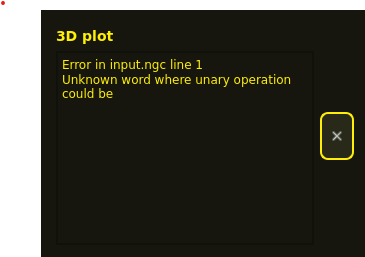
1) Launch an instance of Monokrom (sim)
2) Navigate to the Monokrom Simulation Config Directory. Open terminal there and set environment variables
~/linuxcnc/configs/sim.monokrom/plasmac$ export CONFIG_DIR=$(pwd)
~/linuxcnc/configs/sim.monokrom/plasmac$ export INI_FILE_NAME=$(pwd)/xyz.ini
3) Call preprocessor in terminal with the input.ngc processed by the SheetCam PlasmaC Post
~/linuxcnc/configs/sim.monokrom/plasmac$ python3 plasma_gcode_preprocessor.py input.ngc > processed.ngcThe output is the processed.ngc. The first few lines are below:
Filter name: from-ini func: <function from_ini at 0x7ff0a03176a0>
(--------------------------------------------------)
(            Plasma G-Code Preprocessor            )
(                 00.30                            )
(--------------------------------------------------)
;inputs
#<ucs_x_offset> = [#5221 + [[#5220-1] * 20]]
#<ucs_y_offset> = [#5222 + [[#5220-1] * 20]]
#<ucs_r_offset> = [#5230 + [[#5220-1] * 20]]
#<array_x_offset> = 0.0
#<array_y_offset> = 0.0
#<array_columns> = 1
#<array_rows> = 1
...
This is why I get the error in input.ngc line 1: Unknown word where unary operation could be. The first line contains "Filter name: from-ini func: <function from_ini at 0x7ff0a03176a0>".
Please Log in or Create an account to join the conversation.
- Joco
-

- Offline
- Platinum Member
-
Less
More
- Posts: 532
- Thank you received: 327
31 Dec 2025 19:51 - 01 Jan 2026 07:51 #340798
by Joco
Replied by Joco on topic MonoKrom - QtPyVCP GUI for PlasmaC and Mill
That bug should be resolved in recent builds of the framework. Its not a monokrom bug. It came out due to an errant print statement.
"What's the first rule? Do NOT use print statements in the code. Use LOG.debug"
"What's the first rule? Do NOT use print statements in the code. Use LOG.debug"
Last edit: 01 Jan 2026 07:51 by Joco.
The following user(s) said Thank You: rodw
Please Log in or Create an account to join the conversation.
- AlessandroEmm
- Offline
- Junior Member
-

Less
More
- Posts: 33
- Thank you received: 0
18 Feb 2026 18:16 - 18 Feb 2026 18:31 #343157
by AlessandroEmm
Replied by AlessandroEmm on topic MonoKrom - QtPyVCP GUI for PlasmaC and Mill
Hey guys, trying to get monokrom or at this point qtpyvcp to run, but I always end up with problem in the DB lookups. Since i don't really know how the ORM works i struggle to fix this myself. This is with a clean sqlite db. With the latest main branch on monokrom.
Thanks!
Thanks!
  File "/usr/lib/python3/dist-packages/qtpyvcp/app/launcher.py", line 224, in loadPlugins
    registerPluginFromClass(plugin_id=plugin_id, plugin_cls=cls, args=args, kwargs=kwargs)
    ~~~~~~~~~~~~~~~~~~~~~~~^^^^^^^^^^^^^^^^^^^^^^^^^^^^^^^^^^^^^^^^^^^^^^^^^^^^^^^^^^^^^^^
  File "/usr/lib/python3/dist-packages/qtpyvcp/plugins/__init__.py", line 79, in registerPluginFromClass
    inst = plugin_cls(*args, **kwargs)
  File "/usr/lib/python3/dist-packages/qtpyvcp/plugins/plasma_processes.py", line 356, in __init__
    self._measurementid = LinearSystem.get_by_key(self._session, 'name', linear_setting)[0].id
                          ~~~~~~~~~~~~~~~~~~~~~~~~~~~~~~~~~~~~~~~~~~~~~~~~~~~~~~~~~~~~~~^^^
IndexError: list index out of range
Last edit: 18 Feb 2026 18:31 by AlessandroEmm.
Please Log in or Create an account to join the conversation.
Moderators: KCJ, Lcvette
Time to create page: 0.156 seconds