MonoKrom - QtPyVCP GUI for PlasmaC and Mill

More
10 months 3 weeks ago #339946 by andypugh

Is there a way to manually apply the Monokrom filter plasma_gcode_preprocessor to a G-code file outside of Monokrom, just to see what the output looks like?
Does Monokrom have an option to save the current G-code file? (I can see that it might well not have, as you can't typically change the file in the GUI, so there is no point). 
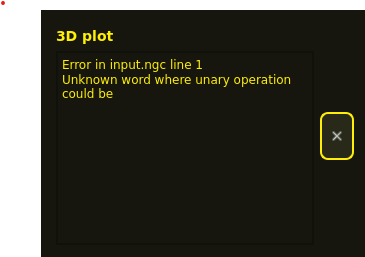
You might be able to view the file-as-run in the GUI though, and see something odd around (I stress "around" as the reported line number can be off by several lines) 

Unary operators are things like SIN[] COS[] etc so I would be looking for unexpected square brackets. 
 

Please Log in or Create an account to join the conversation.
More
10 months 6 days ago #340520 by Sandro
Okay it is possible to pre-process the g-code manually like this:

1) Launch an instance of Monokrom (sim)
2) Navigate to the Monokrom Simulation Config Directory. Open terminal there and set environment variables
Code:
~/linuxcnc/configs/sim.monokrom/plasmac$ export CONFIG_DIR=$(pwd) ~/linuxcnc/configs/sim.monokrom/plasmac$ export INI_FILE_NAME=$(pwd)/xyz.ini

3) Call preprocessor in terminal with the input.ngc processed by the SheetCam PlasmaC Post
Code:
~/linuxcnc/configs/sim.monokrom/plasmac$ python3 plasma_gcode_preprocessor.py input.ngc > processed.ngc

The output is the processed.ngc. The first few lines are below:
Code:
Filter name: from-ini func: <function from_ini at 0x7ff0a03176a0> (--------------------------------------------------) (            Plasma G-Code Preprocessor            ) (                 00.30                            ) (--------------------------------------------------) ;inputs #<ucs_x_offset> = [#5221 + [[#5220-1] * 20]] #<ucs_y_offset> = [#5222 + [[#5220-1] * 20]] #<ucs_r_offset> = [#5230 + [[#5220-1] * 20]] #<array_x_offset> = 0.0 #<array_y_offset> = 0.0 #<array_columns> = 1 #<array_rows> = 1 ...

This is why I get the error in input.ngc line 1: Unknown word where unary operation could be. The first line contains "Filter name: from-ini func: <function from_ini at 0x7ff0a03176a0>".


Please Log in or Create an account to join the conversation.

More
10 months 1 day ago - 10 months 15 hours ago #340798 by Joco
That bug should be resolved in recent builds of the framework.  Its not a monokrom bug. It came out due to an errant print statement.

"What's the first rule?  Do NOT use print statements in the code.  Use LOG.debug"
Last edit: 10 months 15 hours ago by Joco.
The following user(s) said Thank You: rodw

Please Log in or Create an account to join the conversation.

More
8 months 2 weeks ago - 8 months 2 weeks ago #343157 by AlessandroEmm
Hey guys, trying to get monokrom or at this point qtpyvcp to run, but I always end up with problem in the DB lookups. Since i don't really know how the ORM works i struggle to fix this myself. This is with a clean sqlite db. With the latest main branch on monokrom.

Thanks! 
Code:
  File "/usr/lib/python3/dist-packages/qtpyvcp/app/launcher.py", line 224, in loadPlugins     registerPluginFromClass(plugin_id=plugin_id, plugin_cls=cls, args=args, kwargs=kwargs)     ~~~~~~~~~~~~~~~~~~~~~~~^^^^^^^^^^^^^^^^^^^^^^^^^^^^^^^^^^^^^^^^^^^^^^^^^^^^^^^^^^^^^^^   File "/usr/lib/python3/dist-packages/qtpyvcp/plugins/__init__.py", line 79, in registerPluginFromClass     inst = plugin_cls(*args, **kwargs)   File "/usr/lib/python3/dist-packages/qtpyvcp/plugins/plasma_processes.py", line 356, in __init__     self._measurementid = LinearSystem.get_by_key(self._session, 'name', linear_setting)[0].id                           ~~~~~~~~~~~~~~~~~~~~~~~~~~~~~~~~~~~~~~~~~~~~~~~~~~~~~~~~~~~~~~^^^ IndexError: list index out of range 
Last edit: 8 months 2 weeks ago by AlessandroEmm.

Please Log in or Create an account to join the conversation.

Moderators: KCJ, Lcvette
Time to create page: 0.487 seconds
Powered by Kunena Forum
