Home designed and built 5C CNC lathe with ATC and C_Axis

More
5 years 7 months ago #202940 by NoJo
Hi to all -
Andy, I believe the basic lathe 'works' - I have not connected the controller to the lathe in initial tests since I am not sure what will happen and I do not want to damage hardware - also the lathe is in the workshop while it is more convenient to work on this stuff in the electronics lab..
However, I have test switches etc set up to simulate the lathe, ie, limit switches, etc.
I also use an oscilloscope to monitor all stepgens and control signals.
Stepgens all generate step/dir signal, AXIS jog via AXIS UI and mouse works, etc.
NONE of my user control panel controls have any effect ( bar a few switches...)
The MESA cards are all functional, 7i73 LED flashes on/off green, all OK.

I ran pncconf with advanced mode enabled.
On the 7i73 :
I have 4 buttons for jogging X+, X-, Z+, Z-
So selected EXTERNAL BUTTON JOGGING
I have 4 Encoders, X Axis jog, Y Axis Jog, Spindle speed override, and the forth intended for the Live Tool ( milling spindle) speed override - that feature does not exist in lathe config in LinuxCNC, so ignore for now.
I also have a 4 position rotary switch to select jog movement step size.
So , in EXTERNAL MPG JOGGIING with SELECTABLE INCREMENTS
I set a,b,c and D values.
in EXTERNAL FEED OVERRIDE I selected USE MPG
in SPINDLE OVERIDE I selected USE MPG.

Then in the MESA Card Setup Page I selected I/O pins and allocated functions as per my system wiring.
Each axis has a separate HOME button, via 7i76 inputs 28,29,30
An E_STOP input on 7i76 input 27.
Limit switches on 7i76 inputs 16,17,18,19

There are a few more switches similarly wired - Spindle FWD, Spindle ON/OFF, etc ..

ALL of the above I/O shows intended functionality in HAL_Show - the brown/yellow indictor toggles with each switch toggle.
All Encoder counters count up/down correctly.

However, bar the Spindle Speed override encoder , Estop, spindle FWD,
NONE of the other controls have any effect in LinuxCNC. No jogging with manual buttons, or with jog wheels, etc
Spindle Speed override encoder DOES change the Spindle Speed % indicator
Spindle FWD turns on spindle ( but does not turn spindle off when deselected..)
Estop shows ESTOP when active.
No other controls work.

I do suspect that jog does not work because L_CNC is expecting some sort of Axis select input to indicate which axis to jog ( from my limited understanding of the HAL file), but I thought that was taken care of when I selected EXTERNAL MPG JOGGING...ie, no specific axis select needed?
I know the jog wheels work, Hal_Show sees them all, etc.

As I am green in HAL's language, and have a lot to learn, it is difficult to know what all the terms mean and how they link.
Unfortunately, Andy's post of :

A general point: Don't think of HAL as a programming language. It's a network definition. It is only parsed once, and is used to link the HAL component inputs and outputs together.
net signal1 out_pin_1 in_pin_1
net signal1 in_pin_6 in_pin5
net signal1 in_pin2
net signal1 in_pin_3 in_pin_4 in_pin_7


Is still meaningless at this stage!!

There are some functions that I wish to implement that appear to not be catered for in pncconf -
Anything to do with a C_Axis, obviously...An external switch to turn on/off coolant, a switch to select FWD or REV for spindle
direction and an ON/OFF switch for spindle on/off, etc - I am not too concerned about all that now - that can worry me once I understand HAL better..and Components...


But something I thought to be 'simple' - jogging with encoders - certainly is not!
My lack of ability with HAL also makes it very confusing when viewing the HAL file trying to find only those elements that refer to, say, X Axis jogging - the
references to anything 'X Jog' are all over the place and not intuitive at all! So I am battling..

There are :

# --- JOG-X-POS ---
net jog-x-pos <= hm2_7i92.0.7i73.0.1.input-20
net jog-x-pos halui.axis.x.plus
net jog-selected-pos halui.axis.selected.plus
net jog-speed halui.axis.jog-speed

# ---jog button signals---
sets jog-speed 1.000000

net x-jog-count <= hm2_7i92.0.7i73.0.1.enc0.count

# ---mpg signals---

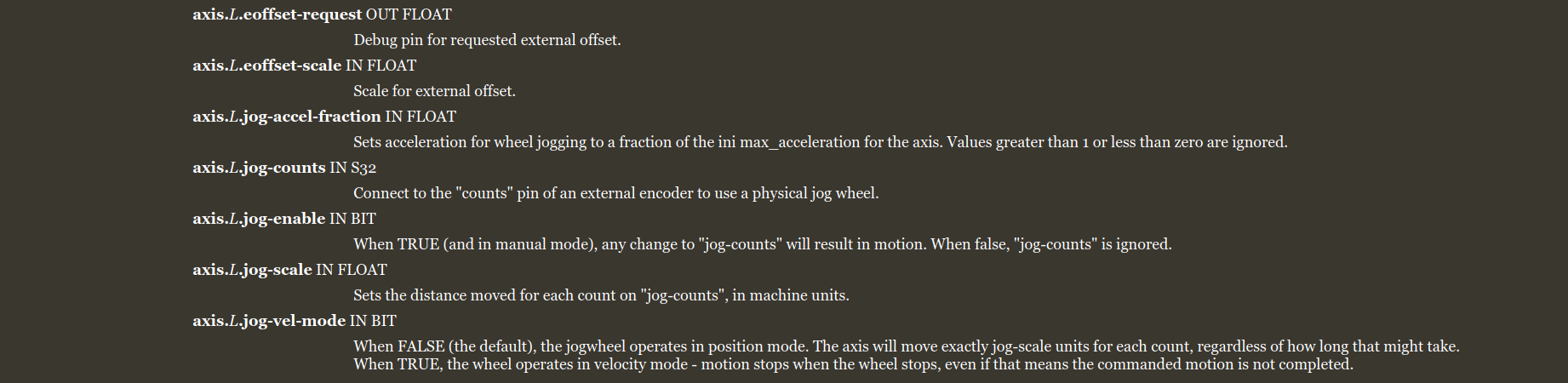
setp axis.x.jog-vel-mode 0
net x-jog-enable => axis.x.jog-enable
net x-jog-count => axis.x.jog-counts
net selected-jog-incr => axis.x.jog-scale
sets x-jog-enable true

# connect selectable mpg jog increments

net jog-incr-a => jogincr.sel0
net jog-incr-b => jogincr.sel1
net jog-incr-c => jogincr.sel2
net jog-incr-d => jogincr.sel3
net selected-jog-incr <= jogincr.out-f

And this poor fool is lost!

It would be so nice to have a simple HAL file with
JUST a single jog wheel driving the X axis, showing each HAL syntax line with explanation of allocation, what each line does, etc!
Not contaminated with all the other stuff - stepgens and PID's, etc..

I have attached HAL and ini files.
However, I need some guidance in forum etiquette here -
I don't think this thread is the place to be discussing HAL and integration issues since it is a show and tell thread - Should I move this elsewhere, or can a moderator do so?
Also, I am obtaining assistance in the process, via emails, from some boffins in South Africa ( our neighbour) , familiar to Henk who joined in earlier, and I don't want to tread on toes and double efforts put in by all those so willing to help me. I feel that any discourse could be useful to those in a similar situation to me, trying to learn, and so any resolution, idea or solution would be useful in posting regardless of source. I realise people may be annoyed when providing help while the recipient sneaks behind obtaining help elsewhere as well, and since its a small, connected world, such behaviour is soon known! So, please tell mw to buzz off if I am annoying you!

Regards
Joe

Please Log in or Create an account to join the conversation.

More
5 years 7 months ago - 5 years 7 months ago #202946 by Aciera
Nice machine.

Note that if your machine is not homed then it has only 'joints' as 'axis' are only created after the joints are homed.

As for HAL there are basically two ways to go about defining a signal: I call it Singleline and Multiline:

Singleline:
Code:
signal <= out-pin => in-pin signal => in-pin


Multiline:
Code:
signal <= out-pin signal => in-pin signal => in-pin

Of course you can also mix the two.
Note
1) that 'signal' is an arbitrary name you chose but is has to be unique for every signal defined (kind of like a variable name)
2) that the '<=' and '=>' are used for the human reader only to make it clear from which OUT-pin the signal is coming and to which IN-pins the signal is going to.
3) a signal can only come from one single OUT-pin but can go to one or several IN-pins

How do we know which pins to use? For that you can use the HAL-show list on the left side of the window. This you seem to have found already.

Or there are 'Man-pages' in the documentation here is an example for the 'motion'-Pins:

linuxcnc.org/docs/html/man/man9/motion.9.html

This gives a description for all the pins available


I have not connected the controller to the lathe in initial tests since I am not sure what will happen and I do not want to damage hardware - also the lathe is in the workshop while it is more convenient to work on this stuff in the electronics lab..


While it is certainly possible to do it that way I personally would not recommend it. Simulating the inputs manually may seem easy enough but you may find it more difficult than you think particularly things like homing.
The usual procedure would be to hook everything up and then use HAL show to verify the inputs are wired correctly. Then test Estop and if that works get the motors set up and verify the distance and direction traveled corresponds to the commanded value. Then setup homing. Then the spindle and so on.
Last edit: 5 years 7 months ago by Aciera.

Please Log in or Create an account to join the conversation.

More
5 years 7 months ago #202950 by NoJo
Thank you for that!

I think quite few of my future posts are going to sound like I am just whining...I don't mean to! Till that Eureka moment though, it's still Greek to me!

Note that if your machine is not homed then it has only 'joints' as 'axis' are only created after the joints are homed. Is something I still do not grasp.
I have read the HAL manuals ( a few times) and refer back very often but even the block diagrams confuse me!

At one end is the Computer running LinucCNC.
The other end is a Stepper motor.
Between there is a motion controller ( trajectory planner, etc), then a PID, then a stepGen, and then actual I/O pins ( Parr port, or MESA card- 7i76,- etc).
A jog wheel must somehow be read through physical pins, and then the axis position, which is manipulated by the stepper, must be updated and then via PID, Stepgen, to pins that drive the stepper controller ( Step/Dir) .
That is all very simple, easy to understand.
But where is a joint, an axis, and all those labels and names that are signals with directions, and then become actual pins...Whew...

I'll get there, but the first steps are horrid!
My failure to grasp even the basics of all that is a major part of the lack of progress - from what you say, nothing (jogging, etc) will work before the machine is homed - I find that very odd, but maybe that is also a lack of understanding how LinuxCNC works - Most CNC machines I have worked on can jog once powered and enabled, without homing anything, eg, on a mill I use, I can power on, jog to a position, zero DRO's and set that position as home, or machine zero, as I wish...But that is not the issue!

I will lug all downstairs to the lathe, connect all up, and try get it to do home and see what happens - but I still have a nagging feeling that in my HAL file, L_CNC wants the axis jog enabled for that axis first before jogging, and I have no way of doing that, aside from the fact that I think its not needed per my pncconf setup!

Thanks for the post, and I will carry on till it works!
Joe

Please Log in or Create an account to join the conversation.

More
5 years 7 months ago - 5 years 7 months ago #202955 by Aciera
Linuxcnc makes a difference between joints and axis. Think of joints as motors and of axis as your cartesian axis X and Z. In your case the two are basically the same since you use 'trivial' kinematics but there are also other machines where the kinematic is 'non-trivial' as for 5axis machining or robotic arms for example. Suffice to say that for more complex setups joints and axis have been separated in LinuxCNC.

Joints CAN be jogged before homing but the pins used are different i.e. joint vs axis. LinuxCNC does have vast capabilities but I believe it would be unwise to jump in at the deep end. The PNCconf has been added to provide an easy first setup to get a basic machine up and running otherwise things can get VERY frustrating. That is why I suggest to do that on the actual machine and then get more fancy once the basic setup works.

I will carry on till it works!


I expected no less!

[edit]
are your home switches located in the middle of your axis travel?
Or why do you have HOME, HOME_OFFSET, MIN_LMIT and MAX_LIMIT set like that?
Last edit: 5 years 7 months ago by Aciera.

Please Log in or Create an account to join the conversation.

More
5 years 7 months ago #202964 by NoJo
I think at the moment the pool I'm in doesn't have a shallow end...!
My intention is to get the machine going as a basic 2 axis lathe to start - that is a given.
After that the next thing is that the mechanics have to be aligned - Z parr to spindle axis, X perp to Z, Spindle nod 0, etc and for that I need to jog the axis around a lot, with dial indicator and accurate test bar in spindle, etc - So that is the reason I am trying to get the jog controls working as part of the basic function. I realise I can do all the jogging using the mouse, etc, but thought the way I am trying is good to learn from as well - after all, the concept is not complex - just jog the Axes with manual wheels, etc!
All the rest of the complex stuff - C_axis, ATC, etc is miles down the road and not on my mind right now!

To continue doggy-paddle in the deep end...
Homing is a bit complex on this machine. The Clearpath motors have a built-in programmable function called 'Accurate Homing' . When the motor is first powered, the first ENABLE causes the motor to rotate in a programed direction, at a (programmed) reduced torque, till the axis engages a hard stop. The motor stops, and rewinds from there till the motor controller senses the Index pulse on its encoder. ( the motor is a brushless motor, with built in controller and 6400 pulse encoder, so is closed loop internally) - When the motor senses it's index pulse it stops and reverts to full torque operational mode. And that is the home position.
How to tell Linuxcnc that we are at home? The motor has an output discrete which indicates it reached the index position, so I will feed that into L_cnc and use that as home, but the problem is that L_cnc must not generate step pulses to home that axis - the motor must just be enabled and the motor will home itself..

Perhaps for starters I must just use the Limit switches as home position to get things going - they are not accurate - only hall effect sensors so not great for absolute home sensing.

This is NOT a basic lathe......If it was I would just have used an ordinary lathe and converted it like many have done! I must just try make it an ordinary one to start..

Regards
Joe

Please Log in or Create an account to join the conversation.

More
5 years 7 months ago - 5 years 7 months ago #202968 by Aciera

The Clearpath motors have a built-in programmable function called 'Accurate Homing' .

I see that will complicate things a bit.

So, just to make sure we are on the same page:
Were your axis homed when you tried to jog?


[edit]
With homed I mean in LinuxCNC (Homed symbol in the DRO)

[edit2]

So considering your homing set up I don't really see all that much of an issue with manual simulation the home switch, my apologies.
There has been a discussion about homing done by the drives. I'll try to find it.

[edit3]
Ok according to this ( linuxcnc.org/docs/2.8/html/config/ini-homing.html ):


to set up for immediate homing you would need to set
HOME_SEARCH_VEL = 0
HOME_LATCH_VEL = 0
HOME_USE_INDEX = NO
HOME_SEQUENCE = 0

Are your drives sending the position back to LCNC (eg by encoder output)?

[edit4]
The only way I see is to connect the 'homed'-signal from the drive to the index input. But for that to work i think you need to set a latch_velocity:
HOME_SEARCH_VEL = 0
HOME_LATCH_VEL = 0.1
HOME_USE_INDEX = YES
HOME_SEQUENCE = 0
The problem is that the stepgenerator will put out steps which is what you don't want. So I don't have a solution for you at the moment.
[strike]Maybe you could try the above with HOME_LATCH_VEL = 0?[/strike] [doesn't work, just tried it on my machine ]

[edit5]
one way might be to loop the pid.N.output back into the pid.N.input and disconnect the stepgen in HAL using a multiplexer (mux2) and using the joint.N.homed for the select input. Not sure what happens once the stepgen is reconnected though, following error?
Last edit: 5 years 7 months ago by Aciera.

Please Log in or Create an account to join the conversation.

Time to create page: 0.092 seconds
Powered by Kunena Forum