Raspberry Pi 4 with Mesa 7c81

More
5 years 9 months ago #195190 by JohnG
Replied by JohnG on topic Raspberry Pi 4 with Mesa 7c81
That did it! Can’t thank you enough.

Please Log in or Create an account to join the conversation.

More
5 years 9 months ago #195400 by JohnG
Replied by JohnG on topic Raspberry Pi 4 with Mesa 7c81
Just getting into pncconf for the first time. I am not sure how to setup and modify the configuration as suggested to get the 7c81 with g540x2d up and running. Any help would be greatly appreciated.

Am I trying to “Modify a configuration already created with this program”? Is so please help with how to do this. Thank you!

Please Log in or Create an account to join the conversation.

More
5 years 9 months ago #195406 by PCW
Replied by PCW on topic Raspberry Pi 4 with Mesa 7c81
I would create a suitable configuration for a 5I25 + G540
then hand edit the created hal and ini files to change
the driver and card names

Please Log in or Create an account to join the conversation.

More
5 years 9 months ago #195414 by JohnG
Replied by JohnG on topic Raspberry Pi 4 with Mesa 7c81
How do I go about editing the Hal and ini files?

What driver would the 7c81 use and is it already installed?

Please Log in or Create an account to join the conversation.

More
5 years 9 months ago #195418 by andypugh
If you set up for 5i25 then you would need to swap "hm2_pci" for "hm2_rpspi" and "5i25" to "7c81"

The "loadrt hm2_pci...." line in the HAL will need to match the line you have already used, including the spi address. This might be explicitly in the HAL, but it is more likely that that it uses references to the INI (which much reduces the number of places that need to be edited)

Please Log in or Create an account to join the conversation.

More
5 years 9 months ago #195448 by PCW
Replied by PCW on topic Raspberry Pi 4 with Mesa 7c81
When you run pncconf, you choose the machine name.
When you have finished creating a configuration, the hal/ini files
will be stored in your home directory/linuxcnc/configs/machine_name/.
The ini and main hal files will be named "machine_name.ini and
machine_name. hal.

For example, I just ran a pncconf session and created
a configuration for a machine called "bob-jones", here
are the files in the created directory:

peter@pcw-HP-EliteDesk-800-G1-USDT:~/linuxcnc/configs/bob-jones$ ls
backups custom_gvcp.hal postgui_call_list.hal
bob-jones.hal custom.hal shutdown.hal
bob-jones.ini custom_postgui.hal tool.tbl

The card name is in the bob-jones.ini file:

[HMOT]
CARD0=hm2_5i25.0

You would need to change this to

[HMOT]
CARD0=hm2_7c81.0

The driver is specified in the bob-jones.hal file:

loadrt hm2_pci config=" num_encoders=0 num_pwmgens=1 num_stepgens=5"

You would need to change this to

loadrt hm2_rpspi config=" num_encoders=0 num_pwmgens=1 num_stepgens=5"

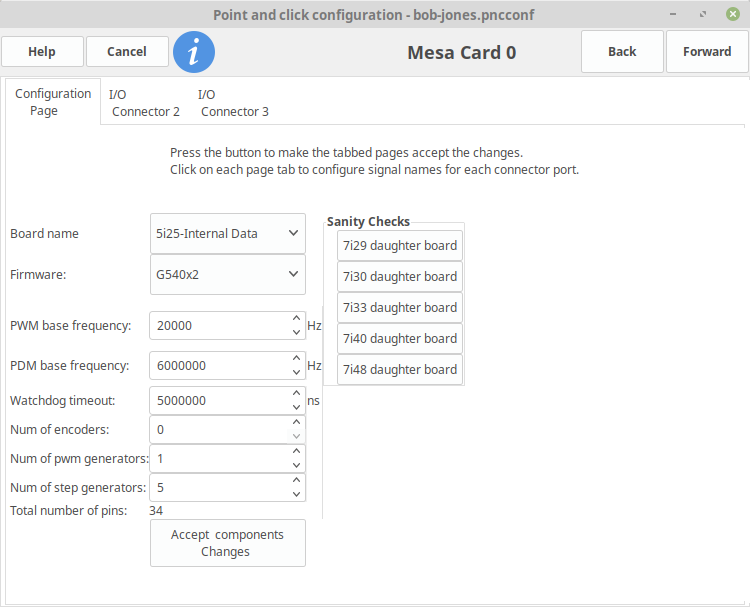
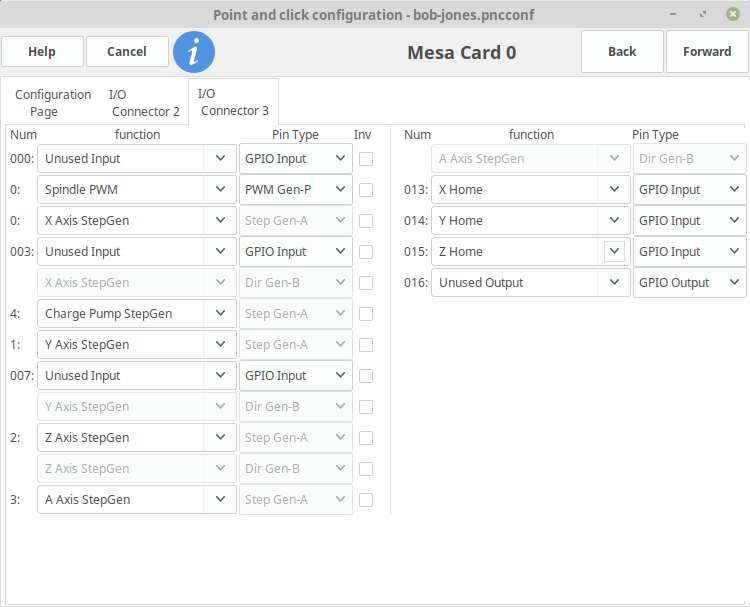
BTW the main card setup I used was:

config (note that I have chosen 5 stepgens since 1 is used to drive the G540s charge-pump)


connector 3 (which would be P1 on a 7C81)

Please Log in or Create an account to join the conversation.

Moderators: PCW, jmelson
Time to create page: 0.118 seconds
Powered by Kunena Forum