
Retrofitting a 3-axis VMC with DC servos - guidance needed
- tommylight
-

- Away
- Moderator
-

Less
More
- Posts: 21906
- Thank you received: 7466
08 Sep 2025 15:27 #334633
by tommylight
Replied by tommylight on topic Retrofitting a 3-axis VMC with DC servos - guidance needed
Z400, Z420, Z600, and probably Z440, Z620, Z640, Z800, Z820 should all do just fine, those 3 at the start i have tested over 20 by now. Also HP 8300 SFF are pretty good, i have maybe 6 or 7 in daily use on machines.
Dell Optiplex series are also good, 7020, 9020 and 980, these i have in daily use, several of them for several years, but they do tend to heat much more than HP ones.
Dell Optiplex series are also good, 7020, 9020 and 980, these i have in daily use, several of them for several years, but they do tend to heat much more than HP ones.
Please Log in or Create an account to join the conversation.
- Japoo_Ness
- Offline
- Junior Member
-

Less
More
- Posts: 31
- Thank you received: 1
24 Jun 2026 14:04 #347304
by Japoo_Ness
Replied by Japoo_Ness on topic Retrofitting a 3-axis VMC with DC servos - guidance needed
Finally, after a long wait, the boards have arrived! Now I'm looking to buy the PC to control the machine. Checking all the models you shared before, I couldn't find any of them available in my country for under $700 USD.
However, I found two options: a Dell Optiplex 790 with an i5-2400, and another refurbished PC with an i5-4400 (the seller didn't specify the exact model, just that it could be an Optiplex, HP, Lenovo, or Bangho).
Which one would recommend? Both rely on integrated graphics. Is that going to be an issue in my case? From what I've read, a dedicated GPU is usually recommended, but I'm not sure if that's only for software pulse generation or if it's recommended for hardware-assisted setups too.
Thanks in advance!
However, I found two options: a Dell Optiplex 790 with an i5-2400, and another refurbished PC with an i5-4400 (the seller didn't specify the exact model, just that it could be an Optiplex, HP, Lenovo, or Bangho).
Which one would recommend? Both rely on integrated graphics. Is that going to be an issue in my case? From what I've read, a dedicated GPU is usually recommended, but I'm not sure if that's only for software pulse generation or if it's recommended for hardware-assisted setups too.
Thanks in advance!
Please Log in or Create an account to join the conversation.
- tommylight
-
- Away
- Moderator
-
Less
More
- Posts: 21906
- Thank you received: 7466
24 Jun 2026 14:47 #347306
by tommylight
Replied by tommylight on topic Retrofitting a 3-axis VMC with DC servos - guidance needed
Dell Optiplex 790 is still usable but needs at least 4GB of RAM.
Lenovo M93 with 4000 series CPU are also good, so if this is what you can get it is better than that Optiplex.
Fujitsu from that era are also OK.
Lenovo M93 with 4000 series CPU are also good, so if this is what you can get it is better than that Optiplex.
Fujitsu from that era are also OK.
The following user(s) said Thank You: Japoo_Ness
Please Log in or Create an account to join the conversation.
- rodw
-

- Offline
- Platinum Member
-

Less
More
- Posts: 12146
- Thank you received: 4142
24 Jun 2026 20:17 #347313
by rodw
Replied by rodw on topic Retrofitting a 3-axis VMC with DC servos - guidance needed
I've never used anything other than integrated graphics. no need for a seperate GPU
The following user(s) said Thank You: Japoo_Ness
Please Log in or Create an account to join the conversation.
- Japoo_Ness
- Offline
- Junior Member
-
Less
More
- Posts: 31
- Thank you received: 1
29 Jun 2026 23:07 #347408
by Japoo_Ness
Replied by Japoo_Ness on topic Retrofitting a 3-axis VMC with DC servos - guidance needed
Hi everyone,
I've just purchased the host PC and I'm waiting for it to arrive so I can set up the RT-OS and start digging into the retrofit.
To practice on the bench and learn the ins and outs of LinuxCNC, I put together a Mesa hardware stack: 7i97T + 7i74 + 7i84U + 7i73.
I have a quick question regarding the initial configuration workflow. From what I’ve gathered reading through the forum and docs, the easiest path forward seems to be:
Use mesaflash to flash the proper binary (.bin) to the 7i97T so it supports the Smart Serial expansion through the 7i74.
Once the main FPGA board has that specific firmware, use mesact to configure the machine basics, pinout, and closed-loop settings.
Regarding step 1: Is mesaflash strictly necessary for this, or can I flash the firmware directly from within mesact? From what I've seen in recent updates, it looks like mesact has a built-in flashing utility that might work for this. Is that correct and reliable for ethernet cards?
Lastly, I’d love to get your advice on the best learning path to fully grasp how Mesa cards interface with LinuxCNC. Should I just wire everything up on the test bench and learn by trial and error, or is there a specific documentation, manual, or forum thread you'd recommend reading first to avoid spinning my wheels?
Thanks a lot for all the help!
I've just purchased the host PC and I'm waiting for it to arrive so I can set up the RT-OS and start digging into the retrofit.
To practice on the bench and learn the ins and outs of LinuxCNC, I put together a Mesa hardware stack: 7i97T + 7i74 + 7i84U + 7i73.
I have a quick question regarding the initial configuration workflow. From what I’ve gathered reading through the forum and docs, the easiest path forward seems to be:
Use mesaflash to flash the proper binary (.bin) to the 7i97T so it supports the Smart Serial expansion through the 7i74.
Once the main FPGA board has that specific firmware, use mesact to configure the machine basics, pinout, and closed-loop settings.
Regarding step 1: Is mesaflash strictly necessary for this, or can I flash the firmware directly from within mesact? From what I've seen in recent updates, it looks like mesact has a built-in flashing utility that might work for this. Is that correct and reliable for ethernet cards?
Lastly, I’d love to get your advice on the best learning path to fully grasp how Mesa cards interface with LinuxCNC. Should I just wire everything up on the test bench and learn by trial and error, or is there a specific documentation, manual, or forum thread you'd recommend reading first to avoid spinning my wheels?
Thanks a lot for all the help!
Please Log in or Create an account to join the conversation.
- tommylight
-
- Away
- Moderator
-
Less
More
- Posts: 21906
- Thank you received: 7466
30 Jun 2026 01:00 #347410
by tommylight
But nothing can replace the hands on approach: wire stuff and test while reading and checking pictures.
-
This last is how i learned last few days that Pico2W is utterly useless as a flight controller, for many, many reasons, but mostly their (anything RPI) being convoluted and disorganized beyond belief for something normal people should use, requiring hundreds of libraries, and never ever consistently building firmware without complaint.
No wonder ESP32 won, much cheaper and much faster and most importantly with flash memory.
Next, use that Pico2w for LinuxCNC, oh joy!
Replied by tommylight on topic Retrofitting a 3-axis VMC with DC servos - guidance needed
Depends a lot, but documentation is a nice start, browsing this forum helps a lot, and there are tutorials/howto's for near everything be it very nice or chaotic written by me.Lastly, I’d love to get your advice on the best learning path to fully grasp how Mesa cards interface with LinuxCNC. Should I just wire everything up on the test bench and learn by trial and error, or is there a specific documentation, manual, or forum thread you'd recommend reading first to avoid spinning my wheels?
But nothing can replace the hands on approach: wire stuff and test while reading and checking pictures.
-
This last is how i learned last few days that Pico2W is utterly useless as a flight controller, for many, many reasons, but mostly their (anything RPI) being convoluted and disorganized beyond belief for something normal people should use, requiring hundreds of libraries, and never ever consistently building firmware without complaint.
No wonder ESP32 won, much cheaper and much faster and most importantly with flash memory.
Next, use that Pico2w for LinuxCNC, oh joy!
The following user(s) said Thank You: Japoo_Ness
Please Log in or Create an account to join the conversation.
- Japoo_Ness
- Offline
- Junior Member
-
Less
More
- Posts: 31
- Thank you received: 1
02 Jul 2026 01:22 #347451
by Japoo_Ness
Replied by Japoo_Ness on topic Retrofitting a 3-axis VMC with DC servos - guidance needed
I've just finished installing the system, disabled all power-saving features (C-states, SpeedStep, etc.) in the BIOS, and isolated a CPU core using isolcpus.
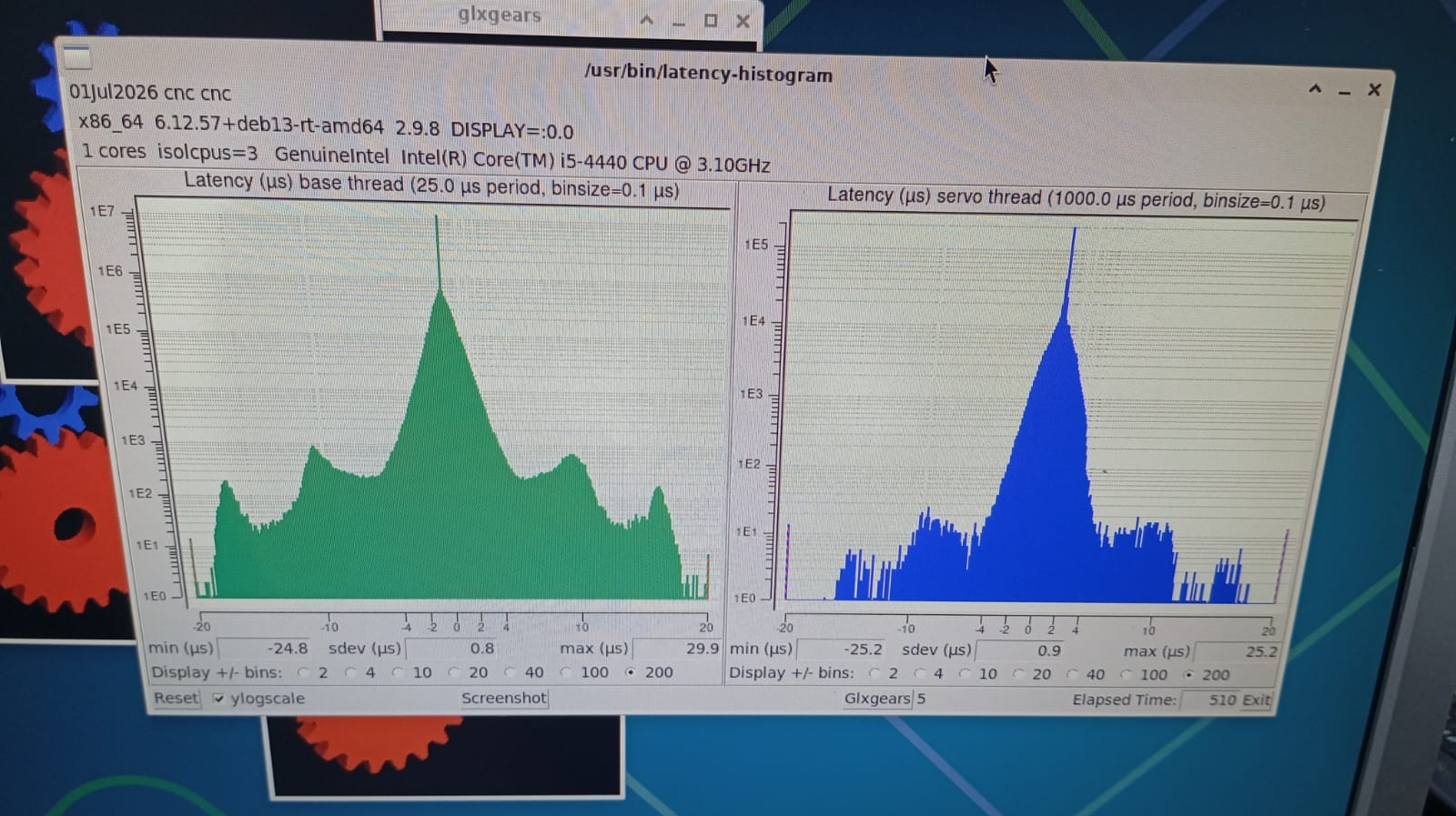
Here are my latency test results while stressing the system with 4 instances of glxgears and a YouTube video playing in the background
Note: I am currently running this test using an old VGA monitor. I suspect the analog output/Xorg driver might be causing some minor latency spikes compared to using a pure digital connection, but I'm not entirely sure.
What do you think of these numbers? Are they good enough to move forward with my Mesa setup, and what should my next steps be?
Thanks in advance for your feedback!
Here are my latency test results while stressing the system with 4 instances of glxgears and a YouTube video playing in the background
Note: I am currently running this test using an old VGA monitor. I suspect the analog output/Xorg driver might be causing some minor latency spikes compared to using a pure digital connection, but I'm not entirely sure.
What do you think of these numbers? Are they good enough to move forward with my Mesa setup, and what should my next steps be?
Thanks in advance for your feedback!
Please Log in or Create an account to join the conversation.
- rodw
-
- Offline
- Platinum Member
-
Less
More
- Posts: 12146
- Thank you received: 4142
02 Jul 2026 06:15 #347454
by rodw
Replied by rodw on topic Retrofitting a 3-axis VMC with DC servos - guidance needed
Looks fine but for mesa its better to run: latency-histogram --nobase --sbins 1000 --show to get rid of the base thread window which gets in the road. and can suppress results. Run that and reshare.
Please Log in or Create an account to join the conversation.
- Japoo_Ness
- Offline
- Junior Member
-
Less
More
- Posts: 31
- Thank you received: 1
02 Jul 2026 20:10 #347465
by Japoo_Ness
Replied by Japoo_Ness on topic Retrofitting a 3-axis VMC with DC servos - guidance needed
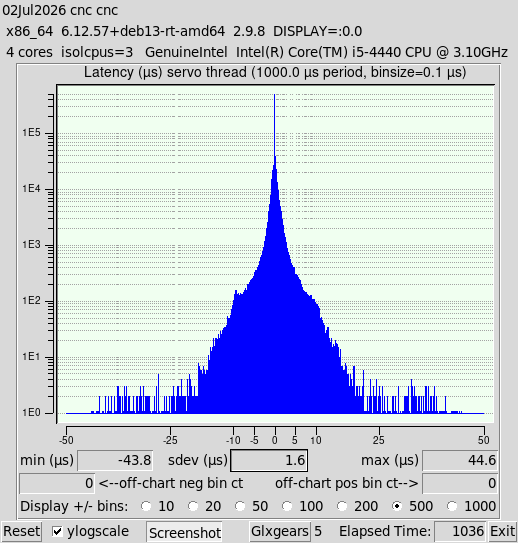
This are the results
for what i understand are good for mesa Ethernet boards
Now i´m gonna try to make connection to the board
its that okay?
for what i understand are good for mesa Ethernet boards
Now i´m gonna try to make connection to the board
its that okay?
Attachments:
Please Log in or Create an account to join the conversation.
- tommylight
-
- Away
- Moderator
-
Less
More
- Posts: 21906
- Thank you received: 7466
02 Jul 2026 20:34 #347466
by tommylight
Replied by tommylight on topic Retrofitting a 3-axis VMC with DC servos - guidance needed
Looks OK, so test with the Mesa attached and a running config.
Please Log in or Create an account to join the conversation.
Moderators: PCW, jmelson
Time to create page: 0.299 seconds