Save / Log "Print Message" to file

More
4 years 11 months ago #225879 by nkp
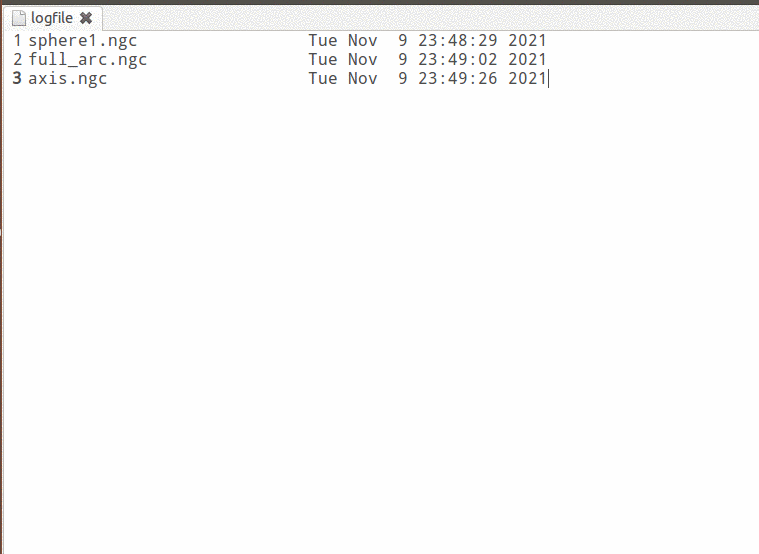
Is there any way to still generate a timestamp at the end of the cycle?

in one line?

try:
    fl = open('/home/nkp/emc2/logfile', "a")
    fl.write(s.file + 12*' ' + time.ctime() + "\n")
    fl.close()
except :
    print "nkplogerror"

Please Log in or Create an account to join the conversation.
More
4 years 11 months ago #225882 by nkp
Warning: Spoiler!


        try:
            fl = open('/home/nkp/emc2/logfile', "a")
            lnf = len(os.path.basename(s.file))
            fl.write(os.path.basename(s.file) + (28-lnf)*' ' + time.ctime() + "\n")       
            fl.close()        
        except :
            print "nkplogerror"

Please Log in or Create an account to join the conversation.
More
4 years 11 months ago #225892 by +Jan+
Thanks for the quick response.
I think I have unfortunately expressed myself unclearly.
I imagine it as follows:

I created the logfile in the directory /home/cnc/linuxcnc with the name logfile (and gave each user read&write rights) and then inserted the code snippet (for all amateurs like me: the axis.py file can be found in the path /usr/bin) in the Axis file adapted to my needs:
Code:
    def task_run(*event):         if run_warn(): return         global program_start_line, program_start_line_last         program_start_line_last = program_start_line;         ensure_mode(linuxcnc.MODE_AUTO)         c.auto(linuxcnc.AUTO_RUN, program_start_line)         program_start_line = 0         t.tag_remove("ignored", "0.0", "end")         o.set_highlight_line(None)                  try:             fl = open('/home/cnc/linuxcnc/logfile', "a")             fl.write(s.file)             fl.write(" Cycle Start ")             fl.write(time.ctime() + "\n")                     fl.close()                 except :             print "nkplogerror"

Also I found other events (Pause, Resume, Abort) I would like to log:
Code:
    def task_stop(*event):         if s.task_mode == linuxcnc.MODE_AUTO and vars.running_line.get() != 0:             o.set_highlight_line(vars.running_line.get())         comp["abort"] = True         c.abort()         c.wait_complete()         time.sleep(0.3)         comp["abort"] = False         try:             fl = open('/home/cnc/linuxcnc/logfile', "a")             fl.write(s.file)             fl.write(" Cycle aborted ")             fl.write(time.ctime() + "\n")                     fl.close()                 except :             print "nkplogerror"

The only thing I am missing now is a way to log the time after a successful cycle run. Where would be the right place for this?

Best wishes

Jan

Please Log in or Create an account to join the conversation.

More
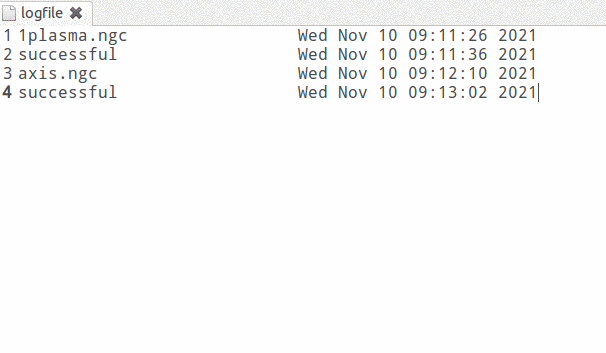
4 years 11 months ago - 4 years 11 months ago #225932 by nkp
##############################################

    def update(self):
        .............
        .............
        ...........
        
        
        if vars.len_program.get():
            if self.stat.motion_line > (vars.len_program.get() - 4):
                vars.len_program.set(0)
                try:
                    fl = open('/home/nkp/emc2/logfile', "a")
                    fl.write("successful" + 18*' ' + time.ctime() + "\n")       
                    fl.close()        
                except :
                    print "nkplogerror"
                    
                    
         user_live_update()  
         
         
#######################################################         
         
vars = nf.Variables(root_window,         
         
         ....
         ....
         ....

    ("len_program", IntVar),
) 


###############################


    def task_run(*event):
        ...
        ...

        try:
            s.poll()
            count = 0
            for line in open(s.file).xreadlines(): count += 1
            vars.len_program.set(count)

            fl = open('/home/nkp/emc2/logfile', "a")
            lnf = len(os.path.basename(s.file))
            fl.write(os.path.basename(s.file) + (28-lnf)*' ' + time.ctime() + "\n")       
            fl.close()        
        except :
            print "nkplogerror"
Warning: Spoiler!
Last edit: 4 years 11 months ago by nkp.

Please Log in or Create an account to join the conversation.

More
4 years 11 months ago #226112 by +Jan+
Thank you for your effort. I have implemented the changes and tried them out. Everything works fine as long as no macro calls are in game.Unfortunately, since I use the remap command with macro call for my manual tool change, the current solution does not work: 
If the required tool (Tool 9) is not in the spindle at cycle start, only the file name of the tool change macro with timestamp appears in the log file. The success is not logged.
If the tool (tool 9) is already in the spindle, the start is logged with the actual file name. At the first tool change (tool 11) success is logged and then nothing more.

Here the G Code file I used for evaluation:
Code:
N0010 (Filename: probekreis.ngc) N0020 (Post processor: EMC_G64_REV00_dyn_wmsg.scpost) N0030 (Date: 10/11/2021) N0040 G21 (Units: Metric) N0050 G40 G90 N0060 F1 N0070 (Part: probekreis) N0080 (Operation: Outside Offset, STANDARD, T9: Fraeser, 6 mm, 0 mm Deep) N0090 G64P0.025 N0100 M6 T9  (Fraeser, 6 mm) N0110 G00 Z6.0000 N0120 M03 S24000 N0130 X19.7990 Y19.7990 N0140 Z1.5000 N0150 G01 Z1.0000 F2000 N0160 G03 X19.7990 Y19.7990 I-19.7990 J-19.7990 F3800.0 N0170 G00 Z6.0000 N0100 M6 T11  (Fraeser, 6 mm) N0110 G00 Z6.0000 N0120 M03 S24000 N0130 X19.7990 Y19.7990 N0140 Z1.5000 N0150 G01 Z1.0000 F2000 N0160 G03 X19.7990 Y19.7990 I-19.7990 J-19.7990 F3800.0 N0170 G00 Z6.0000 N0100 M6 T9  (Fraeser, 6 mm) N0110 G00 Z6.0000 N0120 M03 S24000 N0130 X19.7990 Y19.7990 N0140 Z1.5000 N0150 G01 Z1.0000 F2000 N0160 G03 X19.7990 Y19.7990 I-19.7990 J-19.7990 F3800.0 N0170 G00 Z6.0000 N0180 M05 N0190 M05 M30

Best wishes

Jan

Please Log in or Create an account to join the conversation.

More
4 years 11 months ago #226124 by nkp
need your file remap

Please Log in or Create an account to join the conversation.

Time to create page: 0.318 seconds
Powered by Kunena Forum
