I really appreciate the work that has gone into Gscreen (and its derivatives like Gmoccapy), but my feeling is that it is more of a set of building blocks that a developer can use to build a new screen, rather than a complete interface that can be quickly and easily customized and configured by the typical LinuxCNC user.
I have spent a good bit of time building custom interfaces with gladeVCP, and the problem is it is not low level enough for developers, and it is not high level enough for users. For developers gladeVCP is a pain because you are stuck using a specific version of Glade, there is no way to import the widgets directly (that I know of), and the widgets are not very customizable. For users it is not ideal because they have to fiddle with installing the right version of Glade, getting it to find the gladeVCP widgets, and in the end they essentially have to become developers since you can't do much with gladeVCP without writing code.
What I am trying to do with Hazzy is overcome both of these shortcomings. My goal is to make it very easy for somebody with no programing experience to create a custom screen layout by Drag 'n Drop, and be able to do so on the fly, while LinuxCNC is running, and with out the need for any third party software. At the same time I am working on a library of GTK widgets which will make it easy for a developer or anybody with basic python knowledge to make a new or custom Hazzy widget (with out having to use Glade!!!)
For example, to make a basic XYZ DRO widget you would create an `example_dro.py` file containing
Code:
#!/usr/bin/env python
import gi
gi.require_version('Gtk', '3.0')
from gi.repository import Gtk
from widget_factory.dros import DroEntry, DroType
class ExampleDro(Gtk.Box):
def __init__(self, widget_window):
Gtk.Box.__init__(self, orientation=Gtk.Orientation.VERTICAL)
for axis in 'xyz':
dro = DroEntry(axis, DroType.REL)
self.pack_start(dro, False, False, 2)
Then put this in a folder with the following `__init__.py` file
Code:
from example_dro import ExampleDro as Widget
That's it. If the folder is placed in the machine config dir or one of the standard Hazzy widget dirs our ExampleDro widget will show up in the Hazzy widget chooser ready for use.
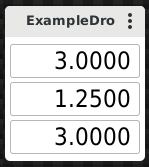
This is what it looks like:
Sorry Chris, I got on a roll