hal-core

More
5 years 1 hour ago - 5 years 17 minutes ago #224947 by Grotius
Replied by Grotius on topic hal-core
When you did the new install, in your desktop menu there is a new program, "halview" this can show your hal configuration.
Another way to preview hal pin names is to : $ /opt/hal-core/bin/./halcmd show

Also the program cam is in your menu entry. This can make a nice gcode from a dxf drawing.

When you have your robot files configured okey, i can add them to the repository with the datasheet. It would be nice
to colorize the stepfiles a bit. It takes some time but it's worth it.

Your robot stepfile's and datasheet are uploaded over here ! image missing /media/kunena/emoticons/cool.png

A runtest for the fanuc was not working after my first attempt. I have to stop for today.

I see the stepfile positions differs from the kuka example. It seems the fanuc have to be rotated 180 degrees?
Can you compare the kuka stepfile positions with your fanuc stepfile positions. I think when this is done, we are a step further.

For the datasheet, some joint min and max value's are not defined. I guessed them for now.

Oke. good luck !~!


Last edit: 5 years 17 minutes ago by Grotius.

Please Log in or Create an account to join the conversation.

More
4 years 11 months ago #224970 by tommylight
The following user(s) said Thank You: Grotius

Please Log in or Create an account to join the conversation.

More
4 years 11 months ago #225004 by Grotius
Replied by Grotius on topic hal-core
Hi Dave,

Your model is working.

The github is updated with your config.
See this info how to export joints with freecad.

One thing to do for you is to fine tune the joint positions in the drawing. And to edit the halfile and update tool lenght position.


Please Log in or Create an account to join the conversation.

More
4 years 11 months ago #225021 by Dave3891
Replied by Dave3891 on topic hal-core
Thanks Grotius!
That looks awesome, I am setting up a fresh debian 11 VM to test out the install from scratch right now.

Again, thank you for all the help

When you did the new install, in your desktop menu there is a new program, "halview" this can show your hal configuration.
Another way to preview hal pin names is to : $ /opt/hal-core/bin/./halcmd show

Also the program cam is in your menu entry. This can make a nice gcode from a dxf drawing.

When you have your robot files configured okey, i can add them to the repository with the datasheet. It would be nice
to colorize the stepfiles a bit. It takes some time but it's worth it.

Your robot stepfile's and datasheet are uploaded over here ! image missing /media/kunena/emoticons/cool.png

Please Log in or Create an account to join the conversation.
More
4 years 11 months ago #225024 by Grotius
Replied by Grotius on topic hal-core
Hi Dave,

I just replaced the stepfiles of the fanuc. I uploaded them accidentaly to the mitsubishi folder.
So if you see a wrong robot, just replace the stepfiles.

Please Log in or Create an account to join the conversation.

More
4 years 11 months ago #225025 by Dave3891
Replied by Dave3891 on topic hal-core
Hi Grotius,
I installed the hal-core with the new install_guide file, so far so good.
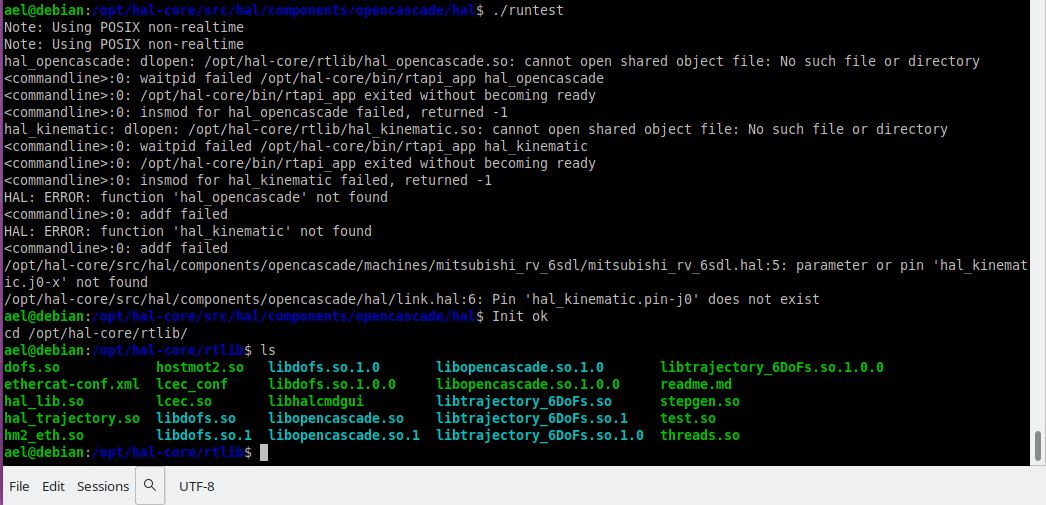
But when I go in to the hal-core/src/hal/components/opencascade/hal and run the ./runtest
I get errors about hal_opencascade.so not found.
Do I need to install another module?

Here is what is in my hal-core/rtlib directory


Please Log in or Create an account to join the conversation.

Time to create page: 0.277 seconds
Powered by Kunena Forum
