Ethercat installation from repositories - how to step by step

More
2 years 6 months ago - 2 years 6 months ago #298341 by Mehta_123
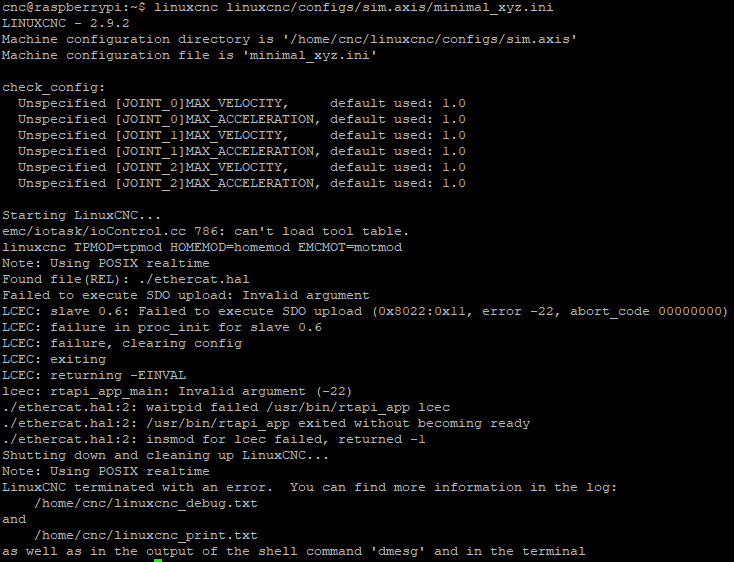
Hello !!Thanks for the detailed steps, I have installed ethercat and able to detect slaves. As I am totally new to this I am not able to start LCNC.I have followed steps of xml and hal file from youtube (attaching hal file and error for your reference) 


I am aware that its the issue of xml file as I am using different driver (panasonic MBDLN25BE)
Can you please guide me what type of changes I need to do in xml file ?

Thanks and Regards,
Mehta
Last edit: 2 years 6 months ago by Mehta_123.

Please Log in or Create an account to join the conversation.

More
2 years 5 months ago #300972 by sevketsakinc
Hello, first of all, thank you for your descriptive shares.
I used a servo with ethercat using "Debian 9" 4 years ago and it has been working since then.

PC: INTEL 9TH GENERATION I3
Ethercat version is 1.5.2.
Servo: Panasonic A6

Now I wanted to use Debian 12, Ethercat version 1.6.0 and LinuxCNC 2.9.2, which has been updated according to your shares.
PC: INTEL 12th GENERATION i3
When I close the Linuxcnc interface, the servos get a synchronization error. This did not happen in the old version.
The servo is still the same servo (PANASONIC A6) but I was getting 80.4 synchronization error.
This error ( <dcConf assignActivate="300" sync0Cycle="*1" sync0Shift="0"/>
<watchdog divider="2498" intervals="5000"/>
)
I solved it by doing .

But now, when I restart it, some of the servos do not switch to OP mode on the first try.

Can you help me ?

I am grateful.

Please Log in or Create an account to join the conversation.

More
2 years 5 months ago #301107 by sevketsakinc
After installing Debian 12, this time I installed ethercat 1.5.2 version.
The problem is still the same.
I suspect it's from Debian 12 or Linuxcnc 2.9.2.
Ethercat protocol does not work properly on servos.

Please Log in or Create an account to join the conversation.

More
2 years 4 months ago #302470 by Cristian_g
Hi, I have installed bookworm kernel version 6.1.54-rt15 on a Raspberry Pi 4B. After restart, I have tried to install the cia 402 drivers, but the git command gives me an permission denied error. In the first attempt I used the sudo to install the drivers, however the hallcmd command to load the configuration file gave me an error. Should I used the sudo to install the drivers? Thank You for your help!

Please Log in or Create an account to join the conversation.

More
2 years 4 months ago #302525 by rodw
Git does not require root permissions (sudo)
Using halcompile does.
Installing software from repositories with apt install needs sudo apt install

Please Log in or Create an account to join the conversation.

More
2 years 4 months ago #302537 by Cristian_g
Thank You! I was able to install everithing according to your instructions. I did not know that git has now a credential manager.
The following user(s) said Thank You: rodw

Please Log in or Create an account to join the conversation.

Time to create page: 0.516 seconds
Powered by Kunena Forum