
- Configuring LinuxCNC
- Advanced Configuration
- EtherCAT
- Ethercat installation from repositories - how to step by step
Ethercat installation from repositories - how to step by step
- kor
- Offline
- Senior Member
-

Less
More
- Posts: 71
- Thank you received: 2
20 Nov 2025 13:00 #338793
by kor
Replied by kor on topic Ethercat installation from repositories - how to step by step
Finally I am a step further. But new problems did arise when installing the ethercat I get a couple errors:linux-image-6.1.0-41-rt-amd64 not configured.
initramfs-tools returns error
dpkg: Abhängigkeitsprobleme verhindern Konfiguration von linux-image-rt-amd64:
 linux-image-rt-amd64 hängt ab von linux-image-6.1.0-41-rt-amd64 (= 6.1.158-1); aber:
  Paket linux-image-6.1.0-41-rt-amd64 ist noch nicht konfiguriert.

dpkg: Fehler beim Bearbeiten des Paketes linux-image-rt-amd64 (--configure):
 Abhängigkeitsprobleme - verbleibt unkonfiguriert
ethercat-master (1.6.8.g2543cc5-1+27.2) wird eingerichtet ...
ethercat.service is a disabled or a static unit, not starting it.
linuxcnc-ethercat (1.40.0.g8a607c0-0) wird eingerichtet ...
Trigger für man-db (2.11.2-2) werden verarbeitet ...
Trigger für libc-bin (2.36-9+deb12u13) werden verarbeitet ...
Trigger für initramfs-tools (0.142+deb12u3) werden verarbeitet ...
update-initramfs: Generating /boot/initrd.img-6.1.0-41-rt-amd64
raspi-firmware: missing /boot/firmware, did you forget to mount it?
run-parts: /etc/initramfs/post-update.d//z50-raspi-firmware exited with return code 1
dpkg: Fehler beim Bearbeiten des Paketes initramfs-tools (--configure):
 »installiertes post-installation-Skript des Paketes initramfs-tools«-Unterprozess gab den Fehlerwert 1 zurück
Fehler traten auf beim Bearbeiten von:
 linux-image-6.1.0-41-rt-amd64
 linux-image-rt-amd64
initramfs-toolsinitramfs-tools returns error
Please Log in or Create an account to join the conversation.
- Hakan
- Offline
- Platinum Member
-

Less
More
- Posts: 1317
- Thank you received: 453
20 Nov 2025 16:50 #338805
by Hakan
Replied by Hakan on topic Ethercat installation from repositories - how to step by step
I think you hit all problems.
"raspi-firmware: missing /boot/firmware, did you forget to mount it?"
"raspi-firmware: missing /boot/firmware, did you forget to mount it?"
apt remove raspi-firmwarePlease Log in or Create an account to join the conversation.
- kor
- Offline
- Senior Member
-
Less
More
- Posts: 71
- Thank you received: 2
20 Nov 2025 17:51 #338817
by kor
I think it is probably better to do a fresh install by now. switching to english and see whether it will work right away. What do you guys think?
Replied by kor on topic Ethercat installation from repositories - how to step by step
sudo apt remove raspi-firmware
[sudo] Passwort für bf20:
Paketlisten werden gelesen… Fertig
Abhängigkeitsbaum wird aufgebaut… Fertig
Statusinformationen werden eingelesen… Fertig
Paket »raspi-firmware« ist nicht installiert, wird also auch nicht entfernt.
Die folgenden Pakete wurden automatisch installiert und werden nicht mehr benötigt:
  linux-headers-6.1.0-30-amd64 linux-headers-6.1.0-30-common
Verwenden Sie »sudo apt autoremove«, um sie zu entfernen.
0 aktualisiert, 0 neu installiert, 0 zu entfernen und 0 nicht aktualisiert.
3 nicht vollständig installiert oder entfernt.
Nach dieser Operation werden 0 B Plattenplatz zusätzlich benutzt.
initramfs-tools (0.142+deb12u3) wird eingerichtet ...
update-initramfs: deferring update (trigger activated)
linux-image-6.1.0-41-rt-amd64 (6.1.158-1) wird eingerichtet ...
/etc/kernel/postinst.d/dkms:
dkms: running auto installation service for kernel 6.1.0-41-rt-amd64.
dkms: autoinstall for kernel: 6.1.0-41-rt-amd64.
/etc/kernel/postinst.d/initramfs-tools:
update-initramfs: Generating /boot/initrd.img-6.1.0-41-rt-amd64
zstd: error 70 : Write error : cannot write block : No space left on device
E: mkinitramfs failure zstd -q -9 -T0 70
update-initramfs: failed for /boot/initrd.img-6.1.0-41-rt-amd64 with 1.
run-parts: /etc/kernel/postinst.d/initramfs-tools exited with return code 1
dpkg: Fehler beim Bearbeiten des Paketes linux-image-6.1.0-41-rt-amd64 (--configure):
 »installiertes post-installation-Skript des Paketes linux-image-6.1.0-41-rt-amd64«-Unterprozess gab den Fehlerwert
 1 zurück
dpkg: Abhängigkeitsprobleme verhindern Konfiguration von linux-image-rt-amd64:
 linux-image-rt-amd64 hängt ab von linux-image-6.1.0-41-rt-amd64 (= 6.1.158-1); aber:
  Paket linux-image-6.1.0-41-rt-amd64 ist noch nicht konfiguriert.

dpkg: Fehler beim Bearbeiten des Paketes linux-image-rt-amd64 (--configure):
 Abhängigkeitsprobleme - verbleibt unkonfiguriert
Trigger für initramfs-tools (0.142+deb12u3) werden verarbeitet ...
update-initramfs: Generating /boot/initrd.img-6.1.0-41-rt-amd64
raspi-firmware: missing /boot/firmware, did you forget to mount it?
run-parts: /etc/initramfs/post-update.d//z50-raspi-firmware exited with return code 1
dpkg: Fehler beim Bearbeiten des Paketes initramfs-tools (--configure):
 »installiertes post-installation-Skript des Paketes initramfs-tools«-Unterprozess gab den Fehlerwert 1 zurück
Fehler traten auf beim Bearbeiten von:
 linux-image-6.1.0-41-rt-amd64
 linux-image-rt-amd64
 initramfs-tools
E: Sub-process /usr/bin/dpkg returned an error code (1)
I think it is probably better to do a fresh install by now. switching to english and see whether it will work right away. What do you guys think?
Please Log in or Create an account to join the conversation.
- Hakan
- Offline
- Platinum Member
-
Less
More
- Posts: 1317
- Thank you received: 453
20 Nov 2025 18:10 - 20 Nov 2025 18:13 #338819
by Hakan
Replied by Hakan on topic Ethercat installation from repositories - how to step by step
"zstd: error 70 : Write error : cannot write block : No space left on device"
Boot device too small most likely.
A fresh install is never wrong.
You should be able to use a swedish I mean german version.
You seem to have missed a step where it says it will dismount the cd-rom and restart or something like that. A guess.
Install all in one large partition, or at least 100 Mb in the boot partition if you are required to have one.
This seem to be the proper sequence to remove raspi-firmware, you'll need to do that after a new install.
Boot device too small most likely.
A fresh install is never wrong.
You should be able to use a swedish I mean german version.
You seem to have missed a step where it says it will dismount the cd-rom and restart or something like that. A guess.
Install all in one large partition, or at least 100 Mb in the boot partition if you are required to have one.
This seem to be the proper sequence to remove raspi-firmware, you'll need to do that after a new install.
   sudo rm /etc/initramfs/post-update.d/z50-raspi-firmware
sudo rm /etc/kernel/postinst.d/z50-raspi-firmware
sudo apt purge --autoremove raspi-firmware
sudo apt update
Last edit: 20 Nov 2025 18:13 by Hakan.
Please Log in or Create an account to join the conversation.
- tommylight
-

- Offline
- Moderator
-

Less
More
- Posts: 21893
- Thank you received: 7463
20 Nov 2025 20:25 #338828
by tommylight
Replied by tommylight on topic Ethercat installation from repositories - how to step by step
Try
sudo apt purge *raspi*Please Log in or Create an account to join the conversation.
- kor
- Offline
- Senior Member
-
Less
More
- Posts: 71
- Thank you received: 2
20 Nov 2025 21:24 #338835
by kor
Replied by kor on topic Ethercat installation from repositories - how to step by step
I did a reeinstall removed the raspi part like hakan suggested and everything worked. I will try to connect my ethercat devices tomorrow 
Thanks
Thanks
The following user(s) said Thank You: tommylight
Please Log in or Create an account to join the conversation.
- RoKoTer
-
- Offline
- New Member
-

Less
More
- Posts: 3
- Thank you received: 1
31 Dec 2025 19:23 #340794
by RoKoTer
Replied by RoKoTer on topic Ethercat installation from repositories - how to step by step
@rodw Thanks for the guide, it really helped me! And some Claude assistance 
The following user(s) said Thank You: rodw
Please Log in or Create an account to join the conversation.
- Otis
- Offline
- New Member
-
Less
More
- Posts: 2
- Thank you received: 1
11 Feb 2026 19:59 #342813
by Otis
Replied by Otis on topic Ethercat installation from repositories - how to step by step
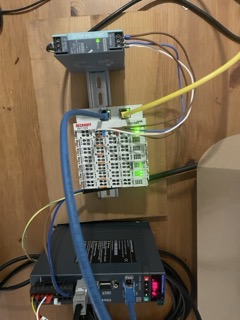
Many thanks for the guide @rodw and the people in the forum!
Spend a some hours getting my setup online on the bench and it its now running only with minor issues that were a result from me not knowing what I was doing!And those were fixable with a bit of Forum reading and LLM help.
Could not be happier!
Setup is:
- Beckhoff (EK1100 EtherCAT-Coupler EL1008 8K. Dig. In EL2008 8K. Dig. Out EL2624 4K. Relais Out EL3102 2K. Ana. In /-10V, DIFF EL4022 2Ch. Ana. Out 4-20mA, 12bit) for coolant/fans and also analog communication for the VFD with current feedback
- And a Stepperonline A6 Servo (now that i works, I will order the missing 2 servos)
Spend some time during the setup to take detailed notes and put them together here if someone plans on doing something simmilar: Github
Spend a some hours getting my setup online on the bench and it its now running only with minor issues that were a result from me not knowing what I was doing!And those were fixable with a bit of Forum reading and LLM help.
Could not be happier!
Setup is:
- Beckhoff (EK1100 EtherCAT-Coupler EL1008 8K. Dig. In EL2008 8K. Dig. Out EL2624 4K. Relais Out EL3102 2K. Ana. In /-10V, DIFF EL4022 2Ch. Ana. Out 4-20mA, 12bit) for coolant/fans and also analog communication for the VFD with current feedback
- And a Stepperonline A6 Servo (now that i works, I will order the missing 2 servos)
Spend some time during the setup to take detailed notes and put them together here if someone plans on doing something simmilar: Github
Please Log in or Create an account to join the conversation.
- tommylight
-
- Offline
- Moderator
-
Less
More
- Posts: 21893
- Thank you received: 7463
11 Feb 2026 22:15 #342824
by tommylight
Replied by tommylight on topic Ethercat installation from repositories - how to step by step
@Otis,
Your link to github is not working, try posting it on a new post as editing usually messes things.
Thank you.
Your link to github is not working, try posting it on a new post as editing usually messes things.
Thank you.
The following user(s) said Thank You: Otis
Please Log in or Create an account to join the conversation.
- Otis
- Offline
- New Member
-
Less
More
- Posts: 2
- Thank you received: 1
12 Feb 2026 07:59 #342839
by Otis
Replied by Otis on topic Ethercat installation from repositories - how to step by step
thanks, indeed that doesnt work therfore jsut as
URL: github.com/LukasOtis/LinuxCNCEthercat
and link link
URL: github.com/LukasOtis/LinuxCNCEthercat
and link link
The following user(s) said Thank You: tommylight
Please Log in or Create an account to join the conversation.
- Configuring LinuxCNC
- Advanced Configuration
- EtherCAT
- Ethercat installation from repositories - how to step by step
Time to create page: 0.214 seconds